

Helm Is Easy for the First Five Charts
Helm is Kubernetes' de-facto package manager. You will love it for the first 5 charts, fight it for the next 10, and either adopt disciplined patterns or migrate to Kustomize/Carvel/Timoni for the rest. The framework is not the problem — the problem is that teams adopt Helm without a chart strategy and end up with 200-line values.yaml files nobody understands.
- Your
values.yamlis so deeply nested you can't override anything cleanly helm upgradedrifts fromgit diff; nobody knows what's actually in the cluster- A failed upgrade left the release in
pending-upgradeand you can't roll back
The Mental Model
A Helm chart is a templated bundle of Kubernetes manifests. A release is one installation of that chart with specific values, tracked by name + revision in a Kubernetes secret. helm upgrade --install is the verb you actually use; helm rollback is the panic button.
flowchart LR
    C[Chart] --> T[templates/*.yaml]
    V[values.yaml] --> R[helm template / upgrade]
    O[--values override.yaml] --> R
    T --> R
    R --> M[Rendered manifests]
    M --> K[Kubernetes API]
    K --> S[Release secret<br/>helm.sh/release.v3.<name>.<rev>]
Chart Layout That Doesn't Rot
my-app/
  Chart.yaml          # name, version, appVersion, dependencies
  values.yaml         # documented defaults; every key has a comment
  values.schema.json  # JSON schema — fail fast on typos
  templates/
    _helpers.tpl      # named templates (fullname, labels, selectors)
    deployment.yaml
    service.yaml
    hpa.yaml
    NOTES.txt         # printed on install
  charts/             # vendored dependencies, never edit
  ci/                 # ci-values-*.yaml for chart-testing
The values.schema.json is the single best Helm habit. It rejects typos at helm install time instead of producing a silently broken Pod.
Three Rules for Templates
- One concern per file — Deployment in
deployment.yaml, Service inservice.yaml. Don't multiplex. - Helpers for labels and names —
{{ include "my-app.labels" . | nindent 4 }}everywhere; never hand-write. - Minimal templating — if-blocks are debug nightmares. Prefer flat values with a default and explicit overrides.
Values Strategy
Layer values, don't copy them:
helm upgrade --install api ./my-app \
  -f values.yaml \
  -f environments/prod/values.yaml \
  -f environments/prod/secrets.dec.yaml \
--set image.tag=sha-3f2a9c8- Base values in the chart.
- Per-environment overlay file in your deploy repo.
- Per-release
--setonly for things that change per deploy (image tag). - Secrets via SOPS-encrypted YAML, External Secrets, or sealed-secrets — never plain.
Dependencies and Umbrella Charts
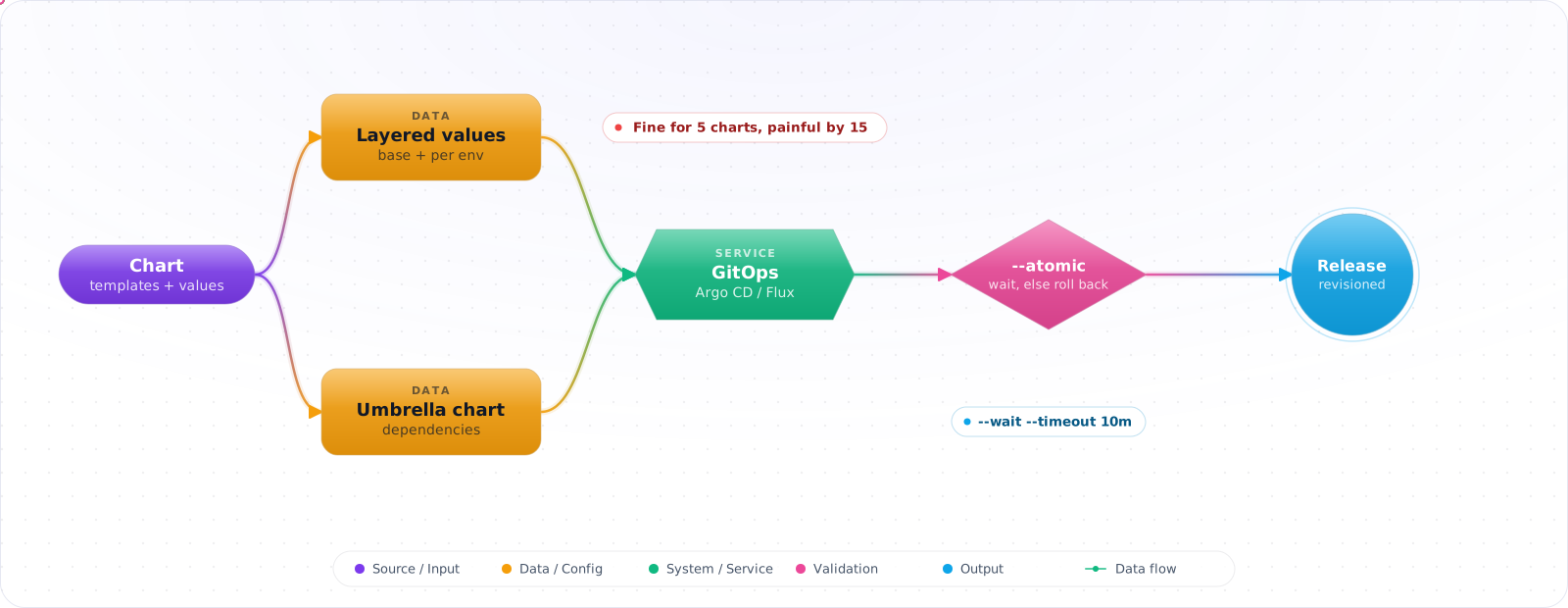
Subcharts are great for reusing community charts (Postgres, Redis, kube-prometheus-stack). Umbrella charts that bundle "your whole platform" into one release tend to age badly — one chart upgrade blocks everything. Prefer many small releases orchestrated by Argo CD / Flux instead.
GitOps: Helm Without Running Helm
In a modern setup you don't run helm from your laptop. Argo CD (with the Helm source type) or Flux (with HelmRelease) renders charts in-cluster, reconciles to git, and gives you drift detection and atomic rollbacks. The Helm CLI becomes a dev/debug tool.
Upgrades, Hooks, and Atomicity
--atomicrolls back on failure — always use it in CI.--wait --timeout 10mwaits for Pods to be Ready before marking success.- Hooks (
helm.sh/hook: pre-upgrade) for migrations — but they can leave clusters in weird states; prefer Job manifests with proper dependencies via Argo. helm history+helm rollback NAME Nrecovers most bad upgrades; if release stuck inpending-upgrade, patch the secret todeployed.
Failure Modes
- Templates without a schema — typos in
values.yamlsucceed silently and break Pods. - Capabilities-based templates —
.Capabilities.APIVersions.Hasevaluated at render time differs across clusters; pin to versions you support. - Chart-as-database — embedding business config in values; use ConfigMaps / external config stores instead.
- Mass
helm dependency update— pulls latest subchart versions; pin and review.
Production Checklist
- Every chart has
values.schema.jsonand CI runshelm lint+helm template | kubeconform. - Releases managed by Argo CD or Flux;
helmCLI is a dev tool. - Layered values: chart → env overlay → SOPS secrets → per-deploy image tag.
- Pinned subchart versions; renovate PRs reviewed, not auto-merged.
--atomic --waitin any direct CI install path.
Key Takeaways
- Helm pays off if you bring schema validation, layered values, and GitOps. Without those it becomes a YAML factory.
- Many small releases beat one umbrella chart for blast radius and ergonomics.
- The CLI is for debugging; production lives in Argo/Flux.