Start by Installing What Resolves
For a prototype that never reaches production, installing whatever resolves today is fine. The practices below are for software you ship and keep running. There, the question after the next big vulnerability is which of your services include the library, and how fast you can change it.
When Log4Shell landed in December 2021, the hard part for many teams was not the patch. It was finding out where log4j-core was. It came in through libraries nobody remembered adding, inside JARs inside other JARs, and people spent days grepping repositories and unpacking builds by hand.
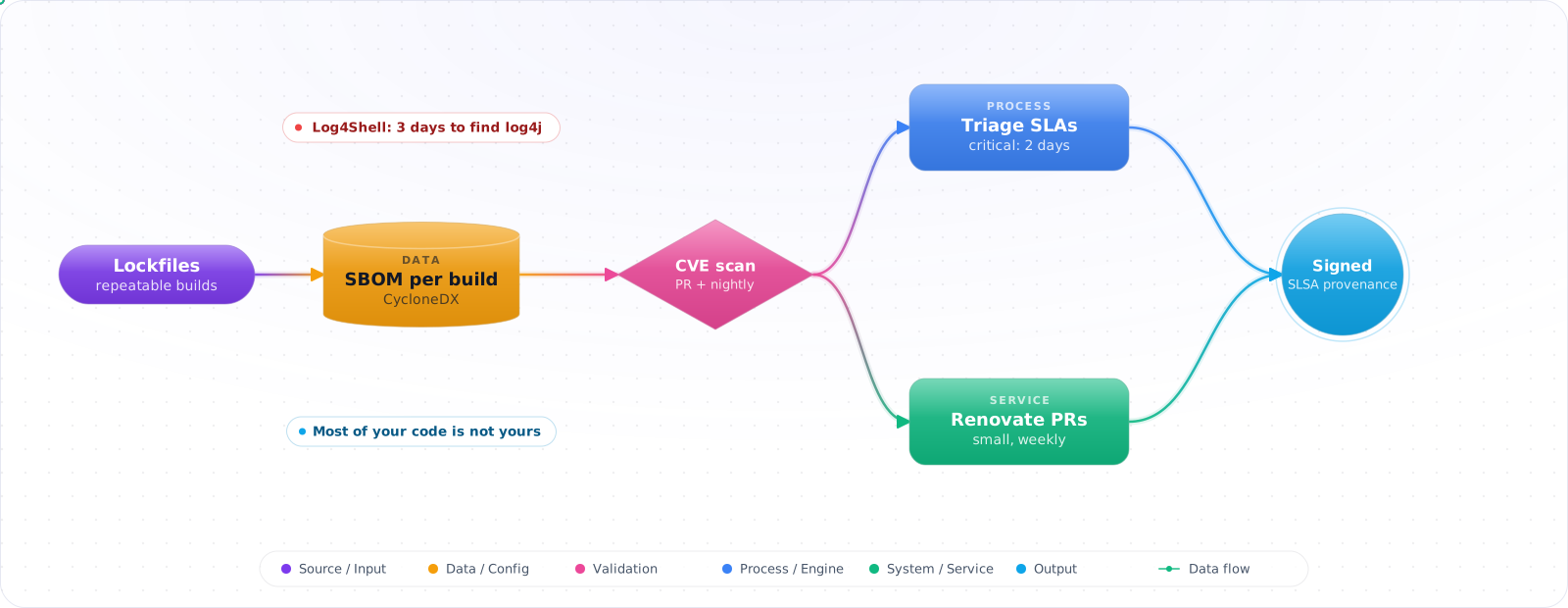
Most of the code you ship was written by someone else. Dependency scanning only works on top of an inventory: lockfiles so builds are repeatable, an SBOM so you know what shipped, and a habit of small updates so a security patch is a version bump instead of a migration. Below is the whole chain, from pinning to signed artifacts.
- You haven't run a fresh
npm auditin months - Dependabot PRs sit open until they conflict, then get closed
- You don't know which CVEs exist in your production image
- Your lockfile is .gitignored “because reproducible builds are slow”
The 2026 baseline is: pinned lockfiles, automated bump PRs, an SBOM in CI, a CVE policy with SLAs, and signed artifacts end-to-end.
The Attack Surface
flowchart LR
    DEV[Dev machine] -->|install| REG[Public registry]
    CI[CI runner] -->|install| REG
    REG -->|tarball + install scripts| BUILD[Build]
    BUILD --> ART[Artifact / image]
    ART --> PROD[Production]
    classDef bad fill:#fee
    class REG bad
Each arrow is an attack surface. Compromise the registry account → poisoned package. Compromise the build → backdoored artifact. Compromise the image base → escalation in production. The defenses below apply to each.
Pin and Lock Everything
Lockfiles (package-lock.json, pnpm-lock.yaml, requirements.txt with hashes, Pipfile.lock,poetry.lock, packages.lock.json) record the exact resolved version and content hash of every transitive dependency. Commit them. Use --frozen-lockfile / npm ci in CI so a sneaky semver bump never enters the build.
Check it: Build the same commit twice and compare the installed versions. Then check that CI installs with the frozen-lockfile option.
Vulnerability Scanning
Three layers, three tools:
- Source dependencies: Dependabot, Snyk, Renovate, GitHub Advanced Security, OSV-Scanner.
- Container images: Trivy, Grype, Docker Scout, Snyk Container.
- Running infrastructure: cloud-native (Defender for Cloud, AWS Inspector, GCP SCC).
# Combined CI step — fail on critical with a known fix
- name: OSV-Scanner (source)
  uses: google/osv-scanner-action@v2
  with: { scan-args: '-r --skip-git ./' }

- name: Trivy (image)
  uses: aquasecurity/trivy-action@0.36.0
  with:
    image-ref: ghcr.io/me/app:${{ github.sha }}
    severity: CRITICAL,HIGH
    ignore-unfixed: true
    exit-code: '1'
    format: sarif
    output: trivy.sarif

- name: Upload to GitHub Security
  uses: github/codeql-action/upload-sarif@v3
  with: { sarif_file: trivy.sarif }
CVE Triage SLAs
Not every CVE is your CVE. A vulnerability in a transitive dep's test fixture is not the same as one in your auth path. UseEPSS (Exploit Prediction Scoring System) and reachability analysis to prioritize:
| Class | SLA |
|---|---|
| Critical CVSS, known exploit, reachable | 72 hours |
| High CVSS, reachable code path | 14 days |
| Medium, no exploit | 30 days |
| Low / unreachable | Best effort, suppress with reason |
Check it: Find your oldest open critical finding, and look for its owner and its deadline. If it has neither, nobody is going to fix it.
SBOMs — Know What's in the Box
A Software Bill of Materials is a machine-readable list of every component in your artifact, in CycloneDX or SPDX format. Generate one per build, attach it to the release, and feed it back into your vulnerability scanner on new CVEs — the next Log4Shell is the day you're glad you have one.
# Generate SBOMs in CI
syft packages dir:. -o cyclonedx-json > sbom.cdx.json
syft packages ghcr.io/me/app:1.2.3 -o spdx-json > sbom.spdx.json

# Query an existing SBOM against the OSV database
osv-scanner --sbom sbom.cdx.json

# Attach as a release artifact, and (in 2026) sign it
cosign attest --type cyclonedx --predicate sbom.cdx.json ghcr.io/me/app:1.2.3Check it: Pick a library and time how long it takes to list every service that ships it, with versions. With an SBOM for each build, it's a lookup.
Lockfile Integrity
Lockfiles record integrity hashes; package managers verify them on install. But review the PR diffs — a lockfile change with no manifest change is suspicious. Tools like lockfile-lint (npm) and pip-audit add additional checks. For deterministic supply chains, vendor critical dependencies or mirror via Artifactory/Nexus with a known-good cache.
Dependency Confusion
Public registries allow anyone to publish a package by name. If your internal package acme-utils is unscoped and that name is free on npm, an attacker publishes a public one with a higher version, and your default resolver may pull theirs instead of yours. Owning the @acme scope on npm closes this for scoped packages, because outsiders can't publish inside it. Defenses:
- Reserve internal scopes on public registries (
@acmeon npm, prefixes on PyPI/NuGet). - Use scoped registries (
.npmrcper scope, NuGet config per source) so internal scopes only resolve from your private feed. - Disable upstream search for internal scopes in your private registry config.
Sigstore and Signed Artifacts
The end-state: every artifact is signed, every signature is verifiable, every consumer enforces a policy on what signers it accepts.Sigstore (cosign + Rekor transparency log + Fulcio short-lived certs) makes this practical without managing key material. Container images, npm packages (via provenance), and GitHub releases all support signing now.
# Sign a container image with OIDC identity in CI (no long-lived keys)
cosign sign --yes ghcr.io/me/app:1.2.3

# Verify at deploy time — kyverno / policy controller enforces this in-cluster
cosign verify ghcr.io/me/app:1.2.3 \
  --certificate-identity-regexp 'https://github.com/me/app/.*' \
  --certificate-oidc-issuer https://token.actions.githubusercontent.com
SLSA — A Framework for “Where Did This Come From?”
SLSA (Supply-chain Levels for Software Artifacts) defines maturity levels for build provenance. SLSA-3 means your build is hosted, isolated, and produces signed provenance. GitHub Actions, GitLab CI, and Google Cloud Build all support generating SLSA provenance documents out-of-box.
Try It on Your Own System This Week
Three checks on a repository you ship from, about an hour in total:
- Check that every lockfile is committed. A lockfile in .gitignore means every build resolves fresh versions.
- Count the open update PRs, and note the oldest. A long queue means updates have turned into migrations.
- Look at how CI refers to third-party actions. A tag can be moved to different code. A full commit SHA can't.
Pitfalls
“We'll patch when there's an incident”
That's called “running unpatched until the breach”. Automate bump PRs with Renovate/Dependabot, group low-risk updates, merge weekly. The cost of a steady drip is much lower than the cost of a yearly forced migration.
Trusting GitHub Actions by ref
uses: actions/checkout@v7 resolves to whatever the maintainer tags as v7. Pin to a full SHA, at minimum for actions outside the GitHub org. Renovate can auto-bump pinned SHAs while keeping the pin discipline.
Treating SBOMs as a compliance checkbox
An SBOM you generate once and forget is paperwork. An SBOM you re-scan against new vulnerability feeds nightly is a security control. Pick the second one.
Attacks Have Moved Upstream
Scanning for known CVEs protects you from yesterday's problem. Modern supply-chain attacks publish a malicious package that has no CVE yet, and they count on you installing it before anyone notices. In September 2025, the Shai-Hulud worm spread across npm by stealing maintainer tokens from infected machines and publishing poisoned versions of their packages, which then did the same to others. A scanner looking for known vulnerabilities saw nothing wrong.
A cooldown is the cheapest defence
Most malicious versions are found within hours or days. So don't install anything that was published yesterday. Package managers now support this directly. In pnpm, minimumReleaseAge delays new versions, and Dependabot and Renovate can both wait before opening an update. A delay of three to seven days gives the community time to catch many of these attacks and costs very little, though a slow-burning compromise can outlast it. Keep an exception path for urgent security fixes.
Turn off install scripts by default where you can, because that's how most npm malware runs. pnpm blocks them unless you allow a package explicitly, which is a good default. Use npm ci or pnpm install --frozen-lockfile in CI, so that the lockfile decides what gets installed.
Check it: Look in your package manager and update-bot settings for a minimum release age. Then check whether install scripts run by default.
Coding agents add a new path
Models sometimes suggest packages that don't exist, and attackers register those names. This is called slopsquatting, and the install succeeds with no warning. An agent running npm install by itself can pull one in with no human ever seeing it. Flag every new dependency in review, and allowlist what agents may install, or point them at an internal registry. Agents also read README files and install scripts, so a hostile package can target the agent directly.
The same applies to AI components. An MCP server, a skill or a model file is a dependency with access to your agent. Model files in pickle format can run code on load, so prefer safetensors. OWASP lists this as ASI04, and keeping an inventory of these components is sometimes called an AIBOM.
Regulation is arriving
The EU's Cyber Resilience Act requires manufacturers of products with digital elements to report actively exploited vulnerabilities from September 2026, with its main obligations following in December 2027. If you sell software into the EU, SBOMs are moving from good practice to expected practice, so generate them on each build now.
Scanning does still matter. Just be clear about what it does: it finds known problems. Lockfiles, cooldowns, install-script controls and provenance checks are what protect you from the unknown ones.