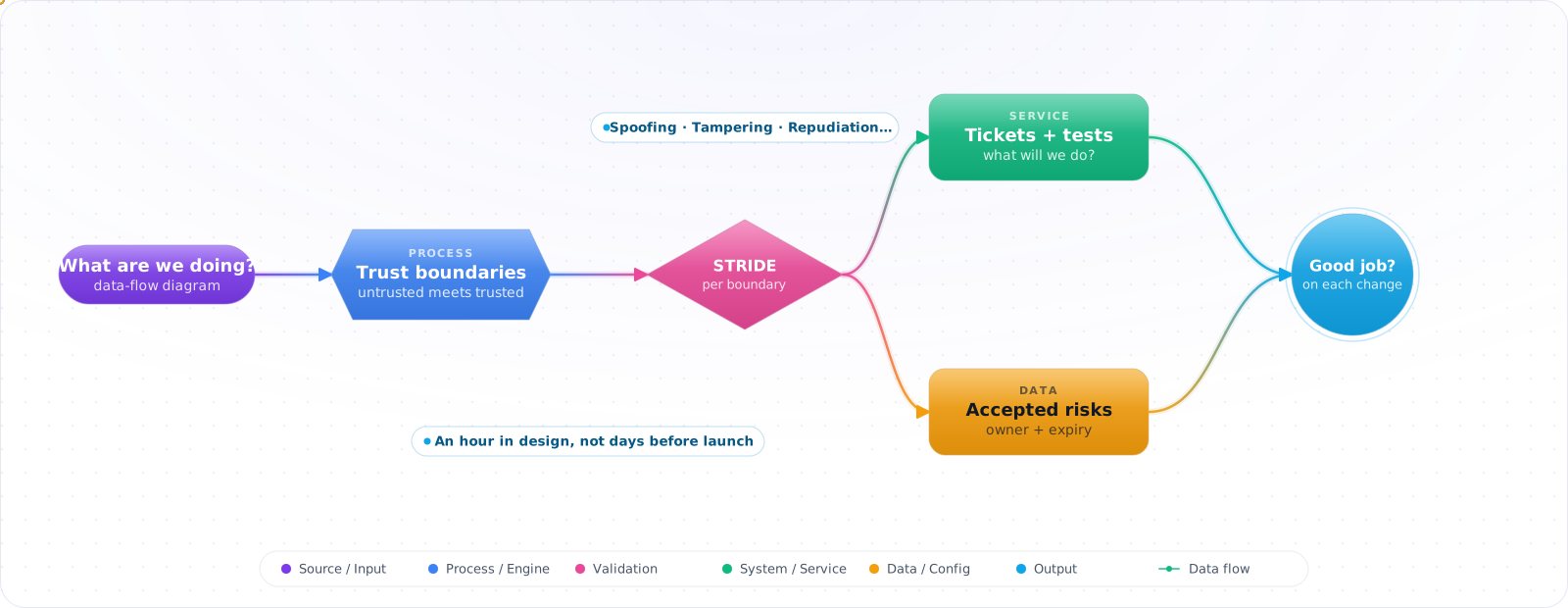
Start With the Platform Model
You don't need a threat model for every CRUD endpoint. A feature that adds no new trust boundary inherits the model the platform already has. Model a feature when it adds a boundary or touches something valuable: the auth path, payments, an admin surface, or an agent that can call tools.
Take a typical case, made up for illustration. A team built a chat assistant that could issue refunds. Two days before launch, a tester typed someone else's order number and told the assistant support had already approved the refund. It worked, because the refund tool trusted whatever order id the model passed in. Fixing it meant redesigning the tool under deadline pressure.
An hour at the whiteboard during design would have caught it. Threat modeling is not a heavy process. It is drawing how data moves, marking where untrusted input crosses into trusted systems, and asking a fixed set of questions at each crossing. Below are Shostack's four questions, STRIDE, and how to fit it into normal sprint work.
- Security review is a checkbox at the end of a six-month project
- You've never drawn the trust boundaries of the feature you're building
- “Who's the attacker?” is met with shrugs in design reviews
- You shipped auth code without listing what could be tampered with or repudiated
Shostack's four questions are enough: What are we working on? What can go wrong? What are we going to do about it? Did we do a good job? STRIDE and DREAD give those four questions a vocabulary.
Shostack's Four Questions
- What are we working on? (diagram)
- What can go wrong? (threats)
- What are we going to do about it? (mitigations)
- Did we do a good job? (validation)
STRIDE — The Threat Categories
| Letter | Threat | Property violated | Example |
|---|---|---|---|
| S | Spoofing | Authentication | Forged JWT, stolen cookie |
| T | Tampering | Integrity | Modified request body, parameter pollution |
| R | Repudiation | Non-repudiation | No audit log, no signed receipt |
| I | Information Disclosure | Confidentiality | IDOR, verbose errors, side channels |
| D | Denial of Service | Availability | Unbounded queries, expensive endpoints, regex DoS |
| E | Elevation of Privilege | Authorization | Missing role check, prototype pollution to admin |
Data Flow Diagrams and Trust Boundaries
flowchart LR
    B[Browser] -.->|TLS| LB[Load Balancer]
    LB --> API[API gateway]
    API --> APP[App service]
    APP -->|VPC| DB[(Database)]
    APP -->|public| LLM[LLM provider]

    subgraph EXT[External / untrusted]
      B
      LLM
    end
    subgraph VPC[Trust boundary: VPC]
      LB
      API
      APP
      DB
    end
Trust boundaries mark where data or control moves between levels of trust, and they're where threats concentrate. Each arrow crossing one needs the controls that flow calls for, usually authentication, input validation and logging. Keep two LLM risks apart. Prompt injection comes from untrusted input, so it applies wherever the model runs, even inside your own network. What happens to data sent to a hosted provider is a separate question of contracts and technical controls.
Check it: Draw one feature and mark every arrow that crosses a trust boundary. For each one, name the authentication, validation and logging on it.
Walking STRIDE Through a Feature
Take a feature like “Customer uploads a CSV and we run a background import.” In ten minutes:
Element: Upload endpoint
  S: Could someone POST as another user?   → JWT verify, scope to user
  T: Could the CSV contents be tampered?    → Pre-signed URL + checksum in transit; schema validation for bad data from valid users
  R: Will we log who uploaded what?         → Append audit row {who, hash, time}
  I: Does the response leak file paths?     → Return opaque ID only
  D: Can someone DoS by uploading 10GB?     → Size limit at gateway, virus scan
  E: Can a CSV cell execute code anywhere?  → Strict parser, no eval, no formulas (CSV injection)

Element: Background importer
  S: Workload identity, not a shared key
  T: Validate row schema before processing
  R: Job-id audit trail per row outcome
  I: Errors logged with row index, never row contents
  D: Bounded concurrency; dead-letter on repeated failure
E: Importer runs with least-privilege DB role (no DDL)Check it: Take one element of your diagram and spend ten minutes on the six letters. Write down each threat you hadn't thought of.
DREAD — A Quick Severity Score
DREAD lets you rank findings consistently. Score each 1–10 and average:
- Damage — how bad if exploited?
- Reproducibility — how easy to repeat?
- Exploitability — skill required?
- Affected users — how many?
- Discoverability — how findable?
DREAD is famously subjective. Use it for relative ranking inside a session, not for cross-team comparisons. For those, CVSS-aligned scoring is a common alternative.
Attack Trees
For high-value targets (the payment flow, the secret manager itself), draw an attack tree. Root = goal. Children = OR/AND of intermediate steps. Leaves = concrete actions. Each path is a chain of mitigations to consider.
flowchart TB
    G[Steal customer PII] --> A{OR}
    A --> A1[Compromise DB]
    A --> A2[Compromise app]
    A --> A3[Compromise a vendor]
    A1 --> A1a[Stolen DB creds]
    A1 --> A1b[Privilege escalation in cloud]
    A2 --> A2a[XSS → cookie theft]
    A2 --> A2b[RCE via dep]
    A3 --> A3a[OAuth scope abuse]
PASTA — When STRIDE Isn't Enough
PASTA (Process for Attack Simulation and Threat Analysis) is a 7-stage methodology that ties technical threats to business impact. It's heavyweight — used by financial and regulated industries where you need to demonstrate a risk-based approach to auditors. For most product teams, STRIDE + light DREAD + attack trees for crown jewels is enough.
Integrating into the SDLC
- Design reviews: every new service or significant feature gets a one-hour threat modeling session, captured in the design doc.
- Templates: a Threat Model section in the ADR/RFC template makes it the default, not an extra step.
- Living document: re-visit when the system materially changes (new trust boundary, new data category).
- Tooling: Microsoft TMT, OWASP Threat Dragon, IriusRisk. For text-first teams, threagile (YAML in repo) is excellent.
- Outcomes flow into the backlog with concrete tickets, owners, and due dates. A threat model with no tickets is a creative writing exercise.
Check it: Open your last threat model and count the tickets that came out of it, with owners and dates. If there are none, it changed nothing.
Pitfalls
Trying to model everything
You don't need a threat model per CRUD endpoint. Model the trust boundaries and the crown jewels — the auth path, the payments path, the AI agent that can call tools, the admin surface. Everything else inherits the platform-level model.
Threat model as a deliverable, not a habit
A 60-page PDF that nobody reads is worse than a 1-page diagram with 6 action items. The output should be a small number of crisp tickets, not a document with sign-off ceremonies.
No security person in the room
Engineers know what they built; security knows what tends to go wrong. A 60-minute joint session early in design saves weeks of retrofitting later. If you don't have a security team, the senior-most engineer plays the role — Shostack's book or the OWASP cheat sheets are enough to drive the conversation.
Try It on Your Own System This Week
Three checks on how your team models threats, about an hour in total:
- Find when your last threat model was written, and what has changed since. A new tool, data source or integration is when the risk changes.
- Look in your design template for a threat model section. If it is there, the session happens by default.
- For one AI feature, list every source of text the model reads. Each one is a trust boundary.
Threat Modelling an AI Feature
STRIDE still works for AI systems, but it needs new questions, since an LLM adds a component that can be talked into things. Draw your data flow as usual, and then mark two new kinds of element: anything that feeds text into the model, and anything the model can cause to happen.
Every source of text is a trust boundary, because the model doesn't reliably separate data from instructions. A document, a web page, a tool result and a memory entry can each carry instructions. Then ask the question that decides most of the risk: what's the worst thing that could happen if the model followed an attacker's instructions right now? Whatever it can reach, assume an attacker can reach.
A useful way to map STRIDE onto an agent:
- Spoofing: can someone impersonate a user or another agent?
- Tampering: can they poison retrieved documents or long-term memory?
- Repudiation: can you prove which prompt and tools led to an action?
- Information disclosure: can the model be made to reveal data or the system prompt?
- Denial of service: can someone run up your token bill? Cost is an availability problem now.
- Elevation of privilege: can text cause a tool call the user couldn't make?
Check for the lethal trifecta as well: private data, untrusted content and a way to send data out, all in one flow. When you find all three, change the design. OWASP's agentic list gives you a ready checklist of known attack classes, and MITRE ATLAS catalogues real techniques against AI systems.
Keep it light
Threat modelling fails when it's a big annual event. Do it for an hour at design time, with the people building the feature, and write down three things: the top risks, what you'll do about each one, and what you're accepting. Keep that file in the repo beside the code. It's living documentation, and it helps with audits.
A coding agent is useful here as a sparring partner. Give it your design and ask it to attack it. It won't replace a security engineer, and it's good at listing the obvious cases quickly, so that your hour goes on the hard ones. Revisit the model when a new tool, data source or integration appears, since that's when the risk changes.