


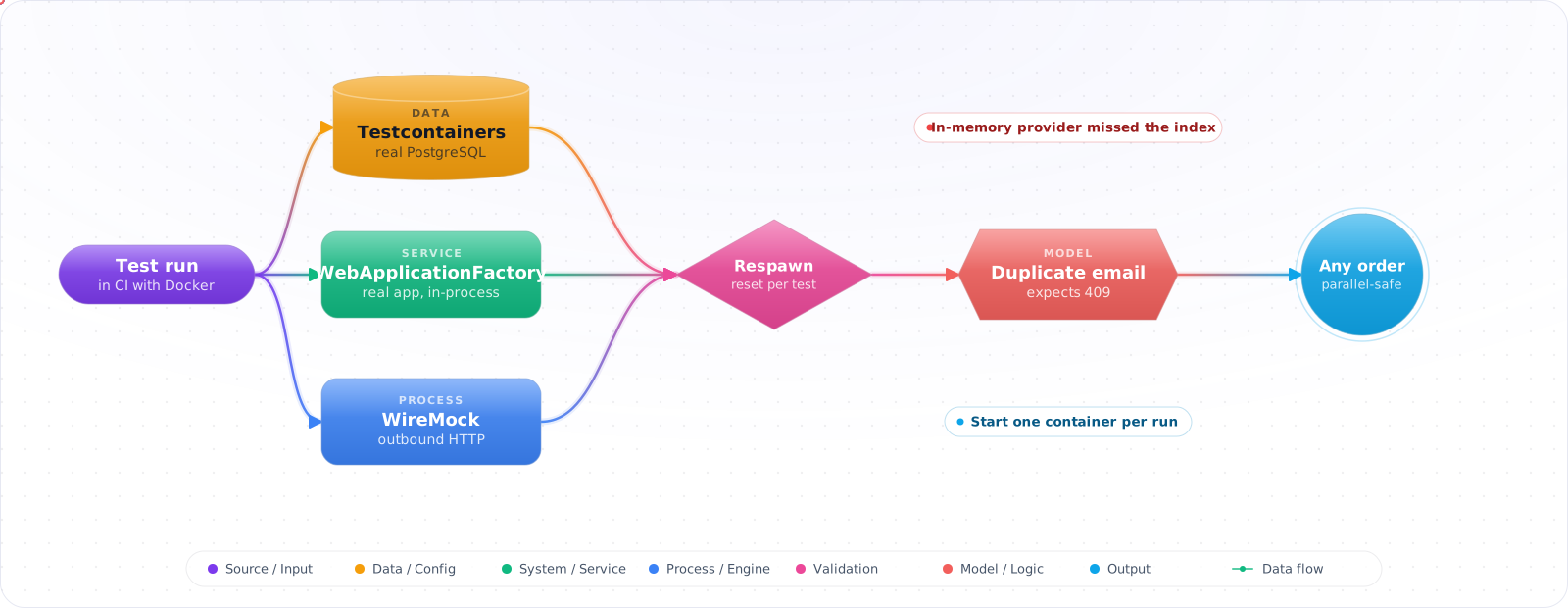
Integration Tests Catch What Unit Tests Can't — Without the Cost of E2E
Take an illustrative case: a customer API had 300 green integration tests running on EF Core's in-memory provider. Production had a unique index on lower-cased email addresses. The in-memory provider does not behave like a relational database, so the tests never saw the conflict, and two sign-ups with the same email in different case produced an unhandled error.
Integration tests check that your code works with the real things around it: the database, configuration, middleware and outbound calls. Containers have made that cheap. Below is how to use Testcontainers and WebApplicationFactory (and the Node equivalents), keep tests isolated, stub outbound HTTP, and keep the suite fast enough to run on every pull request.
- Bugs slip past unit tests because the SQL or mapping is wrong
- You mock the database in tests, then hit the real one in prod and find a NULL constraint you forgot
- CI runs against a shared dev DB and tests step on each other
- You're afraid to test “the whole API” because the suite would take 30 minutes
Modern integration testing is a real Postgres in a container, started on demand, torn down per test class. Fast, isolated, and as close to production as you can get without deploying.
Testcontainers — Real Dependencies, Disposable
Testcontainers (Java, .NET, Node, Python, Go) starts containerized services for tests and tears them down at the end. You get a real Postgres, Redis, Kafka, etc., without managing infra.
// Node.js — Vitest + Testcontainers + Drizzle
import { PostgreSqlContainer, StartedPostgreSqlContainer } from '@testcontainers/postgresql';
import { drizzle } from 'drizzle-orm/node-postgres';
import { Client } from 'pg';
import { beforeAll, afterAll, beforeEach, expect, it } from 'vitest';

let container: StartedPostgreSqlContainer;
let client: Client;
let db: ReturnType<typeof drizzle>;

beforeAll(async () => {
  container = await new PostgreSqlContainer('postgres:17-alpine').start();
  client = new Client({ connectionString: container.getConnectionUri() });
  await client.connect();
  db = drizzle(client);
  await runMigrations(db); // your real migrations
}, 60_000);

afterAll(async () => { await client.end(); await container.stop(); });

beforeEach(async () => {
  // Truncate test data between tests for isolation
  await db.execute(sql`TRUNCATE TABLE orders, customers RESTART IDENTITY CASCADE`);
});

it('creates an order with the right total', async () => {
  const customer = await createCustomer(db, { name: 'Ada' });
  const order = await createOrder(db, customer.id, [{ sku: 'X', qty: 2, price: 5 }]);
  expect(order.total).toBe(10);
  const rows = await db.select().from(orders).where(eq(orders.id, order.id));
  expect(rows[0].status).toBe('pending');
});
WebApplicationFactory — ASP.NET Core In-Process
Microsoft.AspNetCore.Mvc.Testing spins up your real app in-process — middleware, DI, controllers — and gives you anHttpClient that bypasses TCP entirely. Combine with Testcontainers for the data layer and you have a full integration test with no network hop for each request. Measure the timing on your own setup, since it depends on your hardware, schema and queries.
public class ApiFactory : WebApplicationFactory<Program>, IAsyncLifetime
{
    private readonly PostgreSqlContainer _pg = new PostgreSqlBuilder()
        .WithImage("postgres:17-alpine")
        .Build();

    // xUnit v2 signatures. In v3, IAsyncLifetime uses ValueTask.
    public async Task InitializeAsync()
    {
        await _pg.StartAsync();
        using var scope = Services.CreateScope(); // starts the host against the container
        var db = scope.ServiceProvider.GetRequiredService<AppDb>();
        await db.Database.MigrateAsync();         // real migrations, not EnsureCreated
    }

    async Task IAsyncLifetime.DisposeAsync()
    {
        await base.DisposeAsync();                // stop the test host first
        await _pg.DisposeAsync();
    }

    public async Task<Guid> SeedCustomerAsync()
    {
        using var scope = Services.CreateScope();
        var db = scope.ServiceProvider.GetRequiredService<AppDb>();
        var customer = new Customer { Id = Guid.NewGuid(), Name = "Test customer" };
        db.Customers.Add(customer);
        await db.SaveChangesAsync();
        return customer.Id;
    }

    protected override void ConfigureWebHost(IWebHostBuilder builder)
    {
        builder.ConfigureTestServices(services =>
        {
            services.RemoveAll<DbContextOptions<AppDb>>();
            services.AddDbContext<AppDb>(o => o.UseNpgsql(_pg.GetConnectionString()));
        });
    }
}

public class OrdersEndpointsTests : IClassFixture<ApiFactory>
{
    private readonly ApiFactory _factory;
    private readonly HttpClient _client;
    public OrdersEndpointsTests(ApiFactory f) { _factory = f; _client = f.CreateClient(); }

    [Fact]
    public async Task POST_orders_returns_201_with_location()
    {
        var customerId = await _factory.SeedCustomerAsync();
        var resp = await _client.PostAsJsonAsync("/orders",
            new { customerId, items = new[] { new { sku = "X", qty = 1 } } });

        resp.StatusCode.Should().Be(HttpStatusCode.Created);
        resp.Headers.Location.Should().NotBeNull();
    }
}
Node API Testing — supertest + your real app
import request from 'supertest';
import { buildApp } from '../src/app';

it('GET /health → 200', async () => {
  const app = buildApp({ db }); // pass the Testcontainer-backed db
  await request(app.callback()).get('/health').expect(200, { ok: true });
});
Isolation Strategies for the Database
| Strategy | When | Trade-off |
|---|---|---|
| Transaction per test, rollback at end | Single-connection workloads | Can't test code that opens its own connection |
| Truncate / re-seed between tests | Default for most APIs | Slightly slower but always correct |
| One container per test class | Heavy migrations | Best parallelism |
| Per-test schema in shared container | Many small tests | Complex; rarely worth it |
Stubbing Outbound HTTP — WireMock and MSW
Your integration tests can hit a real DB but you still want deterministic responses from upstream HTTP services. WireMock(Java/.NET) and MSW (Node) record-and-replay or define stub responses you assert against.
import { setupServer } from 'msw/node';
import { http, HttpResponse } from 'msw';

const server = setupServer(
  http.post('https://payments.example/charge', () =>
    HttpResponse.json({ id: 'ch_123', status: 'succeeded' })),
);

beforeAll(() => server.listen({ onUnhandledRequest: 'error' }));
afterEach(() => server.resetHandlers());
afterAll(() => server.close());
What to Cover at the Integration Level
- HTTP boundary: routing, model binding, validation, status codes, problem-details on errors.
- Database: real SQL execution, ORM mappings, migrations, constraint violations.
- Authorization: per-endpoint policy with realistic JWTs (issue test tokens with a test-only signer).
- Serialization: dates, decimals, enums, nullable shapes — the things that bite in production but not unit tests.
- Transactions: rollback behavior on failures across multiple writes.
Speed Tips
- Reuse the container across the whole test session when possible (one Postgres, schema per test class).
- Run with
fsync = offin test mode — disk safety doesn't matter for ephemeral data. - Parallelize at the test class level, not per test (each parallel worker gets its own DB).
- Tag slow tests and run them only on PR / nightly, not every push.
Pitfalls
Shared mutable seed data
A global seed used by every test becomes a coupling nightmare — any change cascades. Each test creates the data it needs. Use factories (faker, AutoFixture, factory_bot) to keep this cheap.
Mocking the framework
If you're mocking HttpContext in a controller test, you've written a unit test of the framework, not an integration test of your code. Use WebApplicationFactory instead; the real pipeline catches bugs.
One enormous fixture per test class
Setup that does “everything any test might need” produces fast hashes but slow tests and unclear failures. Each test should arrange exactly what it asserts on, no more.
Keeping Integration Tests Fast and Honest
Integration tests have one main enemy: they get slow, then people stop running them. Testcontainers made real dependencies easy, and with a little care they stay quick.
Share one container per test run, not one per test. Starting Postgres takes seconds, and doing that hundreds of times adds up. Reset state between tests instead, either by wrapping each test in a transaction that rolls back, or by using a tool such as Respawn to clear tables. Transaction rollback is the fastest. It doesn't work if your code manages its own transactions or commits across connections, so truncating tables is a reasonable fallback. For Postgres, cloning a template database is usually quick, depending on its size, and gives each test a clean copy.
Run tests in parallel where you can, with each worker using its own database or schema. Keep each test independent of order. A test that passes only after another has run will fail at the worst possible time.
Test your third-party boundaries
Don't call real external APIs in CI, since rate limits and outages will make your suite flaky. Use a fake server such as WireMock or MSW, and record real responses so that your fakes reflect reality. Then run a small nightly job against the real service, to catch the day when it changes behaviour. That job is what protects you from a fake that has gone stale.
Integration tests for LLM features
LLM calls are slow, expensive and non-deterministic, so they don't belong in your standard integration run. Stub the model client at the boundary, and test everything around it: prompt assembly, retrieval, tool execution, error handling and retries. Record real responses for replay if you need realistic data. Then test real model behaviour separately, with evals, scored on properties and not on exact strings.
Test failure paths too. What happens when the model returns invalid JSON, a tool times out, or you hit a 429? These paths run in production, and they usually have no tests at all.
What belongs here
An integration test is worth writing when a bug would live in the seam between components: a SQL query, a serialisation format, a transaction, an auth rule. If it's pure logic, write a unit test. Coding agents tend to mock everything they can, so ask for real dependencies explicitly, and check what the tests actually exercise.