

The System Prompt That Knew Everything
Your agent's system prompt started at 300 tokens. Then someone added the release process, the SQL style guide, how to file an incident, the brand voice rules and a page on the deploy tool. It is now 14,000 tokens, sent on every request, and most requests use none of it. Worse, the instruction you care about today is buried at line 340, and the model is treating it as one suggestion among hundreds.
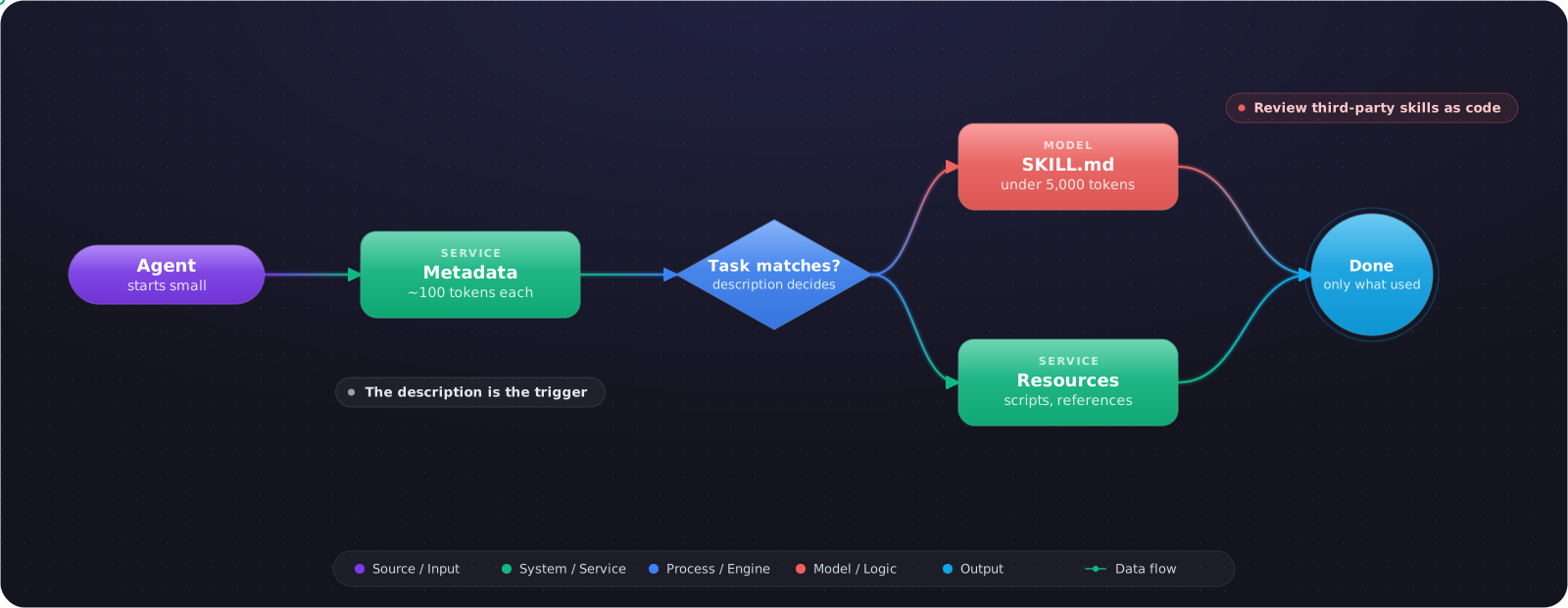
Agent Skills solve this by not loading what you don't need. A skill is a folder holding a SKILL.mdfile, plus optional scripts and references. The agent starts out knowing only each skill's name and one-line description, and reads the rest when a task calls for it. The format was developed at Anthropic and released as an open standard, and it now works across tools that adopt it.
- Your system prompt or AGENTS.md keeps growing and you are afraid to cut it
- You paste the same long instructions into agent sessions every week
- Team know-how lives in people's heads, or in prompts nobody can find
- You want a repeatable procedure, and a tool feels like the wrong shape for it
What Is in a Skill
release-notes/
├── SKILL.md          # required: frontmatter and instructions
├── scripts/          # code the agent can run
├── references/       # docs it reads when needed
└── assets/           # templates and other resources
---
name: release-notes
description: Draft release notes from merged PRs. Use when the user asks for
  release notes, a changelog entry, or a summary of what shipped.
license: MIT
---

# Writing release notes

1. Run scripts/merged_prs.sh <from-tag> <to-tag>.
2. Group changes as Added, Changed, Fixed. Drop internal refactors.
3. Follow references/style.md for tone and length.
4. Show the draft and wait for approval before publishing.
Only name and descriptionare required. The name allows up to 64 lowercase letters, numbers and hyphens, can't start or end with a hyphen or contain two in a row, and has to match the folder name. The description allows up to 1,024 characters. Optional fields include license, compatibility, metadata and an experimental allowed-tools list. The reference validator runs with skills-ref validate ./release-notes, which belongs in CI if your team shares skills.
Why the Token Maths Works
The spec calls this progressive disclosure, and it has three tiers. Each tier is only paid for if the previous one decided it was needed.
| Tier | What loads | When | Rough size |
|---|---|---|---|
| Metadata | name and description | At startup, for every skill | About 100 tokens each |
| Instructions | The body of SKILL.md | When the skill activates | Under 5,000 tokens recommended |
| Resources | Files in scripts/, references/, assets/ | Only when required | As needed |
So thirty skills cost about 3,000 tokens of metadata per request, against 14,000 for the same knowledge in a system prompt, and each of those skills can be as long as it needs to be. Keep the main file under 500 lines, and keep file references one level deep so the agent isn't chasing a chain of links.
sequenceDiagram
    participant U as User
    participant A as Agent
    participant F as Skills folder
    A->>F: Load every name and description
    U->>A: Write release notes for 4.2
    A->>F: Read release-notes/SKILL.md
    A->>F: Run scripts/merged_prs.sh
    A->>F: Read references/style.md
    A-->>U: Draft for approval
Skill, Tool or MCP Server?
| Use | When | Example |
|---|---|---|
| A skill | You are teaching a procedure | How we write release notes |
| A tool | The agent needs one typed action | create_ticket(title, priority) |
| An MCP server | Several clients need the same tools | Deploy status for the whole company |
They work together. A skill can tell the agent which MCP tools to use and in what order. A good test: if you would explain it to a new hire by writing a page, it is a skill. If you would give them an API, it is a tool.
What Goes Wrong
1. A description that never fires
The description is the only thing the agent sees when choosing. “Helps with documents” does nothing. Say what it does and when to use it, in the words a user would actually type. Test it: if the skill doesn't activate on a typical request, the description is the bug.
2. Installing skills from strangers
A skill is instructions and code that your agent will follow. That is a supply-chain risk, and OWASP lists it under agentic supply chain vulnerabilities. Read a third-party skill the way you would read a shell script before piping it into bash, and pin it to a commit.
3. Stuffing everything into SKILL.md
Then you have recreated the long system prompt, one level down. Move reference material to references/ and let the agent read it when needed.
4. Instructions where a script belongs
If the procedure is deterministic, write a script and tell the agent to run it. Ten lines of bash is more reliable than ten sentences asking the model to do the same thing by hand.
Testing a Skill Before You Share It
A skill is a small program written in English, so test it like one. Start with the trigger. Write ten requests that should activate it and ten that shouldn't, including a few that are close but wrong. Run them on the model you actually use, and count. If it fires on unrelated work, its description is too broad. If it misses obvious requests, add the words people really type.
Then test the result. Run the same task with the skill and without it, and compare the output against a rubric. A skill that activates reliably and changes nothing is costing you tokens for no gain.
Skills across tools
Because the format is open, one skill can work in several agents, which is the main reason to prefer it over a tool-specific feature. Portability has limits, though. Scripts assume a shell and an installed runtime, and allowed-tools is still marked experimental, so behaviour varies. Keep the instructions plain, and say what a script needs in the compatibility field when that matters.
Version skills alongside your code when they relate to a repository. For skills shared across a company, use a separate repository with reviews and a changelog, because a change to a popular skill alters the behaviour of every agent that uses it. Treat removing or renaming one as a breaking change, for the same reason you would with a tool.
What I Would Do First
Look at what you paste into agent sessions most often and turn the top item into a skill. Then go through your system prompt and move everything that only applies to some tasks into skills. Keep the rules that apply to every task where they are. Count the prompt tokens before and after to see what you saved, and you also gain a library the whole team can use.