

The Prompt Nobody Wants to Touch
Every team that has shipped an LLM feature has one: a system prompt on its fourteenth revision, edited by four people, with a comment that says do not change the order of these rules. Nobody remembers why revision nine was better than eight. Then the model is upgraded, accuracy on the support-ticket classifier drops a few points, and someone spends two days nudging adjectives.
Meta-prompting is the habit of letting a model do that nudging, under rules you control. One model proposes prompt changes, your evaluation set decides which changes survive, and the winning prompt goes into version control like any other artefact. Done well, it turns prompt tuning from folklore into an optimisation loop you can rerun every time the model changes.
- You have a task with a checkable answer: a label, an extracted field, a pass or fail from a test
- You have at least 50 labelled examples, ideally a few hundred
- The prompt has to be re-tuned when models change, and that keeps happening
- Hand-tuning has stalled: each edit fixes one case and breaks another
Without an evaluation set, skip this article and build one first. An optimiser with no metric optimises for whatever the model likes the sound of.
Two Things People Mean by Meta-Prompting
The term covers two ideas, and it helps to keep them apart.
- Prompts that write prompts. A model generates or rewrites the instructions another model runs on. This is automatic prompt optimisation, and it is what this article is mostly about.
- A conductor prompt.One model instance acts as a coordinator that breaks a task down and hands pieces to “expert” instances of itself with their own instructions, then checks and combines the results (Suzgun and Kalai, 2024). That is closer to multi-agent orchestration, and the same engineering rules apply: clear hand-offs, bounded loops, a verifier at the end.
The Ladder, From Cheap to Serious
There are four levels of automation. Most teams should climb them in order and stop at the first one that gets the metric where it needs to be.
| Level | What happens | What you need |
|---|---|---|
| 1. Ask for a rewrite | Paste the prompt into a strong model, or the prompt improver in your provider’s console, and ask for a clearer version | Ten minutes and a handful of test cases |
| 2. Refine on failures | Run the eval, show the model the failures, let it propose an edit, keep the edit only if the score goes up | A labelled set and a metric |
| 3. Search over candidates | Generate many instruction variants, score each one, iterate on the best (APE, OPRO-style loops) | A bigger set and a budget for hundreds of eval runs |
| 4. Compile a program | Describe the task as typed modules and let a framework such as DSPy optimise instructions and few-shot examples together | Willingness to adopt the framework’s structure |
Level 1 is worth doing even if you go no further. A strong model will usually tidy contradictory rules, move the output format to the end and spot instructions that conflict. But it is a rewrite, not an optimisation: nothing tells you the new version is better until you run it against your cases.
Level 2: A Refinement Loop You Can Read
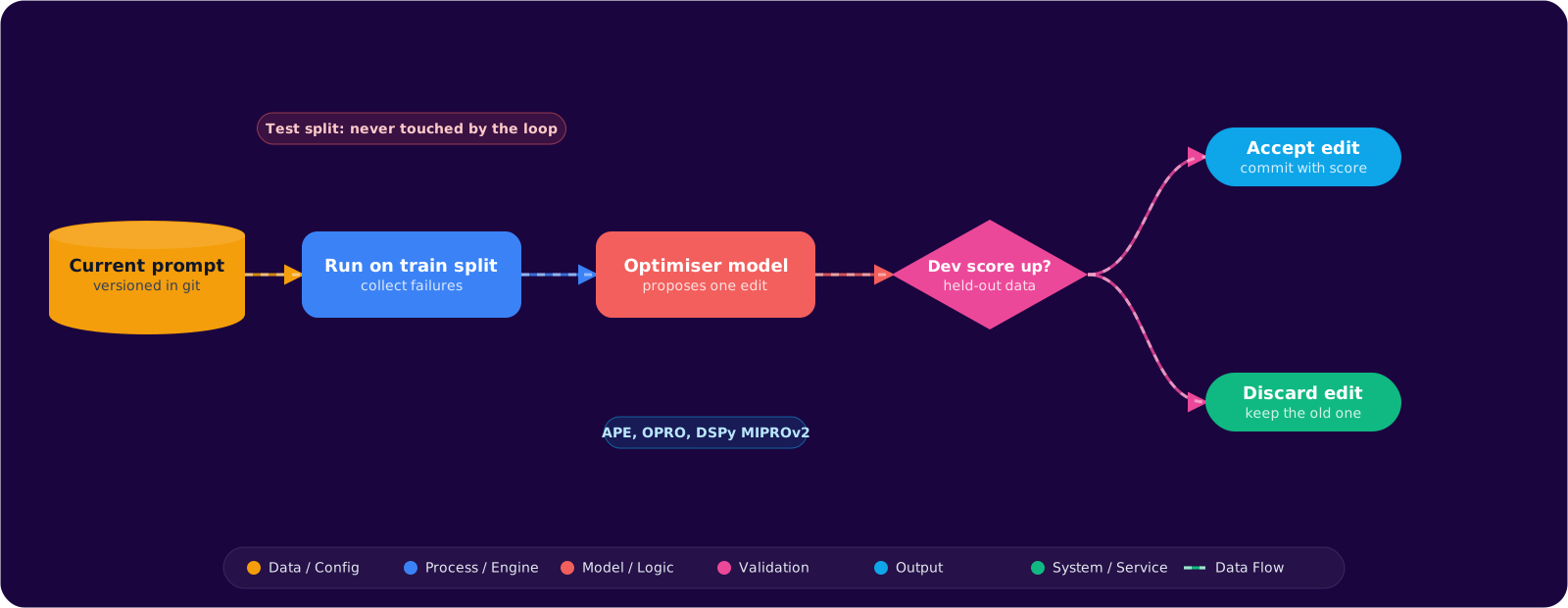
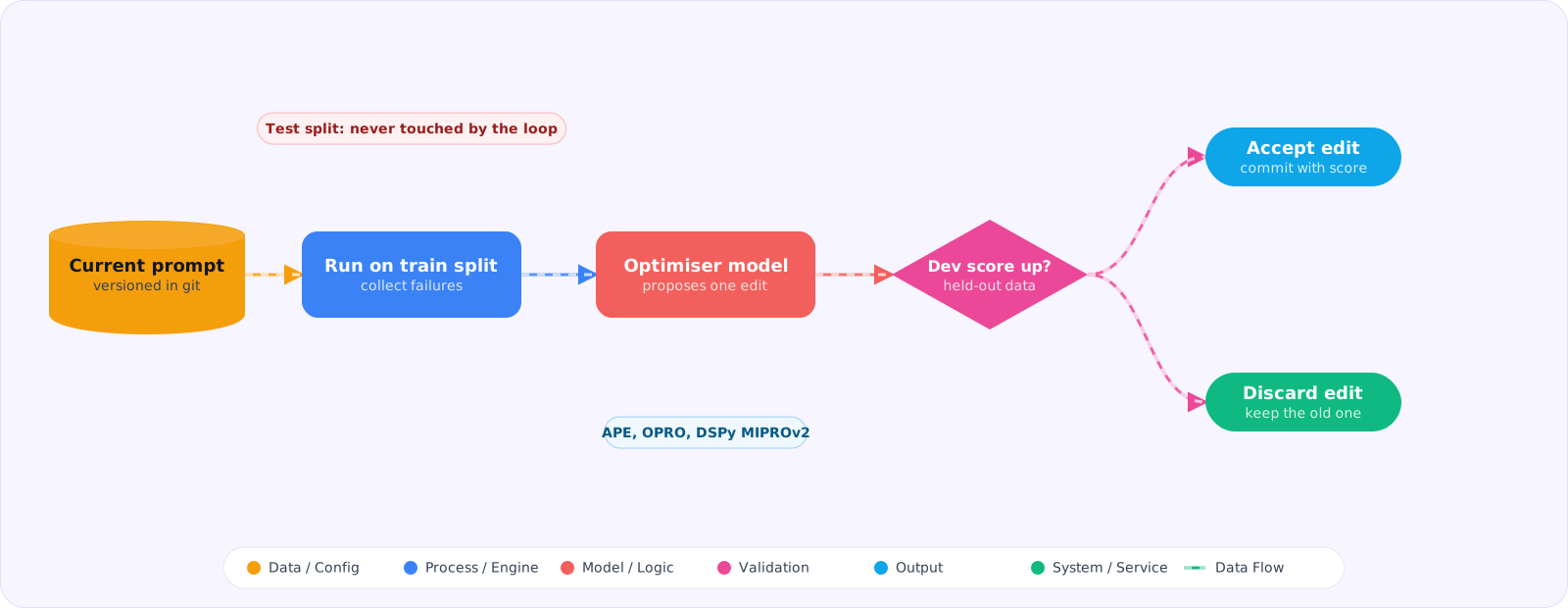
This is where most of the value is, and it fits in one file. The idea, sometimes called textual gradients after the ProTeGi paper (Pryzant and colleagues, 2023), is to treat failures as the signal: show the optimiser model what went wrong, ask for a specific edit, and accept the edit only if it improves the score on data the optimiser has not seen.
import random

def score(prompt: str, examples: list[dict]) -> tuple[float, list[dict]]:
    """Run the task model on every example; return accuracy and the failures."""
    failures = []
    for ex in examples:
        got = run_task(prompt, ex["input"]).strip().lower()
        if got != ex["label"]:
            failures.append({**ex, "got": got})
    return 1 - len(failures) / len(examples), failures

def propose_edit(prompt: str, failures: list[dict]) -> str:
    sample = random.sample(failures, k=min(8, len(failures)))
    cases = "\n\n".join(
        f"Input: {f['input']}\nExpected: {f['label']}\nModel said: {f['got']}" for f in sample
    )
    return complete(
        "You improve instructions for a classifier. Below is the current prompt and "
        "cases it got wrong. Explain in one sentence what the prompt fails to tell the model, "
        "then return the full revised prompt after the line REVISED:. Keep every rule that is "
        "not related to these failures. Do not quote or paraphrase the example inputs.\n\n"
        f"CURRENT PROMPT:\n{prompt}\n\nFAILURES:\n{cases}",
        model=OPTIMISER_MODEL,
    ).split("REVISED:", 1)[-1].strip()

def optimise(prompt: str, train: list[dict], dev: list[dict], rounds: int = 8) -> str:
    best, best_dev = prompt, score(prompt, dev)[0]
    for r in range(rounds):
        _, failures = score(best, train)
        if not failures:
            break
        candidate = propose_edit(best, failures)
        dev_score = score(candidate, dev)[0]
        print(f"round {r}: dev {best_dev:.3f} -> {dev_score:.3f}")
        if dev_score > best_dev:                 # accept only real gains on held-out data
            best, best_dev = candidate, dev_score
    return best
Three details carry the weight. Failures come from the training split, but acceptance is decided on the dev split, so the optimiser cannot win by memorising the cases it saw. The edit prompt tells the optimiser not to quote the examples, because the cheapest way to fix a failure is to paste the input into the instructions, which looks great on that case and does nothing for the next one. And the loop keeps the old prompt unless the new one is measurably better, so a bad round costs tokens but never quality.
Keep a third split, a test set, that no part of the loop ever touches. Report the final number on that set. If the dev score climbs and the test score does not, you have tuned the prompt to the dev set, and you should get more data before you run more rounds.
Level 3: Search Instead of Edit
Editing one prompt at a time can get stuck on a local improvement. The search approaches widen the net. APE (Zhou and colleagues, 2022) generates many candidate instructions from a few input and output pairs and keeps whichever scores best. OPRO (Yang and colleagues, 2023) goes one step further: the optimiser prompt contains the previous candidates together with their scores, sorted, and the model is asked to write one that would score higher. The history of attempts becomes the context.
These work, and they cost a lot more. If each evaluation is 200 examples and you score 30 candidates per round for 5 rounds, that is 30,000 task calls before you count the optimiser. Run them on a cheap task model where you can, cache task outputs by prompt hash, and stop as soon as two consecutive rounds fail to beat the best score.
Level 4: Compiling Prompts with DSPy
DSPy takes a different stance: you stop writing the prompt and write the program. A signature declares inputs and outputs with types, a module such as ChainOfThought decides how the model is called, and an optimiser compiles the instructions and few-shot examples against your metric.
import dspy
from typing import Literal

dspy.configure(lm=dspy.LM("openai/gpt-6-luna"))

class RouteTicket(dspy.Signature):
    """Route a customer support ticket to the team that should handle it."""
    ticket: str = dspy.InputField()
    team: Literal["billing", "outage", "account", "feature_request"] = dspy.OutputField()

program = dspy.ChainOfThought(RouteTicket)

def exact_team(example, pred, trace=None):
    return example.team == pred.team

trainset = [dspy.Example(ticket=t, team=l).with_inputs("ticket") for t, l in labelled_tickets]

optimizer = dspy.MIPROv2(metric=exact_team, auto="light")
compiled = optimizer.compile(program, trainset=trainset)
compiled.save("route_ticket.json")   # commit this file next to the code
MIPROv2 proposes instructions and bootstraps few-shot demonstrations, then searches over combinations; the auto setting (light, medium, heavy) trades run time for thoroughness. Recent DSPy releases also include GEPA, which reflects on failed traces in natural language before proposing changes, much like the Level 2 loop. The saved JSON is the compiled prompt state, so a model upgrade becomes “rerun the compile, compare the metric, commit” rather than a hand-tuning session.
The cost of DSPy is structural. Your prompt logic moves into its abstractions, and debugging means reading what it generated. For a single classifier that is a lot of framework. For a pipeline of several model calls that all need tuning together, it is the most practical option I know of.
Treat the Output Like Code
Whatever level you use, the optimised prompt is generated text that will run in production. Review it the way you would review a large generated diff:
- Read the diff. Optimisers sometimes add rules that only make sense for one example, or quietly drop a safety rule that the metric does not measure. A metric only protects what it measures.
- Version it. Store the prompt in git with the eval score and the model it was tuned for in the commit message. The next person who touches it should be able to see why it looks the way it does.
- Pin it to a model. A prompt tuned on one model is a hypothesis on another. When the model changes, rerun the eval before and after, and re-optimise if the number moves.
- Meta-prompting is optimisation, so it needs a metric and labelled data before anything else.
- A refinement loop on failures, accepted only on held-out data, gets most teams most of the gain.
- Search and compiled programs go further, at the cost of many more evaluation runs.
- Review, version and pin the generated prompt like any other build artefact.
Pitfalls
The optimiser games an LLM judge
If the metric is another model grading free-text output, the optimiser will find wording that the judge likes, which is not always wording your users like. Spot-check winning outputs by hand, and where possible use a judge from a different model family than the optimiser.
Examples leaking into the prompt
A prompt that contains near-copies of training inputs scores well on those inputs and generalises badly. Search the optimised prompt for long phrases from your dataset before you ship it.
Prompts nobody can maintain
Optimisers do not care about readability. If the winning prompt is a wall of rules nobody understands, the next hand edit will break it. Ask the optimiser to keep a short rationale per rule, or follow up with a level 1 rewrite for clarity and confirm the score holds.
Optimising on a moving target
If the dataset is still being labelled or the label definitions are still being argued about, the optimiser will faithfully learn the confusion. Freeze the labels and their definitions for the duration of a run.