Start by Reading the Outputs
While you're still finding out whether an idea works at all, reading a handful of outputs is the right way to judge it. It's fast, and it teaches you what good looks like. It stops working once the feature is live and the prompt changes every week, because five examples can't show you a small regression spread across thousands of users.
Here is how most prompt changes ship. Someone edits the prompt, runs it on the five tickets they keep in a scratch file, reads the outputs, decides they are better, and merges. Two weeks later a support lead mentions that agents are rewriting most of the drafts, and nobody can say which change caused it.
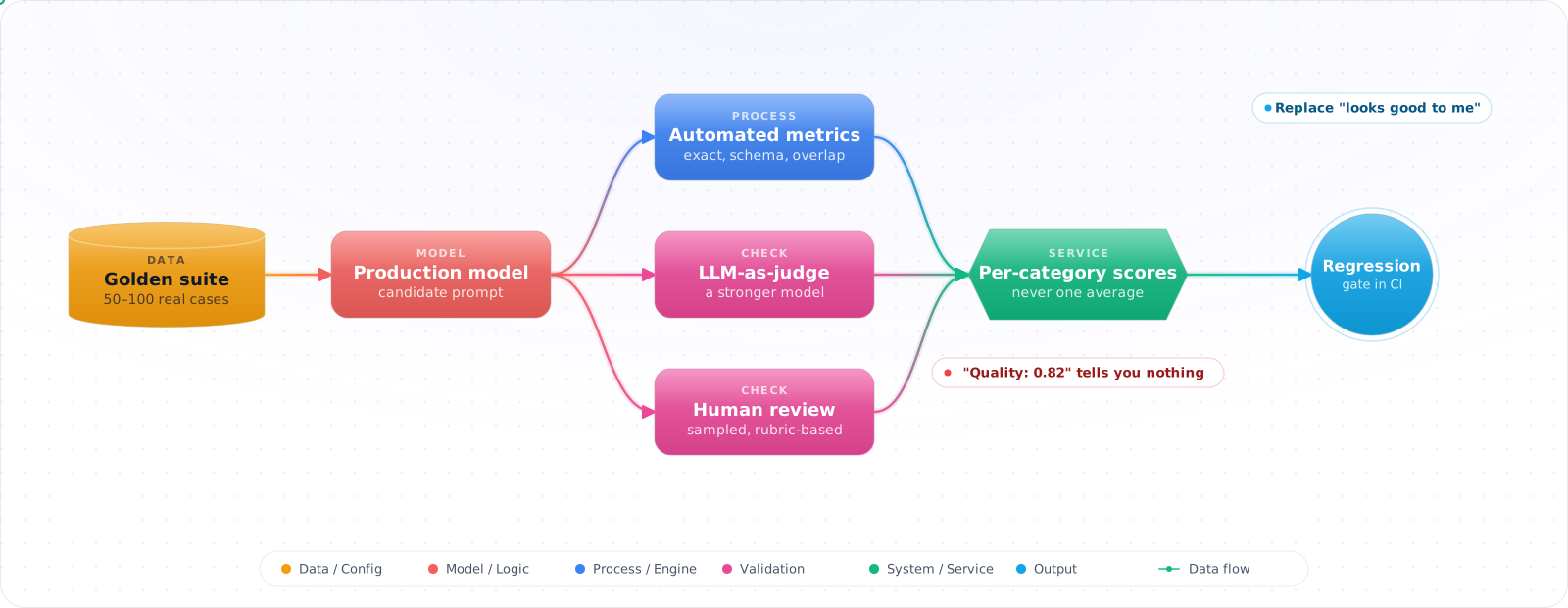
This is not carelessness. LLM output rarely has one right answer, so ordinary unit tests do not fit, and reading outputs feels like the only option. It is not the only option. A fixed set of real cases, scored by code where possible and by a calibrated model where not, turns "I think it is better" into a number you can put in a pull request. The rest of this page builds that, from choosing the cases to running it in CI.
- You updated a prompt and have no idea if it actually improved things or just felt better on the test cases you checked
- Your team can't agree on what "good" output looks like for your use case
- You want to catch regressions automatically but don't know what metrics to track
- Business stakeholders ask "how good is the AI?" and you don't have a number to give them
What You Are Actually Measuring
Good LLM evaluation operates at three levels: offline evaluation (before deployment), online metrics (during production), and human feedback loops (continuous calibration). Each level catches different problems.
      flowchart TD
          A["Define Quality\nDimensions"] --> B["Build Test Suite\n(golden dataset)"]
          B --> C["Automated Evaluation\n(metrics + LLM-as-judge)"]
          C --> D["Human Evaluation\n(calibration)"]
          D --> E["CI Integration\n(regression gate)"]
          E --> F["Production Monitoring\n(online metrics)"]
          F -->|"Feedback loop"| B

          style A fill:#4f46e5,color:#fff,stroke:#4338ca
          style C fill:#059669,color:#fff,stroke:#047857
          style E fill:#7c3aed,color:#fff,stroke:#6d28d9
          style F fill:#dc2626,color:#fff,stroke:#b91c1c
Quality Dimensions
Before measuring anything, define what you're measuring. Common dimensions for engineering tasks:
- Correctness: Is the output factually and technically accurate?
- Relevance: Does the output address what was asked?
- Completeness: Does it cover all required aspects?
- Format compliance: Does it follow the specified structure?
- Conciseness: Is it appropriately brief without losing substance?
- Safety: Does it avoid harmful, biased, or inappropriate content?
LLM-as-Judge
Use a more capable model (e.g., GPT-5.6 Sol) to evaluate outputs from your production model. Provide rubrics, reference answers, and scoring criteria. It's not perfect — judges have biases too — but it scales far better than human review and can track human judgment well on structured rubrics.
Building the Evaluation, Step by Step
Step 1: When you cannot tell if a change helped, build a fixed set of cases
Everything else depends on this set. Take the cases from real traffic, include the hard and the awkward ones, and keep the set fixed so that two runs can be compared.
public class EvalTestCase
{
    public required string Id { get; init; }
    public required string Category { get; init; }
    public required string Input { get; init; }
    public string? ReferenceOutput { get; init; }
    public required Dictionary<string, double> MinScores { get; init; }
}

// Example test cases
var testSuite = new List<EvalTestCase>
{
    new()
    {
        Id = "review-null-check",
        Category = "code-review",
        Input = "Review: if (user != null && user.Name != null) { ... }",
        ReferenceOutput = "Use pattern matching: `if (user is { Name: not null })`...",
        MinScores = new()
        {
            ["correctness"] = 0.8,
            ["actionability"] = 0.7,
            ["conciseness"] = 0.6
        }
    }
};
Check it: Run the current prompt against the set twice without changing anything. The two scores will differ a little. That difference is your noise, and an improvement smaller than it isn't one.
Step 2: When code cannot decide, use a model as judge
Check everything you can with code first, because code is free and never changes its mind. What's left, such as whether an answer is correct or helpful, goes to a judge model with a written rubric.
public class LlmJudge
{
    private readonly ChatClient _judgeClient; // GPT-5.6 Sol

    public async Task<Dictionary<string, double>> ScoreAsync(
        string input, string output, string? reference)
    {
        var prompt = $"""
            Score the following AI output on these dimensions (0.0-1.0):
            - correctness: Technical accuracy of the response
            - relevance: How well it addresses the input
            - completeness: Coverage of important aspects
            - conciseness: Brevity without losing substance

            INPUT: {input}
            AI OUTPUT: {output}
            {(reference != null ? $"REFERENCE: {reference}" : "")}

            Return JSON: {{"correctness": 0.0, "relevance": 0.0,
            "completeness": 0.0, "conciseness": 0.0}}
            """;

        var response = await _judgeClient.CompleteChatAsync(
            [new UserChatMessage(prompt)],
            new ChatCompletionOptions
            {
                ResponseFormat = ChatResponseFormat.CreateJsonObjectFormat(),
                Temperature = 0.1f
            });

        return JsonSerializer.Deserialize<Dictionary<string, double>>(
            response.Value.Content[0].Text)!;
    }
}
Check it: Have a person score thirty cases the judge has already scored, without seeing its scores. Count how often they agree. If agreement is poor, fix the rubric before you trust a single judge score.
Step 3: When regressions reach users, gate changes on the score
A test set that runs when someone remembers will miss the change that mattered. Run it on every prompt and model change, and stop the change if the score drops by more than the noise you measured.
public class EvalPipeline
{
    public async Task<EvalReport> RunAsync(
        IChatClient modelUnderTest,
        List<EvalTestCase> testSuite)
    {
        var results = new List<EvalResult>();

        foreach (var testCase in testSuite)
        {
            var output = (await modelUnderTest.GetResponseAsync(testCase.Input)).Text;
            var scores = await _judge.ScoreAsync(
                testCase.Input, output, testCase.ReferenceOutput);

            var passed = testCase.MinScores.All(
                req => scores.GetValueOrDefault(req.Key, 0) >= req.Value);

            results.Add(new EvalResult
            {
                TestCaseId = testCase.Id,
                Scores = scores,
                Passed = passed,
                Output = output
            });
        }

        return new EvalReport
        {
            TotalTests = results.Count,
            Passed = results.Count(r => r.Passed),
            Failed = results.Count(r => !r.Passed),
            AverageScores = AggregateScores(results),
            FailedTests = results.Where(r => !r.Passed).ToList()
        };
    }
}
Check it: Make the prompt worse on purpose, for example by deleting a key instruction, and open a change. The pipeline should fail it. If it passes, your tolerance is too wide, or your cases don't cover that instruction.
Step 4: When quality drifts after release, keep scoring live traffic
Passing before release doesn't cover what happens after it. Providers update models, and the questions users ask change. Scoring a sample of real traffic catches both.
public class ProductionMonitor
{
    public async Task RecordInteraction(
        string input, string output, string modelId)
    {
        // Sample 5% of interactions for async evaluation
        if (Random.Shared.NextDouble() > 0.05) return;

        var scores = await _judge.ScoreAsync(input, output, reference: null);

        _metrics.RecordGauge("llm.quality.correctness", scores["correctness"],
            new("model", modelId));
        _metrics.RecordGauge("llm.quality.relevance", scores["relevance"],
            new("model", modelId));

        // Alert on quality drops
        if (scores.Values.Average() < 0.6)
            _alerts.Trigger("llm-quality-below-threshold", new { modelId, scores });
    }
}
Check it: Compare last week's live score with the score on your fixed set. If the live score is much lower, your set no longer looks like real traffic, and it needs recent cases added.
Try It on Your Own System This Week
You can have a working evaluation by the end of the day. Three steps, about an hour in total:
- Save twenty real inputs from last week. Include the ones that went badly. That's a test set, and it already beats judging by eye.
- Write down what a good answer is. Two or three criteria, a sentence each. If two people on your team disagree about them, that disagreement is the first thing to fix.
- Run your last prompt change against the twenty. Compare old and new side by side on the same inputs. You'll learn more from that than from the original review.
How Evaluations Mislead You
1. Evaluating only on "happy path" inputs
Your test suite needs adversarial inputs, edge cases, and ambiguous queries — not just the clean examples that look good in demos. If every test case has an obvious correct answer, your evaluation won't catch the failures that matter.
2. Using a single aggregate score
"Quality: 0.82" tells you nothing about what's working and what's broken. Break quality into dimensions (correctness, relevance, format) and track them separately. A model can be highly correct but poorly formatted — that's a different fix than one that's well-formatted but wrong.
3. LLM-as-judge without calibration
Judge models have biases — they tend to prefer verbose outputs, give higher scores to outputs that resemble their own generation style, and struggle with domain-specific correctness. Calibrate by running the same test cases through human evaluation and comparing scores.
4. Running evaluations only at deploy time
Model behavior can change over time (provider-side updates, changes in data and traffic). Run evaluations continuously on a sample of production traffic, not just before deployment.
Evaluating What Agents Actually Do
The methods above assume one input and one output. Agents break that assumption, and InfoQ's 2026 trends report says 2026 has been dubbed the year of AI evaluations. As Daniel Dominguez put it on the panel, you have to evaluate the whole system.
So score at three levels. At the outcome level, did the task get done correctly? At the trajectory level, were the tools and steps reasonable, and did it stay in budget? At the component level, is each tool, retrieval step and prompt working on its own? The first tells you whether there is a problem, and the other two tell you where.
Non-determinism needs repetition
Agents vary between runs, so a single pass tells you little. Run each case several times and report a pass rate. "Passes 9 times out of 10" is real information, and "passed once" isn't. This costs more, so run the full set nightly and a small smoke set on every pull request.
Keep the environment fixed, too. If an agent calls live tools, your eval changes when the data changes. Record tool responses, or point tools at a seeded test environment, so that a score change means your agent changed rather than the world.
Know your baseline
Scores mean little without a reference. Record the current score before you change anything, and compare like with like. Include a simple baseline as well, such as the plain model with no retrieval, because you will sometimes find that a complex pipeline adds less than you thought.
Be careful with small sets. On 30 examples, a five-point move can easily be chance. Either use more examples, or use a paired test on the same examples to see whether the change is real. If you can't tell, treat it as no change.
- Define quality dimensions before measuring. Correctness, relevance, completeness, format, conciseness — decide which matter for your use case and weight them accordingly.
- Build a golden test suite of 50-100 cases. Include easy cases, hard cases, edge cases, and adversarial inputs. This is your evaluation infrastructure — invest in it.
- Use LLM-as-judge for scale, humans for calibration. The judge scales to thousands of evaluations per hour. Humans validate the judge is calibrated correctly. Both are necessary.
- Gate deployments on evaluation scores. No prompt or model change ships without passing the test suite. Treat it like a test suite — red means no deploy.
- Monitor quality in production continuously. Sample production traffic, evaluate asynchronously, alert on quality drops. Models and prompts drift — ongoing monitoring catches it.