Start With the Tests You Already Write
Most of an LLM feature is ordinary code: building the prompt, parsing the reply, handling errors and retries. Test that the way you test anything else, with the model replaced by a mock. Only what's left, the model's own behaviour, needs a different kind of test, and that's where the trouble described next begins.
You add an LLM feature, then write a test the way you always have: call the function, compare the output with an expected string. It fails on the second run, because the wording changed. So you loosen it, then loosen it again, until the test passes whatever the model says, and stops telling you anything.
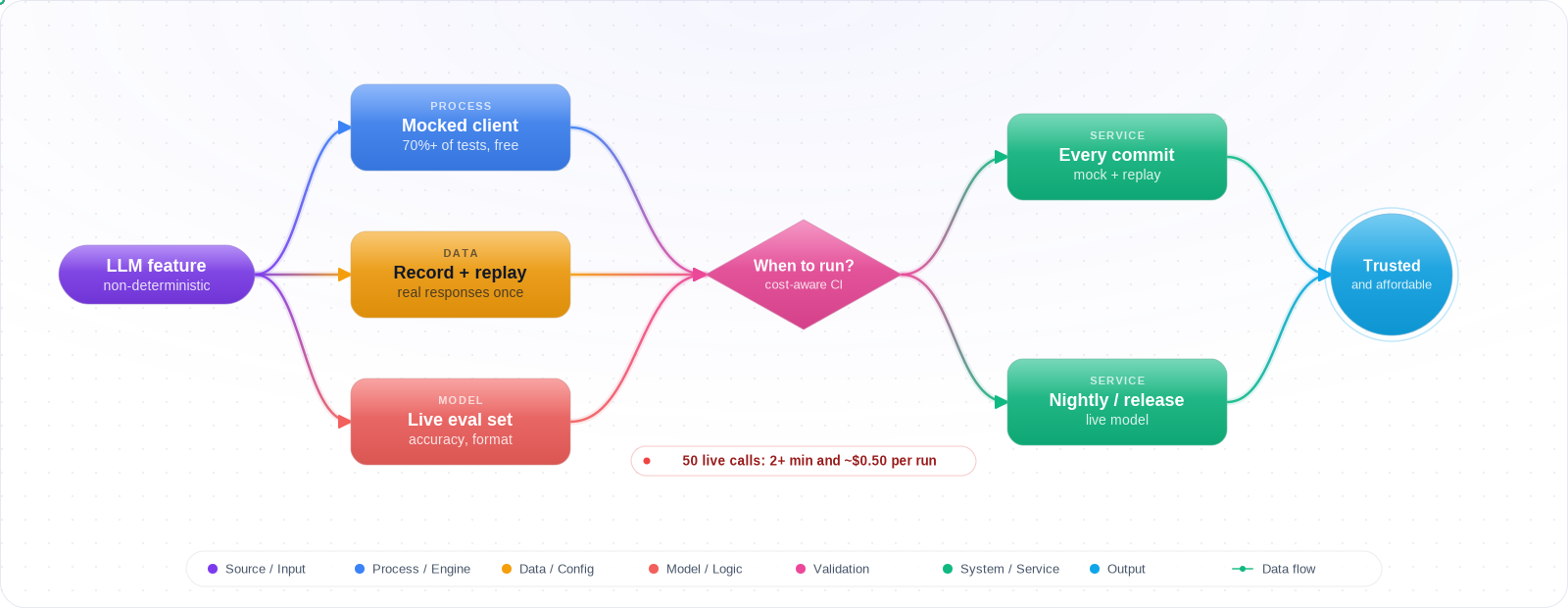
Testing LLM features needs layers. Most of the code around the model (prompt building, parsing, tool handling) can be tested deterministically with the model mocked. The model's behaviour needs evaluations on fixed cases, scored by code where possible and by a calibrated judge where not. Below is how to split the two so CI stays fast, cheap and worth trusting.
- Your CI costs tripled after adding LLM integration tests that call Azure OpenAI on every push
- Tests pass on Monday and fail on Friday with the same code — because the model responded differently
- You're mocking the entire LLM layer and have zero confidence your prompts actually work
- You need to test prompt changes but have no way to measure if the new version is better or worse
What to Test Deterministically, and What to Evaluate
LLM testing requires a layered approach. Each layer catches different types of defects at different costs:
      flowchart TD
          A["Unit Tests - Mocked LLM"] --> B["Snapshot Tests - Recorded Responses"]
          B --> C["Evaluation Tests - Live LLM + Metrics"]
          C --> D["Production Monitoring - Real Traffic"]

          A1["Fast, Free, Deterministic"] -.-> A
          B1["Fast, Cheap, Semi-Deterministic"] -.-> B
          C1["Slow, Costly, Realistic"] -.-> C
          D1["Continuous, Real-World Validation"] -.-> D

          style A fill:#059669,color:#fff,stroke:#047857
          style B fill:#4f46e5,color:#fff,stroke:#4338ca
          style C fill:#7c3aed,color:#fff,stroke:#6d28d9
          style D fill:#d97706,color:#fff,stroke:#b45309
Layer 1: Unit Tests with Mocked LLM
Mock the LLM client entirely. Test your application logic — prompt construction, response parsing, error handling, retry behavior — without calling a model. These run in milliseconds, cost nothing, and should cover most of your test cases.
Layer 2: Snapshot Tests with Recorded Responses
Record real LLM responses once, replay them in tests. This verifies your parsing and downstream logic against realistic outputs without calling the model repeatedly. Re-record snapshots when prompts change.
Layer 3: Evaluation Tests with Live LLM
Run a curated test set against the live model and measure quality metrics: accuracy, format compliance, relevance score. These run on schedule (nightly or pre-release), not on every commit.
Building the Test Layers
Unit tests: when exact-match tests turn flaky, mock the model
// Interface for testability
public interface IChatService
{
    Task<string> GetCompletionAsync(string systemPrompt, string userMessage);
}

// Unit test with mocked LLM
[Fact]
public async Task ClassifyProduct_ReturnsCategory_WhenValidJson()
{
    var mockChat = new Mock<IChatService>();
    mockChat.Setup(c => c.GetCompletionAsync(It.IsAny<string>(), It.IsAny<string>()))
        .ReturnsAsync("""{"category": "electronics", "confidence": 0.95}""");

    var classifier = new ProductClassifier(mockChat.Object);
    var result = await classifier.ClassifyAsync("iPhone 15 Pro Max");

    Assert.Equal("electronics", result.Category);
    Assert.True(result.Confidence > 0.9);
}

[Fact]
public async Task ClassifyProduct_HandlesInvalidJson_Gracefully()
{
    var mockChat = new Mock<IChatService>();
    mockChat.Setup(c => c.GetCompletionAsync(It.IsAny<string>(), It.IsAny<string>()))
        .ReturnsAsync("This is not JSON at all");

    var classifier = new ProductClassifier(mockChat.Object);
    var result = await classifier.ClassifyAsync("some product");

    Assert.Equal("unknown", result.Category);
    Assert.Equal(0.0, result.Confidence);
}
Key insight: Many LLM bugs are in your code, not in the model. Prompt construction, JSON parsing, null handling, timeout logic — these are all testable without a live model.
Check it: Feed the parser three bad replies: JSON wrapped in markdown, half a JSON object, and an empty string. Each should produce the error you designed, not an unhandled exception.
Snapshot tests: when mocks are too tidy, replay real responses
A mock returns what you imagined the model would say. A recording returns what it really said, once, and then costs nothing to replay.
// Record a snapshot (run once, commit the file). The trait keeps this live call
// out of the CI filter below. Check that test discovery excludes it before adding credentials.
[Fact]
[Trait("Category", "LlmEval")]
public async Task RecordSnapshot_Summarization()
{
    var client = CreateRealChatClient(); // live Azure OpenAI
    var response = await client.GetCompletionAsync(
        "Summarize this document in 3 bullet points.",
        documentText);

    File.WriteAllText("snapshots/summarize_doc1.json",
        JsonSerializer.Serialize(new { prompt = documentText, response }));
}

// Replay snapshot in CI
[Fact]
public async Task Summarization_ParsesCorrectly_FromSnapshot()
{
    var snapshot = JsonSerializer.Deserialize<Snapshot>(
        File.ReadAllText("snapshots/summarize_doc1.json"));

    var mockChat = new Mock<IChatService>();
    mockChat.Setup(c => c.GetCompletionAsync(It.IsAny<string>(), It.IsAny<string>()))
        .ReturnsAsync(snapshot.Response);

    var summarizer = new DocumentSummarizer(mockChat.Object);
    var result = await summarizer.SummarizeAsync(snapshot.Prompt);

    Assert.Equal(3, result.BulletPoints.Count);
    Assert.All(result.BulletPoints, bp => Assert.False(string.IsNullOrEmpty(bp)));
}
Check it: Look at the date your snapshots were recorded, and the model version. If either is older than your last model upgrade, the tests are passing against behaviour that no longer exists.
Evaluation tests: when you change a prompt, measure against the live model
Mocks and recordings test your code. Neither can tell you whether a new prompt is better, because they never ask the model.
// Evaluation harness — runs nightly, not per-commit
[Trait("Category", "LlmEval")]
public class LlmEvaluationTests
{
    private readonly record struct EvalCase(
        string Input, string ExpectedCategory, string[] MustContain);

    private static readonly EvalCase[] TestCases =
    [
        new("iPhone 15 Pro", "electronics", ["phone", "Apple"]),
        new("Nike Air Max 90", "clothing", ["shoe", "sneaker"]),
        new("Organic almonds 1lb", "food", ["nut", "snack"]),
    ];

    [Fact]
    public async Task Classification_MeetsAccuracyThreshold()
    {
        var client = CreateRealChatClient();
        var classifier = new ProductClassifier(client);
        int correct = 0;

        foreach (var tc in TestCases)
        {
            var result = await classifier.ClassifyAsync(tc.Input);
            if (result.Category == tc.ExpectedCategory) correct++;
        }

        // A handful of cases only proves the wiring works. For a real gate, use a larger
        // labelled set with edge cases, repeat the runs and report the uncertainty.
        double accuracy = (double)correct / TestCases.Length;
        Assert.True(accuracy >= 0.85,
            $"Accuracy {accuracy:P0} below 85% threshold");
    }
}
Check it: Run the evaluation on the current prompt before you change anything, and write the score down. A score after the change means nothing without it.
Cost-Aware CI Configuration
# GitHub Actions: separate LLM eval from regular CI
name: CI Pipeline

on: [push, pull_request]

jobs:
  unit-tests:
    runs-on: ubuntu-latest
    steps:
      - uses: actions/checkout@v7
      - run: dotnet test --filter "Category!=LlmEval"

  llm-evaluation:
    runs-on: ubuntu-latest
    if: github.ref == 'refs/heads/main' || contains(github.event.pull_request.labels.*.name, 'eval-needed')
    steps:
      - uses: actions/checkout@v7
      - run: dotnet test --filter "Category=LlmEval"
    env:
      AZURE_OPENAI_ENDPOINT: ${{ secrets.AZURE_OPENAI_ENDPOINT }}
Check it: Push a commit that touches no prompt and confirm that no live model call was made. Then add the label, or wait for the schedule, and confirm the evaluation runs.
Try It on Your Own System This Week
Three checks on a test suite that touches a model, about an hour in total:
- Count the live model calls in one CI run. Then multiply by the commits in a day. If the figure surprises you, most of those tests want a mock.
- Find a test that asserts on wording. Rewrite it to check a property: valid JSON, a required field, a phrase that must not appear.
- Run one evaluation five times. The spread between runs is your noise. A change smaller than that isn't an improvement.
Ways LLM Test Suites Lose Trust
1. Testing the model, not your code
Asserting that the LLM returns a specific sentence is testing OpenAI's model, not your application. Test your behavior: Does the parser handle the response? Does the retry logic work? Does the prompt include the right context?
2. Running live LLM tests on every commit
Say a test suite makes 50 Azure OpenAI calls, takes over two minutes and costs about $0.50 per run. At 20 commits a day, that's $10 a day per developer. Use mocks for CI and run live evaluation tests on schedule or label-triggered.
3. No baseline for evaluation
If you change a prompt, how do you know if it's better or worse? Without a baseline eval score before the change, you're guessing. Always run evals before and after prompt changes, and track scores over time.
4. Snapshot rot
Snapshots recorded 6 months ago may not reflect current model behavior. When tests pass against stale snapshots but fail in production, the snapshots are lying. Re-record snapshots quarterly or after model version changes.
5. Ignoring edge cases in mock responses
Mocked responses are always well-formatted. Real models return markdown in JSON, extra whitespace, partial JSON, or empty responses under load. Include adversarial mock responses in your test suite to catch parsing failures.
Testing in the Age of Reasoning Models
Your test strategy has to account for models that don't accept temperature: 0 and whose behaviour changes on upgrade. Exact-match assertions on prose were always fragile, and more so on reasoning models, although closed-form answers such as labels and IDs can still match exactly. For the rest, test properties: is it valid JSON, does it mention the required facts, does it avoid forbidden content, did it call the right tool?
Keep your suite in three layers by cost. The first runs on every commit with no model at all, covering prompt assembly, parsing, schema validation and tool logic, using recorded responses. The second is a small smoke set of 20 to 50 cases against the real model on pull requests that touch prompts or models. The third is the full eval set, run nightly and before any model change, on the batch API at half price.
Budget tests like any other infrastructure. Cache model responses by a hash of the full request, so that an unchanged prompt doesn't cost anything to re-test. Set a spending limit on your CI key, since a bug in a test loop can be expensive.
Agents need trajectory tests
For agents, assert on what they did, as well as what they said. Check that the right tools were called, that nothing destructive happened, and that it finished within a set number of turns. Run with tools stubbed for determinism, and repeat cases several times, reporting a pass rate. If a case passes 7 times in 10, that's useful information, and you should treat it as a failure to investigate.
Add adversarial cases to the same suite, so that every model upgrade re-runs your prompt injection tests automatically.
- Mock the LLM for most tests. Test your code's behavior, not the model's intelligence. Unit tests should never call a live model.
- Use snapshot tests for integration coverage. Record real responses once, replay in CI for deterministic tests against realistic data.
- Run evaluation tests on schedule, not per-commit. Nightly or pre-release evals catch quality regressions without burning your budget.
- Track eval metrics over time. Accuracy, format compliance, latency — treat them like performance benchmarks with alerting on regression.
- Separate LLM test costs in CI. Use labels or branch rules to gate expensive evaluation runs. Your token budget is a test resource like compute.