

It Compiles. It Crashes at Runtime.
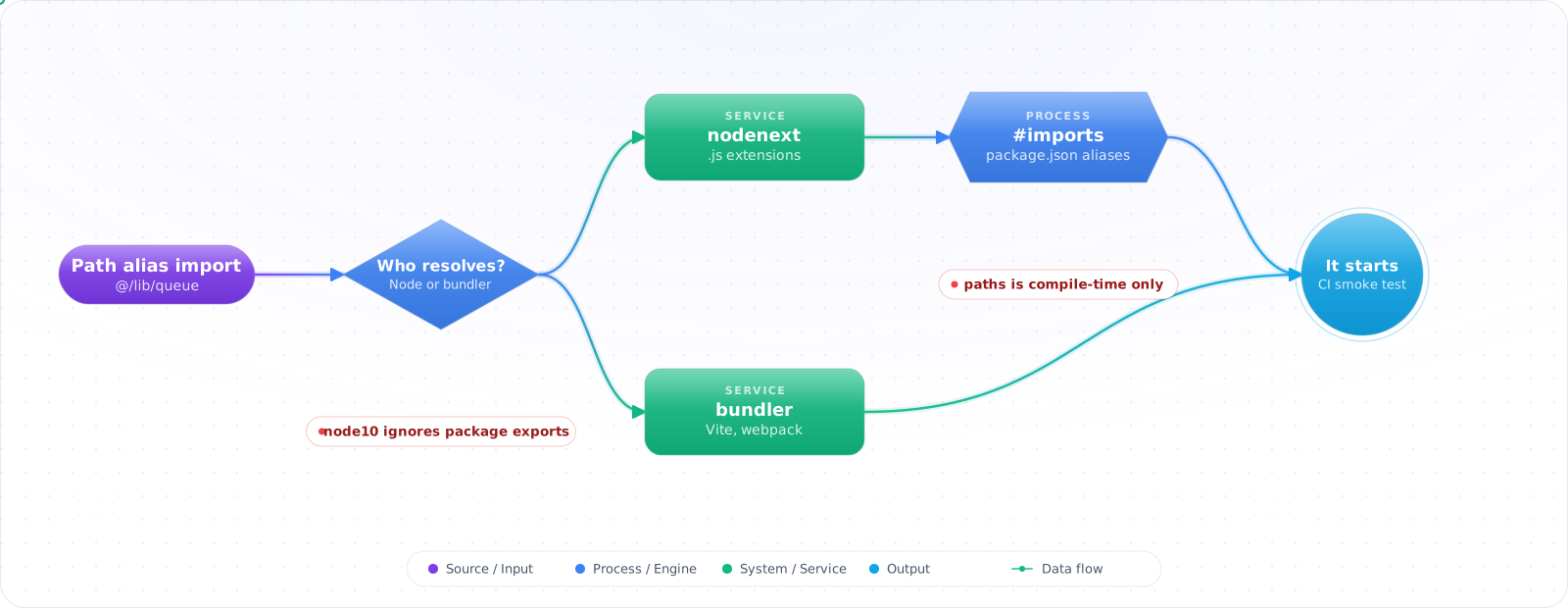
A Node worker compiled cleanly with tsc and crashed on startup with “Cannot find module @/lib/queue”. TypeScript understood the path alias. Node did not, because tscdoes not rewrite aliases in its output. In the same release, an ESM-only dependency's types could not be found under the old resolution mode.
Module resolution is how TypeScript finds the file behind an import, and it has to agree with whatever resolves imports at runtime. Below are the strategies that still matter, why node10 breaks on modern packages, bundler mode, nodenext for code Node runs directly, and why paths and baseUrl are compile-time only.
- Your editor resolves an import fine but
nodethrowsERR_MODULE_NOT_FOUNDon the same line - You installed a package with a
package.json"exports" field and TypeScript can't find its types - Someone on the team asks "should this be
nodenextorbundler" and nobody's sure - A
@/path alias works in the dev server but breaks the moment you run the compiled output directly
moduleResolution exists to make TypeScript's idea of "where does this import point" match whatever will actually execute the code — Node, or a bundler pretending to be Node. When the two drift, the compiler stops being useful for the one thing you need it to catch.
Four Strategies, Two That Still Matter
classic predates Node module resolution entirely and only shows up now behind module: amd or system — if you're not building for one of those, ignore it. node (also called node10) modeled Node's CommonJS algorithm circa Node 10, back before package.json"exports" maps existed. TypeScript 6.0 deprecated it outright, with a straight line in the release notes: migrate to nodenextif you're targeting Node directly, or bundler if a bundler is doing the resolving. Those two are the real decision.
flowchart TD
    Imp["import { x } from 'pkg'"] --> M{"moduleResolution"}
    M -->|"node / node10 (deprecated in TS 6.0)"| N1["Pre-2020 CJS algorithm —<br/>ignores package.json exports"]
    M -->|"node16 / nodenext"| N2["Real Node ESM+CJS rules —<br/>requires explicit file extensions"]
    M -->|"bundler"| N3["Hybrid — respects exports,<br/>allows extensionless imports"]
    N1 --> R1["Wrong file, or types<br/>missing entirely"]
    N2 --> R2["Matches what 'node' does<br/>at runtime"]
    N3 --> R3["Matches what Vite/esbuild/webpack<br/>do at build time"]

    style N1 fill:#dc2626,color:#fff,stroke:#b91c1c
    style N2 fill:#16a34a,color:#fff,stroke:#15803d
    style N3 fill:#0078D4,color:#fff,stroke:#005a9e
Why node10 Breaks on Modern ESM Packages
A package published today typically looks like this — no top-level main, everything routed through exports:
{
  "name": "modern-lib",
  "type": "module",
  "exports": {
    ".": {
      "types": "./dist/index.d.ts",
      "import": "./dist/index.mjs",
      "require": "./dist/index.cjs"
    }
  }
}node10's algorithm has no concept of exports — it was frozen before that field existed. It falls back to guessing at an index.jsin the package root, doesn't find one, and either errors or, worse, silently resolves to a different file than Node will actually load. The types and the runtime disagree, and TypeScript has no way to tell you that.
bundler Mode
Introduced in TypeScript 5.0 specifically because node16/nodenextenforce rules real bundlers don't care about — extensionless relative imports, for one, which Vite, esbuild, and webpack all handle fine but Node's own resolver rejects. bundler respects exportsconditions while staying loose about extensions, which is exactly the hybrid behaviour those tools actually implement. If you're shipping an application through one of them, this is the default you want, not node16.
// App built with Vite / esbuild / webpack
{ "compilerOptions": { "module": "ESNext", "moduleResolution": "bundler" } }

// A package that runs directly under Node, no bundler involved
{ "compilerOptions": { "module": "nodenext", "moduleResolution": "nodenext" } }
node16 / nodenext for Real Node Authoring
If you're publishing a package that Node itself will load with no bundling step, nodenextis the one that keeps you honest. It requires relative imports to carry an explicit extension — and it's the output extension, .js, even though the file you're importing is .ts.
import { formatDate } from './utils.js'; // ✅ required — resolves to utils.ts at compile time
import { formatDate } from './utils';    // ❌ Error: relative import paths need explicit file extensions

// .mts / .cts force a file's module format regardless of the nearest package.json "type"
// date-utils.mts always compiles to date-utils.mjs (ESM)
// legacy-shim.cts always compiles to legacy-shim.cjs (CommonJS)
paths and baseUrl Are Compile-Time Only
This is the one that surprises people who've only ever run code through a dev server. tsc checks a @/ alias fine and then emits the import completely unchanged. It doesn't rewrite anything — resolving aliases was never tsc's job, it was always the bundler's or the loader's.
// tsconfig.json (TypeScript 6.0 deprecates baseUrl: put the prefix in paths instead)
{ "compilerOptions": { "paths": { "@/*": ["./src/*"] } } }

// src/api/orders.ts
import { db } from '@/lib/db'; // typechecks, autocompletes, looks completely normal

// dist/api/orders.js — tsc emitted this literally, alias and all
import { db } from '@/lib/db';

// $ node dist/api/orders.js
// Error: Cannot find module '@/lib/db'
A bundler papers over this because it reads the same paths config (often through a plugin) and rewrites the alias into a real relative path as part of the build. Running raw tsc output through plain Node gets none of that. The fix is one of: let the bundler own resolution end to end, run something like tsc-aliasas a post-build rewrite step, or skip the alias for anything that ships as plain Node output and use Node's own package.json "imports" field — "#lib/db"— which Node resolves natively, because it isn't a TypeScript convention at all.
While you are in that config, drop baseUrl. TypeScript 6.0 deprecates it, partly for this reason: besides prefixing yourpaths entries, it made the folder a lookup root, so a bare import such as someModule could quietly resolve tosrc/someModule.ts and type-check even though no runtime would ever find it. Write the prefix into each pathsentry ("./src/*") and the behaviour is the same, minus the surprise.
Debugging a Resolution Failure
When an import fails, guessing at tsconfig settings wastes an afternoon. Ask the compiler what it did:
# every lookup TypeScript tried, in order, for every import
npx tsc --noEmit --traceResolution > resolution.log
grep -n "some-package" resolution.log | head -40

# why each file is part of the program at all
npx tsc --noEmit --explainFiles | grep -n "some-package"

# check a published package's types against every resolution mode
npx @arethetypeswrong/cli --pack .
The trace shows which package.json was read, whether the exports field matched, and which condition was picked. Three causes cover most failures. The package has an exports map but no types condition, so TypeScript finds the JavaScript and not the declarations. The import uses a subpath (pkg/utils) that exports does not list, and exports blocks every path it does not list. Or the project is still on node10, which ignoresexports entirely. The last command, from the Are the Types Wrong project, runs those checks against a package before you publish it, which is the cheapest place to catch them.
Publishing a Package That Works Everywhere
If you maintain a library, your package.json decides whether consumers ever see these errors. For new packages I publish ESM only, with a types condition listed first in each export:
{
  "name": "@acme/dates",
  "type": "module",
  "exports": {
    ".": { "types": "./dist/index.d.ts", "default": "./dist/index.js" },
    "./format": { "types": "./dist/format.d.ts", "default": "./dist/format.js" }
  },
  "files": ["dist"]
}
Dual CommonJS and ESM builds used to be necessary, and they come with a real cost: two copies of the code, the risk that one consumer loads both, and type declarations that have to match each format. Current Node LTS releases can require() an ES module, so for most new libraries the second build is no longer worth it. Keep it only if you must support older runtimes your consumers still run.
Importing .ts Files Directly
Current Node versions can run TypeScript files by stripping the types, with no build step. That brings back an old question: what extension goes in the import? With rewriteRelativeImportExtensions (TypeScript 5.7 and later), you write the extension that exists on disk, ./utils.ts, and when tsc does emit JavaScript it rewrites relative .ts imports to.js. One source tree then works both under Node directly and as compiled output. The rewrite only applies to relative paths; aliases and package imports are left alone, for the same reason pathsis: resolving them is not the compiler’s job.
Key Takeaways
- node10 predates package.json exports maps entirely — that's the whole reason TypeScript 6.0 deprecated it, not a stylistic preference.
- bundler mode is the right default for app code going through Vite, esbuild, or webpack; nodenext is for packages that run directly under Node with nothing in between.
- paths and baseUrl are a type-checking convenience only — tsc never touches emitted import paths, so something else has to resolve them at runtime.
- When an import typechecks but fails at runtime, the mismatch is almost always here: what tsc assumed will resolve the module versus what actually will.