
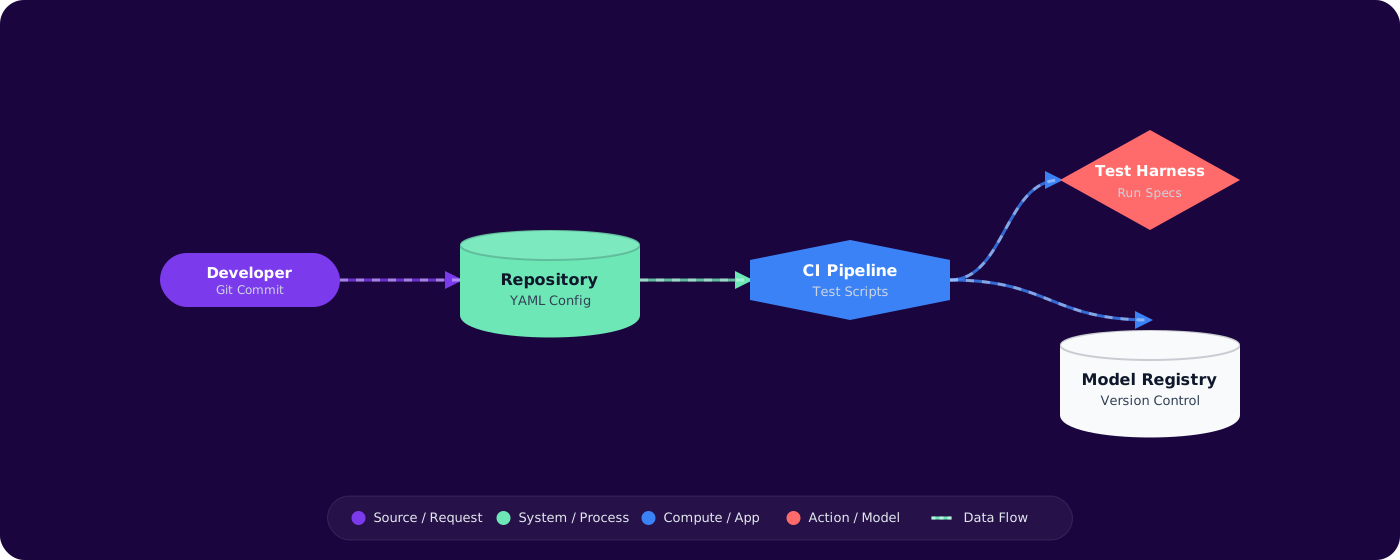
Problem Context
Your team ships a new prompt to production. Something breaks. Nobody knows which version of the prompt was running yesterday. There are no tests, no rollback mechanism, and the prompt lives in a string constant somewhere in the codebase.
Prompt engineering is often treated as an art — tweak it until it works, then move on. But prompts are code. They have inputs, outputs, expected behaviors, edge cases, and regressions. When your application's core behavior depends on a prompt, you need the same engineering discipline you apply to any other critical component.
- You've got prompts scattered across code files, config files, and someone's Notion page
- A "small prompt tweak" broke something in production and you spent hours figuring out what changed
- You want to A/B test prompts but there's no infrastructure for it
- Your team argues about prompt quality based on gut feeling rather than measured evaluation
This article shows you how to treat prompts as first-class engineering artifacts with version control, testing, and CI.
Concept Explanation
The core idea is simple: prompts are configuration with behavior. Like database migrations or feature flags, they need versioning, validation, and controlled rollout. The trick is building the right infrastructure without over-engineering.
      flowchart LR
          A["Prompt Template\n(version controlled)"] --> B["Parameterization\n(variables + context)"]
          B --> C["Evaluation Suite\n(test cases)"]
          C --> D["CI Pipeline\n(automated checks)"]
          D --> E["Deployment\n(feature flag / canary)"]
          E --> F["Monitoring\n(quality + cost)"]

          style A fill:#4f46e5,color:#fff,stroke:#4338ca
          style C fill:#059669,color:#fff,stroke:#047857
          style D fill:#7c3aed,color:#fff,stroke:#6d28d9
          style F fill:#dc2626,color:#fff,stroke:#b91c1c
Prompt as Template
Separate the prompt structure from runtime data. A prompt template has placeholders for variables, clearly defined sections (system instruction, examples, user input), and metadata (version, author, intended model).
Evaluation-Driven Development
Before changing a prompt, define what "good" looks like. Write test cases with expected outputs (or properties of good outputs). Run the new prompt against the test suite. Only ship if quality is maintained or improved.
Implementation
Step 1: Structured Prompt Templates
# prompts/summarize-article/v3.yaml
      metadata:
        name: summarize-article
        version: 3
        model: gpt-4o
        author: team-content
        max_tokens: 500
        temperature: 0.3

      system: |
        You are a technical content summarizer.
        Rules:
        - Output exactly 3 bullet points
        - Each bullet must be one sentence
        - Focus on actionable insights, not descriptions
        - Never start a bullet with "This article"

      user: |
        Summarize the following article for a software engineering audience:

        Title: {{title}}
        Content: {{content}}
Step 2: Prompt Loading with Versioning
public class PromptRegistry
      {
          private readonly string _promptsDir;

          public PromptRegistry(string promptsDir) => _promptsDir = promptsDir;

          public PromptTemplate Load(string name, int? version = null)
          {
              var dir = Path.Combine(_promptsDir, name);
              var files = Directory.GetFiles(dir, "v*.yaml")
                  .OrderByDescending(f => ExtractVersion(f))
                  .ToList();

              var file = version.HasValue
                  ? files.First(f => ExtractVersion(f) == version.Value)
                  : files.First(); // Latest version

              var yaml = File.ReadAllText(file);
              return PromptTemplate.Parse(yaml);
          }

          public string Render(PromptTemplate template, Dictionary<string, string> variables)
          {
              var result = template.UserTemplate;
              foreach (var (key, value) in variables)
                  result = result.Replace($"{{{{{key}}}}}", value);

              return result;
          }
      }
Step 3: Evaluation Test Suite
[TestClass]
      public class SummarizePromptTests
      {
          private readonly PromptEvaluator _evaluator;

          [TestMethod]
          public async Task SummarizeProduces_ExactlyThreeBullets()
          {
              var template = _registry.Load("summarize-article");
              var testCases = LoadTestCases("summarize-article");

              foreach (var testCase in testCases)
              {
                  var output = await _evaluator.RunAsync(template, testCase.Variables);
                  var bullets = output.Split('\n')
                      .Where(l => l.TrimStart().StartsWith("-") || l.TrimStart().StartsWith("•"))
                      .ToList();

                  Assert.AreEqual(3, bullets.Count,
                      $"Expected 3 bullets, got {bullets.Count} for test case '{testCase.Name}'");
              }
          }

          [TestMethod]
          public async Task SummarizeNeverStartsWithThisArticle()
          {
              var template = _registry.Load("summarize-article");
              var testCases = LoadTestCases("summarize-article");

              foreach (var testCase in testCases)
              {
                  var output = await _evaluator.RunAsync(template, testCase.Variables);
                  Assert.IsFalse(
                      output.Contains("This article", StringComparison.OrdinalIgnoreCase),
                      $"Output contains 'This article' for test case '{testCase.Name}'");
              }
          }
      }
Step 4: CI Pipeline for Prompts
# .github/workflows/prompt-ci.yml
      name: Prompt Evaluation
      on:
        pull_request:
          paths: ['prompts/**']

      jobs:
        evaluate:
          runs-on: ubuntu-latest
          steps:
            - uses: actions/checkout@v4

            - name: Detect changed prompts
              id: changes
              run: |
                changed=$(git diff --name-only origin/main -- prompts/ | \
                  sed 's|prompts/\([^/]*\)/.*|\1|' | sort -u)
                echo "prompts=$changed" >> "$GITHUB_OUTPUT"

            - name: Run evaluations
              env:
                AZURE_OPENAI_ENDPOINT: ${{ secrets.AZURE_OPENAI_ENDPOINT }}
              run: |
                for prompt in ${{ steps.changes.outputs.prompts }}; do
                  dotnet test --filter "PromptName=$prompt" \
                    --logger "trx;LogFileName=$prompt-results.trx"
                done

            - name: Comment results on PR
              uses: actions/github-script@v7
              with:
                script: |
                  // Parse .trx files and post summary as PR comment
Step 5: A/B Testing with Feature Flags
public class PromptRouter
      {
          private readonly IFeatureFlagService _flags;
          private readonly PromptRegistry _registry;

          public PromptTemplate GetPrompt(string name, string userId)
          {
              var activeVersion = _flags.GetVariant($"prompt-{name}", userId);
              var version = int.Parse(activeVersion);
              return _registry.Load(name, version);
          }
      }
Pitfalls
1. Testing exact string matches
LLM outputs are non-deterministic. Even at temperature 0, outputs can vary across API calls. Test for properties (bullet count, no forbidden words, JSON validity) rather than exact strings. Use semantic similarity for content validation.
2. One giant prompt file
Stuffing system instructions, examples, context, and user input into one template makes it impossible to test sections independently. Decompose into composable parts: a system template, an examples file, and context injection logic.
3. No baseline measurements
You can't know if a prompt change is an improvement without measuring the current version. Before touching any prompt, run the existing version against your test suite and record the baseline. Then compare.
4. Over-engineering the infrastructure
You don't need a prompt management platform on day one. Start with YAML files in your repo, a simple test suite, and CI that runs evaluations on changed prompts. Scale the infrastructure as the prompt count grows.
Practical Takeaways
- Store prompts in version-controlled template files. YAML or Markdown with metadata. Never in string constants buried in application code.
- Test prompt properties, not exact outputs. Validate structure, constraints, and absence of forbidden patterns. Use semantic similarity for content correctness.
- Run evaluations in CI on prompt changes. Treat prompt PRs like code PRs — they need automated quality checks before merging.
- Measure before you change. Establish baselines for every prompt. You can't improve what you don't measure.
- Start simple. YAML files in the repo, property-based tests, CI that evaluates changed prompts. You can add feature flags and A/B testing later.