
Problem Context
You've accumulated years of technical knowledge — notes from conferences, bookmarked articles, highlighted PDFs, internal design docs, personal wikis, and thousands of Slack threads. When you need to find something, you vaguely remember you read about it somewhere, but searching across all those sources is painful or impossible.
A personal AI knowledge base solves this: ingest your content, embed it, and query it conversationally. "What was that caching strategy from the talk at NDC last year?" becomes a question you can actually answer — with references to your own notes.
- You have notes in Notion, Obsidian, OneNote, and plain text files — and can never find anything
- You bookmarked dozens of architecture articles but can't remember which one had the pattern you need
- You want to ask questions about your own documents, not just the internet
- You've been meaning to organize your knowledge for years but never have the time
This article builds a personal RAG system step-by-step — from ingesting your content to querying it conversationally.
Concept Explanation
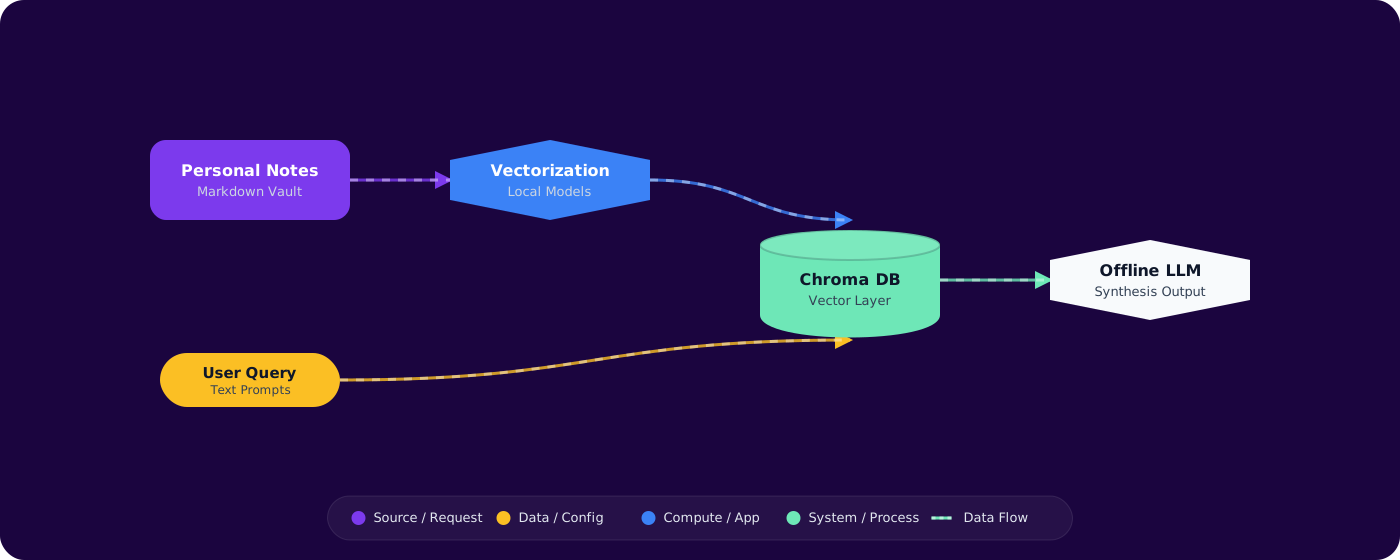
A personal knowledge base is a RAG (Retrieval-Augmented Generation) system scoped to your own content. The architecture is simple: ingest documents → chunk them → embed chunks → store in a vector database → query with natural language → generate answers with citations.
      flowchart TD
          S["Sources\n(Notes, PDFs, Bookmarks)"] --> I["Ingestion\n(parse + chunk)"]
          I --> E["Embedding\n(text → vectors)"]
          E --> V["Vector Store\n(Azure AI Search / FAISS)"]

          Q["Your Question"] --> QE["Query Embedding"]
          QE --> V
          V -->|"Top-K chunks"| LLM["LLM\n(generate answer)"]
          LLM --> A["Answer + Citations"]

          style S fill:#4f46e5,color:#fff,stroke:#4338ca
          style V fill:#059669,color:#fff,stroke:#047857
          style LLM fill:#7c3aed,color:#fff,stroke:#6d28d9
Key Design Decisions
Chunking strategy: How you split documents determines retrieval quality. Too large (whole documents) means the embedding captures too many topics. Too small (individual sentences) loses context. The sweet spot for technical content: 300-500 tokens per chunk with 50-token overlap.
Embedding model: For personal use, Azure OpenAI's text-embedding-3-small offers the best quality-per-dollar. For fully local operation, nomic-embed-text via Ollama provides good quality with zero API costs.
Vector store: For a personal system, you don't need a distributed database. A local FAISS index or SQLite with vector extension works perfectly for up to 100K chunks. Azure AI Search for cloud-hosted with richer querying.
Implementation
Step 1: Content Ingestion Pipeline
public class ContentIngester
      {
          public async IAsyncEnumerable<DocumentChunk> IngestDirectory(string path)
          {
              var files = Directory.GetFiles(path, "*.*", SearchOption.AllDirectories)
                  .Where(f => SupportedExtensions.Contains(Path.GetExtension(f)));

              foreach (var file in files)
              {
                  var content = Path.GetExtension(file) switch
                  {
                      ".md" => await File.ReadAllTextAsync(file),
                      ".txt" => await File.ReadAllTextAsync(file),
                      ".html" => HtmlToText(await File.ReadAllTextAsync(file)),
                      ".pdf" => await ExtractPdfText(file),
                      _ => null
                  };

                  if (string.IsNullOrWhiteSpace(content)) continue;

                  var chunks = _chunker.Chunk(content, maxTokens: 400, overlap: 50);
                  foreach (var chunk in chunks)
                  {
                      yield return new DocumentChunk
                      {
                          Source = file,
                          Content = chunk,
                          Title = Path.GetFileNameWithoutExtension(file),
                          CreatedAt = File.GetCreationTime(file)
                      };
                  }
              }
          }
      }
Step 2: Embedding and Indexing
public class KnowledgeIndexer
      {
          private readonly EmbeddingClient _embeddingClient;
          private readonly IVectorStore _store;

          public async Task IndexChunks(IAsyncEnumerable<DocumentChunk> chunks)
          {
              var batch = new List<DocumentChunk>();

              await foreach (var chunk in chunks)
              {
                  batch.Add(chunk);
                  if (batch.Count >= 50)
                  {
                      await EmbedAndStoreBatch(batch);
                      batch.Clear();
                  }
              }

              if (batch.Count > 0)
                  await EmbedAndStoreBatch(batch);
          }

          private async Task EmbedAndStoreBatch(List<DocumentChunk> batch)
          {
              var texts = batch.Select(c => c.Content).ToList();
              var embeddings = await _embeddingClient.GenerateEmbeddingsAsync(texts);

              for (int i = 0; i < batch.Count; i++)
              {
                  batch[i].Embedding = embeddings.Value[i].ToFloats().ToArray();
              }

              await _store.UpsertAsync(batch);
          }
      }
Step 3: Conversational Query Interface
public class KnowledgeAssistant
      {
          public async Task<AnswerWithSources> AskAsync(string question)
          {
              // Embed the question
              var queryEmbedding = await _embeddingClient.GenerateEmbeddingAsync(question);

              // Retrieve relevant chunks
              var results = await _store.SearchAsync(
                  queryEmbedding.Value.ToFloats().ToArray(),
                  topK: 5);

              // Build context from retrieved chunks
              var context = string.Join("\n\n---\n\n",
                  results.Select(r => $"[Source: {r.Source}]\n{r.Content}"));

              // Generate answer with citations
              var messages = new List<ChatMessage>
              {
                  new SystemChatMessage("""
                      Answer the question using ONLY the provided context.
                      Cite sources in [brackets] when referencing specific information.
                      If the context doesn't contain the answer, say so.
                      """),
                  new UserChatMessage($"Context:\n{context}\n\nQuestion: {question}")
              };

              var response = await _chatClient.CompleteChatAsync(messages);

              return new AnswerWithSources
              {
                  Answer = response.Value.Content[0].Text,
                  Sources = results.Select(r => r.Source).Distinct().ToList()
              };
          }
      }
Step 4: Incremental Updates
public class IncrementalSync
      {
          public async Task SyncChanges(string watchDir)
          {
              var lastSync = await _store.GetLastSyncTime();
              var changed = Directory.GetFiles(watchDir, "*.*", SearchOption.AllDirectories)
                  .Where(f => File.GetLastWriteTime(f) > lastSync)
                  .Where(f => SupportedExtensions.Contains(Path.GetExtension(f)));

              foreach (var file in changed)
              {
                  // Remove old chunks for this file
                  await _store.DeleteBySourceAsync(file);

                  // Re-ingest
                  await foreach (var chunk in _ingester.IngestFile(file))
                  {
                      var embedding = await _embeddingClient.GenerateEmbeddingAsync(chunk.Content);
                      chunk.Embedding = embedding.Value.ToFloats().ToArray();
                      await _store.UpsertAsync(chunk);
                  }
              }

              await _store.SetLastSyncTime(DateTimeOffset.UtcNow);
          }
      }
Pitfalls
1. Chunking too aggressively
Single-sentence chunks lose context. The embedding captures the sentence but not enough surrounding meaning for useful retrieval. Chunk at paragraph or section boundaries with overlap, aiming for 300-500 tokens per chunk.
2. Not preserving metadata
Knowing where information came from is as important as finding it. Store source file path, section title, creation date, and any tags. Citations without sources aren't useful for knowledge work.
3. Embedding everything at once
Initial bulk embedding of 10K documents takes time and money. Start with your most valuable content (recent notes, key docs) and add incrementally. You'll also want to iterate on chunking strategy — doing it on your whole corpus first is wasteful.
4. No deduplication
If you export notes from multiple sources, duplicates are common. Similar chunks create noisy search results where the top 5 results are all the same content from different sources. Deduplicate during ingestion using content hashing.
Practical Takeaways
- Start small with your most used content. Index your last 3 months of notes, not your entire digital history. Iterate on quality before scaling quantity.
- Chunk at semantic boundaries. Headings, paragraphs, and sections make natural chunk boundaries. Fixed-size chunks that split mid-sentence produce poor embeddings.
- Preserve rich metadata. Source, date, title, tags — all searchable, all useful for filtering results and providing citations.
- Build incremental sync from day one. Your knowledge base is only useful if it stays current. File watchers or scheduled syncs keep it fresh without manual re-indexing.
- Local-first is viable. Ollama + FAISS gives you a fully private, zero-cost knowledge base for personal use. Move to cloud services only if you need multi-device access or larger scale.