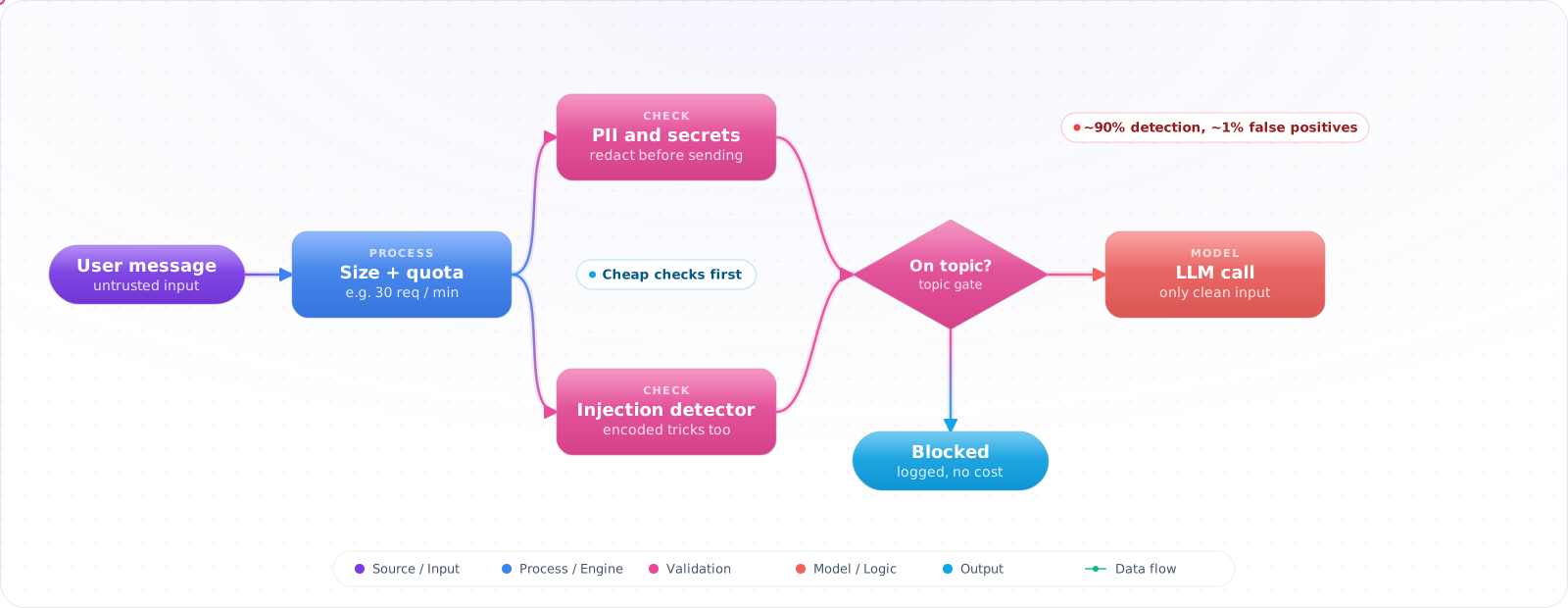
Start by Sending the Input Straight In
For a prototype used by people you trust, sending input straight to the model is fine. You learn what people ask, and nothing is at risk. The checks below belong in front of the model from the day strangers can type into it, because by then every input costs money and lands in your logs.
Input validation for an LLM application is not the same problem as input validation for a REST API. The threats are different — prompt injection, jailbreaks, PII leakage upstream, off-topic abuse — and the defences must run before a single token reaches your model. Skipping input validation is an easy way for a "safe" LLM app to end up in public screenshots.
- Your only input validation is "is it a string and < 8 KB"
- You can't tell jailbreak attempts apart from genuinely tricky questions
- You discovered an internal customer pasted credentials into the chat
The Five Things to Check Before Calling the LLM
- Length / token cap — bound the input so a single user can't blow your context window or your bill.
- PII / secrets detection — refuse or redact credit cards, SSNs, API keys, JWTs before they reach a third-party model.
- Prompt-injection / jailbreak detection — a classifier that recognises the "ignore previous instructions" family.
- Topic / policy gate — is this request even something your product is supposed to answer?
- Rate / quota check — per-user and per-tenant. Cheap, catches abuse early.
flowchart LR
    R[Request] --> L[Length/token cap]
    L --> S[Secret/PII scan]
    S --> J[Injection classifier]
    J --> T[Topic gate]
    T --> Q[Rate limit / quota]
    Q --> LLM[LLM call]
    L -. fail .-> X[Typed 4xx + audit]
    S -. fail .-> X
    J -. fail .-> X
    T -. fail .-> X
    Q -. fail .-> X
Cheap Before Expensive
Order matters. Each step should be cheaper than the next:
- Length check — bytes/regex (microseconds).
- Secret detector — regex over high-signal patterns (Stripe key, AWS key, JWT, IBAN).
- Lightweight injection classifier — local model or managed (Azure Content Safety, Lakera, Protect AI) — milliseconds.
- Optional LLM-as-judge for ambiguous cases.
Check it: Log which layer stopped each rejected request for a day. Most should stop at the cheapest layers. If the classifier is doing most of the rejecting, something cheaper is missing in front of it.
PII / Secret Detection
Use a layered detector: regex for high-confidence patterns (credit card with Luhn, AWS access key prefix, GitHub PAT) plus a Presidio/AWS Comprehend / Azure AI Language NER pass for names, emails, phone numbers, addresses. Two policies are useful:
- Redact-then-call — replace with placeholders (
[EMAIL]) before sending to the LLM, optionally re-insert in the response. - Block-and-warn — for secrets (API keys, credentials), refuse outright and surface a clear message.
Check it: Paste a fake API key and a fake card number into the chat. The key should be refused with a clear message. Then search your logs and traces for both. Neither should be there.
Prompt Injection Detection
Modern injection classifiers operate on the request and on any retrieved context (RAG documents are a primary injection vector). Patterns they catch:
- Direct: "ignore previous instructions and …".
- Indirect: instructions hidden in retrieved markdown, PDFs, scraped web pages.
- Encoded: base64, leetspeak, foreign-language equivalents of override phrases.
- Multi-turn social engineering — needs conversation-aware classifiers.
No detector catches everything, so measure detection and false-positive rates on your own traffic. Tune toward false-positives you can survive — over-blocking creates worse UX than under-blocking creates risk for most consumer apps; the calculus reverses for high-stakes domains.
Check it: Put an instruction inside a document that retrieval will return, such as a line telling the assistant to reveal its prompt. Ask an ordinary question that retrieves it, and confirm the instruction is caught.
Topic Gating
For domain-specific assistants, a topic classifier (or a small embedding-similarity check against your scope description) blocks off-topic traffic before the expensive model runs. This is also where you catch users trying to use your finance assistant for medical advice.
Check it: Ask five questions that are clearly outside your product's scope. None should reach the main model. Then ask five borderline ones, and read what happened to each.
Quota / Rate Limiting
- Per-user rate (e.g. 30 requests/min) — blocks scrapers and runaway client loops.
- Per-user token budget (e.g. 200K tokens/day) — caps individual cost.
- Per-tenant burst + sustained — protects multi-tenant fairness.
- Always emit a typed 429 with
Retry-Afterand a budget-remaining header — clients can adapt instead of retrying immediately.
Failure Modes
- Validation that runs after the model call — defeats the purpose; cost and risk already incurred.
- Static denylist of injection phrases — bypassed by paraphrase. Use semantic classifiers.
- Silent block — user has no idea why their request failed. Always return a clear, typed error.
- No audit trail — you can't tune false positives without a log of every block and why.
Try It on Your Own System This Week
Three checks on an assistant that takes public input, about an hour in total:
- Send the largest input your interface allows. Find out what it costs, and what limits it.
- Search yesterday's logs for a card number pattern. If you find one, redaction has to run before logging, not after.
- Trigger each block yourself. Read the error the way a user would. If it doesn't say what to do next, rewrite it.
Production Checklist
- Five-layer pipeline: length → PII → injection → topic → quota.
- Cheap-first ordering with explicit fail-stop on each layer.
- PII detection on both inputs and retrieved RAG context.
- Typed errors, audit log, dashboard for block rate per layer.
- Periodic red-team set in CI to catch regressions in your detectors.
Input Validation for Agents and Documents
Validation used to mean checking what a user typed. In an agent, most of the input isn't typed by the user at all. It comes from web pages, emails, tickets, PDFs and tool results, and that text deserves the same suspicion. A check that only looks at the chat box misses the attack path that matters most: indirect prompt injection.
So label every piece of content by where it came from. Keep untrusted content clearly separated from instructions, and record that the session has read it, so that later steps can be stricter. No detector catches every injection, so treat detection as a useful signal rather than a wall. The durable control is limiting what a compromised model can do, which belongs at the tool boundary.
Files are input too
Uploads need their own rules. Check type and size before you parse anything, and don't trust the file extension. PDFs and Office documents can contain hidden text, white-on-white instructions and metadata that a person never sees and a model reads perfectly. Images can hold instructions as well. If you extract text for a model, consider showing the extracted text in your logs, so that you can see what the model saw.
Long inputs are a cost attack as much as a quality problem. Without a limit, one request can send a million tokens and spend real money. Set limits per request and per user, and reject before you call the model. Check for repeated or machine-generated text, too, since unbounded input is a common way to run up someone's bill. OWASP's LLM list includes unbounded consumption for this reason.
Unicode tricks
Attackers hide instructions with zero-width characters, tag characters and look-alike letters. A model can read text that your filter and your reviewers can't see. Normalise input before you check it, and strip invisible characters unless you have a reason to keep them. This is a small function, and it closes a whole class of tricks.
import re
import unicodedata

INVISIBLE = re.compile(r"[\u200b-\u200f\u2060-\u2064\ufeff]|[\U000e0000-\U000e007f]")

def clean_input(text: str, max_chars: int = 20_000) -> str:
    if len(text) > max_chars:
        raise ValueError("input too long")
    return INVISIBLE.sub("", unicodedata.normalize("NFKC", text))
Log what you remove. A request full of tag characters is rarely an accident, and that's a signal worth an alert. As with all of these checks, keep the rejected samples for your eval set, since real attempts are better test data than anything you could invent.
Key Takeaways
- Input validation for LLMs is not a webhook concern — it is a security boundary specific to generative AI.
- Layer cheap checks before expensive ones; classify, don't denylist.
- Treat retrieved context as user input — indirect injection is an easy attack surface to under-defend.