Start Without a Limit
For an internal API with a handful of callers you trust, you don't need a rate limit yet, and adding one only creates a way to reject your own traffic. It becomes necessary once anyone outside can call the API, because sooner or later one client's retry loop will try to take the rest down.
Rate limiting is the cheapest insurance you'll ever buy. It protects against abusive clients, runaway bots, mis-configured retry loops, and your own bad deploys. ASP.NET Core has shipped rate-limiting middleware since .NET 7, including partitioned limiters and per-endpoint policies, built on System.Threading.RateLimiting. Combined with Azure API Managementor Envoy at the edge, you get layered defense: gateway-level coarse limits + app-level fine-grained policies.
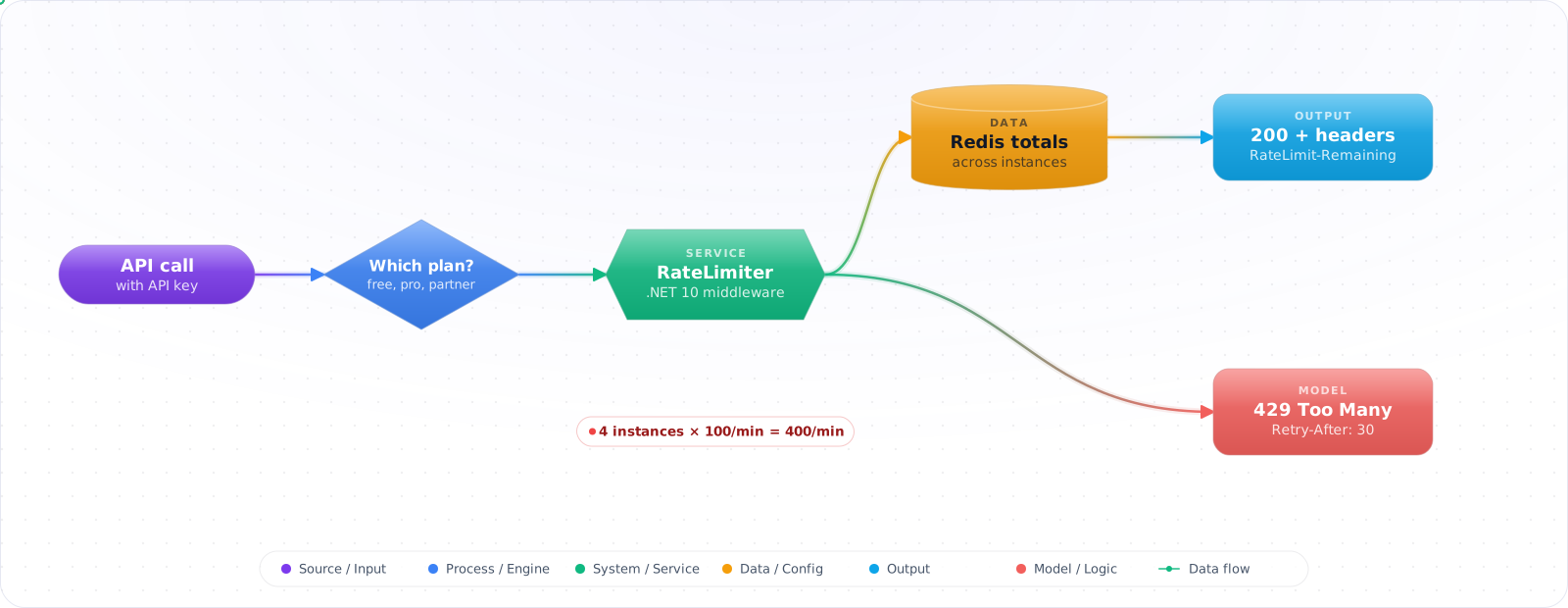
The 2026 standard responses are HTTP 429 Too Many Requests (RFC 6585) with a Retry-After header, plusRateLimit draft headers (RateLimit-Limit, RateLimit-Remaining, RateLimit-Reset) so well-behaved clients can self-throttle.
- One client's retry loop took down your DB last weekend
- You hand-rolled rate limiting with a
MemoryCachedictionary - Your "rate limiter" doesn't survive a process restart
- Distributed deployment + per-IP limits = wildly inconsistent enforcement
Use the .NET 10 RateLimiter middleware locally + Redis for cross-instance limits + 429 with Retry-After.
Algorithms, Plans and Headers
Four classic algorithms (the .NET middleware ships all four):
- Fixed window — N requests per minute, reset at the top of every minute. Cheap, bursts at boundary.
- Sliding window — same N, but the window is split into segments and slides one segment at a time, so permits used in the oldest segment come back as it expires. Smoother.
- Token bucket — N tokens, refill at R/sec. Allows bursts up to N. Most flexible.
- Concurrency — at most N in-flight at a time (not per minute). Use for expensive endpoints.
For multi-instance deployments you need a distributed counter: Redis with INCR + EXPIRE (atomic via Lua), or a managed service (Azure API Management, Cloudflare, Kong).
flowchart LR
    C["Client"] -->|GET /api/...| GW["Edge gateway<br/>(APIM / Envoy)<br/>coarse limits"]
    GW --> APP["App instance<br/>RateLimiter middleware"]
    APP -->|INCR/EXPIRE| R["Redis<br/>(distributed counters)"]
    APP -->|429 + Retry-After| C

    style APP fill:#0078D4,color:#fff,stroke:#005a9e
Building Rate Limits in ASP.NET Core
Step 1: Token bucket on .NET 10
builder.Services.AddRateLimiter(o =>
{
    o.RejectionStatusCode = StatusCodes.Status429TooManyRequests;
    o.OnRejected = async (ctx, ct) =>
    {
        if (ctx.Lease.TryGetMetadata(MetadataName.RetryAfter, out var retry))
            ctx.HttpContext.Response.Headers.RetryAfter =
                ((int)retry.TotalSeconds).ToString();
        ctx.HttpContext.Response.ContentType = "application/problem+json";
        await ctx.HttpContext.Response.WriteAsJsonAsync(new
        {
            type   = "https://errors.example.com/rate-limited",
            title  = "Too many requests",
            status = 429
        }, ct);
    };

    o.AddTokenBucketLimiter("api", opt =>
    {
        opt.TokenLimit         = 100;
        opt.TokensPerPeriod    = 100;
        opt.ReplenishmentPeriod = TimeSpan.FromMinutes(1);
        opt.QueueLimit         = 0;       // reject immediately, don't queue
        opt.AutoReplenishment  = true;
        // A full refill once a minute lets 100 requests through just before a refill and
        // 100 more just after, like a fixed window. For smoother traffic refill in smaller
        // steps, e.g. TokensPerPeriod = 10 every 6 seconds.
    });
});

var app = builder.Build();
app.UseRateLimiter();
app.MapGet("/api/data", () => "ok").RequireRateLimiting("api");Check it: Send a burst larger than the bucket. The first requests should pass and the rest should get a 429. Wait for the refill, and confirm that requests pass again.
Step 2: Per-user / per-API-key partitioning
o.AddPolicy("per-user", httpContext =>
{
    // Headers["X-Api-Key"].ToString() returns "" (not null) when the header is missing,
    // so test for empty instead of chaining ?? past it.
    var apiKey = httpContext.Request.Headers["X-Api-Key"].ToString();
    var key = httpContext.User.FindFirstValue("sub")
              ?? (string.IsNullOrEmpty(apiKey) ? null : apiKey)
              ?? httpContext.Connection.RemoteIpAddress?.ToString()
              ?? "anon";

    return RateLimitPartition.GetTokenBucketLimiter(key, _ => new TokenBucketRateLimiterOptions
    {
        TokenLimit         = 60,
        TokensPerPeriod    = 60,
        ReplenishmentPeriod = TimeSpan.FromMinutes(1),
        QueueLimit         = 0
    });
});

app.MapGet("/api/profile", ...).RequireRateLimiting("per-user");Check it: Use up the limit with one API key, then call with another. The second key should be unaffected.
Step 3: Tiered limits (free vs paid)
o.AddPolicy("tiered", httpContext =>
{
    var tier = httpContext.User.FindFirstValue("tier") ?? "free";
    var (limit, key) = tier switch
    {
        "enterprise" => (10_000, $"e:{httpContext.User.FindFirstValue("sub")}"),
        "pro"        => (1_000,  $"p:{httpContext.User.FindFirstValue("sub")}"),
        _            => (60,     $"f:{httpContext.User.FindFirstValue("sub") ?? httpContext.Connection.RemoteIpAddress?.ToString()}")
    };

    return RateLimitPartition.GetFixedWindowLimiter(key, _ => new FixedWindowRateLimiterOptions
    {
        PermitLimit = limit,
        Window      = TimeSpan.FromMinutes(1)
    });
});Check it: Send the same burst as a free account and as a paid one. The paid account should get further before its first 429.
Step 4: Distributed counter with Redis (Lua atomic)
// In-memory limiters reset per instance — bad for horizontal scale.
// This Lua script atomically increments + sets TTL on first hit.
const string LUA = @"
local current = redis.call('INCR', KEYS[1])
if current == 1 then redis.call('EXPIRE', KEYS[1], ARGV[1]) end
return current";

public async Task<bool> AllowAsync(string key, int limit, int windowSeconds)
{
    var bucket = $"rl:{key}:{DateTimeOffset.UtcNow.ToUnixTimeSeconds() / windowSeconds}";
    var count  = (long)await db.ScriptEvaluateAsync(
        LUA, new RedisKey[] { bucket }, new RedisValue[] { windowSeconds });
    return count <= limit;
}
// Plug into a custom .NET 10 PartitionedRateLimiter or before-middleware check.Check it: Run two instances and split a burst between them. The total allowed should be the limit, not twice the limit.
Step 5: RateLimit headers
// Advertise remaining quota. Headers must be set before the body starts:
// after await next() they are read-only once the endpoint has written anything.
// remaining and secondsUntilReset are placeholders: read them from your own limiter.
app.Use(async (ctx, next) =>
{
    ctx.Response.OnStarting(() =>
    {
        if (ctx.Response.StatusCode != 429)
        {
            ctx.Response.Headers["RateLimit-Limit"]     = "60";
            ctx.Response.Headers["RateLimit-Remaining"] = remaining.ToString();
            ctx.Response.Headers["RateLimit-Reset"]     = secondsUntilReset.ToString();
        }
        return Task.CompletedTask;
    });
    await next();
});

// Clients that read these headers can slow down before they hit the limit.
These three headers are the style most APIs and client libraries recognise today. The IETF draft that standardises rate limit headers has since moved to two structured fields, RateLimit-Policy for the quota and RateLimit for the current state, and it is still a draft. Pick one style, document it, and keep sending Retry-After on 429 responses, which is standard and understood by almost every HTTP client.
Check it: Read the headers on a normal response and on a 429. A client should be able to tell how much quota is left, and how long to wait.
Step 6: Layered: APIM at the edge, app for fine-grain
// Azure API Management policy (XML) — coarse, cheap, before reaching the app
// <inbound>
//   <rate-limit-by-key calls="1000" renewal-period="60"
//                      counter-key="@(context.Subscription.Id)" />
//   <quota-by-key      calls="1000000" renewal-period="2592000"
//                      counter-key="@(context.Subscription.Id)" />
// </inbound>

// App-side then enforces endpoint-specific limits:
//   POST /charges  → 10/min per user (expensive)
//   GET  /catalog → 1000/min per user (cheap, cached)
Choosing the Numbers
The code is the easy part. The hard part is picking limits that stop abuse without throttling your best customer during their busiest hour. Guessing round numbers is how that happens. Work from data instead:
- Measure current usage per client. From access logs, compute each API key’s request rate per minute and look at the 99th percentile and the maximum over a few weeks. That is what legitimate traffic looks like, including batch jobs and month-end peaks.
- Check capacity. Estimate what the expensive endpoints can sustain in total. Per-client limits multiplied by the number of active clients should not exceed it by an order of magnitude, or the limit protects nothing.
- Run in shadow mode first. Log “would have been limited” without rejecting anything for a week or two. The log tells you exactly which clients a limit would hit, and you can contact them before it does.
- Enforce, then watch. Alert on the rate of 429 responses per client. A sudden rise for one well-known customer is a conversation to have, not a success metric.
Clients That Back Off Properly
If you also write the clients, or publish an SDK, the client side matters as much as the server side. A naive retry loop turns one rejected burst into a sustained one. Honour Retry-After when it is present. When it is not, use exponential backoff with random jitter, so a thousand clients that were rejected in the same second do not all retry in the same second. Cap the number of retries, and stop retrying entirely when a circuit breaker sees most calls failing. Retrying a request that was rejected for being too frequent is only useful if you wait longer each time.
How Rate Limits Backfire
- In-memory only at scale. 4 instances + a 100/min limit = up to 400/min in practice. Use Redis or a managed gateway for distributed counters.
- No
Retry-After. Returning 429 without telling the client when to retry invites every rejected client to come back at once. - Limiting by IP behind a proxy without
X-Forwarded-For. You'll either limit the load balancer or everyone behind one corporate NAT. ConfigureForwardedHeadersmiddleware first. - Same limit for all endpoints. A 1ms
GET /healthzand a 2-secondPOST /chargesneed very different policies. Use per-routeRequireRateLimiting. - Queueing instead of rejecting. A
QueueLimit > 0with a long replenish period turns rate limiting into slow rate amplification. Reject early and let the client back off. - Forgetting the auth path. If
/loginisn't rate-limited, credential stuffing chews through your user table. Brute-force endpoints need stricter limits than business endpoints.
Try It on Your Own System This Week
Three checks on an API with outside callers, about an hour in total:
- Work out each key's peak rate from your access logs. Look at the 99th percentile and the maximum over a few weeks. That's what legitimate traffic looks like.
- Call past the limit and read the response. If there's no Retry-After, every rejected client will come back at once.
- Check the login endpoint. If it has no limit of its own, credential stuffing has an open door.
What I Would Set Up
- .NET 10
RateLimiter+ token bucket + per-user partition is where I'd start for most APIs. - Distributed enforcement = Redis Lua INCR/EXPIRE, or APIM / Envoy / Cloudflare at the edge.
- Always return 429 with
Retry-After+application/problem+jsonbody. - Emit
RateLimit-*headers — well-behaved clients will self-throttle. - Tier limits by plan; tier limits by endpoint cost.
- Authentication endpoints need their own (much stricter) limits.
- Layered defense: edge gateway (coarse) + app (per-endpoint) + DB (statement timeout) is much harder to take down.
Limiting by Cost, Not Only by Count
Request counts stop working when requests vary in cost. For an LLM endpoint, one call might cost a thousandth of a cent and the next might cost a dollar. Charge each request against a budget of tokens or cost, deduct an estimate on the way in, and correct it from the actual usage on the way out. Give agents their own limit too, because a loop can use up a whole month's allowance in minutes.