Start Without a Limit
While you have a few clients and all of them behave, a rate limiter only refuses requests you could have served. The need arrives with the first client that sends far more than the rest: a partner's sync job, a retry loop, a scraper. The service treats every request alike, so whoever sends the most takes the most, and everyone else waits behind them.
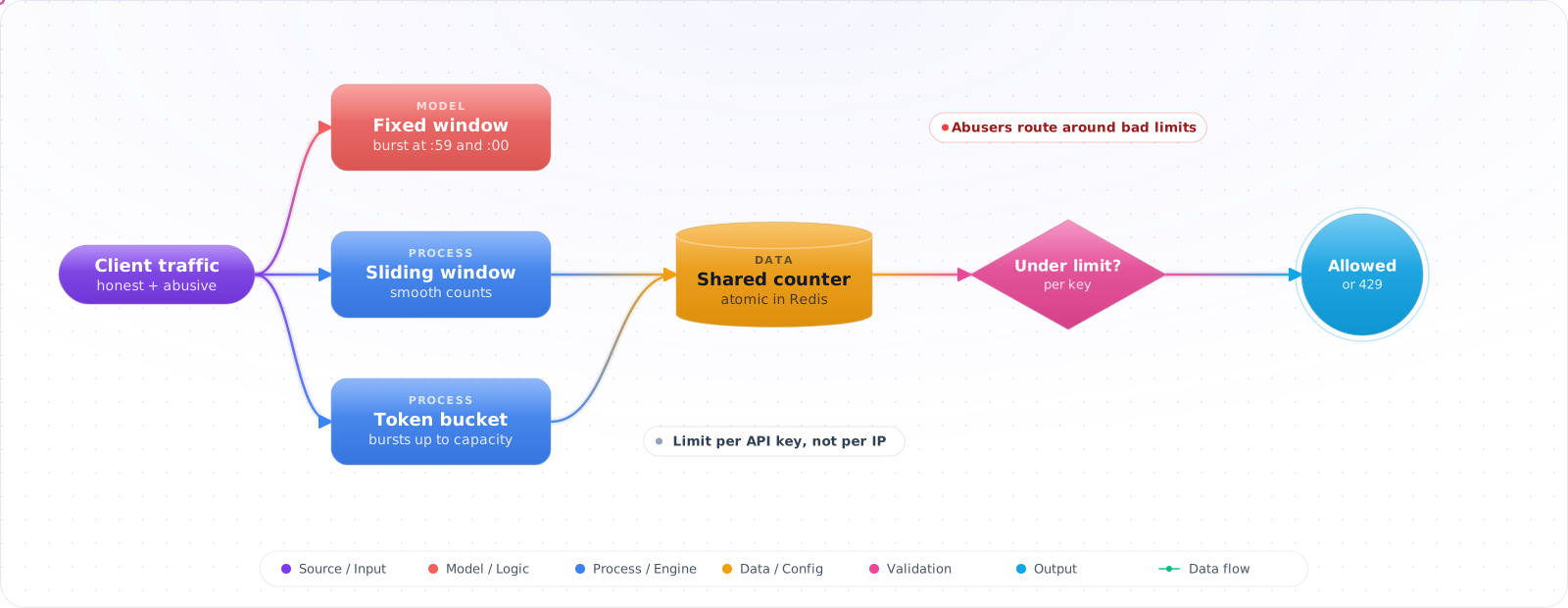
A limit per client fixes that, and then shows you its own weak points one at a time: counters that don't agree across instances, bursts that slip through when a window resets, clients that push harder after being refused. The table above lists those signals in order. This article compares the algorithms, then answers each situation with a way to check it.
- You don't rate limit at all and a single client occasionally takes the API down
- You rate limit by IP, and a corporate NAT customer gets blocked for everyone behind it
- Your fixed-window limiter lets a burst at second 59 and another at second 1 sail through
- Your 429 doesn't include
Retry-Afterand clients hammer immediately
This is the rate-limit playbook — algorithms that actually work, where to enforce, what key to use, and the response semantics that get clients to back off.
Rate-Limiting Algorithms Compared
Four algorithms cover almost every use case:
- Fixed window — N requests per minute, reset on the minute boundary. Cheapest, but allows a 2N burst at the boundary.
- Sliding window — N requests in the last 60s, computed precisely. Smooth, more state.
- Token bucket — bucket of N tokens, refills at R/sec. Allows controlled bursts up to bucket size, then steady rate. Default choice for APIs.
- Concurrency limit — at most N in-flight requests. Best for protecting downstream finite resources (DB connections, GPU).
flowchart LR
    C["Client"] --> EDGE["Edge limiter<br/>Front Door / WAF<br/>(coarse: by IP, geo)"]
    EDGE --> APIM["API Mgmt<br/>per-subscription quota"]
    APIM --> APP["App rate limiter<br/>(fine: per user, per route)"]
    APP --> DB["Backend"]

    APP -.->|exceeded| R429["429 + Retry-After<br/>+ RateLimit headers"]

    style EDGE fill:#0078D4,color:#fff,stroke:#005a9e
    style APP fill:#dc2626,color:#fff,stroke:#b91c1c
Building a Distributed Limiter
The code is ASP.NET Core and Redis. The situations are the same on any stack.
Step 1: When one client crowds out the rest, give each client its own bucket
Start with the limiter your framework already has. Two decisions matter: who a bucket belongs to, and what happens when it's empty. Here it's one bucket per signed-in user, and an immediate refusal.
using System.Threading.RateLimiting;

builder.Services.AddRateLimiter(options =>
{
    options.RejectionStatusCode = StatusCodes.Status429TooManyRequests;
    options.OnRejected = async (ctx, ct) =>
    {
        if (ctx.Lease.TryGetMetadata(MetadataName.RetryAfter, out var ra))
            ctx.HttpContext.Response.Headers.RetryAfter = ((int)ra.TotalSeconds).ToString();
        await ctx.HttpContext.Response.WriteAsync("Too many requests.", ct);
    };

    // Token bucket per authenticated user (fall back to IP for anonymous)
    options.AddPolicy("per-user", httpContext =>
    {
        var key = httpContext.User.FindFirst("sub")?.Value
                  ?? httpContext.Connection.RemoteIpAddress?.ToString()
                  ?? "anon";
        return RateLimitPartition.GetTokenBucketLimiter(key, _ => new TokenBucketRateLimiterOptions
        {
            TokenLimit       = 100,                       // bucket size
            TokensPerPeriod  = 100,                       // refill amount
            ReplenishmentPeriod = TimeSpan.FromMinutes(1),// every minute
            QueueLimit       = 0,                         // reject immediately
            AutoReplenishment= true
        });
    });
});

var app = builder.Build();
app.UseRateLimiter();

app.MapGet("/api/search", () => "...").RequireRateLimiting("per-user");Check it: Send 150 requests in a few seconds as one user. About 100 should succeed and the rest should get a 429. At the same time, send requests as a second user. Theirs must all succeed.
Step 2: When you run several instances, keep the count in one place
The built-in limiter counts inside each process. Behind a load balancer, three instances means three separate counts, so a client gets three times the limit you wrote down. The count has to live where every instance can see it.
// Built-in limiter is per-process, so the effective limit is the limit × instance count.
// Use a Redis-backed sliding-window for accurate global limits.
public class RedisSlidingWindow(IConnectionMultiplexer redis)
{
    private const string Lua = """
        local key = KEYS[1]
        local now = tonumber(ARGV[1])
        local window = tonumber(ARGV[2])
        local limit = tonumber(ARGV[3])
        redis.call('ZREMRANGEBYSCORE', key, 0, now - window)
        local count = redis.call('ZCARD', key)
        if count >= limit then return 0 end
        redis.call('ZADD', key, now, ARGV[4])  -- a unique member, or same-millisecond hits collapse
        redis.call('PEXPIRE', key, window)
        return 1
    """;

    public async Task<bool> AllowAsync(string key, int limit, TimeSpan window)
    {
        var db = redis.GetDatabase();
        var result = (long)await db.ScriptEvaluateAsync(Lua,
            new RedisKey[] { $"rl:{key}" },
            new RedisValue[] { DateTimeOffset.UtcNow.ToUnixTimeMilliseconds(),
                               (long)window.TotalMilliseconds, limit, Guid.NewGuid().ToString() });
        return result == 1;
    }
}Check it: Run two instances and send requests across both. The total allowed should be the limit, not twice it. The script runs inside Redis as one step, so two instances checking at the same moment can't both take the last slot.
Step 3: When clients share an address, limit by who they are
A limit is only as fair as its key. Limit by IP address and a whole office behind one address shares a single allowance, while an abuser who rotates addresses gets many.
Bad keys:
  ❌ Client IP only          → corporate NAT = thousands of users on one IP
  ❌ User-Agent              → trivially forged
  ❌ Auth token raw          → token rotation bypasses the limit

Good keys, in priority order:
  ✅ Authenticated user/sub  → first choice for logged-in APIs
  ✅ API key / subscription  → for B2B; tier the limits per plan
  ✅ Tenant id               → per-tenant fairness in multi-tenant apps
  ✅ IP + path bucket        → fallback for anonymous endpoints
✅ Composite (sub + route) → expensive endpoints get tighter limitsCheck it: Send requests from one address as two different signed-in users. Each should have a full allowance. Then send anonymous requests from that address and confirm they share one.
Step 4: When some endpoints cost far more, give them tighter limits
One number for the whole API is either too loose for the expensive endpoints or too tight for the cheap ones. Set each limit by what a request costs you.
// Cheap endpoints: generous limits
app.MapGet("/api/products/{id}", ...).RequireRateLimiting("standard");   // 600/min

// Expensive endpoints: tight limits
app.MapPost("/api/search/full-text", ...).RequireRateLimiting("expensive"); // 30/min

// Auth/login: very tight + per-IP fallback to defeat credential stuffing
app.MapPost("/api/auth/login", ...).RequireRateLimiting("auth-strict"); // 5/min/IPCheck it: Use up the allowance on the expensive endpoint, then call a cheap one as the same user. The cheap call should still succeed. If it doesn't, the two are sharing a bucket.
Step 5: When refused clients retry at once, tell them when to come back
A client that gets a bare refusal has no idea how long to wait, so many retry immediately and add to the load. A refusal that says when to return turns a storm into a pause.
# Field names from the IETF RateLimit draft, which can still change
HTTP/1.1 200 OK
RateLimit-Policy: "default";q=100;w=60
RateLimit: "default";r=23;t=37   # r = remaining, t = seconds until reset

# When rejected:
HTTP/1.1 429 Too Many Requests
Retry-After: 12                # seconds; a well-behaved client waits this long
RateLimit-Policy: "default";q=100;w=60
RateLimit: "default";r=0;t=12Check it: Trigger a 429 and read the response. It should carry Retry-After with a number of seconds. Wait that long and try again, and the request should succeed.
Step 6: When one limiter is not enough, limit at every layer
The application limiter is the fair one, but it sits behind everything else, so a flood still reaches your servers before it is refused. Coarser limits further out stop that traffic earlier, and a cap on work in progress protects the database if everything else fails.
Layer 1  Azure Front Door / WAF
         • Rate-limit by client IP (coarse, anti-DDoS)
         • Block bad geos / known abusive ASNs

Layer 2  Azure API Management
         • Quota by subscription key (1M calls/month)
         • Spike-arrest at the gateway (50 req/sec per key)

Layer 3  App-level (ASP.NET RateLimiter)
         • Per-user, per-route, with cost weighting
         • Returns proper 429 + Retry-After

Layer 4  Backend (DB connection pool, semaphore)
         • Bulkhead: max in-flight ops per dependency
• Last line of defence; protects the data tierCheck it: For each layer you run, write down what it keys on and what it protects. Two layers keyed on the same thing are redundant. A layer with nothing in front of it that can absorb a flood is exposed.
How Limiters Go Wrong
1. Per-instance limits in a multi-instance app. The built-in RateLimiter middleware is per-process. With 10 pods, your "100/min" is actually 1000/min. Use Redis-backed limits for global accuracy or accept the multiplier and tune accordingly.
2. IP-only keys behind a proxy. If you forget UseForwardedHeaders, every request looks like it came from the proxy IP and the entire fleet shares one bucket. Configure X-Forwarded-For properly.
3. Fixed-window burst attack. A client can fire 100 requests at 12:00:59.999 and another 100 at 12:01:00.001 — that's 200 in 2ms. Use sliding window or token bucket for limits that matter.
4. Returning 429 without Retry-After. Clients (and SDKs) without this header retry immediately, amplifying load. Always emit Retry-After and the RateLimit headers.
5. Counting all routes equally. A GET /healthz and a full-text search both count as "1 request" — but the search costs 100x. Either separate policies per route or assign request cost (token bucket lets you take N tokens per request).
6. No rate limit on auth/login. Credential stuffing attacks fire millions of login attempts. Tight per-IP and per-username limits + CAPTCHA on suspicious patterns are mandatory for any login endpoint.
What I Would Set Up
- Default algorithm: token bucket per user. It allows fair bursts and a steady rate.
- Key by authenticated identity first, API key second, tenant third, IP last.
- For multi-instance apps, use a Redis-backed sliding window or accept that built-in limits are per-process.
- Limit at multiple layers: edge (DDoS), gateway (subscriber quota), app (per-user), backend (bulkhead).
- Always return
Retry-After+RateLimitheaders. Document them. - Tier limits by endpoint cost. A search shouldn't share a bucket with a healthcheck.
- Auth endpoints get the strictest limits + CAPTCHA fallback. Treat them as the prime target.
Try It on Your Own System This Week
Three checks on a running API, about an hour in total:
- Find your heaviest client. Look at requests per client over the last day. If one client sends a large share, ask what would happen to the others if it doubled.
- Count your instances and find where the limiter keeps its count. If the count lives in process memory and you run more than one instance, your real limit is a multiple of the one you set.
- Trigger a refusal and read it as a client would. If it doesn't say when to retry, Step 5 is a small change with a large effect.
Rate Limiting When Requests Aren't Equal
Classic rate limiting counts requests. That fails for LLM APIs, where one request can cost a thousand times more than another. A user within their 100-requests-a-minute limit can still spend $50 in that minute. So limit on tokens or cost as well.
The difficulty is that you don't know the cost until the response finishes. A practical approach is to reserve and reconcile. Estimate the tokens up front from the input size and max_tokens, deduct that from the budget, and correct it when you see the actual usage:
RESERVE = """
local value = redis.call('GET', KEYS[1])
if not value then
  value = ARGV[1]
  redis.call('SET', KEYS[1], value, 'EX', ARGV[3])
end
if tonumber(value) < tonumber(ARGV[2]) then return 0 end
redis.call('DECRBY', KEYS[1], ARGV[2])
return 1
"""

allowed = r.eval(RESERVE, 1, f"tokens:{user_id}", DAILY_TOKENS, estimate, 86400)
# after the response: r.incrby(f"tokens:{user_id}", estimate - actual_tokens)
The Lua script makes the check and the deduction atomic. Without it, two concurrent requests can both pass.
Agents need per-run limits
An agent can make hundreds of calls in a loop, so a per-minute limit doesn't protect you. Give each run a total budget of turns and cost, and stop it when it's used up. Add a limit per tool, too, particularly for anything expensive or with side effects.
Being a good client
Your app is also a client of someone else's rate limit. Respect Retry-After, back off exponentially with jitter, and limit concurrency on your side. Retrying without jitter creates waves of synchronised requests, which keep a struggling service down. Put a queue in front of batch work, so that a burst waits rather than failing.
Tell clients where they stand. Return RateLimit headers, as described in the IETF draft, with the remaining quota and reset time. A clear 429 with a Retry-After lets an honest client back off, and lets an agent wait instead of retrying blindly. Decide what happens when your rate limiter's store is down as well. Failing open keeps you available, and failing closed protects your costs. For expensive LLM endpoints, I'd lean towards failing closed.