Start With the Defaults
In a small app, register stateful services as scoped, inject them through constructors, and let the container do the rest. The details below matter once you add singletons, background workers or a second implementation of the same contract, because that is where lifetimes start to collide.
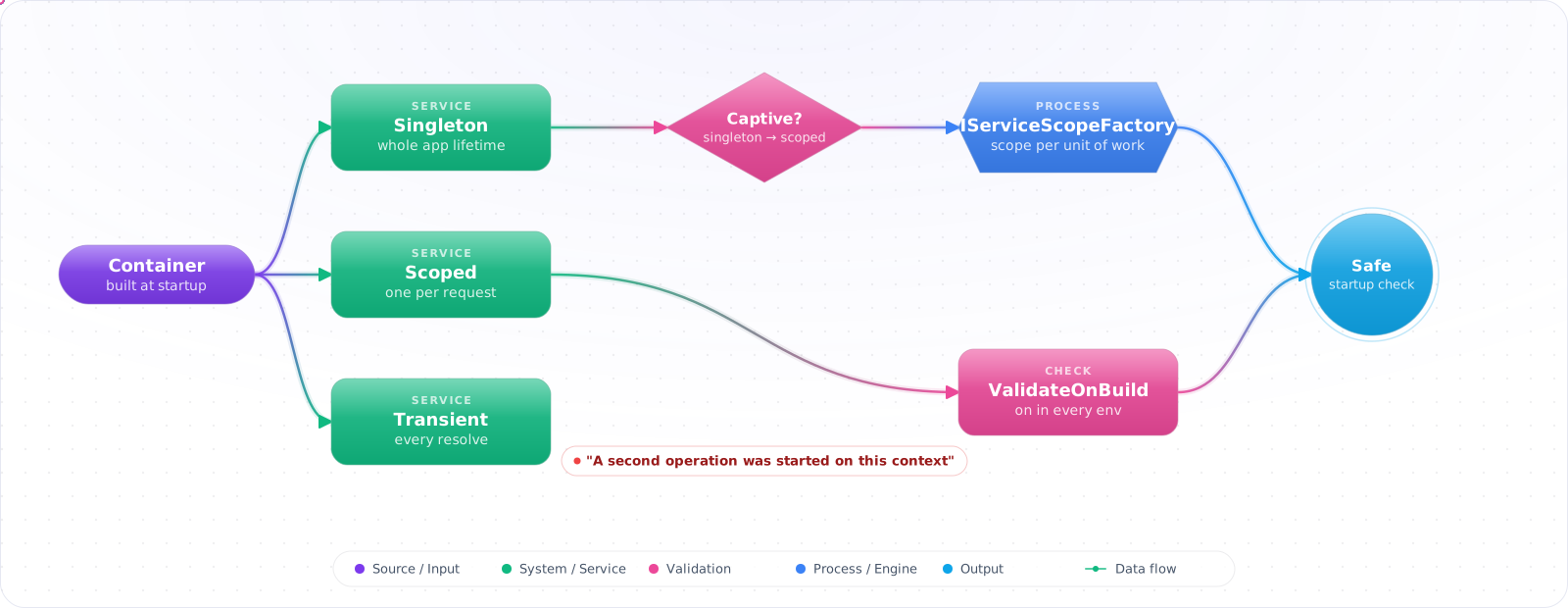
Take a typical case, made up for illustration. A team added a singleton price cache that took the app's DbContext in its constructor. It worked on every developer machine. In production, within minutes, the logs filled with “A second operation was started on this context instance before a previous operation completed”, because every request was now sharing one DbContext.
The container in ASP.NET Core is easy to use and easy to misuse, and nearly every DI bug comes down to lifetimes. Below is how singleton, scoped and transient really behave, the captive-dependency trap, how to use scopes from background services, keyed services, and the startup validation that would have caught that bug before it shipped.
- You injected
DbContextinto a singleton service and don't know why production occasionally returns wrong data - You have
IServiceProvidersprinkled through your code as a "lookup bag" - You need two implementations of
IPaymentProvider(Stripe and PayPal) and have a factory class shimming around the container - You see
BuildServiceProvider()called from insideConfigureServicesin a code review
Singleton, Scoped, Transient and What Each Means
The built-in container has three lifetimes. Transient: new instance every resolve. Scoped: one instance per scope (one HTTP request in ASP.NET Core). Singleton: one instance for the app's lifetime. Pick the longest lifetime that's safe — and a service can never depend on a shorter-lived one (a singleton can't hold a scoped DbContext).
flowchart TB
    A["WebApplication.CreateBuilder"] --> B["builder.Services"]
    B --> C["AddSingleton - 1 per app"]
    B --> D["AddScoped - 1 per request"]
    B --> E["AddTransient - 1 per resolve"]
    B --> F["AddKeyed* (.NET 8) - by string/enum key"]

    C --> G["IClock, IConfiguration, IMemoryCache"]
    D --> H["DbContext, current user services"]
    E --> I["lightweight, per-call helpers"]
    F --> J["multiple impls of one interface"]

    style C fill:#dc2626,color:#fff,stroke:#991b1b
    style D fill:#059669,color:#fff,stroke:#047857
    style E fill:#0891b2,color:#fff,stroke:#0e7490
    style F fill:#4f46e5,color:#fff,stroke:#4338ca
The captive dependency rule: a longer-lived service that holds a reference to a shorter-lived one captures it. Inject DbContext (scoped) into a singleton and that singleton holds the same DbContext forever — across every request, every user. That's a data integrity bug. Enable scope validation (WebApplication.CreateBuilder does this in development by default) and the container throws at startup if you do this.
Check it: List your singletons and read each constructor. Any parameter that is registered as scoped is a captive dependency.
Wiring a Real Service
Step 1: Lifetime quick reference
var builder = WebApplication.CreateBuilder(args);

// SINGLETON — stateless, thread-safe, holds no per-request state
builder.Services.AddSingleton<IClock, SystemClock>();
builder.Services.AddSingleton<IConfiguration>(builder.Configuration);
builder.Services.AddSingleton<IPriceCalculator, PriceCalculator>();

// SCOPED — per-request, often holds a DbContext or current-user info
builder.Services.AddScoped<IUserContext, HttpUserContext>();
builder.Services.AddScoped<IOrderService, OrderService>();
builder.Services.AddDbContext<AppDbContext>(o => o.UseNpgsql(connStr));   // scoped by default

// TRANSIENT — cheap, stateless, often a wrapper or lightweight helper
builder.Services.AddTransient<IEmailMessageBuilder, EmailMessageBuilder>();

// HOSTED SERVICE — singleton background work
builder.Services.AddHostedService<OrderRetryWorker>();

var app = builder.Build();
Step 2: Keyed services (.NET 8+)
// Multiple implementations of one contract, distinguished by a key
builder.Services.AddKeyedScoped<IPaymentProvider, StripeProvider>("stripe");
builder.Services.AddKeyedScoped<IPaymentProvider, PaypalProvider>("paypal");

// Resolve via constructor parameter
public class CheckoutService(
    [FromKeyedServices("stripe")] IPaymentProvider stripe,
    [FromKeyedServices("paypal")] IPaymentProvider paypal,
    IUserContext user)
{
    public Task ChargeAsync(Order o, CancellationToken ct) =>
        user.PreferredProvider switch
        {
            "paypal" => paypal.ChargeAsync(o, ct),
            _        => stripe.ChargeAsync(o, ct),
        };
}

// Resolve via service locator (rare — prefer constructor)
public class Worker(IServiceProvider sp)
{
    public Task RunAsync(string key) =>
        sp.GetRequiredKeyedService<IPaymentProvider>(key).ChargeAsync(/*...*/);
}

// Minimal API endpoint
app.MapPost("/charge/{provider}",
    ([FromKeyedServices("stripe")] IPaymentProvider stripe, Order o, CancellationToken ct)
        => stripe.ChargeAsync(o, ct));

// HttpClientFactory keyed registration. Keyed DI itself arrived in .NET 8, but AddAsKeyed
// needs Microsoft.Extensions.Http and Microsoft.Extensions.DependencyInjection 9.0.0+.
builder.Services.AddHttpClient("openai", c => c.BaseAddress = new Uri("https://api.openai.com"))
    .AddAsKeyed();
// Then: [FromKeyedServices("openai")] HttpClient client
Keyed services replace most hand-written factory shims that wrapped the container with their own switch statements. One contract, many implementations, picked by key.
Step 3: BackgroundService and the scope pattern
// WRONG — captive dependency. DbContext is scoped, BackgroundService is singleton.
public class BadWorker(AppDbContext db) : BackgroundService
{
    protected override async Task ExecuteAsync(CancellationToken ct) { /* ... */ }
}

// RIGHT — inject IServiceScopeFactory, create a scope per iteration
public class OrderRetryWorker(IServiceScopeFactory scopeFactory, ILogger<OrderRetryWorker> log)
    : BackgroundService
{
    protected override async Task ExecuteAsync(CancellationToken ct)
    {
        using var timer = new PeriodicTimer(TimeSpan.FromMinutes(1));
        while (await timer.WaitForNextTickAsync(ct))
        {
            using var scope = scopeFactory.CreateScope();
            var db = scope.ServiceProvider.GetRequiredService<AppDbContext>();
            var orders = scope.ServiceProvider.GetRequiredService<IOrderService>();
            try
            {
                var pending = await db.Orders.Where(o => o.Status == "Retry").ToListAsync(ct);
                foreach (var o in pending) await orders.RetryAsync(o, ct);
            }
            catch (Exception ex)
            {
                log.LogError(ex, "Retry pass failed");
            }
        }
    }
}
Every iteration of a long-running worker that needs scoped services must create its own scope. Without it, the DbContext change tracker grows unbounded across iterations and you eventually OOM. With it, each tick is clean.
Check it: Open each hosted service and look at its constructor. It should take a scope factory, and create a scope inside the loop.
Step 4: Options pattern with DI
// Bind config section to a strongly-typed options class
public class StripeOptions
{
    // ValidateDataAnnotations reads attributes. The required keyword alone won't catch a missing value.
    [Required] public required string ApiKey { get; init; }
    [Required] public required string WebhookSecret { get; init; }
    public TimeSpan Timeout { get; init; } = TimeSpan.FromSeconds(30);
}

builder.Services
    .AddOptions<StripeOptions>()
    .Bind(builder.Configuration.GetSection("Stripe"))
    .ValidateDataAnnotations()
    .ValidateOnStart();

// Inject IOptions<T> (singleton snapshot), IOptionsSnapshot<T> (per-request, hot reload),
// or IOptionsMonitor<T> (live changes via callback)
public class StripeProvider(IOptions<StripeOptions> opts, HttpClient http)
{
    private readonly StripeOptions _config = opts.Value;
}Check it: Remove a required setting and start the app. It should fail at startup, before the first request.
How DI Setups Go Wrong
1. Captive dependencies. Singleton holding scoped = bug. Scope validation in CreateApplicationBuilder catches this in development; make sure it's on. In production, validation is off by default for performance.
2. Service locator anti-pattern. Injecting IServiceProvider and calling GetService<T>everywhere hides dependencies and breaks testing. Use it only in framework-level glue (background workers, factories) — never in domain or application services.
3. BuildServiceProvider in ConfigureServices. Calling services.BuildServiceProvider() before the host builds creates a second container — the singletons you resolve from it are different from the ones the app uses. Analyzer ASP0000 warns; respect it.
4. IDisposable on transients. Transient services that implement IDisposable are disposed at the end of the scope they were resolved in. If resolved from the root, they wait until the app shuts down, so in an unbounded loop they pile up and leak. Either make them scoped or wrap them in using manually.
5. Constructor doing real work. DI calls your constructor every time the service resolves (transient/scoped). Constructors should assign fields and validate arguments — nothing more. Move I/O and heavy init to InitializeAsync or a factory.
Rules I Follow
- Default to scoped for stateful services, singleton for stateless ones, transient for cheap helpers. Justify any deviation.
- Use keyed services (.NET 8+) instead of hand-rolled factories when you need multiple implementations of one contract.
- In
BackgroundService, injectIServiceScopeFactoryand create a scope per work iteration. Never injectDbContextdirectly into a hosted service. - Bind configuration with
AddOptions<T>().Bind(...).ValidateDataAnnotations().ValidateOnStart(). Failures show up at startup, not at the first request. - Trust the container — don't pass
IServiceProvideraround. If you find yourself doing it, your design has a missing abstraction. - Keep scope validation enabled in development (default in
WebApplication.CreateBuilder). Captive dependencies caught at startup beat 3am incident calls.
Catching Lifetime Bugs Before Production
The worst DI bugs compile, pass unit tests and work fine on your machine. A singleton that captures a scoped DbContext behaves perfectly until two requests overlap, and then you get a threading exception that only appears under load. Let the container catch these for you. Turn on both validation options, and leave them on outside production as well:
builder.Host.UseDefaultServiceProvider(options =>
{
    options.ValidateScopes = true;
    options.ValidateOnBuild = true;
});
ValidateOnBuild checks at startup that every registered service can be constructed, which turns a runtime surprise into a failed deploy. ValidateScopes throws when a scoped service is resolved from the root provider. Both are on by default in the Development environment only, so a test that runs in another environment can miss them.
Background services need their own scope
A BackgroundService is a singleton, so injecting a scoped DbContext directly is the classic captive dependency. Inject IServiceScopeFactory and create a scope per unit of work:
public sealed class OutboxWorker(IServiceScopeFactory scopes) : BackgroundService
{
    protected override async Task ExecuteAsync(CancellationToken ct)
    {
        while (!ct.IsCancellationRequested)
        {
            await using var scope = scopes.CreateAsyncScope();
            var outbox = scope.ServiceProvider.GetRequiredService<OutboxProcessor>();
            await outbox.PublishPendingAsync(ct);
            await Task.Delay(TimeSpan.FromSeconds(5), ct);
        }
    }
}
CreateAsyncScope matters when a service implements IAsyncDisposable, because the plain using form would throw on dispose.
Keyed services
Since .NET 8 you can register several implementations under a key and inject one with [FromKeyedServices("stripe")]. It's cleaner than a hand-written factory when you need to choose an implementation by name. Don't overuse it, though. If a class needs to know a key, it has become slightly aware of the container, and a small strategy interface is often clearer.
Check it: On a branch, inject a scoped service into a singleton and start the app outside the Development environment with both validation options on. Startup should throw.
Try It on Your Own System This Week
Three checks on an app you already run, about an hour in total:
- Search for IServiceProvider outside startup code and workers. Each use hides a dependency.
- Search for BuildServiceProvider. It creates a second container, with singletons of its own.
- Count the constructor parameters of your largest classes. More than about five usually means the class needs splitting.
Register With Intent
Group registrations by feature in extension methods such as AddBilling(), so that Program.cs stays readable. Avoid the service locator habit of injecting IServiceProvider into business code, since it hides a class's real dependencies. Long constructors are a useful warning: more than about five dependencies usually means that the class needs splitting, and DI has only made that visible.