Start With useState
For a handful of components, keep state in the component that uses it and pass it down. The question of a store only comes up when many distant components need the same value.
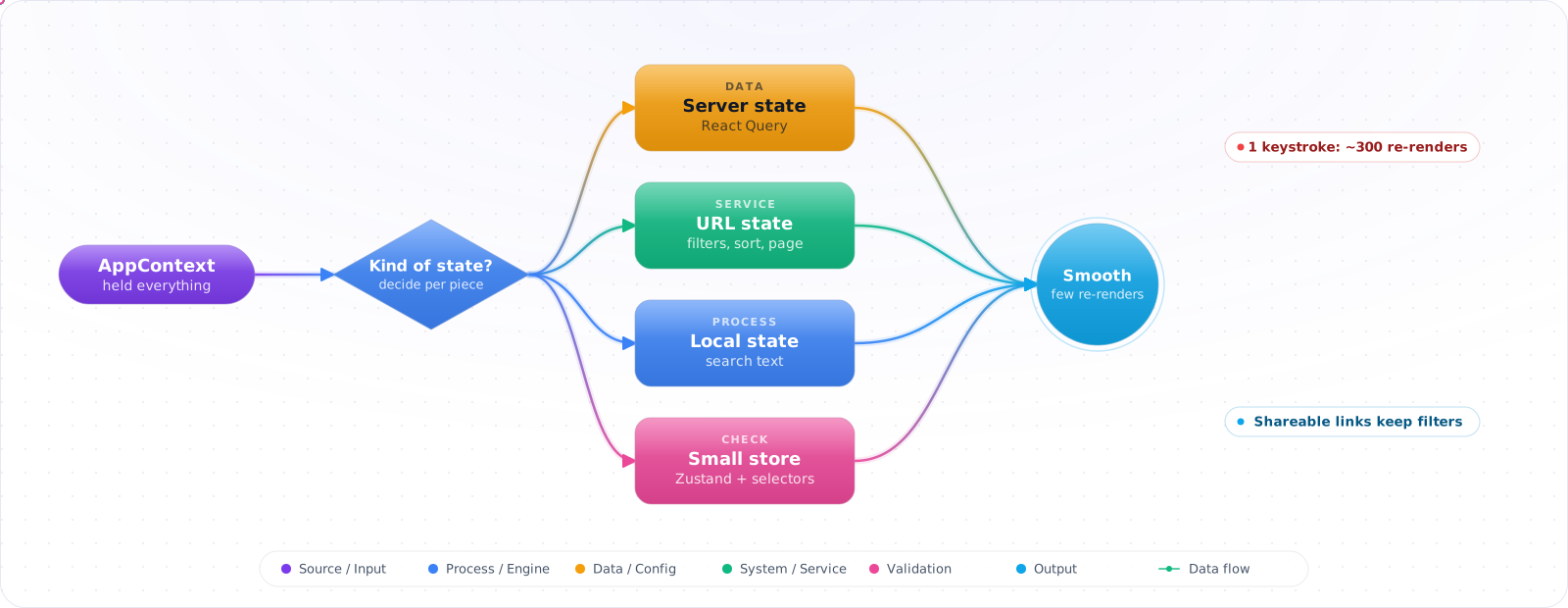
Take a typical case, made up for illustration. A catalogue page kept cart, user, theme, filters, products and the search text in one app-wide context. Every keystroke in the search box produced a new context value, and around 300 components re-rendered. Typing lagged on mid-range phones, and filtered pages could not be shared by link.
The fix was not a better store. It was noticing that most of that state did not belong in a store at all. Server data belongs in a query cache, shareable state belongs in the URL, and most UI state is local. Below is how to sort state by kind, the tools for each, and how to keep the small amount of real global state from re-rendering the world.
- You wired Redux to hold the result of a single
fetch()call - You sync the same value to Context, the URL, and
localStoragewith threeuseEffects - Your Context provider re-renders the entire tree every keystroke
- You can't explain why your app needs a global store at all
The Kinds of State
Categorize every piece of state by who owns it:
flowchart TD
    A["What kind of state?"] --> B{"Lives on server?"}
    B -->|Yes — DB row, API result| C["TanStack Query<br/>or fetch in RSC"]
    B -->|No — UI only| D{"Used by one component?"}
    D -->|Yes| E["useState / useReducer"]
    D -->|No| F{"Belongs in URL?"}
    F -->|Yes — filters, tabs, page| G["useSearchParams /<br/>nuqs"]
    F -->|No| H{"Cross-cutting (theme, auth)?"}
    H -->|Yes, rarely changes| I["React Context"]
    H -->|Yes, changes often| J["Zustand / Jotai"]

    style C fill:#059669,color:#fff,stroke:#047857
    style G fill:#0891b2,color:#fff,stroke:#0e7490
    style J fill:#4f46e5,color:#fff,stroke:#4338ca
Three categories most people get wrong: (1) server cache state ends up in Redux when it should be in React Query — you reinvent caching, dedup, and invalidation badly. (2) URL state ends up in a store when it should be in ?filters=... — it breaks back/forward and shareable links. (3) Form state ends up globalized when it should be local — a form draft is one component's problem.
Check it: List everything in your global store and label each item: server data, URL state, local UI or truly global. Count how many are truly global.
Putting Each Kind of State in Its Place
Step 1: useState / useReducer — the default
// Most state is one component's problem
function Modal() {
  const [open, setOpen] = useState(false);
  return <button onClick={() => setOpen(true)}>Open</button>;
}

// useReducer when transitions are non-trivial
type Action = { type: 'add'; item: Item } | { type: 'remove'; id: string } | { type: 'clear' };
function cartReducer(state: Item[], action: Action): Item[] {
  switch (action.type) {
    case 'add': return [...state, action.item];
    case 'remove': return state.filter(i => i.id !== action.id);
    case 'clear': return [];
  }
}
function Cart() {
  const [items, dispatch] = useReducer(cartReducer, []);
  // ...
}
Step 2: URL as state — useSearchParams + nuqs
'use client';
// nuqs gives type-safe, shallow-routed URL params
import { useQueryState, parseAsInteger, parseAsString } from 'nuqs';

export function ProductFilters() {
  const [page, setPage] = useQueryState('page', parseAsInteger.withDefault(1));
  const [q, setQ] = useQueryState('q', parseAsString.withDefault(''));

  // URL becomes ?page=2&q=shoes, so refresh and share work. nuqs replaces the history
  // entry by default: pass { history: 'push' } if Back should step through each filter.
  // Needs the NuqsAdapter for your framework around the app.
  return (
    <>
      <input value={q} onChange={e => setQ(e.target.value || null)} />
      <button onClick={() => setPage(p => p + 1)}>Next</button>
    </>
  );
}
Step 3: Context done right — split value, never put state in the same provider as setters
// BAD — every consumer re-renders when value OR setter identity changes
const ThemeContext = createContext<{ theme: string; setTheme: (s: string) => void }>(null!);

// GOOD — split read and write contexts
const ThemeStateContext = createContext<string>('light');
const ThemeDispatchContext = createContext<(s: string) => void>(() => {});

export function ThemeProvider({ children }: { children: React.ReactNode }) {
  const [theme, setTheme] = useState('light');
  return (
    <ThemeStateContext.Provider value={theme}>
      <ThemeDispatchContext.Provider value={setTheme}>
        {children}
      </ThemeDispatchContext.Provider>
    </ThemeStateContext.Provider>
  );
}

// Components that only call setTheme don't re-render when theme changes
export const useTheme = () => use(ThemeStateContext);
export const useSetTheme = () => use(ThemeDispatchContext);Check it: Type in an input that writes to context, with the Profiler recording. Count the components that rendered and didn't need to.
Step 4: Zustand — when you genuinely need a client store
'use client';
import { create } from 'zustand';
import { devtools } from 'zustand/middleware';

type CartStore = {
  items: Item[];
  add: (item: Item) => void;
  remove: (id: string) => void;
  total: () => number;
};

export const useCart = create<CartStore>()(
  devtools(
    (set, get) => ({
      items: [],
      add: (item) => set(s => ({ items: [...s.items, item] })),
      remove: (id) => set(s => ({ items: s.items.filter(i => i.id !== id) })),
      total: () => get().items.reduce((s, i) => s + i.price, 0),
    }),
    { name: 'cart' },
  ),
);

// Subscribe to ONLY the slice you need — selector form prevents re-renders
function CartBadge() {
  const count = useCart(s => s.items.length); // re-renders only when length changes
  return <span>{count}</span>;
}
Step 5: Jotai — atomic state for fine-grained subscriptions
'use client';
import { atom, useAtom, useAtomValue } from 'jotai';

const queryAtom = atom('');
const filterAtom = atom<'all' | 'active' | 'done'>('all');
// Derived atoms recompute lazily and are memoized
const filteredCountAtom = atom((get) => {
  const q = get(queryAtom);
  const f = get(filterAtom);
  return computeCount(q, f);
});

function Counter() {
  const count = useAtomValue(filteredCountAtom); // only re-renders when count changes
  return <span>{count}</span>;
}
How State Management Goes Wrong
1. Hand-building a server cache in Redux/Zustand. You end up reimplementing cache invalidation, refetching, dedup, and pagination — badly. TanStack Query, RTK Query if you're already on Redux, or fetching in Server Components handle this for you.
2. Context for high-frequency updates. Every consumer re-renders when the provider value changes. Mouse position in Context will re-render your whole tree on every move. Use a store with selectors.
3. Globalizing form state. Forms are component-local. Use useActionState, React Hook Form, or TanStack Form. A global "form store" is almost always the wrong abstraction.
4. Storing what should be in the URL. Filters, tabs, pagination, search query — all belong in ? params so back/forward and link-sharing work. nuqs makes this trivial in App Router.
5. Premature global store. Adding Zustand on day one because "we'll need it" usually means you write Zustand selectors for things one component owns. Start with useState; promote to a store when two unrelated components need the same state.
6. Misusing equality functions. A Zustand selector that reads a prop is fine, because it runs with the latest props on render. Equality functions only compare what the selector returned, so don't use them to pass values in.
What I Would Choose
- The decision tree: server data → React Query / RSC. URL data → URL. Local UI →
useState. Global UI → store. - Reach for
useReducerwhen state transitions are non-trivial (4+ actions or interdependent fields). - Split Context into State and Dispatch when both change at different rates — or use a store.
- Default to Zustand for new client stores in 2026 — small API, devtools, no provider, selector-based subscriptions.
- Use Jotai when you have many tiny atoms that derive from each other (graph-shaped state).
- Keep Redux Toolkit only on legacy codebases or when you genuinely need its middleware ecosystem (RTK Query, sagas).
- Whenever you reach for a store, ask: "Could the URL hold this?" If yes, put it there.
Check it: For each value in a store, ask whether the URL could hold it. If you'd want to share or bookmark it, it belongs there.
Try It on Your Own System This Week
Three checks on an app with shared state, about an hour in total:
- Search for effects that copy one piece of state into another place. Each is a sign that the value has two homes.
- Look for server data kept in a client store. It belongs in a query cache.
- Find where each store is created. At module level on the server, it is shared between requests.
Server State and Forms in 2026
The biggest shift in React state management is how little client state most apps turn out to need. Once server data lives in TanStack Query or in Server Components, and filters live in the URL, what remains is usually small: a theme, an open drawer, a draft form. A Redux store that mostly cached server data can shrink to a few small Zustand slices once that data moves out.
React 19 reduced this further for forms. Actions, useActionState and useOptimistic handle pending states, errors and optimistic updates, with no global store involved:
function RenameForm({ name, rename }: { name: string; rename: (n: string) => Promise<string> }) {
  const [current, formAction, isPending] = useActionState(
    async (_: string, data: FormData) => rename(String(data.get('name'))),
    name,
  );
  return (
    <form action={formAction}>
      <input name="name" defaultValue={current} />
      <button disabled={isPending}>Save</button>
    </form>
  );
}
The React Compiler changes the maths
Much of the advice about selectors and memoisation exists to avoid re-renders. The React Compiler, stable since late 2025, memoises components and values automatically, so useMemo and useCallback are needed less often. It doesn't remove the cost of a state change near the root, though. If a context value changes, every consumer still re-renders. So placing state close to where it's used is still the first rule.
Choosing a library
Pick by the shape of your problem. For shared UI state, Zustand is small and simple. Jotai suits fine-grained, atom-style state, where many independent pieces update separately. Redux Toolkit still fits large teams who value strict conventions and devtools, and I wouldn't migrate a working Redux app just for fashion. XState earns its place when you have a real state machine, such as a multi-step checkout, where impossible states would be a bug. Plain Context is fine for values that rarely change, such as the current user.
State libraries in Server Component apps need care. A global store created at module level is shared across requests on the server, which can leak one user's data to another. Create the store per request, or keep it entirely in client components. This is an easy mistake, and a serious one.