Start New Work in Bicep
Nobody should start a new project in ARM JSON. Bicep compiles to it and reads far better. This article is for the templates you already have and still need to deploy safely.
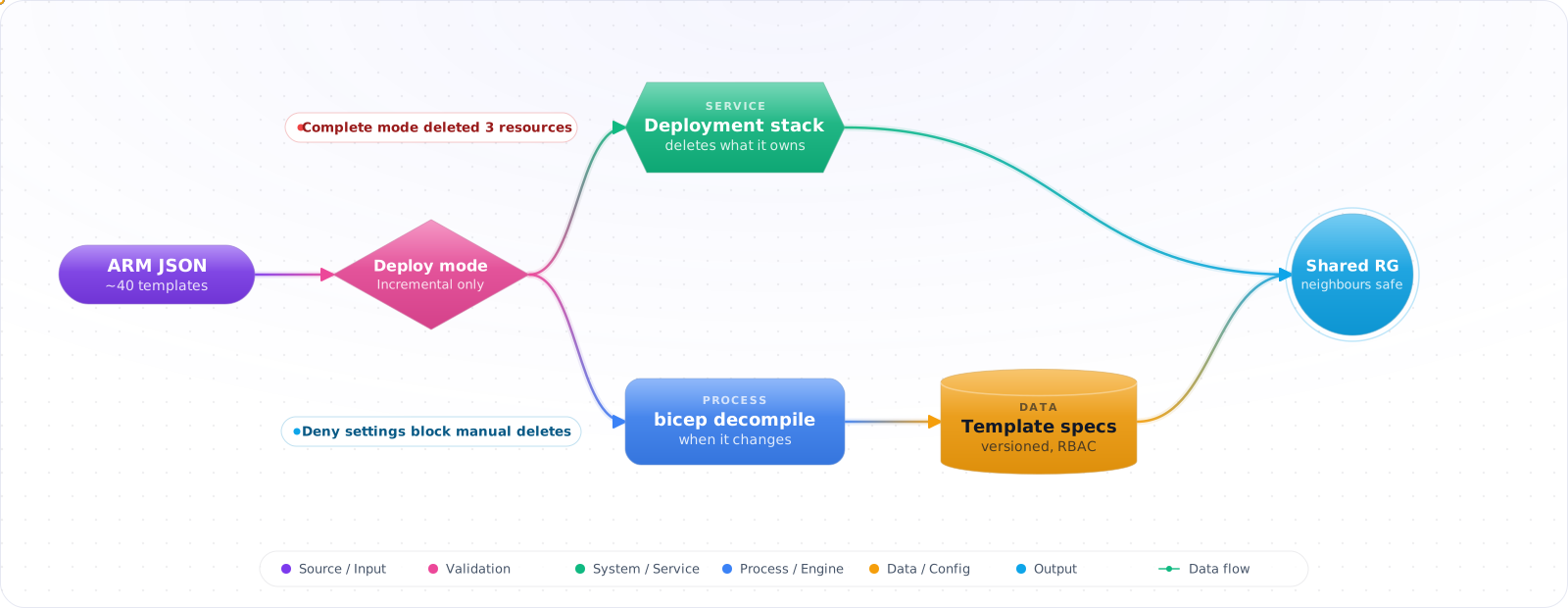
Take a typical case, made up for illustration. A team removed an unused cache from an ARM template and redeployed in Complete mode to clean it up. Complete mode deletes everything in the resource group that the template does not mention. The cache went, and so did a storage account and a function app another team had added to the same group.
ARM templates are still everywhere, and you will maintain some. Bicep compiles to them, so knowing how they work still pays. Below is the structure of a template, the sections that matter, dependencies, template specs, deployment modes (and why I avoid Complete), and when to move a template to Bicep.
- You deployed to dev by hand and now production is missing two security settings
- Your “infrastructure script” is a 400-line bash file that no one understands
- You need to onboard a new Azure region and dread the manual work
- Audit asks for a history of infrastructure changes — you have nothing
Core Structure
Every ARM template is a JSON document with a fixed schema:
{
  "$schema": "https://schema.management.azure.com/schemas/2019-04-01/deploymentTemplate.json#",
  "contentVersion": "1.0.0.0",
  "parameters": {
    "storageAccountName": {
      "type": "string",
      "minLength": 3,
      "maxLength": 24,
      "metadata": { "description": "Storage account name — globally unique" }
    },
    "sku": {
      "type": "string",
      "defaultValue": "Standard_LRS",
      "allowedValues": ["Standard_LRS", "Standard_GRS", "Premium_LRS"]
    }
  },
  "variables": {
    "location": "[resourceGroup().location]"
  },
  "resources": [
    {
      "type": "Microsoft.Storage/storageAccounts",
      "apiVersion": "2023-01-01",
      "name": "[parameters('storageAccountName')]",
      "location": "[variables('location')]",
      "sku": { "name": "[parameters('sku')]" },
      "kind": "StorageV2",
      "properties": {
        "minimumTlsVersion": "TLS1_2",
        "allowBlobPublicAccess": false,
        "supportsHttpsTrafficOnly": true
      }
    }
  ],
  "outputs": {
    "storageEndpoint": {
      "type": "string",
      "value": "[reference(parameters('storageAccountName')).primaryEndpoints.blob]"
    }
  }
}Check it: Deploy the same template to two environments, changing only the parameter file. If the template itself has to change, an environment name is hard-coded in it.
Key Sections Explained
Parameters
Parameters are the inputs to your template. They support types (string, int, bool, object, array, secureString), validation constraints (minLength, maxLength, allowedValues), and defaults. Use secureString for secrets — Azure redacts these from deployment logs.
Variables
Variables are computed once and reused throughout the template. They reduce repetition and let you centralise logic. The resourceGroup().location function is a classic variable use case — inherit location from the resource group rather than hard-code it.
Resources
The core array. Each resource needs type (e.g., Microsoft.Storage/storageAccounts), apiVersion, name, and location. Use learn.microsoft.com/azure/templates to look up exact schema for each resource type and API version. Pin the API version — never use latest.
Outputs
Outputs expose values from the deployment — resource IDs, endpoints, connection strings (avoid outputting secrets; use Key Vault instead). Outputs are essential when chaining templates: an outer template passes outputs from one child template as parameters to another.
DependsOn and Implicit Dependencies
ARM infers a dependency when you call reference() or a list* function on a resource in the same template, referred to by its name. resourceId() doesn't do that: [resourceId('Microsoft.Network/virtualNetworks', ...)] only builds an identifier string, so setting a subnet id with it creates no dependency. Use an explicit dependsOn in those cases, as in this role assignment:
{
  "type": "Microsoft.Authorization/roleAssignments",
  "apiVersion": "2022-04-01",
  "name": "[guid(resourceGroup().id, 'StorageBlobDataContributor')]",
  "dependsOn": ["[resourceId('Microsoft.Storage/storageAccounts', parameters('storageAccountName'))]"],
  "properties": {
    "roleDefinitionId": "[subscriptionResourceId('Microsoft.Authorization/roleDefinitions', 'ba92f5b4-...')]",
    "principalId": "[parameters('principalId')]"
  }
}
Template Specs and Linked Templates
For large deployments, split your template into reusable modules using Template Specs (the recommended modern approach) or Linked Templates (classic approach via accessible URL).
Template Specs are versioned ARM templates stored as Azure resources. You deploy them by referencing their resource ID:
{
  "type": "Microsoft.Resources/deployments",
  "apiVersion": "2022-09-01",
  "name": "networkModule",
  "properties": {
    "mode": "Incremental",
    "templateLink": {
      "id": "/subscriptions/.../resourceGroups/rg-templates/providers/Microsoft.Resources/templateSpecs/network-template/versions/1.0"
    },
    "parameters": { ... }
  }
}
Incremental vs Complete Mode
ARM templates support two deployment modes. Incremental (default) leaves resources that aren't in the template alone, but it still redeploys every resource that is, so a property you left out can go back to its default. Complete mode also deletes resources in the resource group that are not in the template, apart from a few documented exceptions, so it's dangerous and I wouldn't use it as a drift fix. Check --what-if before any deployment, and treat its output as a review aid, since some changes can show up as noise.
# What-if before any deployment
az deployment group what-if \
  --resource-group rg-production \
  --template-file main.json \
  --parameters @prod.parameters.json

# Deploy in incremental mode (safe default)
az deployment group create \
  --resource-group rg-production \
  --template-file main.json \
--parameters @prod.parameters.jsonCheck it: Run what-if against a shared resource group before you deploy. Read every line marked as a delete.
ARM vs Bicep — When to Use Each
Bicep compiles to ARM JSON — every Bicep template has an equivalent ARM template. In practice:
- New projects: Use Bicep. Cleaner syntax, type checking, native VS Code tooling, automatic dependency inference.
- Existing ARM investments: Keep ARM if it's working; migrate to Bicep incrementally using
az bicep decompile. - Low-level operations: ARM is still the foundation. Understanding ARM helps debug Bicep compilation output and interpret deployment errors.
- Cross-tool export: Azure portal's “Export template” produces ARM JSON — decompile it to Bicep as a starting point.
Production Checklist
- Pin API versions — never rely on defaults
- Use
secureStringfor passwords and connection strings - Always run
--what-ifbefore deployments affecting production - Store parameter files per environment; never hard-code environment names in the template
- Enable diagnostic settings and resource locks in the template — not as a post-deployment step
- Version your templates in Git; tag releases that match deployed infrastructure
- Use Template Specs for shared modules instead of copy-pasting JSON across repos
Try It on Your Own System This Week
Three checks on templates you still maintain, about an hour in total:
- Search your pipelines for Complete mode. Each use can delete resources the template doesn't list.
- List the API versions your templates pin. The old ones will be retired.
- Decompile one small template to Bicep. See how much clean-up the draft needs before it builds.
Living With ARM in 2026
Nobody should start a new project in ARM JSON. Bicep compiles to ARM, reads far better, and has full feature parity. But plenty of estates have thousands of lines of templates, so here's how I'd handle them.
Decompile with az bicep decompile --file template.json. It produces a first draft, with warnings where it couldn't work things out, and that draft may not build until you fix them. Expect to clean up names and split out modules by hand. Don't migrate everything at once. Convert a template the next time you need to change it, and rely on what-if to confirm that the Bicep version produces no changes against the deployed resources. That last check is what makes the migration safe.
Incremental and complete modes
Incremental is the default. It doesn't delete resources, so ones you remove from a template stay behind, but it does reapply the resources you keep, including defaults for properties you left out. Complete mode deletes whatever isn't in the template, and it has wiped out resources that were deployed by other means. I'd avoid it. Deployment stacks are the modern way to get proper cleanup, with much better safeguards.
Debugging failed deployments
ARM errors can be cryptic. Start with the deployment operations list, which shows which resource failed and why:
az deployment operation group list \
  --resource-group rg-app \
  --name main \
  --query "[?properties.provisioningState=='Failed'].properties.statusMessage"
Common causes are API versions, name collisions on globally unique resources, soft-deleted Key Vaults holding on to a name, and dependency ordering. Check whatIf output first, because it finds many of these with no deployment needed. Use the Azure Resource Graph to see what actually exists.
Keep API versions current
Old API versions are retired, and templates that pin them will eventually stop working. Update them periodically, and read the change notes. Newer versions can change defaults, so test in a lower environment. Run the ARM Template Toolkit (arm-ttk) in CI if you keep JSON templates around, as it catches many best-practice problems early. Secure parameters should use securestring, and should never appear in outputs, since deployment history stores outputs in plain text for anyone with read access.