Start With No Secrets
A local prototype that talks to nothing protected has no secrets to manage, and the best systems stay close to that. The fewer secrets you hold, the less there is to leak. The practices below are for the ones you can't avoid.
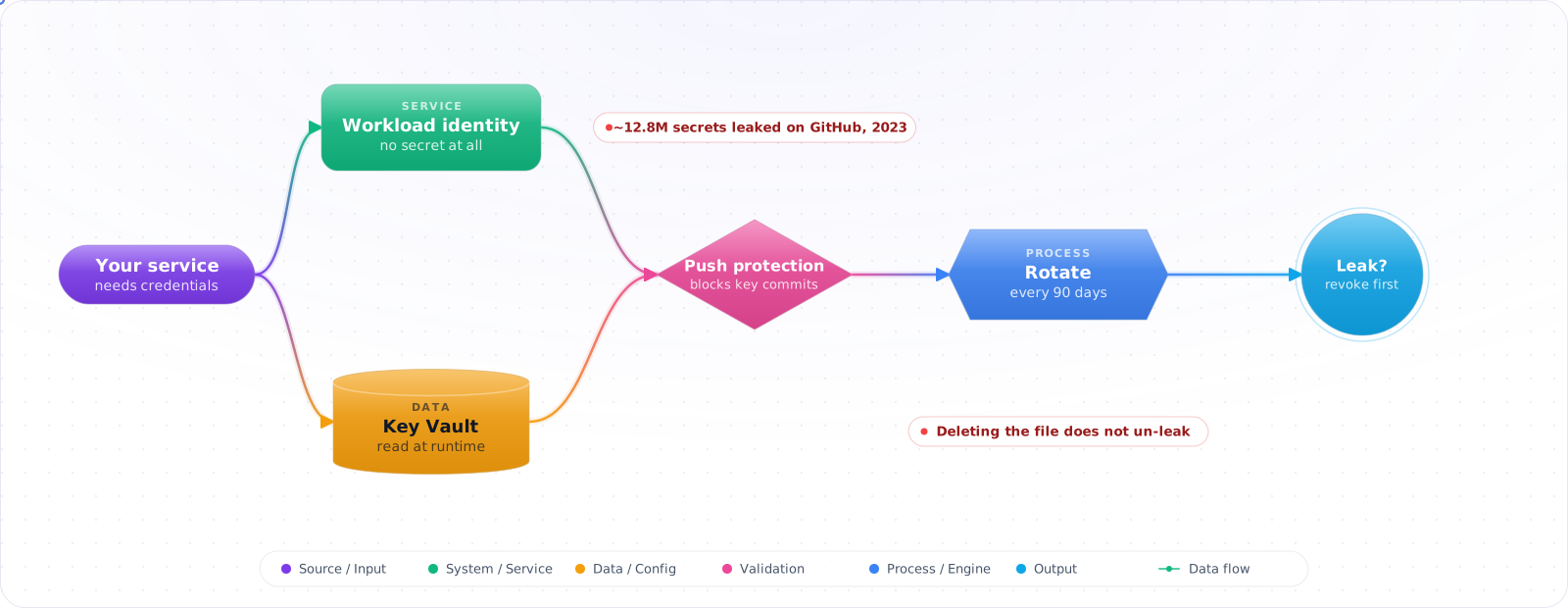
Someone commits a .env file in a hurry, notices, and deletes it in the next commit. It feels fixed. It is not: the key is still in Git history, possibly in a fork, and automated scanners crawl public repositories for exactly this. GitGuardian counted around 12.8 million secrets exposed in public GitHub commits in 2023 alone.
Good secrets management is mostly about having fewer secrets. Workload identity removes whole categories of them; a vault holds the rest in one audited place; push protection stops new ones reaching the repository; and rotation is a routine instead of a panic. Below is how each piece works, and what to do in the first hour after a leak.
git log -pin your repo would surface at least three live API keys- The same DB password has been in use since 2021
- Service accounts have
Owneron subscriptions “just in case” - When someone leaves, their PAT lives on for months
The 2026 baseline: a managed vault as the source of truth, workload identity instead of static keys, automated rotation, and pre-commit + CI secret scanning that fails the build.
The Hierarchy of Secret Quality
flowchart TB
    A[Workload Identity / mTLS<br/>no secret at all] --> B[Short-lived tokens from STS]
    B --> C[Vault-issued dynamic secrets]
    C --> D[Vault-stored static secrets, auto-rotated]
    D --> E[Static secrets in env vars, manually rotated]
    E --> F["Plaintext in .env in repo<br/>(don't)"]
    classDef bad fill:#fee
    class F bad
Climb as high as you can. Cloud-native services let you skip secrets entirely via managed identity, IRSA, or workload identity federation — always the first choice when available.
Check it: List the static keys your services hold. For each one, ask whether a managed identity could replace it.
The Vault Pattern
HashiCorp Vault, Azure Key Vault, AWS Secrets Manager, GCP Secret Manager,Doppler, 1Password Secrets Automation — pick one, standardize on it. Apps don't store secrets; they authenticate (using workload identity) and fetch on startup or on demand.
// Azure Key Vault from a Node.js app, no client secret in env
import { DefaultAzureCredential } from '@azure/identity';
import { SecretClient } from '@azure/keyvault-secrets';

const credential = new DefaultAzureCredential(); // managed identity in prod, az login locally
const client = new SecretClient(`https://${vaultName}.vault.azure.net`, credential);

const dbConn = (await client.getSecret('db-connection-string')).value!;

// AWS equivalent:
//   const sm = new SecretsManagerClient({});
//   const out = await sm.send(new GetSecretValueCommand({ SecretId: 'prod/db' }));
//
// GCP equivalent:
// const [version] = await client.accessSecretVersion({ name: 'projects/.../secrets/db/versions/latest' });Check it: Search your deployment settings and repositories for a credential. There should be none, only the means to authenticate to the vault.
Dynamic Secrets — The Step Beyond Storage
Vault's database secrets engine can issue brand new credentials on demand, scoped to the requester, with a short TTL. A microservice asks Vault for a Postgres credential; Vault creates a one-hour DB user, returns the creds, the app uses them, the user expires. The app never holds a long-lived password. AWS Secrets Manager and GCP Secret Manager work differently: they store and rotate secrets, and database IAM authentication is a separate feature that issues short-lived tokens.
Rotation
Static secrets must rotate on a schedule. Automate it; never make rotation a human task. Most vault platforms have built-in rotators for common backends (Postgres, MySQL, S3 keys, service principals). The rule of thumb:
| Secret type | Suggested starting interval (set yours by risk and compliance needs) |
|---|---|
| Database passwords | 30 days (or dynamic) |
| API keys to internal services | 90 days |
| Cloud service principals | 90 days, or replace with workload identity |
| Signing keys (JWT, code signing) | 1 year, overlapping with kid |
| Encryption keys (DEKs) | Yearly + on suspected compromise |
Check it: Rotate one credential in a test environment while the app is running. The app should pick up the new value with no restart.
Envelope Encryption
Don't encrypt large data with a vault-managed key directly — too slow, too many calls. Instead, generate a Data Encryption Key (DEK) per object, encrypt the data with the DEK, encrypt the DEK with a Key Encryption Key (KEK) held in the vault, and store the encrypted DEK next to the ciphertext. This is how AWS KMS, Azure Key Vault, and GCP KMS expect you to use them.
// Envelope encryption with AWS KMS
import { KMSClient, GenerateDataKeyCommand, DecryptCommand } from '@aws-sdk/client-kms';
import { createCipheriv, createDecipheriv, randomBytes } from 'node:crypto';

const kms = new KMSClient({});

async function encrypt(plaintext: Buffer) {
  const { Plaintext, CiphertextBlob } = await kms.send(new GenerateDataKeyCommand({
    KeyId: KMS_KEY_ARN, KeySpec: 'AES_256',
  }));
  const iv = randomBytes(12);
  const cipher = createCipheriv('aes-256-gcm', Buffer.from(Plaintext!), iv);
  const ct = Buffer.concat([cipher.update(plaintext), cipher.final()]);
  return { ct, iv, tag: cipher.getAuthTag(), wrappedKey: Buffer.from(CiphertextBlob!) };
}
Secret Scanning — Catch It Before It Lands
Three layers:
- Pre-commit:
gitleaks,detect-secretsas Husky/pre-commit hooks. Stops most accidents on the developer's machine. - CI: same scanners on every PR, fail the build on a finding.
- Provider-side: GitHub Secret Scanning + Push Protection, GitLab Secret Detection. Catches what slipped through.
Check it: Try to commit a fake key on a branch. The hook should stop it. If you bypass the hook, the push or the build should.
What to Do When a Secret Leaks
The clock starts the moment it's committed (even to a private repo — assume compromised). The response order is non-negotiable:
- Rotate the credential immediately. Don't wait to investigate first.
- Revoke all sessions and tokens issued with it.
- Review logs for use of the credential from unexpected sources.
- Purge history if possible (BFG, git-filter-repo). It's already public — treat this as evidence cleanup, not mitigation.
- Postmortem: how did it get there, and why didn't the pre-commit hook catch it?
Check it: Time a practice rotation of your most important key. If it needs an outage, fix that on a quiet day.
Local Development Without Real Secrets
Devs should never have prod credentials on a laptop. Patterns that work:
- Per-developer dev environments with their own dev-tier services and dev-tier secrets.
- Vault dynamic secrets scoped to a developer's identity, expiring at end of day.
- Doppler-style CLI wrappers (
doppler run -- npm start) that inject env vars at runtime, never write them to disk.
Pitfalls
One vault, many apps, no scoping
If every app can read every secret, the vault is just a slightly fancier .env. Scope access per workload identity to the exact secrets it needs. Audit access logs.
Rotation that breaks at the worst time
A rotation that requires a manual restart will be deferred forever. Apps must fetch secrets on demand (with a short cache) so that a rotation is picked up automatically — or be designed for zero-downtime credential swap.
Secret sprawl across CI providers
GitHub Actions secrets + Vercel envs + Doppler + a vault is four sources of truth. Pick the vault as canonical and sync (one-way) to CI providers via OIDC federation or a small sync job. Auditors will ask, and you should be able to answer in one place.
Try It on Your Own System This Week
Three checks on a team that handles credentials, about an hour in total:
- Run git log -p on one repository and search the output for keys. Anything you find is live until it is rotated.
- Check which secrets each workload can read. If every app can read everything, the vault is a fancier .env file.
- Test whether your coding agent can read your secret files. An ignore file isn't an enforced permission.
Secrets and AI Tools
AI tooling has opened new ways for secrets to leak. Developers paste a stack trace with a connection string into a chat. A coding agent reads .env to debug a problem, and the contents go into its context and maybe its logs. An MCP config file holds a long-lived token in plain text on a laptop. Each one sends a secret somewhere you didn't plan for.
Treat anything a model can read as potentially logged, and keep it minimal. Keep secret files out of your coding agent's reach. Ignore files often only affect indexing or context, so use enforced permission rules or a sandbox, and test that the agent really can't read those paths. Give agents short-lived, narrowly scoped credentials rather than your own. Use an MCP server's OAuth flow where one exists, instead of pasting a token into a config. In the tool layer, inject credentials server-side, so that the model never sees them.
Scan for secrets in more places as well: pre-commit hooks, CI, and your logs and traces, where prompts and tool results may have captured them. A trace store full of prompts is a secret store nobody planned to protect.
When something leaks, rotate first and investigate second. The moment a secret reaches a public repo, automated bots can find it in minutes, so deleting the commit is not a fix. Practise the rotation before you need it. If you can't rotate a key without an outage, then it's a liability, and that's worth fixing on a quiet day.