

Twenty Minutes to Write, Two Days to Review
You give a coding agent a ticket before lunch. By the time you sit back down there is a 3,000-line pull request. CI is green. It also renamed a shared helper, added a dependency nobody asked for, and “fixed” a flaky test by loosening the assertion. Reviewing it properly will take longer than writing it would have, and you can feel your team deciding to skim.
That is the actual skill gap with coding agents in 2026. Getting code out of them is easy. Getting code you can trust, at a size a person can review, takes a way of working. InfoQ's 2026 trends report has agentic coding among early adopters and spec-driven development among innovators, and those two belong together. The engineers I see getting the most from these tools spend more time on the problem and less on the typing.
- Your agent's pull requests are too big to review honestly
- You spend longer correcting the agent than you would have spent doing the work
- The agent is great on greenfield code and poor in your real codebase
- You have tried running several agents at once and ended up with a mess
The Loop That Works
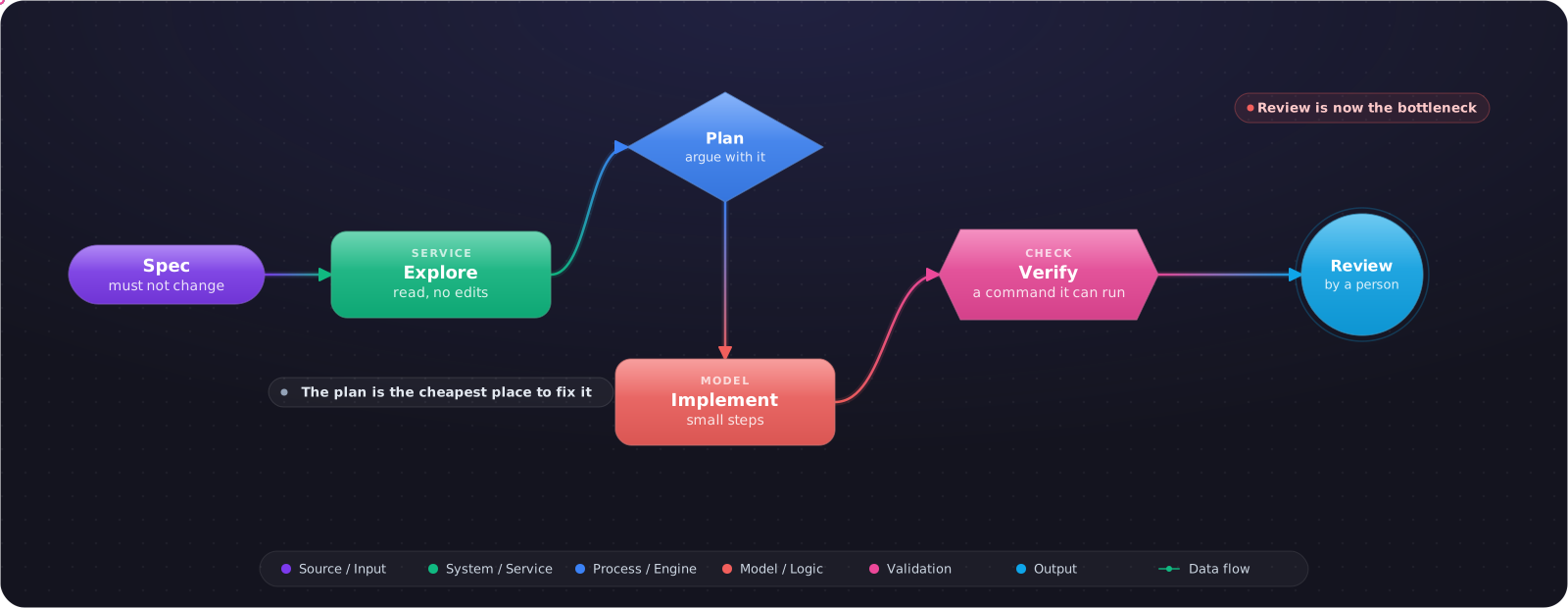
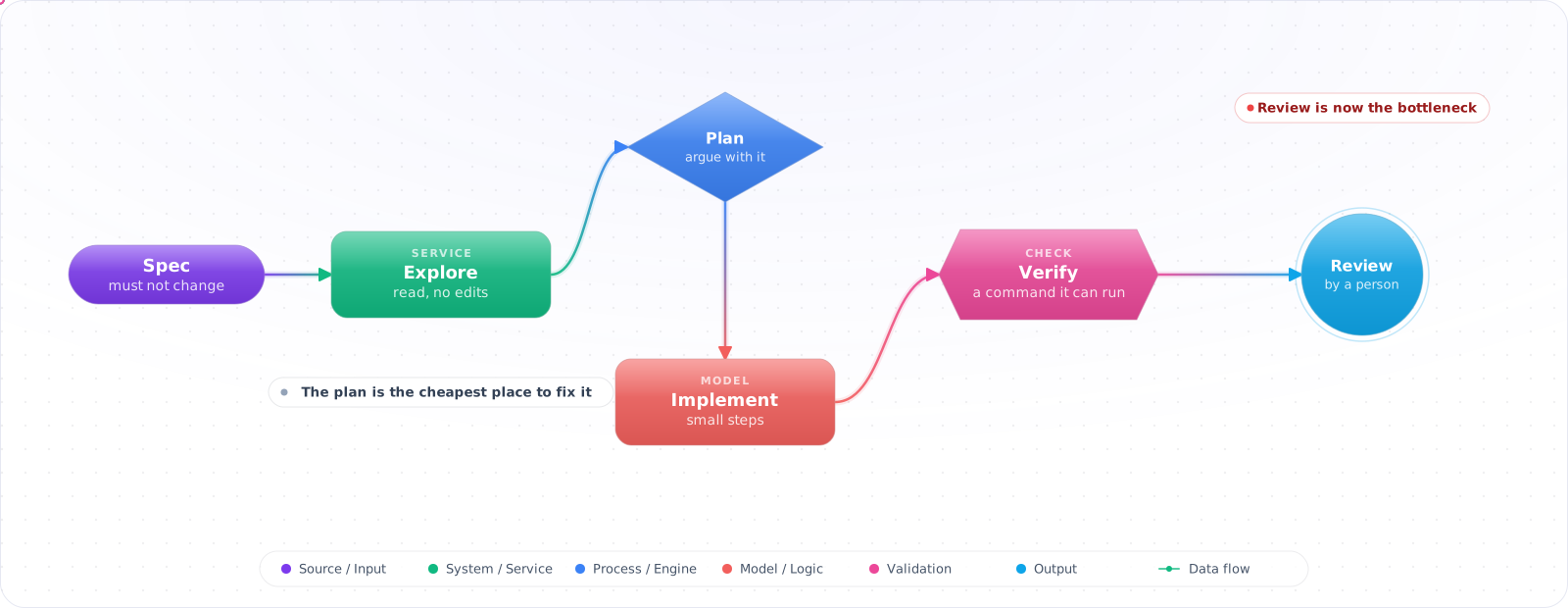
Whichever tool you use, the same five steps show up. Skipping the first two is the most common reason an agent goes off in the wrong direction.
flowchart LR
    E["Explore<br/>read, do not edit"] --> P["Plan<br/>agree the approach"]
    P --> I["Implement<br/>small steps"]
    I --> V["Verify<br/>tests, run it"]
    V -->|"fails"| I
    V --> R["Review<br/>a person reads the diff"]
    R -->|"changes"| I
    R --> M["Merge"]
- Explore. Ask it to read the relevant code and explain how the feature works today, with no edits. This fills the context with the right files, and shows you whether it has understood the problem.
- Plan. Get a short plan and argue with it. This is the cheapest place to catch a bad idea, because nothing has been written yet.
- Implement. One step at a time. If it starts going wrong, stop it early. A correction after two minutes costs far less than one after twenty.
- Verify. Give it a command to run and let it iterate. An agent with a failing test to fix is far better than one guessing at what you want.
- Review. Read the diff yourself. Reviewing agent-written code has its own habits.
Write the Spec First
Spec-driven development sounds heavier than it is. For anything larger than a bug fix, I write a page saying what should change, what must not change, and how we will know it worked, and I check it into the repo. On the InfoQ panel, Hien Luu described building a spec first, then having a brainstorming session with your coding agent, so it has the context it needs. Use the agent to find the holes in your spec, then have a fresh session implement it.
# Spec: per-tenant rate limits

## Change
Replace the global limit in RateLimitMiddleware with a limit per tenant.

## Must not change
- The 429 response body
- Behaviour for requests with no tenant

## Done when
- ./scripts/test.sh passes
- tests/load/tenant_limits.js shows tenant A at its limit while tenant B is unaffected

## Out of scope
Admin UI. Limits come from config for now.
The “must not change” and “out of scope” sections do most of the work. Agents are eager, and left alone they will tidy up things you didn't ask them to touch.
What to Give an Agent
| Hand it over | Work closely | Keep it yourself |
|---|---|---|
| Bug fix with a failing test | A new feature in a familiar area | Auth, payments and data migrations, at least the design |
| Mechanical migrations | Refactors across modules | Architecture decisions |
| Test coverage for existing code | Performance work | Anything you can't verify |
The test I use: can I check the result quickly and reliably? If yes, delegate. If checking it takes as long as doing it, the agent hasn't saved anything.
Running More Than One
Parallel agents work when the tasks don't touch the same files. Git worktrees give each one an isolated checkout:
git worktree add ../app-issue-412 -b fix/issue-412
git worktree add ../app-issue-418 -b fix/issue-418

# start one agent session in each directory, then clean up after merging
git worktree remove ../app-issue-412
Your limit here is review capacity. Three agents produce three pull requests, and the bottleneck moves straight to you. Past a certain point, more agents just produce more unreviewed code.
Choosing a Tool
Benchmarks here change monthly and conflict with each other, so choose by how you want to work.
| Style | Tools | Good for |
|---|---|---|
| Terminal agent | Claude Code | Deep, scriptable work, with hooks and subagents |
| Cloud and async | For example, Codex (which also runs locally) or GitHub Copilot coding agent | Delegating a task and getting a pull request back |
| In the editor | Cursor, VS Code with Copilot | Staying in your IDE and watching each change |
Try two on the same real ticket from your own repo. That tells you more than any ranking, and you can repeat it next quarter with very little effort.
What Goes Wrong
1. A session that never ends
One long session accumulates wrong turns and stale context, and quality drops. Start a new one for each task, and move what matters into your repo instructions.
2. Correcting forever
If you have corrected the same mistake twice, stop. Clear the session and write a better prompt that includes what you learned.
3. Letting it edit the tests to pass
Tell it not to, and check the diff. A changed assertion needs a reason.
4. Accepting code you don't understand
You are still responsible for what you merge, and at 2 a.m. you are the one who has to debug it. If you can't explain a change, ask the agent to walk you through it or send it back.
Measuring Whether It's Helping
It's easy to feel faster and not be. Track what your team ships, not how much code gets written: lead time, change failure rate and rework within two weeks. If output rises and failures rise with it, you've moved the work rather than removed it. Ask reviewers how they're coping as well, because that's where the strain shows up first. Try the same check on yourself: note how long a task took with the agent, including review and fixes, and compare honestly with how long it'd have taken you by hand.
What I Would Do First
Pick one annoying, well-tested bug. Have the agent explain the code, propose a plan, write a failing test, and fix it, and read every line. Then add what it got wrong to your AGENTS.md. Repeat that for a week before you try anything fancier.