Start With a Chatbot That Only Talks
A chatbot that only answers questions is a fine place to start. One model call per message is cheap, fast and easy to test, and for a pure question-and-answer product it's also where you stop. The work below begins on the day users ask it to do something.
You built a chatbot. It streams nicely and people use it. Then the requests start: can it check my order, open a ticket, remember what I told it yesterday? It cannot do any of that. It can only talk.
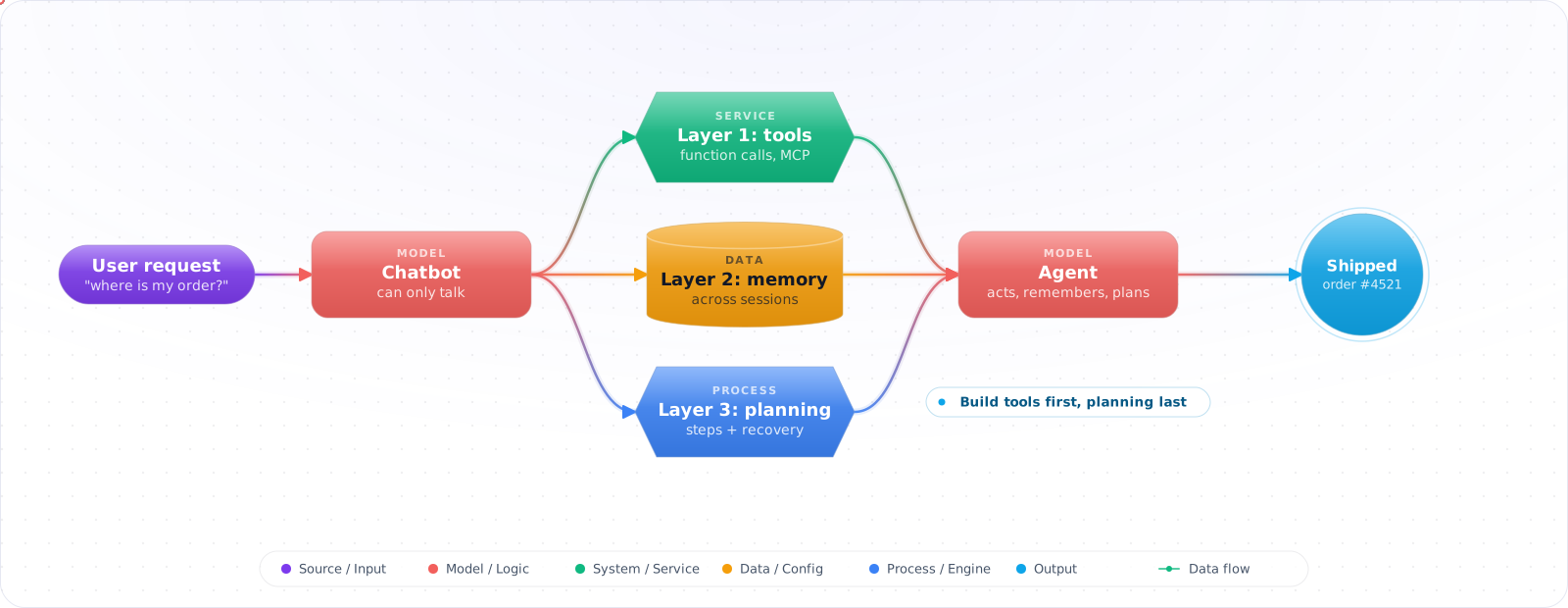
Getting from there to something that acts is a sequence, not a leap: tools first, so it can do things; memory next, so it can carry context; planning last, for tasks with several steps. Adding them one at a time matters, because each layer brings its own failures and you want to know which one broke. Below, each layer goes onto the same codebase, along with the point where a plain workflow beats an agent.
- You have a working chat interface but users keep asking it to do things it can't
- You want to add tool calling but aren't sure how to handle the back-and-forth between LLM and tools
- Your chatbot forgets everything between sessions and users are frustrated
- You need the chatbot to handle multi-step tasks like "book a room and send the confirmation"
Three Layers: Tools, Memory, Planning
A chatbot answers questions. An agent takes actions. The difference is three capabilities:
      flowchart TD
          CB["Chatbot\n(stateless Q&A)"] --> T["+ Tools\n(can take actions)"]
          T --> M["+ Memory\n(remembers context)"]
          M --> P["+ Planning\n(multi-step tasks)"]
          P --> A["Agent\n(autonomous assistant)"]

          style CB fill:#6b7280,color:#fff,stroke:#4b5563
          style T fill:#d97706,color:#fff,stroke:#b45309
          style M fill:#059669,color:#fff,stroke:#047857
          style P fill:#4f46e5,color:#fff,stroke:#4338ca
          style A fill:#7c3aed,color:#fff,stroke:#6d28d9
Layer 1: Tools
The LLM can request function calls. Your code executes them and returns results. The LLM incorporates results into its response. This is the difference between "I can tell you how to check order status" and "Your order #4521 shipped yesterday."
Layer 2: Memory
Persistent storage of conversation history and user context across sessions. Without memory, every conversation starts from zero. With memory, the agent knows your preferences, previous requests, and ongoing tasks.
Layer 3: Planning
The ability to decompose a complex request into steps, execute them in order, handle failures mid-plan, and report progress. "Book a room and send the confirmation" becomes: (1) search available rooms, (2) select best match, (3) create booking, (4) send confirmation email. Current frontier models expose a reasoning effort setting, and planning is one of the places worth testing a higher setting on your own tasks.
Adding Each Layer to a Real Chatbot
The samples use the OpenAI .NET SDK's Chat Completions client (OpenAI.Chat.ChatClient). Check your model's page before you pick this API for tool calling: OpenAI's GPT-6.1 Sol page says tool calling requires the Responses API, and GPT-6 Luna supports function calling in Chat Completions only with reasoning effort set to none. The loop itself is the same shape on either API.
Step 1: The Starting Chatbot
// The basic chatbot — stateless, no tools
using System.Text.Json;
using OpenAI.Chat;

public class SimpleChatbot
{
    private readonly ChatClient _client;

    public SimpleChatbot(ChatClient client) => _client = client;

    public async Task<string> ChatAsync(string userMessage)
    {
        var messages = new List<ChatMessage>
        {
            new SystemChatMessage("You are a helpful assistant."),
            new UserChatMessage(userMessage)
        };

        var response = await _client.CompleteChatAsync(messages);
        return response.Value.Content[0].Text;
    }
}
Check it: Send two messages in a row, the second one referring to the first. It answers the second as if the first never happened. That's the baseline every later step improves on.
Step 2: When users ask it to act, add tools
The model chooses which tool to call and with what arguments, so treat each call as untrusted input. The registry below rejects unknown tool names and malformed JSON, and asks the user before running anything with side effects. Each handler still checks that the current user is allowed to do what it asks; pass functionSchemaIsStrict: true to ChatTool.CreateFunctionTool if you want the arguments held to your schema.
public sealed record ToolResult(bool Ok, string Text);

public sealed record ToolDefinition(
    ChatTool Tool,
    Func<JsonElement, Task<string>> Handler,
    bool HasSideEffects = false);

public class ToolRegistry
{
    private readonly Dictionary<string, ToolDefinition> _tools = new();
    private readonly Func<string, string, Task<bool>> _confirm; // (tool, args) => did the user approve?

    public ToolRegistry(Func<string, string, Task<bool>> confirm) => _confirm = confirm;

    public void Register(ToolDefinition tool) => _tools[tool.Tool.FunctionName] = tool;
    public IEnumerable<ChatTool> GetAll() => _tools.Values.Select(t => t.Tool);
    public IEnumerable<string> Names => _tools.Keys;

    public async Task<ToolResult> ExecuteAsync(string name, string argumentsJson)
    {
        if (!_tools.TryGetValue(name, out var tool))
            return new ToolResult(false, $"Unknown tool '{name}'.");

        JsonDocument args;
        try { args = JsonDocument.Parse(argumentsJson); }
        catch (JsonException) { return new ToolResult(false, "Arguments were not valid JSON."); }

        using (args)
        {
            if (tool.HasSideEffects && !await _confirm(name, argumentsJson))
                return new ToolResult(false, "The user declined this action.");
            return new ToolResult(true, await tool.Handler(args.RootElement));
        }
    }
}

public class ToolEnabledChatbot
{
    private const int MaxToolRounds = 8;
    private readonly ChatClient _client;
    private readonly ToolRegistry _tools;

    public ToolEnabledChatbot(ChatClient client, ToolRegistry tools)
    {
        _client = client;
        _tools = tools;
    }

    public Task<string> ChatAsync(string userMessage) =>
        RunToolLoopAsync(new List<ChatMessage>
        {
            new SystemChatMessage("You are a helpful assistant with access to tools."),
            new UserChatMessage(userMessage)
        });

    // Appends every assistant and tool message to 'messages', so callers can keep the history.
    public async Task<string> RunToolLoopAsync(List<ChatMessage> messages)
    {
        var options = new ChatCompletionOptions
        {
            ToolChoice = ChatToolChoice.CreateAutoChoice()
        };
        foreach (var tool in _tools.GetAll())
            options.Tools.Add(tool);

        // Bounded loop: a confused model can't call tools forever and run up the bill.
        for (var round = 0; round < MaxToolRounds; round++)
        {
            ChatCompletion completion = await _client.CompleteChatAsync(messages, options);
            messages.Add(new AssistantChatMessage(completion));

            if (completion.FinishReason != ChatFinishReason.ToolCalls)
                return completion.Content.Count > 0 ? completion.Content[0].Text : "";

            foreach (var toolCall in completion.ToolCalls)
            {
                var result = await _tools.ExecuteAsync(
                    toolCall.FunctionName,
                    toolCall.FunctionArguments.ToString());

                // Failures go back to the model as text, so it can correct itself
                messages.Add(new ToolChatMessage(toolCall.Id, result.Ok ? result.Text : "Error: " + result.Text));
            }
        }

        return "I couldn't finish this within the tool-call limit.";
    }
}
Check it: Ask for a tool that doesn't exist, and send arguments that aren't valid JSON. The registry should reject both with a clear result, not an exception. Then ask for an action with a side effect and confirm that it asks you first.
Step 3: When users have to repeat themselves, add memory
Tools make it useful for one request. Without memory, every conversation still starts from zero, so store the history and send back only what fits.
// Your own persistence (a database table, Redis, ...) and a token counter for your model.
public interface IChatStore
{
    Task<List<ChatMessage>?> LoadHistoryAsync(string sessionId);
    Task SaveHistoryAsync(string sessionId, List<ChatMessage> history);
}

public interface ITokenCounter
{
    int Count(IEnumerable<ChatMessage> messages);
}

public class MemoryEnabledAgent
{
    private const int MaxHistoryTokens = 12_000;
    private readonly ToolEnabledChatbot _toolLoop;
    private readonly IChatStore _store;
    private readonly ITokenCounter _tokens;

    public MemoryEnabledAgent(ToolEnabledChatbot toolLoop, IChatStore store, ITokenCounter tokens)
    {
        _toolLoop = toolLoop;
        _store = store;
        _tokens = tokens;
    }

    public async Task<string> ChatAsync(string sessionId, string userMessage)
    {
        // Load conversation history
        var history = await _store.LoadHistoryAsync(sessionId)
            ?? new List<ChatMessage>
            {
                new SystemChatMessage("""
                    You are a helpful assistant. You remember previous
                    conversations. Reference past context when relevant.
                    """)
            };

        history.Add(new UserChatMessage(userMessage));

        // The Step 2 loop appends the assistant reply and any tool messages to history
        var reply = await _toolLoop.RunToolLoopAsync(history);

        if (_tokens.Count(history) > MaxHistoryTokens)
            history = TrimToRecentTurns(history);

        await _store.SaveHistoryAsync(sessionId, history);

        return reply;
    }

    // Keeps the system message and about the last 10 messages. It cuts on a user turn,
    // so a tool result never loses the assistant message that called it.
    private static List<ChatMessage> TrimToRecentTurns(List<ChatMessage> history)
    {
        var system = history.First();
        var start = Math.Max(1, history.Count - 10);
        while (start > 1 && history[start] is not UserChatMessage) start--;
        return new List<ChatMessage> { system }
            .Concat(history.Skip(start)).ToList();
    }
}
Check it: Tell it a preference, start a new session and ask about it. It should remember. Then hold a long conversation and watch the request size. It should stop growing once the older turns are trimmed.
Step 4: When one request needs several steps, add planning
Some requests are several actions in order, such as booking a room and then sending the confirmation. A plan makes those steps explicit, so a failure halfway has somewhere to be handled.
public sealed record PlanStep(string Action, JsonElement Params, string Purpose);
public sealed record Plan(List<PlanStep> Steps);
public sealed record StepResult(PlanStep Step, bool Success, string Output);

public class PlanningAgent
{
    private const int MaxPlanSteps = 10;
    private static readonly JsonSerializerOptions Json = new() { PropertyNameCaseInsensitive = true };
    private readonly ChatClient _client;
    private readonly ToolRegistry _tools;

    public PlanningAgent(ChatClient client, ToolRegistry tools)
    {
        _client = client;
        _tools = tools;
    }

    public async Task<string> HandleComplexTask(string userRequest)
    {
        // Step 1: Ask the model for a plan. With $$, {{...}} interpolates and single braces stay literal.
        var planPrompt = $$"""
            The user wants: {{userRequest}}
            Available tools: {{string.Join(", ", _tools.Names)}}

            Create a step-by-step plan using only those tools.
            Return JSON: {"steps": [{"action": "tool_name", "params": {}, "purpose": "why"}]}
            """;

        var plan = await GetPlanAsync(planPrompt);
        if (plan.Steps.Count > MaxPlanSteps)
            return $"That plan needs {plan.Steps.Count} steps; the limit is {MaxPlanSteps}.";

        // Step 2: Run the plan through the same registry as Step 2, so the same checks apply
        var results = new List<StepResult>();
        foreach (var step in plan.Steps)
        {
            ToolResult result;
            try
            {
                result = await _tools.ExecuteAsync(step.Action, step.Params.GetRawText());
            }
            catch (Exception ex)
            {
                result = new ToolResult(false, ex.Message);
            }

            results.Add(new StepResult(step, result.Ok, result.Text));

            // Stop at the first failure. Retry or re-plan here only if your tools are safe to repeat.
            if (!result.Ok) break;
        }

        // Step 3: Summarize results for the user
        return await SummarizeAsync(userRequest, results);
    }

    private async Task<Plan> GetPlanAsync(string prompt)
    {
        var options = new ChatCompletionOptions
        {
            ResponseFormat = ChatResponseFormat.CreateJsonObjectFormat()
        };
        ChatCompletion completion = await _client.CompleteChatAsync(
            [new UserChatMessage(prompt)], options);

        return JsonSerializer.Deserialize<Plan>(completion.Content[0].Text, Json)
            ?? throw new InvalidOperationException("The model returned an empty plan.");
    }

    private async Task<string> SummarizeAsync(string request, List<StepResult> results)
    {
        var log = string.Join("\n", results.Select(r =>
            $"- {r.Step.Action}: {(r.Success ? "done" : "failed")}: {r.Output}"));

        ChatCompletion completion = await _client.CompleteChatAsync(
            [new UserChatMessage($"The user asked: {request}\nSteps run:\n{log}\nTell the user what was done and what failed.")]);
        return completion.Content[0].Text;
    }
}
Check it: Make the second step of a plan fail, for example by having a tool return an error. The run should retry, skip or re-plan, and tell the user what happened. It must not carry on as if the step had worked.
Step 5: Send simple requests down the short path
Most messages need no plan. Classify each request first, so that only the multi-step ones pay for planning.
public enum TaskComplexity { Simple, MultiStep }

public class FullAgent
{
    private readonly ChatClient _client;
    private readonly MemoryEnabledAgent _memoryAgent;
    private readonly PlanningAgent _planningAgent;

    public FullAgent(ChatClient client, MemoryEnabledAgent memoryAgent, PlanningAgent planningAgent)
    {
        _client = client;
        _memoryAgent = memoryAgent;
        _planningAgent = planningAgent;
    }

    public async Task<string> ProcessAsync(string sessionId, string message)
    {
        // Classify: simple chat or complex task?
        var complexity = await ClassifyComplexity(message);

        return complexity switch
        {
            TaskComplexity.MultiStep => await _planningAgent.HandleComplexTask(message),
            _ => await _memoryAgent.ChatAsync(sessionId, message)
        };
    }

    private async Task<TaskComplexity> ClassifyComplexity(string message)
    {
        var response = await _client.CompleteChatAsync(new[]
        {
            new UserChatMessage($"""
                Classify this request:
                - "simple" if it's a question or single action
                - "multi_step" if it requires multiple actions in sequence

                Request: {message}
                Return only: simple or multi_step
                """)
        });

        return response.Value.Content[0].Text.Trim().Contains("multi_step")
            ? TaskComplexity.MultiStep
            : TaskComplexity.Simple;
    }
}
Check it: Log which path each request took for a day. Most should be simple. If nearly everything is classed as multi-step, the classifier is wrong and you're paying for plans nobody needed.
Layer 1 Without Writing Every Integration: MCP
The tools in this article are written by hand, which is the right way to learn the loop. In production, most tools you need already exist as Model Context Protocol servers: source control, issue trackers, databases, cloud providers, internal APIs. An MCP server publishes its tools with names, descriptions and schemas, and your agent discovers them at start-up instead of you coding each one.
The agent loop does not change. A tool is still a name, a schema and a result. What changes is where the tool comes from, and that brings two new responsibilities. Loading every tool from every server fills the context window and makes tool selection worse, so expose only the tools a task needs. And a server you did not write is code you are trusting with the model's attention, so review it and pin its version the way you would any dependency.
1. Adding all layers at once
Each layer multiplies the complexity and debugging surface. Add tools first, validate they work, then add memory, validate persistence, then add planning. Debugging a planning failure is nearly impossible if you're also unsure about your tool execution.
2. Unbounded tool-calling loops
Without a loop limit, the LLM can call tools indefinitely — especially if tool results are ambiguous. Set a maximum iteration count (I'd start around 5-10 and tune it from your traces) and break out with an "I couldn't complete this task" message if exceeded.
3. Storing raw chat history forever
Chat history grows with every turn, and tool call results are often verbose. Long before you hit the context limit, you are paying to resend old turns on every request. Trim or summarize: compress old turns into a summary while keeping recent turns verbatim.
4. Planning without failure handling
Plans that assume every step succeeds are fragile. Real-world tool calls fail — APIs time out, permissions are denied, data doesn't exist. Every plan needs error handling: retry, skip, or re-plan from the point of failure.
Try It on Your Own System This Week
Three checks on a chatbot you already run, about an hour in total:
- List the last twenty things users asked it to do. Look for requests it could only describe and not perform. The most common one is your first tool.
- Find the longest run from last week. Count its steps. If you can't find that number, you have no loop limit and no trace, and both come before any new layer.
- Send the same state-changing request twice. If the change happens twice, a retry after a timeout will do the same thing to a real customer. Fix that before you add planning.
The Checks to Add Before You Ship the Agent
A chatbot that gets something wrong produces a bad sentence. An agent that gets something wrong does something. That difference should change what you test. Before the first real user touches it, I'd want four things in place: a cost and turn limit on every run, so a loop can't run forever; a trace of every step, so you can answer "why did it do that?"; a confirmation step for anything with side effects; and an eval set that checks the actions taken, as well as the final text. None of this is glamorous, and all of it is much cheaper to add before launch. If the agent has write access to anything, read the agent security topic first.
- Add layers incrementally. Chatbot → tools → memory → planning. Each layer should be stable before adding the next. This is evolutionary architecture, not big-bang design.
- The tool-calling loop is the core pattern. LLM requests a function call → your code executes it → result goes back to the LLM. Master this loop; everything else builds on it.
- Memory makes the agent useful. Users won't adopt a tool that forgets everything between sessions. Even simple session-based history dramatically improves the experience.
- Planning is optional for many use cases. In my view, tools plus memory cover most requests. Add planning only when users genuinely need multi-step workflows, because it adds significant complexity. Frameworks run the tool loop for you: Semantic Kernel's
ChatCompletionAgent(with function calling enabled explicitly in C#) and its successor, Microsoft Agent Framework'sChatClientAgent. Building the loop by hand once still shows you what they do. - Set limits everywhere. Max tool calls per turn, max history length, max plan steps. Without limits, agents loop, costs spiral, and users wait forever.