Start With a Plain Model Call
If the model only has to answer in words, you don't need tools. A plain call is simpler, and there's nothing to validate. Function calling is for the moment the model has to look something up or do something, and the tempting shortcut at that point is the one described next.
The first time you need a model to do something (look up an order, run a calculation, open a ticket), the tempting approach is to ask it to describe the action as JSON and parse the reply. It works in testing. In production the replies arrive with prose around the JSON, renamed fields, and arguments the user never mentioned.
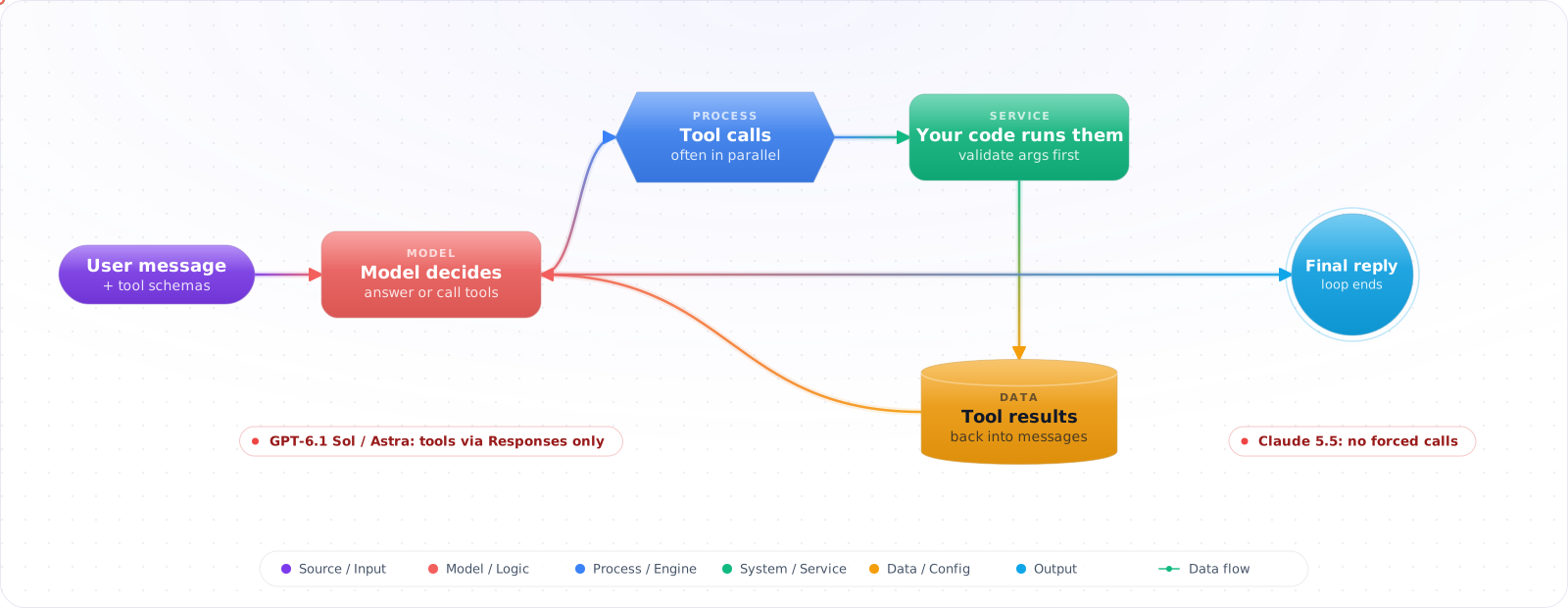
Function calling is the fix: you describe your functions as typed tools, and the model returns structured calls for your code to validate and run. The model never executes anything; your loop does. That loop is the part to get right: schemas, validation, errors fed back to the model, parallel calls, step limits, and the provider differences that break portable code.
- You're regex-parsing LLM outputs to extract structured data, and it breaks on edge cases
- You have an agent loop that sometimes calls the wrong tool because the descriptions are vague
- You need the model to trigger external actions (database query, API call) based on conversation context
- Your LLM sometimes calls a tool with invalid arguments and your code throws at runtime
Well-defined tool schemas remove the parsing layer, and with strict mode on, the arguments arrive in the shape your function expects. You still validate what they mean.
Tool Schema Design
The model selects tools and generates arguments based entirely on your schema descriptions. Bad descriptions mean wrong tool selection. Treat tool descriptions like API documentation — write them for someone who can't see your code.
sequenceDiagram
    participant User
    participant LLM
    participant App
    participant DB

    User->>LLM: "Show me orders from last week over $500"
    LLM->>App: tool_call: searchOrders({minAmount:500, dateFrom:"2025-01-13"})
    App->>DB: SELECT * FROM orders WHERE ...
    DB->>App: [{id: 123, amount: 750, ...}, {id: 456, ...}]
    App->>LLM: tool_result: [{id:123, ...}, {id:456, ...}]
    LLM->>User: "Found 2 orders: order #123 for $750..."
import OpenAI from 'openai';

const openai = new OpenAI();

// Define tools with precise descriptions — the model reads these
const tools: OpenAI.Chat.Completions.ChatCompletionTool[] = [
  {
    type: 'function',
    function: {
      name: 'searchOrders',
      description: `Search customer orders by date range and amount.
        Use when the user asks about orders, purchases, or transactions.
        Returns an array of order objects with id, amount, status, and date.`,
      parameters: {
        type: 'object',
        properties: {
          minAmount: {
            type: 'number',
            description: 'Minimum order amount in USD. Omit if no minimum.',
          },
          maxAmount: {
            type: 'number',
            description: 'Maximum order amount in USD. Omit if no maximum.',
          },
          dateFrom: {
            type: 'string',
            description: 'Start date in ISO 8601 format (YYYY-MM-DD). Omit for all dates.',
          },
          dateTo: {
            type: 'string',
            description: 'End date in ISO 8601 format (YYYY-MM-DD). Omit for today.',
          },
          status: {
            type: 'string',
            enum: ['pending', 'processing', 'shipped', 'delivered', 'cancelled'],
            description: 'Filter by order status. Omit to return all statuses.',
          },
        },
        required: [],  // All params optional — model decides what to include
        additionalProperties: false,
      },
    },
  },
];Check it: Give the tool descriptions to a colleague who hasn't seen the code, and ask which tool they'd call for five real requests. Where they hesitate, the model will too.
The Conversation Loop
type Message = OpenAI.Chat.Completions.ChatCompletionMessageParam;

// Tool implementations
const toolHandlers: Record<string, (args: unknown) => Promise<unknown>> = {
  searchOrders: async (args) => {
    // CRITICAL: validate args before executing
    const parsed = SearchOrdersSchema.parse(args); // Zod validation
    return db.orders.findMany({
      where: {
        amount: { gte: parsed.minAmount, lte: parsed.maxAmount },
        createdAt: { gte: parsed.dateFrom, lte: parsed.dateTo },
        status: parsed.status,
      },
    });
  },
};

const MAX_STEPS = 8;  // A loop without a cap can run (and bill) forever

async function runAgentLoop(userMessage: string): Promise<string> {
  const messages: Message[] = [
    { role: 'system', content: 'You are a helpful order management assistant.' },
    { role: 'user', content: userMessage },
  ];

  // Loop until the model stops calling tools, or the step limit is hit
  for (let step = 0; step < MAX_STEPS; step++) {
    const response = await openai.chat.completions.create({
      model: 'gpt-6-luna', reasoning_effort: 'none',
      messages,
      tools,
      tool_choice: 'auto',  // model decides when to call tools
    });

    const message = response.choices[0].message;
    messages.push(message);

    // No tool calls → final text response
    if (!message.tool_calls?.length) {
      return message.content ?? '';
    }

    // Execute each tool call
    for (const toolCall of message.tool_calls) {
      let result: unknown;
      if (toolCall.type !== 'function') {
        result = { error: 'Only function tools are supported' };
      } else {
        const handler = toolHandlers[toolCall.function.name];
        try {
          // Bad JSON or a failed Zod parse becomes an error the model can read
          result = handler
            ? await handler(JSON.parse(toolCall.function.arguments))
            : { error: 'Tool not found: ' + toolCall.function.name };
        } catch (error) {
          result = { error: (error as Error).message };
        }
      }

      // Append tool result to conversation
      messages.push({
        role: 'tool',
        tool_call_id: toolCall.id,
        content: JSON.stringify(result ?? null),
      });
    }
    // Loop continues — model sees tool results and decides next step
  }
  return 'Stopped after ' + MAX_STEPS + ' steps without a final answer.';
}Check it: Make a tool throw. The loop should still append a tool message with the error, and the model should recover or explain. Then make a tool fail every time, and confirm the loop stops at its step limit.
Parallel Tool Calls
// When the model calls multiple tools in one turn, execute them in parallel
// This is a performance optimisation — the model already decided to call all of them

const response = await openai.chat.completions.create({
  model: 'gpt-6-luna', reasoning_effort: 'none',
  messages,
  tools,
});

const toolCalls = response.choices[0].message.tool_calls ?? [];

// Execute all tool calls in this turn concurrently
const toolResults = await Promise.all(
  toolCalls.map(async (toolCall) => {
    let result: unknown;
    try {
      if (toolCall.type !== 'function') throw new Error('Unsupported tool type');
      const handler = toolHandlers[toolCall.function.name];
      if (!handler) throw new Error('Tool not found: ' + toolCall.function.name);
      result = await handler(JSON.parse(toolCall.function.arguments));
    } catch (error) {
      // One failing call must not reject the whole Promise.all
      result = { error: (error as Error).message };
    }
    return {
      role: 'tool' as const,
      tool_call_id: toolCall.id,
      content: JSON.stringify(result ?? null),
    };
  })
);

messages.push(response.choices[0].message, ...toolResults);Check it: Ask something that needs two independent lookups and time it. The total should be close to the slower of the two, not the sum. Then make one of them fail, and confirm the other result still reaches the model.
Controlling Tool Use
// tool_choice controls whether and which tools the model uses

// auto — model decides (default)
tool_choice: 'auto'

// none — never use tools (text-only response)
tool_choice: 'none'

// required — must call at least one tool
tool_choice: 'required'

// specific function — must call this exact function
tool_choice: { type: 'function', function: { name: 'searchOrders' } }

// Use 'required' for structured data extraction tasks:
// "Extract the key details from this support ticket"
// + required tool: extractTicketDetails
// The model must return a tool call; add strict: true so the arguments also match the schema
Provider Rules That Break Portable Tool Code
The tool-calling loop is the same everywhere, but the request rules are not, and they changed with the 2026 model generations. Code that ran unchanged against GPT-4o and Claude 3.5 now fails in three specific places.
| What you send | OpenAI (GPT-6 family) | Anthropic (Claude 5.5 models) |
|---|---|---|
| Tools on the chat endpoint | GPT-6.1 Sol and Astra accept tools only through the Responses API. Chat Completions tool calling works on GPT-6 Luna with reasoning effort set to none. | Works on the Messages API for every tier. |
| Forcing a tool call | tool_choice: 'required' or a named function is still accepted. | Forced tool choice (any or a named tool) is rejected on Fable 5.2, Opus 5.5 and Sonnet 5.5. Only auto and none work. |
| Sampling parameters | temperature and top_p are rejected unless reasoning effort is none. | Setting temperature, top_p or top_k returns a 400 error on Sonnet 5.5. Check each model's page. |
The practical consequence: do not build your design around forcing a call. If you were forcing a tool only to get JSON back, use structured outputs instead, which every current provider supports. If you genuinely need the model to call one specific tool, keeptool_choice on auto, say so in the instructions, and validate that the call happened before you continue.
Strict mode: make argument validation the provider's job
Both OpenAI and Anthropic let you mark a tool definition as strict. In strict mode the arguments are guaranteed to match your JSON Schema, so the missing-field and wrong-type failures disappear. The cost is a tighter schema. Both require additionalProperties: false. OpenAI also requires every property to be listed in required, so you express an optional field as a union with null. Anthropic's strict mode accepts optional properties left out of required.
const searchOrders = {
  type: 'function',
  name: 'searchOrders',
  description: 'Find orders for a customer. Use when the user asks about order status.',
  strict: true,
  parameters: {
    type: 'object',
    properties: {
      customerId: { type: 'string' },
      status: { type: ['string', 'null'], enum: ['open', 'shipped', 'cancelled', null] },
    },
    required: ['customerId', 'status'],   // strict mode: every property is required
    additionalProperties: false,          // strict mode: no extra keys
  },
};
Strict mode guarantees the shape, not the meaning. A schema-valid customerId can still belong to a different user, so the authorisation check in your handler stays.
Check it: Turn strict mode on and repeat a request that used to come back with a missing field. The shape should now be right every time. Then pass a valid ID that belongs to another user, and confirm your handler still refuses it.
Try It on Your Own System This Week
Three checks on a tool-calling feature you already run, about an hour in total:
- Read your tool descriptions cold. Could someone who can't see the code tell when to use each one, and what each argument means? That's the model's position on every request.
- Send arguments the model shouldn't send. An ID that belongs to another user, a number out of range, a path with dots in it. Your code should refuse each one.
- Call a write tool twice with the same arguments. If the action happens twice, a retry will do the same thing in production.
Pitfalls
Trusting model-generated arguments directly
Never execute a tool call with unvalidated model output. The model can hallucinate argument values, generate SQL fragments, produce out-of-range numbers, or construct paths that traverse directories. Always validate against a schema (Zod, Joi, AJV) before passing to your handler. Treat LLM-generated arguments like untrusted user input.
Overloading a single tool
A callDatabase(sql: string) tool that accepts raw SQL is a security and reliability disaster. Use narrow, typed tools with explicit parameters. The model should be selecting typed parameters — not constructing strings that your code interprets.
Missing tool call IDs in history
Every tool_calls entry in the assistant message must have a corresponding tool message with the matchingtool_call_id. Missing a tool result causes an API error on the next turn. If a tool fails, still append a tool message with an error description so the model can gracefully handle it.
Designing Tools for a Model, Not a Developer
An API designed for developers usually makes a poor tool. Developers read documentation once and can chain six calls. A model reads your description on every request, and it benefits from one tool that does the whole job. Wrapping list_users, get_user and update_user one-to-one often works worse than a single update_customer_email(email, new_email) that handles the lookup itself. Anthropic's guidance on writing tools for agents makes the same point: build tools around tasks rather than around your endpoints.
Keep responses small and meaningful. Return names rather than opaque IDs where you can, cap the number of rows, and offer pagination. Each extra field is paid for and has to be read. Make errors actionable as well, since the error text is what the model uses to recover. "Date must be YYYY-MM-DD, got 03/04" gets fixed on the next turn. "Invalid input" gets retried unchanged.
Tool calls are untrusted output
The arguments come from a model that may have read a poisoned document, so validate them as you would any public input. Check them against the schema, and then against your business rules. Never pass them to eval, a shell or a raw SQL string. Check authorisation in the tool itself, using the real user's identity rather than anything in the arguments.
For tools that change something, require a confirmation step or an idempotency key, because agents retry, and a repeated charge_card is a serious bug. Mark which tools are read-only so you can run those freely and in parallel, while anything with side effects goes through a stricter path.
Measure tool selection too. Keep a small set of requests with the expected tool and run it after any change to a description. Tool definitions are prompts, and they regress the same way prompts do.
When to use MCP
If one app calls its own functions, plain function calling is simpler. Once several apps need the same tool, publish it through MCP.