Start With a Normal Request
While a model call returns in a couple of seconds, a plain request and response is the right design. It's the simplest thing to build, test and debug. The patterns below are for when the calls get long, or when nobody is waiting for the answer.
A large-model request takes anywhere from two seconds to well over a minute, depending on how much it writes. Put that inside a normal synchronous API call and you inherit all of it: users watching a spinner, worker threads blocked, and a proxy somewhere cutting the connection at 60 seconds after you have already paid for the tokens.
The fix depends on whether anyone is watching. Interactive answers should stream, so the first words appear in under a second. Everything else (summaries, classification, moderation, embeddings, reports) belongs on a queue, handled by workers that scale on their own and can retry safely. Below I build that asynchronous side: events, queues, idempotent workers and progress reporting.
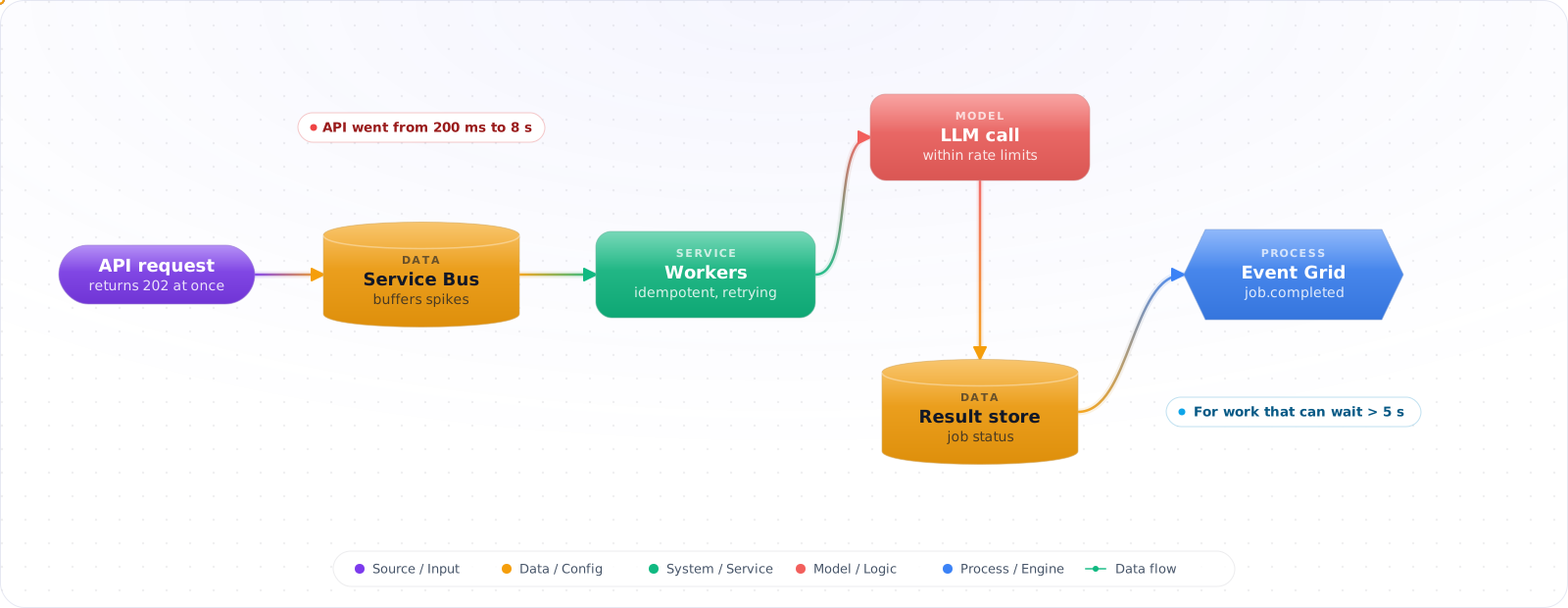
- Your API response times went from 200ms to 8 seconds after adding LLM calls to the request path
- Users are staring at loading spinners while the backend waits for the model to finish
- Your LLM rate limits kill throughput when 50 requests hit at once
- A single failed LLM call causes the entire request to fail with no retry
Events, Queues and Workers
The core idea: instead of calling the LLM inline during a user request, publish an event ("document uploaded", "review requested") and let a background processor handle the AI work. The user gets an immediate acknowledgment; the AI result arrives when it's ready.
      flowchart LR
          subgraph Request Path - Fast
              A["User Upload"] --> B["API - Validate & Store"]
              B --> C["Publish Event"]
              C --> D["Return 202 Accepted"]
          end

          subgraph Processing Path - Async
              E["Service Bus Queue"] --> F["AI Worker"]
              F --> G["Call LLM"]
              G --> H["Store Result"]
              H --> I["Notify User"]
          end

          C --> E

          style A fill:#059669,color:#fff,stroke:#047857
          style D fill:#059669,color:#fff,stroke:#047857
          style F fill:#4f46e5,color:#fff,stroke:#4338ca
          style G fill:#7c3aed,color:#fff,stroke:#6d28d9
When to Go Async
Use event-driven patterns when:
- Latency tolerance > 5 seconds. If users can wait for a notification, don't block the request.
- Batch processing. Embedding 10,000 documents, classifying a backlog, generating reports.
- Fan-out workloads. One input triggers multiple AI tasks (summarize + classify + extract entities).
- Retry requirements. LLM calls fail. Queues give you built-in retry with dead-letter handling.
Keep synchronous when:
- Chat/conversational interfaces where the user expects to see tokens streaming back.
- Sub-second classification that gates a UI decision (e.g., content safety check before showing content).
Azure Messaging Services for AI Pipelines
Azure Service Bus — Your primary choice for AI task queues. Supports sessions (ordered processing per entity), dead-letter queues (failed LLM calls), and scheduled delivery (rate-limit your LLM calls). Use queues for point-to-point processing, topics for fan-out.
Azure Event Grid — For event routing and triggering. When a blob is uploaded to storage, Event Grid triggers your processing pipeline. It's the router, not the queue: low latency and push-based, and an undelivered event is only retried for up to 24 hours by default before it's dropped or dead-lettered.
Azure Event Hubs — For high-throughput ingestion when you're processing thousands of AI requests per second (telemetry classification, log analysis). Overkill for most AI pipelines but essential at scale.
Building the Pipeline
Pattern 1: When a job runs for minutes, put it on a queue
The request only records the work and returns. A worker picks the message up and calls the model, so no connection is held open while it writes.
      flowchart TD
          A["Blob Upload"] -->|"Event Grid"| B["Orchestrator Function"]
          B --> C["Service Bus: chunk-queue"]
          B --> D["Service Bus: metadata-queue"]

          C --> E["Chunking Worker"]
          E --> F["Service Bus: embed-queue"]
          F --> G["Embedding Worker"]
          G --> H["AI Search Index"]

          D --> I["Metadata Extractor"]
          I --> J["Cosmos DB"]

          H --> K["Notify: Ready for RAG"]
          J --> K

          style B fill:#4f46e5,color:#fff,stroke:#4338ca
          style G fill:#7c3aed,color:#fff,stroke:#6d28d9
          style I fill:#059669,color:#fff,stroke:#047857
// Azure Function: Service Bus triggered AI worker
[Function("ProcessDocument")]
public async Task Run(
    [ServiceBusTrigger("ai-tasks", Connection = "ServiceBusConnection", AutoCompleteMessages = false)]
    ServiceBusReceivedMessage message,
    ServiceBusMessageActions messageActions)
{
    var task = JsonSerializer.Deserialize<AiTask>(message.Body);

    try
    {
        var result = task.Type switch
        {
            "summarize" => await _llmService.SummarizeAsync(task.Content),
            "classify" => await _llmService.ClassifyAsync(task.Content),
            "embed" => await _llmService.EmbedAsync(task.Content),
            _ => throw new ArgumentException($"Unknown task: {task.Type}")
        };

        await _resultStore.SaveAsync(task.Id, result);
        await messageActions.CompleteMessageAsync(message);
    }
    catch (System.ClientModel.ClientResultException ex) when (ex.Status == 429)
    {
        // Rate limited (Azure.AI.OpenAI 2.x throws ClientResultException).
        // Abandon releases the lock at once and bumps DeliveryCount, so the
        // message comes straight back. For a real backoff, schedule a copy
        // for later and complete this one.
        await messageActions.AbandonMessageAsync(message);
    }
}
Check it: Stop the worker halfway through a job and start it again. The job should finish once, with one result. Then send a message that can never succeed, and confirm it ends up in the dead-letter queue where you'll see it.
Pattern 2: Fan-Out / Fan-In with Durable Functions
When a single input needs multiple AI operations that converge into one result:
// Orchestrator: fan-out AI tasks, fan-in results
[Function("AnalyzeDocument")]
public async Task<AnalysisResult> RunOrchestrator(
    [OrchestrationTrigger] TaskOrchestrationContext context)
{
    var document = context.GetInput<Document>();

    // Fan-out: run 3 AI tasks in parallel
    var summaryTask = context.CallActivityAsync<string>(
        "Summarize", document.Content);
    var entitiesTask = context.CallActivityAsync<List<Entity>>(
        "ExtractEntities", document.Content);
    var sentimentTask = context.CallActivityAsync<string>(
        "AnalyzeSentiment", document.Content);

    await Task.WhenAll(summaryTask, entitiesTask, sentimentTask);

    // Fan-in: combine results
    return new AnalysisResult
    {
        Summary = summaryTask.Result,
        Entities = entitiesTask.Result,
        Sentiment = sentimentTask.Result
    };
}
Check it: Make one of the parallel tasks fail. Decide beforehand what you expect, a partial result or a failed job, and confirm that's what you get.
Pattern 3: Rate-Controlled Batch Processing
When you need to process thousands of items but your LLM endpoint has TPM limits:
// Configure Service Bus processor with concurrency control
var processor = client.CreateProcessor("embed-queue", new ServiceBusProcessorOptions
{
    MaxConcurrentCalls = 5,  // Size from your TPM budget (see below)
    AutoCompleteMessages = false,
    MaxAutoLockRenewalDuration = TimeSpan.FromMinutes(10)
});
Size MaxConcurrentCalls from your Azure OpenAI deployment's TPM limit. TPM divided by average tokens per request gives you requests per minute, not concurrency: multiply that by the average call duration in minutes to get the number of calls you can have in flight. Concurrency caps in-flight work, not the request rate, so short calls can still hit 429s; keep the 429 handling.
Check it: Queue far more work than your quota allows and watch it drain. Throughput should hold steady just under the limit, with few 429s. Bursts followed by waves of retries mean the concurrency is set too high.
Try It on Your Own System This Week
Three checks on an application that already calls a model, about an hour in total:
- Find your slowest model call. Look at the longest durations from last week, not the average. Anything close to a timeout in your proxy or load balancer is the first job to move.
- Ask of each call whether anyone is watching. If someone is, stream it. If nobody is, it belongs on a queue.
- Look in the dead-letter queue. If you have one and never read it, failed jobs are piling up there. If you don't have one, they're disappearing somewhere less visible.
Failure Modes of Async AI Work
1. No dead-letter handling
LLM calls fail for many reasons: rate limits, content policy violations, malformed inputs, model timeouts. If you don't configure dead-letter queues and monitor them, failed tasks silently disappear. Set MaxDeliveryCount to 3–5 and actively process the dead-letter queue.
2. Message lock expiration during long LLM calls
Service Bus default lock duration is 1 minute, and the maximum is 5 minutes. A reasoning model such as GPT-5.6 Sol on Azure OpenAI can take longer than that for long outputs. If the lock expires, another consumer picks up the same message, and you get duplicate processing. Raise the lock duration or use auto-lock-renewal (the Functions trigger renews for up to 5 minutes by default; raise maxAutoRenewDuration in host.json for longer calls).
3. Ordering assumptions
Service Bus queues don't guarantee ordering across consumers. If document chunks must be processed in order (e.g., for context-dependent summarization), use Service Bus sessions with a session ID per document.
4. Missing idempotency
Messages can be delivered more than once (at-least-once semantics). If your AI worker writes results without checking if they already exist, you'll get duplicate entries. Store a processing record keyed by message ID and check before processing.
5. Tight coupling through message schemas
If your event schema includes LLM-specific details (model name, temperature), you couple every producer to your AI implementation. Keep events domain-focused ("DocumentUploaded") and let the consumer decide which model to use.
Backpressure and Batch
Model APIs have rate limits, so a queue needs a consumer that respects them. Limit concurrency to what your quota allows, and back off on 429s. Otherwise a backlog just becomes a retry storm. For anything that can wait, use the batch API: it costs half as much, and it removes rate-limit pressure. Track queue age alongside queue depth, because age is what tells you whether users are waiting too long. Make sure each stage is idempotent, too, since a retry should never produce a second email or a second charge.
Showing Progress to Users
Async work needs a clear contract with the user. Return a job ID at once, and offer progress through polling or server-sent events. Store the status in your own table, so that a refreshed page can find it. Decide what happens to jobs nobody's waiting for any more, since finishing an abandoned job still costs money. A cancel button pays for itself.
- Default to async for any AI workload that doesn't need streaming responses. The reliability and scalability benefits are immediate.
- Use Service Bus for AI task queues — built-in retries, dead-letter, sessions, and scheduled delivery cover most of the failure modes you'll meet.
- Control LLM throughput with consumer concurrency first.
MaxConcurrentCallson the Service Bus processor is your main throttle; still handle 429s, because concurrency doesn't cap the request rate. - Durable Functions for fan-out/fan-in when one input needs multiple AI operations that converge. Don't build your own orchestration.
- Monitor your dead-letter queue. It's the first place to check when "AI isn't working" — the answer is usually there.