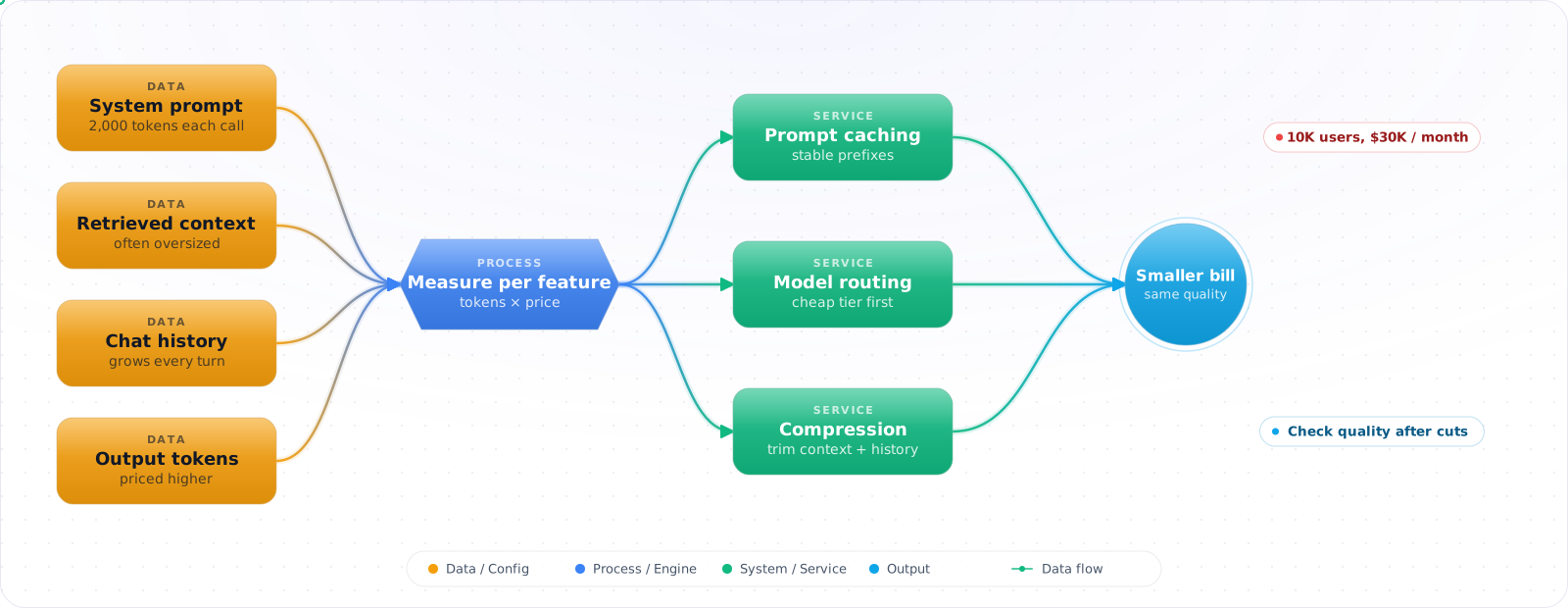
Start by Logging, Not Optimising
With a handful of users, the bill is too small to be worth an hour of your time, and optimising now means guessing. The one thing worth doing from the first day is logging how many tokens each request uses. Everything below depends on that record.
The feature launches, people use it, and the first full month's invoice arrives at five times the budget. Someone asks why a feature with 10,000 users costs $30,000 a month, and the honest answer is that nobody knows, because nobody measured where the tokens go.
Pricing looks simple: a price per token, times tokens per request. In practice the bill is driven by things a demo never shows: long system prompts, conversation history resent on every turn, retries, retrieved context and verbose answers. Switching to a cheaper model treats the symptom. Measuring tokens by component, then fixing the biggest one, treats the cause.
- You can't explain why your LLM costs increased 3x last month
- Your system prompt alone consumes 2,000 tokens on every request, and nobody's questioned it
- You don't know the per-user or per-feature cost of your AI capabilities
- You want to offer AI features at scale but the unit economics don't work at current prices
Where the Tokens Actually Go
Token economics has three layers: visibility (knowing what you spend), attribution (knowing why you spend it), andoptimization (spending less for the same quality). Most teams skip the first two and jump to optimization — which means they're optimizing blind.
      flowchart TD
          A["Instrument Costs\n(per request)"] --> B["Attribute to Features\n(per feature/user)"]
          B --> C["Identify Cost Drivers\n(prompts, retries, model)"]
          C --> D["Optimize"]
          D --> D1["Prompt Compression"]
          D --> D2["Semantic Caching"]
          D --> D3["Model Routing"]
          D --> D4["Budget Guardrails"]

          style A fill:#4f46e5,color:#fff,stroke:#4338ca
          style B fill:#059669,color:#fff,stroke:#047857
          style C fill:#d97706,color:#fff,stroke:#b45309
          style D fill:#dc2626,color:#fff,stroke:#b91c1c
Token Pricing Basics
LLM APIs charge per token, and how much text a token holds depends on the tokenizer: Anthropic puts 1M tokens at roughly 2.5M Unicode characters on its current tokenizer. Input tokens (your prompt) and output tokens (the model's response) are priced separately, and on every model in the price table below output costs 5x input. On GPT-6.1 Sol ($2/$10 per million tokens, OpenAI pricing page, 2026-10-31), a request with a 2,000-token system prompt, 500-token user input and 500-token response costs 2,500 × $2/1M + 500 × $10/1M = $0.005 + $0.005 = $0.01. The 500 output tokens cost as much as the 2,500 input tokens.
The Hidden Cost Multipliers
- System prompts: Sent on every request. A 2K-token system prompt at 100K requests/day = 200M input tokens/day, which is $400/day at $2 per million (GPT-6.1 Sol or Claude Sonnet 5.5 list price, 2026-10-31). Read from cache at $0.10 per million, the same tokens cost $20/day, plus a cache write at 1.25x the input rate each time the prefix has to be rewritten. OpenAI caches by default; cached reads are 0.1x input on most of its current models and 0.05x on GPT-6.1 Sol, but only for a repeated prefix of at least 1,024 tokens.
- Conversation history: Grows linearly per turn. By turn 10, you're sending all previous turns as context.
- Retries: Failed requests that get retried still cost tokens for the first attempt.
- Redundant requests: Same question from different users gets computed from scratch every time without caching.
- Not using batch APIs: For non-real-time tasks (analytics, bulk classification), OpenAI's and Anthropic's batch APIs are 50% cheaper than synchronous calls; OpenAI promises completion within 24 hours.
Measuring and Cutting the Bill
Step 1: When nobody can explain the bill, measure tokens per request
The bill arrives as one number. To act on it you need it broken down: by feature, by user, and by which part of the prompt the tokens came from.
using System.Diagnostics.Metrics;

public class CostTracker
{
    // USD per million tokens, standard tier, from each vendor's pricing page on 2026-10-31.
    // Prices change: date the table and re-check it.
    private static readonly Dictionary<string, (decimal Input, decimal Output)> PricePerMillionTokens = new()
    {
        ["gpt-6.1-sol"] = (2.00m, 10.00m),       // Workhorse baseline
        ["claude-sonnet-5-5"] = (2.00m, 10.00m), // Same price as the baseline
        ["gemini-3.8-flash"] = (0.75m, 3.75m),   // ~2.7x cheaper until 31 Dec 2026, then $1.50/$7.50
        ["gpt-6-luna"] = (0.10m, 0.50m),         // 20x cheaper
        ["claude-haiku-5-5"] = (0.10m, 0.50m),   // 20x cheaper (prompts up to 100K tokens)
        ["gpt-6-astra"] = (10.00m, 50.00m),      // 5x premium for the top tier
    };

    private static readonly Meter Meter = new("MyApp.Llm");
    private static readonly Histogram<double> CostUsd = Meter.CreateHistogram<double>("llm.cost", unit: "USD");
    private static readonly Histogram<long> InputTokens = Meter.CreateHistogram<long>("llm.tokens.input");
    private static readonly Histogram<long> OutputTokens = Meter.CreateHistogram<long>("llm.tokens.output");

    // An estimate from input and output only. Real bills also depend on cache reads and
    // writes, reasoning tokens, batch rates and long-context tiers, so reconcile against
    // the usage your provider reports.
    public decimal CalculateCost(string model, int inputTokens, int outputTokens)
    {
        if (!PricePerMillionTokens.TryGetValue(model, out var prices))
            throw new ArgumentException($"No price configured for model '{model}'.", nameof(model));

        return (inputTokens * prices.Input / 1_000_000m)
             + (outputTokens * prices.Output / 1_000_000m);
    }

    public void Record(string feature, string model, int inputTokens, int outputTokens)
    {
        var feat = new KeyValuePair<string, object?>("feature", feature);
        var mdl = new KeyValuePair<string, object?>("model", model);

        CostUsd.Record((double)CalculateCost(model, inputTokens, outputTokens), feat, mdl);
        InputTokens.Record(inputTokens, feat, mdl);
        OutputTokens.Record(outputTokens, feat, mdl);
    }
}
Check it: Add up a day of your own logged costs and compare the total with the provider's bill for that day. They should be close. If they aren't, some calls are going out unlogged, and those are often the expensive ones.
Step 2: When the prompt itself is most of the cost, make it smaller
The system prompt and the conversation history are sent on every call, so a wasted line is paid for thousands of times a day.
public class PromptOptimizer
{
    // Before: about 2,100 tokens
    const string VerbosePrompt = """
        You are a helpful customer support assistant working for Contoso Inc.
        You should always be polite and professional in your responses.
        When a customer asks about their order status, you should look up
        their order using the order_lookup function.
        When a customer has a billing question, you should check their
        account using the account_lookup function.
        You should never make up information...
        [... 50 more lines of instructions ...]
        """;

    // After: about 800 tokens. Run your eval set on both before you ship it.
    const string CompressedPrompt = """
        Contoso support assistant. Professional tone.
        Rules:
        - Order questions → order_lookup function
        - Billing questions → account_lookup function
        - Never fabricate. Say "I'll check" if unsure.
        - Escalate: refund > $100, legal, complaints.
        Response: ≤ 3 sentences unless detail requested.
        """;
}
Check it: Run your eval set with the old prompt and the trimmed one. Quality should hold. If it drops, put back what you removed, a piece at a time, until it recovers.
Step 3: When the same questions keep coming, answer them from a cache
Many users ask the same things. A cache that recognises a repeated question can return the stored answer and skip the model call altogether.
using Azure.Search.Documents;
using Azure.Search.Documents.Models;

public interface IEmbedder
{
    Task<ReadOnlyMemory<float>> EmbedAsync(string text);
}

// Everything that must match for a cached answer to be safe to reuse.
public sealed record CacheScope(string TenantId, string PermissionSet, string PromptVersion, string Model)
{
    public string ToFilter(DateTimeOffset now) => SearchFilter.Create(
        $"TenantId eq {TenantId} and PermissionSet eq {PermissionSet} and PromptVersion eq {PromptVersion} and Model eq {Model} and ExpiresAt gt {now}");
}

public class CacheEntry
{
    public string Id { get; set; } = Guid.NewGuid().ToString("N");
    public string Query { get; set; } = "";
    public string Response { get; set; } = "";
    public ReadOnlyMemory<float> QueryVector { get; set; }
    public string TenantId { get; set; } = "";
    public string PermissionSet { get; set; } = "";
    public string PromptVersion { get; set; } = "";
    public string Model { get; set; } = "";
    public DateTimeOffset ExpiresAt { get; set; }
}

public class SemanticCache
{
    private readonly SearchClient _index;   // an Azure AI Search index with a vector field "QueryVector"
    private readonly IEmbedder _embedder;
    private readonly TimeSpan _ttl;
    private readonly double _minScore;      // calibrate on your own data; depends on the similarity metric

    public SemanticCache(SearchClient index, IEmbedder embedder, TimeSpan ttl, double minScore)
    {
        _index = index;
        _embedder = embedder;
        _ttl = ttl;
        _minScore = minScore;
    }

    public async Task<string?> GetCachedResponse(string query, CacheScope scope)
    {
        var vector = await _embedder.EmbedAsync(query);
        var options = new SearchOptions
        {
            Size = 1,
            Filter = scope.ToFilter(DateTimeOffset.UtcNow),
            VectorSearch = new()
            {
                Queries = { new VectorizedQuery(vector) { KNearestNeighborsCount = 1, Fields = { "QueryVector" } } }
            }
        };

        SearchResults<CacheEntry> results = await _index.SearchAsync<CacheEntry>(null, options);
        await foreach (SearchResult<CacheEntry> hit in results.GetResultsAsync())
        {
            if (hit.Score >= _minScore)
                return hit.Document.Response;
        }
        return null;
    }

    public async Task CacheResponse(string query, string response, CacheScope scope)
    {
        var entry = new CacheEntry
        {
            Query = query,
            Response = response,
            QueryVector = await _embedder.EmbedAsync(query),
            TenantId = scope.TenantId,
            PermissionSet = scope.PermissionSet,
            PromptVersion = scope.PromptVersion,
            Model = scope.Model,
            ExpiresAt = DateTimeOffset.UtcNow.Add(_ttl)
        };
        await _index.UploadDocumentsAsync(new[] { entry });
    }
}
Check it: Ask the same question twice in different words and confirm the second is served from cache. Then ask two questions that look alike and mean the opposite, such as cancelling an order and not cancelling it. They must not share an answer.
Step 4: When one user can spend the whole budget, set limits
Without a cap, one heavy user or one runaway script decides what your month costs. A budget per user and per feature turns a surprise into a refusal you chose.
using System.Diagnostics.Metrics;

public interface ISpendStore
{
    // Atomically adds 'amount' only if the total stays within 'limit'. In Redis this is a short
    // Lua script; in SQL, UPDATE ... SET Spent = Spent + @amount WHERE Spent + @amount <= @limit.
    Task<bool> TryReserveAsync(string key, decimal amount, decimal limit);
    Task AdjustAsync(string key, decimal delta);
}

public sealed record Reservation(string Day, string UserId, decimal Amount);

public class BudgetGuard
{
    private static readonly Meter Meter = new("MyApp.Llm");
    private static readonly Counter<long> Limited = Meter.CreateCounter<long>("llm.budget.limited");

    private readonly CostTracker _costs;
    private readonly ISpendStore _store;
    private readonly decimal _dailyBudgetUsd;
    private readonly decimal _perUserBudgetUsd;

    public BudgetGuard(CostTracker costs, ISpendStore store, decimal dailyBudgetUsd, decimal perUserBudgetUsd)
    {
        _costs = costs;
        _store = store;
        _dailyBudgetUsd = dailyBudgetUsd;
        _perUserBudgetUsd = perUserBudgetUsd;
    }

    // Reserve before each attempt (retries included), using the request's max output tokens,
    // so concurrent requests can't all pass the same check.
    public async Task<Reservation?> TryReserveAsync(string userId, string model,
        int estimatedInputTokens, int maxOutputTokens)
    {
        var estimate = _costs.CalculateCost(model, estimatedInputTokens, maxOutputTokens);
        var day = DateTime.UtcNow.ToString("yyyy-MM-dd");

        if (!await _store.TryReserveAsync($"spend:{day}", estimate, _dailyBudgetUsd))
        {
            Limited.Add(1, new KeyValuePair<string, object?>("scope", "daily"));
            return null;
        }

        if (!await _store.TryReserveAsync($"spend:{day}:{userId}", estimate, _perUserBudgetUsd))
        {
            await _store.AdjustAsync($"spend:{day}", -estimate); // release the daily hold
            Limited.Add(1, new KeyValuePair<string, object?>("scope", "user"));
            return null;
        }

        return new Reservation(day, userId, estimate);
    }

    // After the call, swap the estimate for the cost the provider reported.
    public async Task SettleAsync(Reservation reservation, decimal actualCostUsd)
    {
        var delta = actualCostUsd - reservation.Amount;
        await _store.AdjustAsync($"spend:{reservation.Day}", delta);
        await _store.AdjustAsync($"spend:{reservation.Day}:{reservation.UserId}", delta);
    }
}
Check it: Give a test account a very low limit and keep sending requests. The feature should degrade the way you designed it to, with a clear message, and the rest of the application should keep working.
Try It on Your Own System This Week
Three checks on a feature that is already live, about an hour in total:
- Find your most expensive feature. If you can't name it from your logs, Step 1 is the only thing to do this week.
- Measure one typical request part by part. System prompt, history, retrieved context, user message, output. The largest part is where to look first.
- Check whether prompt caching is on. It's often a setting and a stable start to the prompt away, and it's usually the biggest saving for the least work.
Savings That Backfire
1. Optimizing before measuring
Teams switch to smaller models or compress prompts without knowing where the money goes. Instrument first. You might find that 80% of your cost is one feature with unnecessarily long conversation histories — a targeted fix, not a broad optimization.
2. Ignoring output token costs
Output tokens cost five times as much as input tokens on every model in the price table above. A chatty model that generates 1,000-token responses when 200 tokens would suffice can easily be your biggest cost driver. Ask for concise answers and set an output limit, but leave room on reasoning models: their hidden reasoning tokens count against the same limit, and a response cut off at the limit is wasted spend.
3. Caching without invalidation
Semantic caching saves money, but stale cache entries serve outdated information. Set TTLs based on how fast your data changes. Product catalog cache can live for hours; stock price cache should live for seconds.
4. No per-user budget limits
Without per-user caps, one power user (or one bot) can consume your entire daily budget. Set reasonable per-user limits and implement graceful degradation — rate limit AI features, not the entire application.
Pricing Has More Moving Parts Now
A token price used to be one number. It no longer is, and a good share of avoidable spend comes from not noticing that.
Cached input is the largest discount. On Claude Sonnet 5.5, a cache read costs $0.10 per million against $2 for fresh input, and on GPT-6.1 Sol it's $0.10 against $2 as well (both list prices, 2026-10-31). Cache writes cost extra: 1.25x the input rate for a 5-minute write on Anthropic and a 30-minute write on OpenAI. A long, stable system prompt and tool list become cheap after the first call, but only if the prefix doesn't change. One timestamp near the top of a prompt can cost you the entire discount. Check your cache hit rate before you do anything else.
Batch pricing is half price at both OpenAI and Anthropic, for work that can wait. Any overnight job, such as summarising, classifying or running evals, should use it. Teams leave this on the table simply because the first version used the normal endpoint.
Long-context pricing is a trap. GPT-6 models bill prompts over 272,000 input tokens at 2x input and 1.5x output for the whole request, and Haiku 5.5 moves from $0.10 to $0.50 per million input tokens above 100,000 prompt tokens. A single large document can multiply the price of a call, so a job that looks cheap on small inputs can behave very differently in production.
Reasoning tokens count as output. A reasoning model may produce thousands of tokens you never see, billed at the output rate. When you compare models, compare the cost of a finished task, not the price per token. A cheaper model that needs three retries isn't cheaper.
Prices also change on published dates. Gemini 4 Argon rises from $2/$10 to $4/$20 on 1 December 2026, and Gemini 3.8 Flash doubles from $0.75/$3.75 to $1.50/$7.50 on 1 January 2027. If your forecast assumes today's rates, it's already wrong.
Agents multiply everything
A chat call happens once. An agent call happens in a loop, and each turn re-sends the history. In Anthropic's write-up of its multi-agent research system, agents typically used about 4 times the tokens of a chat interaction, and multi-agent systems about 15 times. So the unit to manage is cost per completed task, and the tool that matters most is a hard budget per run. A runaway loop is one of the most expensive bugs you can ship, and it's preventable with a counter.
The most reliable optimisation order I know: turn on caching, move what you can to batch, route simple work to a cheaper tier, and only then start trimming prompts. Each step needs an eval run behind it, or you may save money and lose quality without noticing.
What I Would Do First
- Instrument every LLM call. Record model, input tokens, output tokens, and calculated cost. Attribute to feature and user. You can't optimize what you don't measure.
- Compress system prompts. They're sent on every request and often bloated. Cutting a system prompt by 60% cuts that part of the input bill by 60%, or less if the prompt was already cached. Check quality with your eval set before and after.
- Cache semantically similar queries. FAQ-type interactions, repeated lookups, and common questions can be served from cache at near-zero cost.
- Route to the cheapest model that meets quality requirements. At list price (2026-11-15), GPT-6 Luna and Claude Haiku 5.5 ($0.10/$0.50) are 20x cheaper than GPT-6.1 Sol and Claude Sonnet 5.5, 80x cheaper than Claude Fable 5.2 and 100x cheaper than GPT-6 Astra. For classification, extraction, and simple tasks the quality gap is often small, but measure it on your own eval before you switch.
- Set budget guardrails from day one. Daily caps, per-user caps, and per-feature caps prevent surprise bills. Alert before you hit them, not after.