Start With Who Can Reach It
For an internal tool used by a few trusted colleagues, you can simply refuse anything that looks wrong, and a dedicated safety layer is more than you need. That changes on the day the assistant is open to the public, because it will then receive harmful content, and it can be made to produce it.
Content safety is the runtime layer that prevents your LLM from generating, or being used to generate, harmful content — hate, self-harm, sexual content, violence, illegal acts, jailbreak attempts. It is distinct from policy (your product's rules) and from quality (is the answer good?). Compliance and reputation both live here.
- Your only safety story is "we put it in the system prompt"
- Someone asked how you handle harmful content, and you don't have a concrete answer
- You can't produce numbers for "blocked harmful requests this month"
The Standard Harm Taxonomy
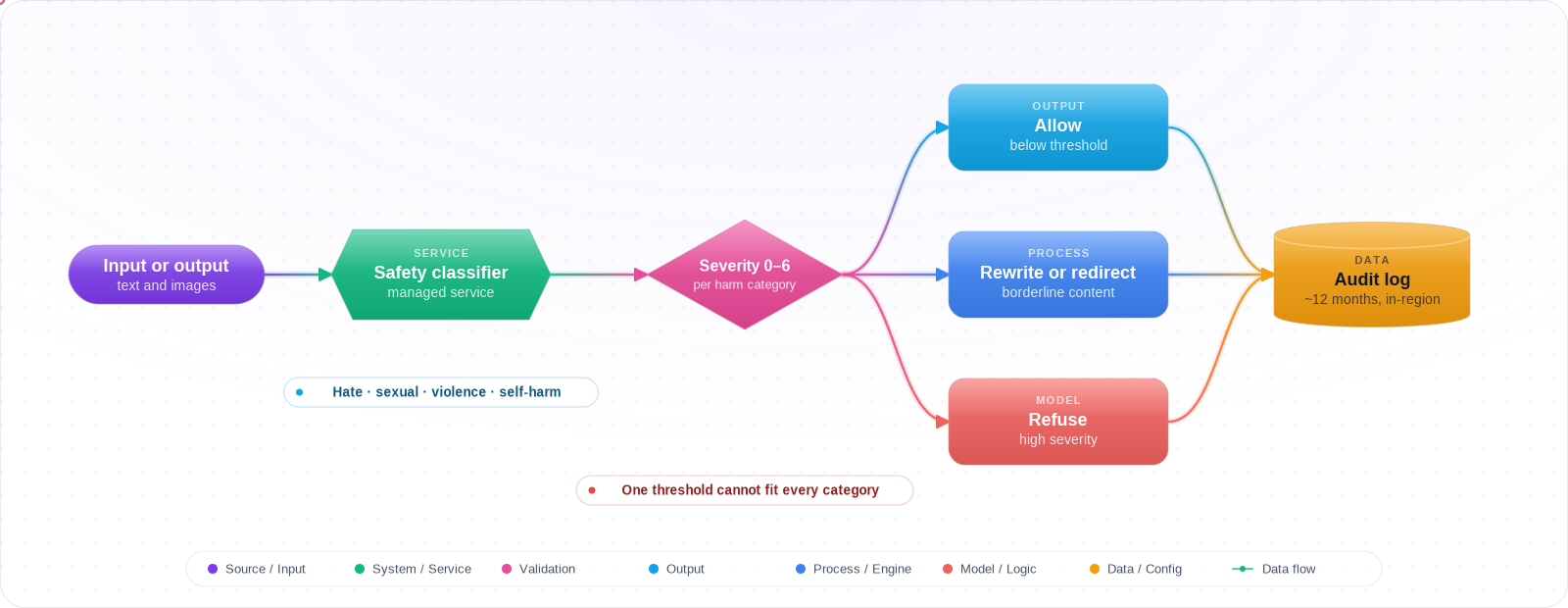
Azure AI Content Safety is a typical example, with four categories and a 0–7 severity scale that can be trimmed to 0, 2, 4 and 6:
- Hate & fairness — slurs, dehumanising language, discriminatory generalisations.
- Sexual — sexual content; strict on minors (CSAM is its own pipeline).
- Violence — depictions, glorification, planning, weapons.
- Self-harm — suicide, eating disorders; usually treated with referral text rather than block.
Plus orthogonal categories: jailbreak, protected material (copyrighted text), code vulnerabilities.
flowchart LR
    R[Request] --> CS1[Content Safety — input]
    CS1 -- pass --> LLM
    LLM[LLM] --> CS2[Content Safety — output]
    CS2 -- pass --> U[User]
    CS1 -- block --> N1[Refuse + log]
    CS2 -- block --> N2[Rewrite, redirect, or refuse]
Pick a Managed Classifier
Do not build this yourself. Use one of:
- Azure AI Content Safety — text + image, 4 harm categories with severity, jailbreak & prompt-shield, protected material.
- OpenAI Moderation — text and images, free, no injection or jailbreak category.
- AWS Bedrock Guardrails — tight with Bedrock models.
- Google Cloud Model Armor — screens prompts and responses, on Google Cloud or other clouds.
- Lakera Guard / Protect AI — vendor-neutral.
Check it: Send ten requests you know are harmful and ten that are legitimate but sensitive, such as a medical question. Note what the classifier returns for each before you set any threshold.
Severity Thresholds: Action by Category
Don't use a single threshold. Map severity to action per category. These values are an example to tune, not a standard:
Category          Block ≥    Soft-warn ≥    Notes
hate              4          2              Often false-positive on academic / quoted text
sexual            2          —              Strictest; 6+ → permaban path
violence          4          2              Allow safety/education contexts
self-harm         —          2              Always show helpline; never just block silently
jailbreak (any flag) — Block + log + monitor for repeat offendersCheck it: Run a labelled set through your thresholds and count two things for each category: harmful items that passed, and legitimate ones that were blocked. Tune each category on its own.
Refuse, Rewrite, or Redirect
- Refuse — the response/request is fundamentally outside policy. Short, neutral, no detail that helps a retry.
- Rewrite — the underlying intent is legitimate (e.g. medical question, security research). Re-prompt the model with stricter guidance.
- Redirect — self-harm signals → mental-health resources for the user's region; weapons → terms of service link.
Check it: Send a message that signals self-harm. The reply should offer support resources for the user's region. A bare refusal here is a failure.
Image and Multimodal
If your app accepts or generates images, run image content safety on both. Azure AI Content Safety and OpenAI's moderation both support images. Watch for: CSAM (mandatory reporting pipelines apply — talk to legal before storing), violent imagery, copyright. Most image generators also have built-in filters; do not rely on them alone.
Compliance Hooks
Legal duties depend on where you operate and what your system does, so work out what applies with your legal team. These records make that conversation much easier:
- Audit log every block: timestamp, user (hashed), category, severity, action, model.
- Retention: set the period with your legal team, keep the data in-region, and encrypt it at rest.
- User-facing transparency: a disclosure when a response is filtered ("This response was modified for safety reasons").
- Explainability: be able to surface the category and severity if a regulator asks.
Check it: Pick one block from last week and answer from the log alone: when, which category, what severity and what action. Then confirm the log holds no more of the content than it needs.
Failure Modes
- Over-blocking — academic, legal, medical, security queries flagged as harmful. Tune category-specific thresholds against a real eval set; allow context-aware bypass for verified domains.
- Under-blocking via paraphrase — "how do I make a [redacted word in a different language]". Use multilingual classifiers.
- Stateful jailbreaks — slow build-up across turns. Score the whole conversation periodically, not just the last message.
- Silent failures — the classifier API times out; you fail open. Always have a circuit breaker that fails closed on critical paths.
Try It on Your Own System This Week
Three checks on a public assistant, about an hour in total:
- Turn the classifier off in a test environment. Find out whether your system fails open or closed when the safety service is unavailable.
- Read twenty recent blocks. Count how many were legitimate requests. That's what your current thresholds cost.
- Look for a way to contest a block. If users can't tell you a block was wrong, you're missing your best source of test cases.
Production Checklist
- Managed classifier on both input and output paths.
- Per-category severity thresholds with per-category actions (refuse/rewrite/redirect).
- Audit log with retention matching your compliance regime.
- Conversation-level periodic re-scoring to catch slow jailbreaks.
- Circuit breaker that fails closed on safety-classifier outage.
Multimodal and Generated Content
Most moderation guidance assumes text. That's no longer enough. Users upload images and audio, and your own product may generate media. Each direction needs its own check. Inbound media can carry harmful content or text-based instructions hidden in an image, and outbound media can be unsafe even when the prompt looked harmless. Run your image and audio moderation on outputs as well as inputs, because a safe prompt doesn't guarantee a safe result.
Thresholds per context
A single threshold can't suit every feature. The same text can be fine in a medical support tool and unacceptable in a children's education app. Keep thresholds as configuration per product and per category, and record why each one was set. When someone asks why a borderline message was allowed, a written reason is far better than a number nobody remembers choosing.
Over-blocking has a real cost, and it often lands on the people you most want to help: someone asking about self-harm support, or a user discussing their own experience of discrimination. Review false positives as seriously as false negatives. A refusal that points to real help is usually a better outcome than a flat block, especially in sensitive categories, where you should use reviewed, human-written responses rather than letting a model improvise.
The appeal path
Whatever you build will make mistakes, so give people a way to contest a block. Even a simple "this was wrong" button produces useful data, because those reports are the best source of false positives you will ever get. Route them to a person, feed confirmed errors into your test set, and track how long reviews take. For a regulated product, this log also shows that you take these decisions seriously.
Moderation classifiers need the same eval discipline as anything else. Keep a labelled test set per category and language, and run it whenever a vendor changes its model. Performance can differ a lot between languages, so if you serve users outside English, test in those languages rather than trust a headline accuracy figure.
Key Takeaways
- Content safety is a compliance and reputation control — not just a UX nicety.
- Buy a managed classifier; tune thresholds per category against your own corpus.
- Audit, redirect, and conversation-aware re-scoring are what differentiate a good safety story from a bad one.