Start by Deploying to the App
For a small site that changes rarely, deploying straight to the app is fine, and a few seconds of restart bothers nobody. The practices below are for an app that deploys several times a week and has customers on it the whole time.
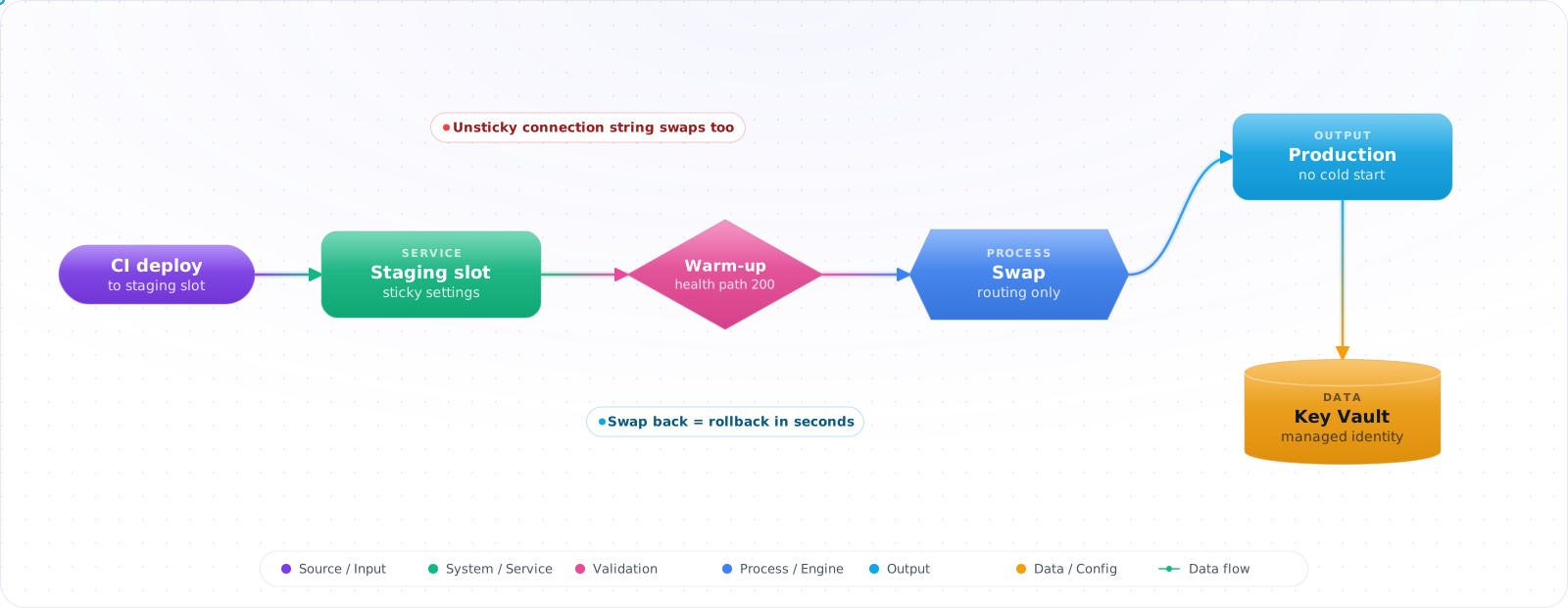
Take a typical case, made up for illustration. A team deployed their website straight to the production app several times a week, and every deploy brought about 45 seconds of 503s while instances restarted and warmed up. The first time they tried deployment slots, the swap carried the staging database connection string into production, because nobody had marked it as a slot setting.
App Service has been around long enough that many people remember an older version of it. Today it runs Linux containers and code, scales well, and its deployment slots are still one of the safest ways to ship on Azure. Below is how to use slots, sticky settings, health checks, managed identity and networking (inbound and outbound are different features) so that deploys stop being events.
- Your "deployment" is FTPing files to wwwroot
- You don't use deployment slots because "they cost extra" (they don't: slots are included from the Standard tier up)
- You're hardcoding connection strings instead of using Key Vault references
- You're on the old Premium V2 plan and never benchmarked V3 / V4
How App Service Works Today
Three concepts:
- App Service Plan — the VM tier (B/S/P3V3/P*V4 etc.). You pay for the plan; one plan can host many apps.
- App Service (Web App / Web App for Containers) — your code or container. Runs in the plan's VMs.
- Deployment Slot — a parallel instance of your app (with its own URL, settings, identity) that you swap into production.
flowchart LR
    USR["User"] -->|HTTPS| FD["Front Door / WAF"]
    FD --> PROD["App Service<br/>Slot: production"]
    DEV["GitHub Actions"] -->|Deploy, warm, smoke test| STG["App Service<br/>Slot: staging"]
    STG -.->|Swap| PROD
    PROD -->|Managed Identity| KV["Key Vault<br/>(connection strings)"]
    PROD -->|VNet Integration| SQL["Azure SQL<br/>(Private Endpoint)"]
    PROD --> AI["Application Insights"]

    style PROD fill:#0078D4,color:#fff,stroke:#005a9e
    style KV fill:#16a34a,color:#fff,stroke:#15803d
Slots, Identity and Networking in Practice
Step 1: Bicep — Premium V4 Linux plan with system identity
param appName string
param location string = resourceGroup().location

resource plan 'Microsoft.Web/serverfarms@2023-12-01' = {
  name: '${appName}-plan'
  location: location
  sku: { name: 'P0v4', tier: 'PremiumV4', capacity: 1 }   // PremiumV4 = newest gen
  kind: 'linux'
  properties: { reserved: true }                          // Linux
}

resource app 'Microsoft.Web/sites@2023-12-01' = {
  name: appName
  location: location
  kind: 'app,linux'
  identity: { type: 'SystemAssigned' }
  properties: {
    serverFarmId: plan.id
    httpsOnly: true
    siteConfig: {
      linuxFxVersion: 'DOTNETCORE|10.0'                    // or 'DOCKER|registry/img:tag'
      minTlsVersion: '1.2'
      ftpsState: 'Disabled'
      http20Enabled: true
      vnetRouteAllEnabled: true
      healthCheckPath: '/healthz'
      appSettings: [
        // Key Vault reference — App Service resolves at runtime via MI
        { name: 'ConnectionStrings__Default'
          value: '@Microsoft.KeyVault(SecretUri=https://kv-x.vault.azure.net/secrets/sql-conn/)' }
        { name: 'WEBSITE_RUN_FROM_PACKAGE', value: '1' }
      ]
    }
  }
}
Step 2: Grant the app identity Key Vault Secrets User
var secretsUserRoleId = '4633458b-17de-408a-b874-0445c86b69e6'
resource kv 'Microsoft.KeyVault/vaults@2023-07-01' existing = {
  name: 'kv-x'
}

resource ra 'Microsoft.Authorization/roleAssignments@2022-04-01' = {
  scope: kv                                               // symbolic reference, not a resourceId() string
  name: guid(app.id, secretsUserRoleId)
  properties: {
    roleDefinitionId: subscriptionResourceId(
      'Microsoft.Authorization/roleDefinitions', secretsUserRoleId)
    principalId: app.identity.principalId
    principalType: 'ServicePrincipal'
  }
}Check it: Search the app settings for anything that looks like a password or a key. After this step there should only be Key Vault references. Then check that the staging slot's identity has the same role.
Step 3: Deployment slot for blue/green
resource staging 'Microsoft.Web/sites/slots@2023-12-01' = {
  parent: app
  name: 'staging'
  location: location
  identity: { type: 'SystemAssigned' }                    // separate identity!
  properties: {
    serverFarmId: plan.id
    siteConfig: {
      linuxFxVersion: 'DOTNETCORE|10.0'
      healthCheckPath: '/healthz'
      appSettings: [
        { name: 'ASPNETCORE_ENVIRONMENT', value: 'Staging' }
      ]
    }
  }
}

// Mark environment-specific settings as slot settings so they don't swap.
// Without this, the staging connection string follows the code into production.
resource stickySettings 'Microsoft.Web/sites/config@2023-12-01' = {
  parent: app
  name: 'slotConfigNames'
  properties: {
    appSettingNames: [ 'ConnectionStrings__Default', 'ASPNETCORE_ENVIRONMENT' ]
  }
}Check it: Deploy a visibly different build to staging and swap while a stream of requests is running. Count the failed requests. Then swap back.
Step 4: GitHub Actions — deploy to staging, then swap
# .github/workflows/deploy.yml
name: Deploy
on:
  push: { branches: [main] }
permissions: { id-token: write, contents: read }

jobs:
  deploy:
    runs-on: ubuntu-latest
    steps:
      - uses: actions/checkout@v7
      - uses: actions/setup-dotnet@v6
        with: { dotnet-version: '10.0.x' }
      - run: dotnet publish -c Release -o ./out
      - uses: azure/login@v3
        with:
          client-id: ${{ secrets.AZURE_CLIENT_ID }}
          tenant-id: ${{ secrets.AZURE_TENANT_ID }}
          subscription-id: ${{ secrets.AZURE_SUBSCRIPTION_ID }}
      - uses: azure/webapps-deploy@v3
        with:
          app-name: my-app
          slot-name: staging
          package: ./out
      # Smoke-test the staging URL
      - run: curl -fsSL https://my-app-staging.azurewebsites.net/healthz
      # Swap into production (staging instances restart with prod settings, get warmed up, then routing switches)
      - run: az webapp deployment slot swap -g rg-x -n my-app --slot staging --target-slot production
Step 5: Easy Auth — sign-in via Entra without writing code
az webapp auth update -g rg-x -n my-app \
  --enabled true \
  --action RedirectToLoginPage \
  --redirect-provider azureactivedirectory

az webapp auth microsoft update -g rg-x -n my-app \
  --client-id <APP_REG_CLIENT_ID> \
  --tenant-id <TENANT_ID>
Your app reads the signed-in user from X-MS-CLIENT-PRINCIPAL headers; no MSAL setup required for the auth flow itself.
Step 6: VNet integration + Private Endpoint backends
# Outbound: app integrates with a delegated subnet (regional VNet integration)
az webapp vnet-integration add -g rg-x -n my-app \
  --vnet vnet-prod --subnet snet-app

# Now the app reaches Azure SQL/Key Vault on their Private Endpoints
# (vnetRouteAllEnabled=true forces ALL outbound through the VNet)Check it: From outside the virtual network, try to reach the database and the vault directly. Both should refuse the connection.
How App Service Setups Go Wrong
1. Connection strings in appSettings. Use Key Vault references (@Microsoft.KeyVault(SecretUri=...)) so secrets rotate without redeploys and never appear in deployment logs or PR diffs.
2. Skipping the healthCheckPath. Without it, App Service never takes a failing instance out of rotation. With it, App Service pings the path once a minute and removes an instance after 10 failed pings by default (configurable down to 2), as long as you run at least two instances. Set /healthz and have it actually verify dependencies.
3. Slot swap without warmup. Swapping cold instances into production causes a latency spike. App Service does anHTTP GET / warmup by default; configure WEBSITE_SWAP_WARMUP_PING_PATH to hit your real warmup endpoint.
4. Identity confusion across slots. Each slot has its own managed identity. Role assignments on prod don't carry to staging — grant both, or you'll discover the missing permission after the swap.
5. Autoscale on CPU only. CPU lags. Combine CPU + HTTP-queue-length + memory rules with cooldowns. Or, on Premium V2 to V4, turn on automatic scaling, which scales on HTTP traffic and keeps a prewarmed instance ready.
6. Treating App Service as Kubernetes. Linux apps now support up to nine sidecar containers, so a telemetry agent or cache alongside your app is fine. If you need many independently scaled services, service-to-service discovery or fine pod-level traffic splitting, you've outgrown App Service — move to Container Apps or AKS rather than fighting the platform.
Try It on Your Own System This Week
Three checks on an app you already host, about an hour in total:
- Deploy during a load test. Count the errors. Any at all means you need a slot swap with warm-up.
- Look for a health check path. Without one, a failing instance stays in rotation.
- List your slot settings. Anything environment-specific that isn't marked will follow the code into production.
What I Would Set Up First
- Default to Linux + Premium V4 for prod (where your region has it; Premium V4 has no stable outbound IPs, so use a NAT gateway if partners allowlist you). The Basic / Free tiers are for demos.
- System-assigned identity + Key Vault references = zero secrets in code or config.
- Always deploy to a staging slot, smoke-test, then swap. This is your blue/green.
- Set
healthCheckPathand have it verify downstream dependencies, not just process liveness. - Easy Auth handles Entra sign-in for you — only write MSAL code if you need on-behalf-of flows.
- Regional VNet integration + Private Endpoints on backends = no public exposure of SQL / Storage / Key Vault.
- Promote with GitHub Actions + OIDC federation. Stop generating service-principal secrets.
Getting Deployments and Scaling Right
Most App Service problems I've seen were about configuration rather than the platform. Three habits prevent most of them.
Use deployment slots for every production release. Deploy to staging, warm it up, and swap. The swap is close to instant, and rolling back is one more swap. Point WEBSITE_SWAP_WARMUP_PING_PATH at a real warm-up endpoint (and set WEBSITE_SWAP_WARMUP_PING_STATUSES, because by default any response counts as warm), or use applicationInitialization on Windows, so that the slot is really ready. Mark settings that shouldn't move with the code, such as a connection string for a staging database, as slot settings. Otherwise a swap can point production at the wrong place, and that's an incident you only need once.
Set up health checks properly. Point the health check at an endpoint that checks your actual dependencies, then the platform can take a bad instance out of rotation. Keep it cheap, because it runs constantly. Separate liveness from readiness if you can, so that a slow database doesn't get every instance recycled at the same moment.
Scale out on the right signal. CPU alone misses thread-pool starvation and slow downstream calls. Autoscale rules should also consider HTTP queue length and response time, and need a cool-down, or they'll flap. Test the scale-out with real load, because new instances need time to warm up, and that is exactly when you're under pressure.
Use managed identity
There's little reason to store a connection string or API key in app settings now. Enable a managed identity, grant it the roles it needs, and connect to SQL, Key Vault, Storage and Azure OpenAI with DefaultAzureCredential. There's no secret to rotate or leak. Where a secret is unavoidable, use a Key Vault reference, so that the setting holds a pointer rather than the value.
Is it still the right choice?
For a typical web API or a .NET site, App Service remains the simplest option on Azure, and I'd pick it over Kubernetes for most teams. Azure Container Apps is worth comparing if you need scale-to-zero or are already building containers. Look at AKS only when you truly need what Kubernetes gives you, because the operational cost is much higher.
Don't forget the runtime. .NET 8 and 9 leave support in November 2026, so check what your apps run on, and upgrade them to .NET 10.