Start With the Defaults
For a handful of small functions where a slow first response doesn't matter, the defaults of a current plan are fine, and there's nothing to tune. The settings below are for functions with real load, real latency targets or a database behind them.
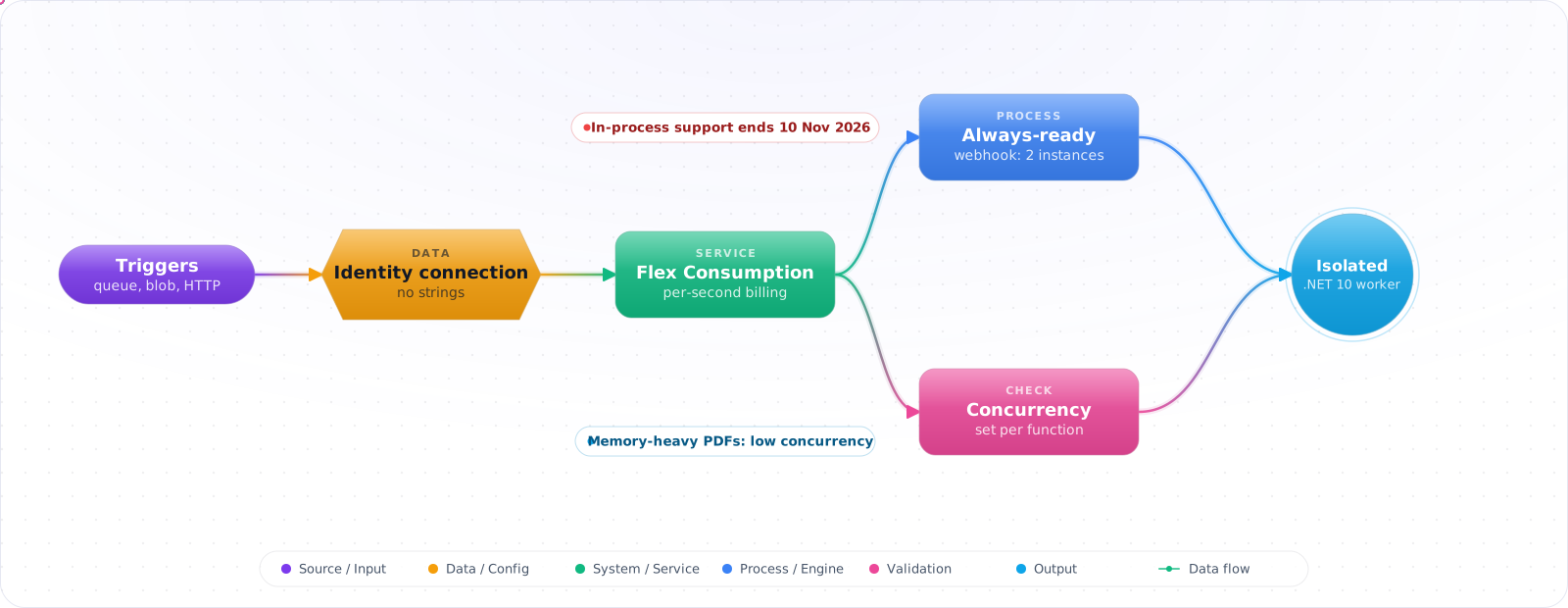
Support for the .NET in-process model ends on 10 November 2026, and plenty of production functions still run on it. Take a typical case, made up for illustration. A team migrating their order functions moved to the isolated worker on Flex Consumption and gave every function the same high concurrency. PDF invoice generation, which uses a lot of memory per run, then crashed its instances under load.
Azure Functions works best when you tell the platform what each function needs. Below is the current setup: the isolated worker, Flex Consumption with always-ready instances where latency matters, identity-based connections instead of connection strings, concurrency per function, and when to use Durable Functions or something else entirely.
- Your function uses
FUNCTIONS_WORKER_RUNTIME=dotnet(in-process — deprecated) - You moved to Premium just to get out of cold starts and now you're paying for idle
- You can't explain why a function with a Service Bus trigger only scales to 1 instance
- You're still wiring connection strings instead of using identity-based connections
Hosting Plans and the Isolated Worker
Hosting plans in 2026:
- Flex Consumption — pay-per-execution, faster cold starts than the old Consumption plan, per-instance concurrency knobs, VNet integration, instance memory choice (512 MB / 2 GB / 4 GB), "always-ready" instance pool, Linux only. The default.
- Premium (EP) — pre-warmed instances, no cold start on the warm pool, larger instances, deployment slots. Pick when you need Windows, slots, or always-warm capacity under steady high load. (Flex Consumption and Premium both have no enforced maximum timeout.)
- Consumption (legacy) — original serverless tier. Linux Consumption retires on 30 September 2028; Windows Consumption is still the serverless option if you depend on Windows or Flex Consumption isn't in your region.
- App Service Plan — runs on the same VMs as a Web App. Pick when you already have spare plan capacity.
flowchart LR
    HTTP["HTTP Request"] --> FN1["Function: ProcessOrder<br/>(httpTrigger)"]
    SB["Service Bus Queue<br/>(orders)"] -->|scale out from 0| FN2["Function: HandleOrder<br/>(serviceBusTrigger)"]
    BLOB["Blob: uploads/*"] -->|Event Grid| FN3["Function: Resize<br/>(blobTrigger)"]
    TIMER["CRON 0 */5 * * * *"] --> FN4["Function: SyncStatus<br/>(timerTrigger)"]

    FN1 --> KV["Key Vault<br/>(MI)"]
    FN2 --> SQL["Azure SQL<br/>(MI)"]
    FN3 --> CV["Azure AI Vision"]

    style FN1 fill:#0078D4,color:#fff,stroke:#005a9e
    style FN2 fill:#0078D4,color:#fff,stroke:#005a9e
    style FN3 fill:#0078D4,color:#fff,stroke:#005a9e
    style FN4 fill:#0078D4,color:#fff,stroke:#005a9e
Building Functions That Hold Up
Step 1: Provision Flex Consumption with Bicep
param appName string
param location string = resourceGroup().location
param storageAccountName string

resource plan 'Microsoft.Web/serverfarms@2023-12-01' = {
  name: '${appName}-plan'
  location: location
  sku: { tier: 'FlexConsumption', name: 'FC1' }
  kind: 'functionapp,linux'
  properties: { reserved: true }
}

resource fn 'Microsoft.Web/sites@2023-12-01' = {
  name: appName
  location: location
  kind: 'functionapp,linux'
  identity: { type: 'SystemAssigned' }
  properties: {
    serverFarmId: plan.id
    httpsOnly: true
    functionAppConfig: {
      deployment: {
        storage: {
          type: 'blobContainer'
          value: 'https://${storageAccountName}.blob.core.windows.net/deploymentpackage'
          authentication: { type: 'SystemAssignedIdentity' }
        }
      }
      scaleAndConcurrency: {
        maximumInstanceCount: 100
        instanceMemoryMB: 2048
      }
      runtime: { name: 'dotnet-isolated', version: '10.0' }
    }
    siteConfig: {
      appSettings: [
        // Identity-based connection — no key in storage conn string!
        { name: 'AzureWebJobsStorage__accountName', value: storageAccountName }
        { name: 'AzureWebJobsStorage__credential',  value: 'managedidentity' }
      ]
    }
  }
}
Step 2: Isolated worker (.NET 10) — Program.cs
using Microsoft.Azure.Functions.Worker;
using Microsoft.Extensions.DependencyInjection;
using Microsoft.Extensions.Hosting;
using Azure.Core;
using Azure.Identity;

var host = new HostBuilder()
    .ConfigureFunctionsWebApplication()                // ASP.NET Core integration
    .ConfigureServices(services =>
    {
        services.AddApplicationInsightsTelemetryWorkerService();
        services.ConfigureFunctionsApplicationInsights();
        services.AddSingleton<TokenCredential>(new DefaultAzureCredential());
    })
    .Build();

await host.RunAsync();Check it: Check the worker runtime setting on every function app you run. Any that still says dotnet, without isolated, is on the model whose support is ending.
Step 3: HTTP trigger (Functions in 2026 use ASP.NET Core integration)
public class OrdersFunction(ILogger<OrdersFunction> log)
{
    [Function("ProcessOrder")]
    public async Task<IActionResult> Run(
        [HttpTrigger(AuthorizationLevel.Function, "post")] HttpRequest req)
    {
        var order = await req.ReadFromJsonAsync<Order>();
        if (order is null) return new BadRequestResult();

        log.LogInformation("Processing order {Id}", order.Id);
        return new OkObjectResult(new { accepted = true, order.Id });
    }
}
Step 4: Service Bus trigger — let the platform scale you
public class OrderHandler(ILogger<OrderHandler> log)
{
    // Fully qualified namespace + identity — no connection string
    [Function("HandleOrder")]
    public async Task Run(
        [ServiceBusTrigger("orders", Connection = "ServiceBus", AutoCompleteMessages = false)] ServiceBusReceivedMessage msg,
        ServiceBusMessageActions actions)
    {
        try
        {
            var order = JsonSerializer.Deserialize<Order>(msg.Body)!;
            await ProcessAsync(order);
            await actions.CompleteMessageAsync(msg);
        }
        catch (PoisonMessageException ex) // your own exception type for bad payloads
        {
            await actions.DeadLetterMessageAsync(msg, "Poison", ex.Message);
        }
    }
}
// host.json — concurrency that actually fits Service Bus
{
"version": "2.0",
"extensions": {
"serviceBus": {
"maxConcurrentCalls": 32,
"maxConcurrentSessions": 8,
"prefetchCount": 0
}
}
}# App settings (identity-based)
ServiceBus__fullyQualifiedNamespace = myns.servicebus.windows.net
ServiceBus__credential = managedidentityCheck it: Put a thousand messages on the queue and watch the instance count and the database's connection count together. The second should stay inside its limit.
Step 5: Blob trigger — via Event Grid (the only option on Flex Consumption)
// The polling blob trigger relies on best-effort storage logs and container scans:
// higher latency, and blobs can be missed. Flex Consumption supports only the Event Grid source.
public class ResizeFunction
{
    [Function("Resize")]
    public async Task Run(
        [BlobTrigger("uploads/{name}", Source = BlobTriggerSource.EventGrid,
                     Connection = "AzureWebJobsStorage")] Stream blob,
        string name)
    {
        await image.ResizeAsync(blob, name);
    }
}Check it: Upload a file and time how long the function takes to start. With the Event Grid source it should be seconds.
Step 6: Deploy with az CLI (Flex Consumption package deployment)
# zip the publish output
dotnet publish -c Release -o ./out
(cd out && zip -r ../app.zip .)

# push the package; the deployment service stores it in the deployment container.
# Uploading app.zip to the container yourself does not deploy it.
az functionapp deployment source config-zip \
  -g rg-fn -n my-fn-app --src app.zip
Try It on Your Own System This Week
Three checks on function apps you already run, about an hour in total:
- Check each app's worker model and .NET version. Both have end-of-support dates. Know which apps are affected.
- Search the app settings for connection strings. Each one can be replaced with an identity-based connection.
- Measure a cold start before you blame it. If it's seconds, look at what your own startup code does.
How Functions Go Wrong
1. Still on the in-process .NET model. Support ends on 10 November 2026. Migrate to dotnet-isolated; the project references the Microsoft.Azure.Functions.Worker packages and the entry point is Program.cs. In-process stops at .NET 8, so .NET 9 and 10 need it, and Flex Consumption doesn't run in-process at all.
2. Default polling Blob trigger at scale. The classic blob trigger polls storage logs and scans the container. Logs are best-effort, so blobs can be missed, and an idle Consumption app can take up to 10 minutes to notice a new blob. Use Source = BlobTriggerSource.EventGrid for production blob workflows; on Flex Consumption it's the only option.
3. Connection strings in AzureWebJobsStorage. Use the identity-based form (__accountName + __credential=managedidentity). Same for Service Bus, Event Hubs, Cosmos. Grants needed: Storage Blob Data Owner, Service Bus Data Receiver, etc.
4. Wrong concurrency knob. Functions has two scale dials: instance count (platform) and per-instance concurrency(you, in host.json). On Flex Consumption you also tune maximumInstanceCount and HTTP per-instance concurrency inscaleAndConcurrency. Misconfigure and you either over-saturate downstream or never scale out.
5. Long-running HTTP functions. Flex Consumption has no enforced execution timeout (default 30 minutes, and executions get a 60-minute grace period on scale-in), but an HTTP-triggered function must respond within 230 seconds regardless, because of the load balancer idle timeout. For long work, queue + Durable Functions or off-load to a worker.
6. Cold start blamed for everything. Measure before you blame the platform: a lean .NET 10 isolated app on Flex Consumption starts quickly. If you're seeing seconds, check JIT, large dependency graphs, or expensive startup code (DB pings, HTTP probes). Use ReadyToRun and trim startup work.
Choosing a Plan and Avoiding Surprises
Flex Consumption has become my default for new Functions. It gives you scale-to-zero, faster scale-out than the old Consumption plan, virtual network integration, and optional always-ready instances to soften cold starts. The older Linux Consumption plan is on its way out, and if you still use the in-process .NET model, you should already be planning the move to the isolated worker, since in-process support ends on 10 November 2026. Check that date against your own apps today.
Durable Functions for AI work
Long LLM workflows are a natural fit for Durable Functions. An orchestrator can call activities, wait days for a human approval, and survive a restart, all with progress saved for you. The rules are strict, though. Orchestrator code replays from the start each time, so it must be deterministic. No DateTime.UtcNow, no random IDs and no direct I/O in the orchestrator. Use context.CurrentUtcDateTime, and put all real work in activities. Breaking this produces bugs that only show up on replay, which makes them painful to diagnose.
Keep activities idempotent, because they can run more than once. Pass an idempotency key to anything that charges money or sends a message. This is the same discipline as any durable agent, and the runtime only helps if the activities cooperate.
Scaling can hurt your database
Functions scale out quickly, and that's a risk as well as a feature. A queue backlog can bring up a hundred instances, each opening connections, and your database falls over. Set a maximum scale-out, and use a shared connection pool. The same applies to model APIs, where a burst of parallel functions will trigger 429s. Limit concurrency to match what the downstream service can take. Keep functions small and stateless, too, and watch your execution timeout, since long-running work belongs in a durable orchestration rather than in a single function.
Observability
Turn on Application Insights, and keep an eye on sampling, because the default can hide rare failures. Log a correlation ID through the queue message, so that a trace survives the hop from one function to the next.
What I Would Do Now
- Flex Consumption + .NET 10 isolated is the 2026 default (.NET 8 and 9 support also ends on 10 November 2026). Move off in-process and legacy Consumption.
- Identity-based connections everywhere — Storage, Service Bus, Event Hubs, Cosmos. No keys.
- Blob workflows: always Event Grid–sourced trigger. Polling is slower and can miss blobs.
- Tune both axes of concurrency:
maximumInstanceCount+ per-trigger concurrency inhost.json. - Use Durable Functions for orchestrations, fan-out/fan-in, and human-in-the-loop. Don't hand-roll state.
- Deploy a zip package with
az functionapp deployment source config-zip, Core Tools or the CI tasks; the deployment container uses managed identity. No FTP. - Monitor with Application Insights from day one. The Functions worker integration is built in.