Start With a Scheduled Poll
If changes are rare and a minute's delay doesn't matter, a scheduled job that checks for them is simple and good enough. Events earn their place when the polling itself becomes the cost: many sources, checked often, with nothing new most of the time.
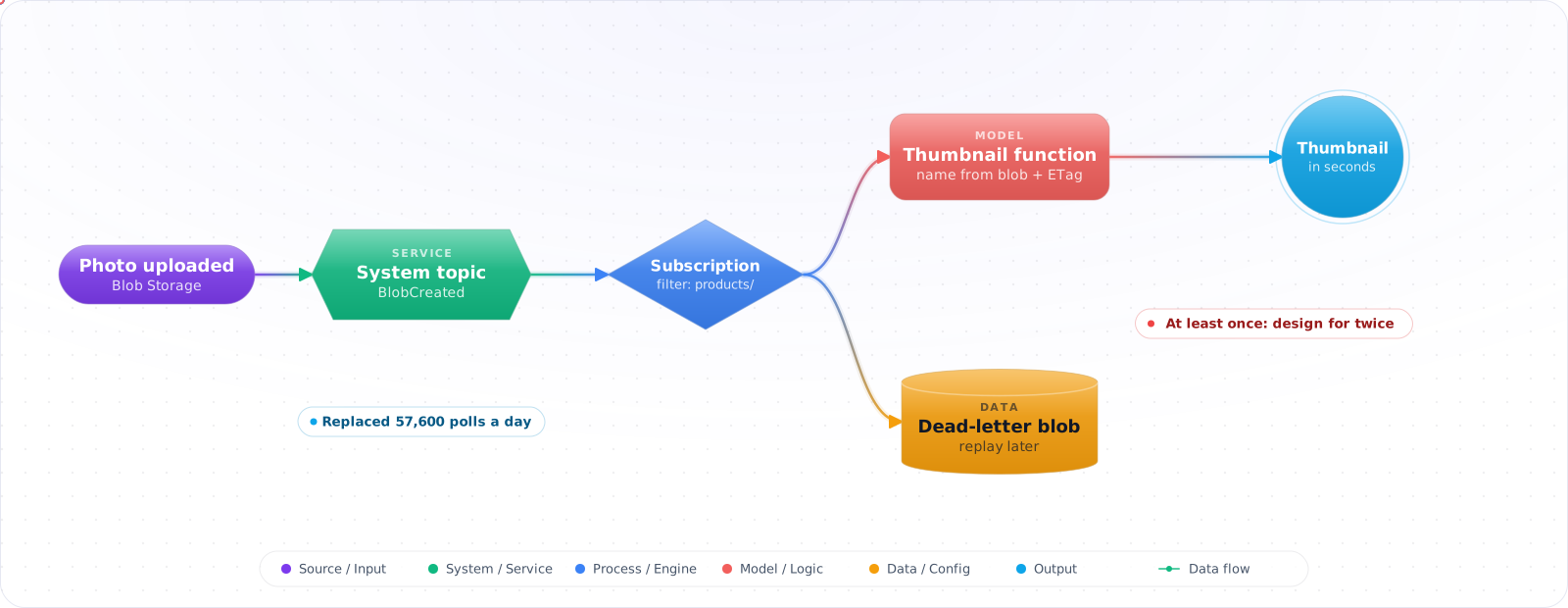
Take a typical case, made up for illustration. A job listed 40 blob containers every minute, looking for new product photos. That is 57,600 calls a day, almost all of which found nothing, and new photos still took up to a minute to get thumbnails. Switching to storage events made thumbnails appear in seconds, and the first event handler promptly created duplicates, because events can arrive more than once.
Event Grid is Azure's push-based eventing service: something happens, and every interested subscriber is told. It is not a queue and not a stream. Below is when to use it rather than Service Bus or Event Hubs, how to filter and deliver events, how to handle retries and dead-lettering, and what the newer namespace tier adds.
- You wrote a Function that polls Storage every 30 seconds for new blobs
- You can't explain the difference between Event Grid Topics, System Topics, Domains, and Namespaces
- Your webhook subscriber stopped receiving events and you didn't know retries had been exhausted
- You picked Event Grid for high-throughput telemetry and watched cost spiral
What Event Grid Is (and Is Not)
Three event sources, four delivery patterns:
- System Topics — emitted by Azure resources (Storage, Key Vault, AKS, Resource Groups). You don't create the topic, you subscribe to it.
- Custom Topics — your apps publish their own events to a topic you create.
- Domains — a multi-tenant container of topics; useful when you have 100s of customer-scoped topics with shared subscribers.
- Namespaces (newer tier) — adds pull delivery (consumer-initiated), MQTT v3.1.1/v5 broker, and event-stream patterns.
flowchart LR
    A["Storage Account<br/>(BlobCreated)"] --> ST["System Topic"]
    B["Custom App<br/>(POST /events)"] --> CT["Custom Topic"]
    M["MQTT Client<br/>(IoT device)"] --> NS["Namespace<br/>(MQTT broker)"]

    ST --> S1["Subscription:<br/>Function"]
    CT --> S2["Subscription:<br/>Webhook"]
    CT --> S3["Subscription:<br/>Service Bus Queue"]
    NS --> S4["Pull subscription:<br/>Worker polls"]

    S2 -.->|delivery fails<br/>retries exhausted| DLQ["Dead-letter to<br/>Storage Blob"]

    style ST fill:#0078D4,color:#fff,stroke:#005a9e
    style CT fill:#0078D4,color:#fff,stroke:#005a9e
    style NS fill:#7c3aed,color:#fff,stroke:#5b21b6
    style DLQ fill:#dc2626,color:#fff,stroke:#b91c1c
Schema: use CloudEvents v1.0 (JSON envelope with specversion, type, source,id, data). It isn't the default on the basic tier: a custom topic's input schema and a subscription's delivery schema default to the proprietary Event Grid schema, so set CloudEventSchemaV1_0 explicitly. Namespace topics use CloudEvents only.
Wiring Events End to End
Step 1: System Topic — react to BlobCreated with a Function
param storageAccountId string
param functionId string

resource sysTopic 'Microsoft.EventGrid/systemTopics@2024-12-15-preview' = {
  name: 'sys-storage-blobs'
  location: resourceGroup().location   // the storage account's region; 'global' is only for subscription/RG-level sources
  properties: {
    source: storageAccountId
    topicType: 'Microsoft.Storage.StorageAccounts'
  }
}

resource sub 'Microsoft.EventGrid/systemTopics/eventSubscriptions@2024-12-15-preview' = {
  parent: sysTopic
  name: 'to-thumbnail-fn'
  properties: {
    eventDeliverySchema: 'CloudEventSchemaV1_0'
    filter: {
      includedEventTypes: ['Microsoft.Storage.BlobCreated']
      subjectBeginsWith: '/blobServices/default/containers/uploads/'
    }
    destination: {
      endpointType: 'AzureFunction'
      properties: {
        resourceId: functionId
        maxEventsPerBatch: 1
        deliveryAttributeMappings: []
      }
    }
    retryPolicy: { maxDeliveryAttempts: 30, eventTimeToLiveInMinutes: 1440 }
    deadLetterDestination: {
      endpointType: 'StorageBlob'
      properties: { resourceId: storageAccountId, blobContainerName: 'eg-deadletter' }
    }
  }
}Check it: Upload a file and time how long the function takes to run. It should be seconds, with no polling job involved.
Step 2: Custom Topic — publish your own events
using Azure.Identity;
using Azure.Messaging;
using Azure.Messaging.EventGrid;

// The topic must be created with inputSchema CloudEventSchemaV1_0 to accept CloudEvents.
var endpoint = new Uri("https://my-topic.eastus2-1.eventgrid.azure.net/api/events");
var client = new EventGridPublisherClient(endpoint, new DefaultAzureCredential());

var evt = new CloudEvent(
    source: "/aiwisdom/orders",
    type: "com.aiwisdom.order.placed",
    jsonSerializableData: new { orderId = order.Id, total = order.Total })
{
    Subject = $"customer/{order.CustomerId}",
    Time = DateTimeOffset.UtcNow,
    Id = Guid.NewGuid().ToString(),
};

await client.SendEventAsync(evt);
Step 3: Webhook subscriber (CloudEvents delivery) — handle the validation handshake
using Azure.Messaging;

// CloudEvents abuse protection: Event Grid validates the endpoint with an HTTP OPTIONS request
app.MapMethods("/eventgrid", new[] { "OPTIONS" }, (HttpRequest req, HttpResponse res) =>
{
    if (req.Headers["WebHook-Request-Origin"] == "eventgrid.azure.net")
        res.Headers["WebHook-Allowed-Origin"] = "eventgrid.azure.net";
    return Results.Ok();
});

app.MapPost("/eventgrid", async (HttpRequest req) =>
{
    // One event per request by default (application/cloudevents+json),
    // a JSON array when output batching is on. ParseMany handles both.
    var body = await BinaryData.FromStreamAsync(req.Body);
    foreach (CloudEvent evt in CloudEvent.ParseMany(body))
    {
        await dispatcher.HandleAsync(evt.Type, evt.Data);   // enqueue, don't do slow work here
    }
    return Results.Ok();   // Event Grid waits 30 s for a response before treating it as failed
});
With the Event Grid schema, validation is instead a SubscriptionValidation event (header aeg-event-type) that you answer with its validationCode. With CloudEvents, Event Grid sends the HTTP OPTIONS preflight with WebHook-Request-Origin, and you respond with WebHook-Allowed-Origin: eventgrid.azure.net, as above.
Check it: Create the subscription and confirm that it becomes active. If your handler rejects the validation request, the subscription never starts delivering.
Step 4: Advanced filters — keep handlers focused
filter: {
  includedEventTypes: ['com.aiwisdom.order.placed']
  advancedFilters: [
    { operatorType: 'NumberGreaterThanOrEquals', key: 'data.total', value: 1000 }
    { operatorType: 'StringIn',                 key: 'data.region', values: ['us-east','eu-west'] }
    { operatorType: 'IsNullOrUndefined',        key: 'data.archived' }
  ]
}Check it: Upload a file type the handler doesn't care about, and confirm that the handler isn't invoked at all.
Step 5: Namespace + Pull delivery — when push doesn't fit
// Namespace topics support pull (REST/SDK ReceiveCloudEvents)
using Azure.Identity;
using Azure.Messaging.EventGrid.Namespaces;

var client = new EventGridReceiverClient(
    new Uri("https://myns.eastus-1.eventgrid.azure.net"),
    topicName: "orders",
    subscriptionName: "warehouse",
    credential: new DefaultAzureCredential());

ReceiveResult result = await client.ReceiveAsync(maxEvents: 10, maxWaitTime: TimeSpan.FromSeconds(30));
foreach (var detail in result.Details)
{
    try
    {
        await Process(detail.Event);
        await client.AcknowledgeAsync(new[] { detail.BrokerProperties.LockToken });
    }
    catch
    {
        await client.ReleaseAsync(new[] { detail.BrokerProperties.LockToken });
    }
}
How Event-Driven Setups Go Wrong
1. Picking Event Grid for telemetry. Event Grid bills per operation and per delivery attempt. Pumping millions of small events through it costs more than Event Hubs and gives you weaker ordering guarantees. Reserve Event Grid for state-change notifications.
2. Webhook handler that takes > 30s. Event Grid waits 30 seconds for a response (200–204 count as success); after that it queues the event for retry. Acknowledge fast, queue work asynchronously.
3. Forgetting the validation handshake. Creating a webhook subscription always starts with validation (a SubscriptionValidation event, or an OPTIONS request for CloudEvents). If your handler 401s or 500s on it, the subscription never activates.
4. No DLQ configured. Without a dead-letter destination, exhausted retries silently drop events. Always setdeadLetterDestination to a Storage container and alert on its growth.
5. Coupling business logic to Event Grid schema. Use CloudEvents and parse type/data through your own DTOs. The Azure SDK gives you CloudEvent deserializers — use them.
6. Conflating Service Bus, Event Hubs, and Event Grid. Discrete state changes → Event Grid. Workflow messages → Service Bus. Telemetry/log streams → Event Hubs. They are not interchangeable.
Try It on Your Own System This Week
Three checks on a system that reacts to changes, about an hour in total:
- Count your polling jobs, and how often each finds something. The ones that mostly find nothing are candidates for events.
- Check every subscription for a dead-letter destination. Without one, events that run out of retries are dropped.
- Time your slowest handler. Anything near thirty seconds should acknowledge first and do the work from a queue.
When I Would Use It
- Use CloudEvents v1.0 for all new topics, and set it explicitly; the basic tier still defaults to the Event Grid schema.
- Always configure a dead-letter Storage container and alert on object count.
- Subscribers must respond within 30 seconds with 2xx — process asynchronously if work is slow.
- Use advanced filters server-side to avoid waking up handlers that won't do anything.
- Function and Service Bus destinations are first-class — prefer them over raw webhooks (no validation handshake, retries handled).
- Use Namespaces when you need MQTT, pull delivery, or event retention of up to 7 days (basic topics keep undelivered events for 1 day).
- Auth via Entra and managed identity.
EventGridPublisherClient(endpoint, credential)works without keys.
Reliability and When to Pick Something Else
Event Grid delivers events at least once, and retries with backoff for up to 24 hours by default. That means two things for your handler. It must be idempotent, using the event ID to ignore duplicates, and it must respond quickly. If your endpoint does slow work before responding, Event Grid will time out and retry, and you've created your own duplicate storm. Accept the event, put it on a queue, and return a 200.
Configure a dead-letter destination in a storage account. Without one, events that exhaust their retries are simply dropped, and nobody finds out until a customer complains. Alert on the dead-letter count, and have a tool to replay.
Use the CloudEvents schema for new work, since it's an open standard and makes moving between systems easier. Use filters on the subscription so that handlers receive only the events they care about, rather than filtering in code and paying for each delivery.
Event Grid, Service Bus or Event Hubs?
These three get confused all the time, and they solve different problems:
- Event Grid tells you that something happened. It's push-based, with lightweight events and many subscribers. Use it for reacting to a blob upload or a resource change.
- Service Bus carries a command or business message that must be processed. It has ordering, sessions, transactions and dead-lettering. Use it for "process this order".
- Event Hubs ingests a high-volume stream, such as telemetry, that consumers read at their own pace, and it can replay.
A common and effective design combines them: Event Grid signals that a file arrived, and a function places a job on Service Bus, which workers process at their own speed.
Keep event payloads small
Put an ID and a link in the event, not the whole object. Large events hit size limits, leak data to every subscriber, and go stale. Subscribers can fetch what they need, with their own permissions. Version your event types too. A change to an event's shape is a breaking change for every consumer, and you may not know who they all are. Add new types rather than changing old ones, and keep a registry of who subscribes to what.