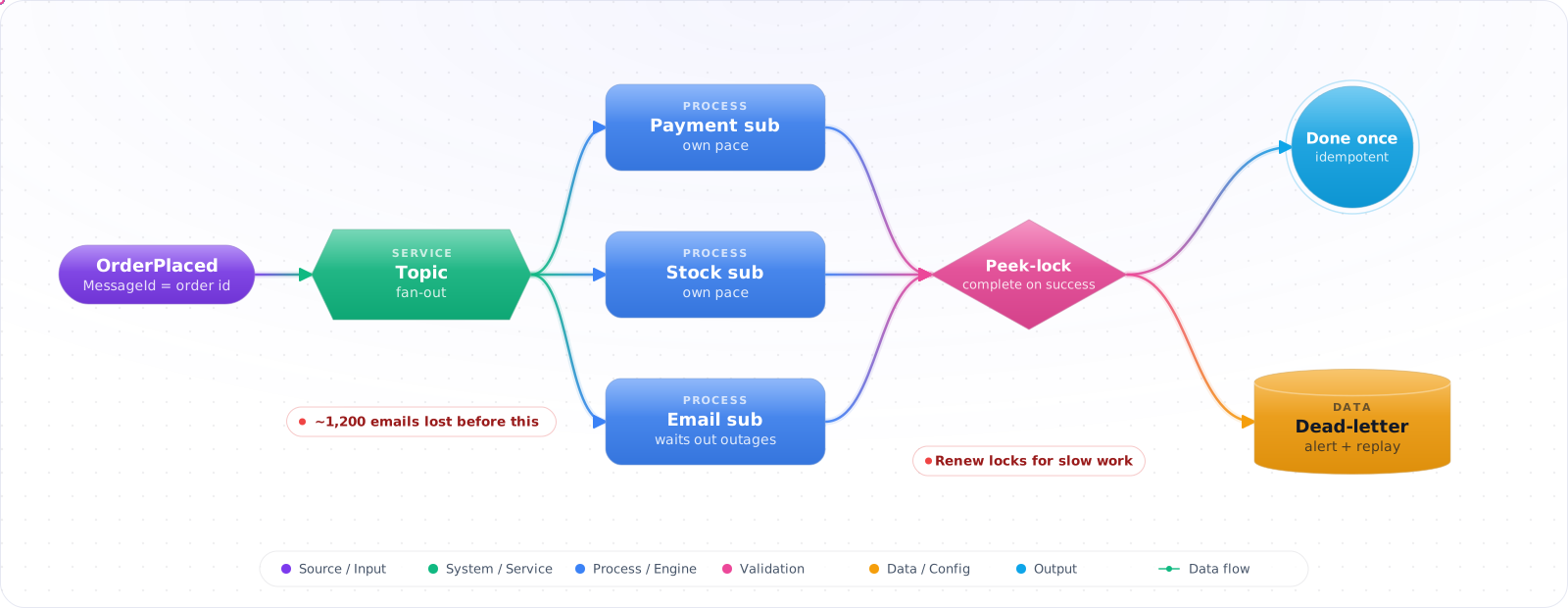
Start With a Direct Call
When one service calls one dependency that is fast and reliable, a direct call is the right design, and a broker would only add a moving part. Messaging earns its place when one event has to trigger work in several places, and one of them being slow shouldn't fail the rest.
Take a typical case, made up for illustration. An order service called the email provider directly. When the provider had a 20-minute outage, the service logged the failures and carried on, and around 1,200 confirmation emails were never sent. Nobody noticed until customers started asking support whether their orders had gone through.
A message broker keeps that work safe until it can be done. Azure Service Bus gives you queues, topics with subscriptions, sessions for ordering, dead-letter queues and duplicate detection. Below is how to use each, the settings that matter (lock duration, delivery count, sessions), and the consumer patterns that stop redelivery from turning into duplicate side effects.
- Your "at-least-once" processor is actually "exactly twice" because nobody's idempotent
- You used
ReceiveAndDeletemode and lost messages on a crash - Your dead-letter queue is full and you can't remember when last someone looked at it
- You confused Service Bus with Event Hubs or Event Grid and picked the wrong one
Queues, Topics, Sessions and Locks
Two primitives:
- Queue — point-to-point. One sender, one or more competing consumers. Each message delivered to exactly one consumer.
- Topic + Subscription — pub/sub. One sender, N independent subscriptions. Each subscription gets its own copy with its own filter.
flowchart LR
    P["Producer"] --> T["Topic: orders"]
    T -->|filter: type='paid'| S1["Sub: billing"]
    T -->|filter: type='paid'| S2["Sub: warehouse"]
    T -->|filter: amount > 1000| S3["Sub: fraud"]
    S1 --> C1["Billing Worker"]
    S2 --> C2["Warehouse Worker"]
    S3 --> C3["Fraud Worker"]
    C1 -.->|MaxDeliveryCount<br/>exceeded| DLQ["Dead-letter Queue"]

    style T fill:#0078D4,color:#fff,stroke:#005a9e
    style DLQ fill:#dc2626,color:#fff,stroke:#b91c1c
Three SKUs in 2026:
- Basic — queues only. Don't use in production.
- Standard — queues + topics, dynamic shared capacity, AMQP. Fine for most apps.
- Premium — dedicated capacity, low jitter, geo-DR, partitioned namespaces, large messages (1 MB by default, configurable up to 100 MB over AMQP), VNet integration. Required for high-throughput / regulated workloads.
Building Reliable Producers and Consumers
Step 1: Bicep — Premium namespace, Entra-only, with a queue
param namespaceName string
param location string = resourceGroup().location

resource ns 'Microsoft.ServiceBus/namespaces@2024-01-01' = {
  name: namespaceName
  location: location
  sku: { name: 'Premium', tier: 'Premium', capacity: 1 }   // 1 messaging unit; load-test to size MUs
  properties: {
    disableLocalAuth: true                                  // Entra only
    publicNetworkAccess: 'Disabled'
    minimumTlsVersion: '1.2'
  }
  identity: { type: 'SystemAssigned' }
}

resource ordersQueue 'Microsoft.ServiceBus/namespaces/queues@2024-01-01' = {
  parent: ns
  name: 'orders'
  properties: {
    maxDeliveryCount: 5                                     // → DLQ after 5 failed deliveries
    lockDuration: 'PT1M'                                    // 1 min lock
    defaultMessageTimeToLive: 'P14D'
    deadLetteringOnMessageExpiration: true
    requiresSession: false
    // Premium partitioning is a namespace setting (premiumMessagingPartitions), chosen
    // at namespace creation; entity-level enablePartitioning is for Basic/Standard.
  }
}
Step 2: Send messages with .NET 10
using Azure.Identity;
using Azure.Messaging.ServiceBus;

var fqdn = "myns.servicebus.windows.net";
var client = new ServiceBusClient(fqdn, new DefaultAzureCredential());

await using var sender = client.CreateSender("orders");

var batch = await sender.CreateMessageBatchAsync();
foreach (var order in orders)
{
    var msg = new ServiceBusMessage(JsonSerializer.SerializeToUtf8Bytes(order))
    {
        ContentType = "application/json",
        MessageId = order.Id.ToString(),         // de-dup window if enabled
        ApplicationProperties = { ["type"] = order.Type, ["amount"] = order.Amount },
        // SessionId only matters on a session-enabled queue (Step 5)
    };
    if (!batch.TryAddMessage(msg))
    {
        // Batch is full: send it and start a new one
        await sender.SendMessagesAsync(batch);
        batch.Dispose();
        batch = await sender.CreateMessageBatchAsync();
        if (!batch.TryAddMessage(msg))
            throw new InvalidOperationException("Message too large even for an empty batch");
    }
}
if (batch.Count > 0) await sender.SendMessagesAsync(batch);
batch.Dispose();
Step 3: Receive with peek-lock — the only safe mode
var processor = client.CreateProcessor("orders", new ServiceBusProcessorOptions
{
    AutoCompleteMessages = false,                // YOU complete on success
    MaxConcurrentCalls = 16,
    PrefetchCount = 32,
    ReceiveMode = ServiceBusReceiveMode.PeekLock // default; never use ReceiveAndDelete in prod
});

processor.ProcessMessageAsync += async args =>
{
    try
    {
        var order = JsonSerializer.Deserialize<Order>(args.Message.Body);
        await orderService.ProcessAsync(order!);   // MUST be idempotent
        await args.CompleteMessageAsync(args.Message);
    }
    catch (PoisonMessageException ex)              // permanent failure
    {
        await args.DeadLetterMessageAsync(args.Message, "Poison",
            ex.Message.Substring(0, Math.Min(ex.Message.Length, 4096)));
    }
    // Any other unhandled exception → message is abandoned by the processor
    // and redelivered until MaxDeliveryCount → auto-DLQ.
};

processor.ProcessErrorAsync += args => { logger.LogError(args.Exception, "SB"); return Task.CompletedTask; };
await processor.StartProcessingAsync();Check it: Kill a consumer while it's processing a message. The message should reappear after the lock expires and be handled by another consumer.
Step 4: Topic with subscription filters
resource topic 'Microsoft.ServiceBus/namespaces/topics@2024-01-01' = {
  parent: ns
  name: 'orders'
}

resource billingSub 'Microsoft.ServiceBus/namespaces/topics/subscriptions@2024-01-01' = {
  parent: topic
  name: 'billing'
  properties: { maxDeliveryCount: 5, deadLetteringOnFilterEvaluationExceptions: true }
}

resource billingRule 'Microsoft.ServiceBus/namespaces/topics/subscriptions/rules@2024-01-01' = {
  parent: billingSub
  name: 'paid-only'
  properties: {
    filterType: 'SqlFilter'
    sqlFilter: { sqlExpression: "type = 'paid'" }
  }
}Check it: Publish one event and confirm that each subscription received its own copy. Then stop one consumer. The others should carry on, and its messages should wait.
Step 5: Sessions — strict FIFO per partition key
// Queue must have requiresSession = true
var sessionProcessor = client.CreateSessionProcessor("orders-fifo", new ServiceBusSessionProcessorOptions
{
    MaxConcurrentSessions = 8,                  // 8 customers in parallel
    MaxConcurrentCallsPerSession = 1,           // strict order within a session
});

sessionProcessor.ProcessMessageAsync += async args =>
{
    // args.SessionId is the customer id — guaranteed in-order per session
    await ApplyAsync(args.Message);
    await args.CompleteMessageAsync(args.Message);
};Check it: Send ten numbered messages for one order while several consumers are running. They should be processed in order.
Step 6: DLQ replay — operational must-have
// Read from the DLQ sub-queue in bounded batches, so the job ends
await using var dlqReceiver = client.CreateReceiver("orders",
    new ServiceBusReceiverOptions { SubQueue = SubQueue.DeadLetter });

var seen = new HashSet<long>();
while (true)
{
    var msgs = await dlqReceiver.ReceiveMessagesAsync(maxMessages: 50, maxWaitTime: TimeSpan.FromSeconds(5));
    if (msgs.Count == 0) break;                          // nothing left
    if (msgs.Count(m => seen.Add(m.SequenceNumber)) == 0) break; // only skipped messages coming back

    foreach (var msg in msgs)
    {
        if (await CanReprocessAsync(msg))
        {
            // Resubmit to main queue
            await sender.SendMessageAsync(new ServiceBusMessage(msg) { MessageId = Guid.NewGuid().ToString() });
            await dlqReceiver.CompleteMessageAsync(msg);
        }
        // Messages we can't fix yet stay in the DLQ when their lock expires
    }
}Check it: Send a message that can never be processed. It should land in the dead-letter queue after the delivery limit, and an alert should fire. Fix the cause, then replay it.
How Messaging Goes Wrong
1. ReceiveAndDelete in production. The broker hands you the message and immediately deletes it. Crash mid-processing and the message is gone. PeekLock with explicit CompleteMessageAsync is the only durable mode.
2. Non-idempotent consumers. Service Bus guarantees at-least-once. Network blips between "process succeeded" and "Complete acked" will redeliver. Build idempotency into the consumer (dedup table on MessageId, or upsert semantics).
3. MaxDeliveryCount = 10 with no DLQ alerting. Bad messages silently retry 10 times then sit forever in the DLQ. Set an alert on DLQ message count and a runbook to triage daily.
4. Confusing Service Bus with Event Hubs. Service Bus = messages, transactional, queue/topic, ordering optional, "each message matters". Event Hubs = events, high-throughput streaming, partition-ordered, "the firehose". Use Service Bus when individual messages trigger work; Event Hubs when you're ingesting telemetry at scale.
5. Lock duration too short. If your processing takes longer than lockDuration, the broker releases the lock and a second consumer picks up the message — duplicate work. Either raise the lock or call RenewMessageLockAsync in a heartbeat.
6. Connection-string auth still in code. Set disableLocalAuth: true and use DefaultAzureCredential. The managed-identity story is fully supported across the Azure SDKs.
Try It on Your Own System This Week
Three checks on a namespace you already use, about an hour in total:
- Count the messages in each dead-letter queue. Then find out who is responsible for them. If nobody is, that's the gap.
- Search for ReceiveAndDelete. Any consumer that uses it loses the message when it crashes.
- Compare your lock duration with your slowest handler. If the handler can outlast the lock, two consumers will do the same work.
What I Would Set Up
- Provision Premium for prod (predictable latency, VNet, partitions, messages up to 100 MB, geo-DR). Standard for dev.
- Disable local auth, use Entra. The Service Bus Data Receiver / Sender / Owner built-in roles cover almost all cases.
- Always peek-lock, always idempotent consumers, always set
MaxDeliveryCount+ DLQ alerting. - Use sessions (
SessionId) when you need ordering within a partition key — never try to roll your own ordering. - Topics + SQL filters keep fan-out simple. One topic, many subscriptions, one processing pipeline per concern.
- Build a DLQ replay job into day-one ops, not as an afterthought.
- Pick Service Bus for "workflow" semantics. Pick Event Hubs for raw telemetry. Pick Event Grid for reactive system events.
Handling Duplicates and Poison Messages
Service Bus delivers at least once, so a message can arrive twice. That isn't an edge case: it happens whenever a consumer crashes after doing the work and before completing the message, or when a lock expires during a slow operation. Every handler has to be idempotent. The simplest approach is an inbox table keyed by message ID, checked in the same transaction as the work:
await using var tx = await db.Database.BeginTransactionAsync(ct);

if (await db.Inbox.AnyAsync(m => m.Id == message.MessageId, ct))
{
    await receiver.CompleteMessageAsync(message, ct);
    return;
}

db.Inbox.Add(new InboxEntry(message.MessageId));
await ApplyOrderAsync(message, ct);
await db.SaveChangesAsync(ct);
await tx.CommitAsync(ct);
await receiver.CompleteMessageAsync(message, ct);
Service Bus also has duplicate detection on the send side, within a time window you configure. That helps with producer retries, and it does nothing for a consumer that processes a message twice, so you still need the inbox.
Dead-letter queues need an owner
A dead-letter queue nobody watches is a slow data-loss incident. Messages land there after exceeding the delivery count, or on a TTL or filter failure. Alert when the count rises, record the reason, and have a tool to inspect and replay messages after a fix. Decide who owns this before launch.
The opposite mistake is setting MaxDeliveryCount very high to avoid dead letters. A poison message then blocks a session for a long time, retrying something that can never succeed. Classify errors: retry transient ones, and dead-letter a message straight away when it can't ever succeed, with a clear reason.
Lock renewal
If a job takes longer than the lock duration, the broker hands the message to another consumer while the first is still working. The processor can renew locks automatically, up to MaxAutoLockRenewalDuration. Set that longer than your slowest job, and for very long work, such as an LLM batch, consider completing the message early and tracking progress in your own store.
Check it: Deliver the same message twice on purpose. The visible effect, such as a charge or an email, should happen once.
Sessions, Ordering and Scale
Use sessions when messages for one entity must be processed in order, such as all events for one order. Each session is locked to a single consumer, so ordering holds per entity, and different entities still run in parallel. Choose a session key with many distinct values, otherwise everything queues behind one lock. Watch your premium namespace's messaging units, and alert on throttling, because a saturated namespace looks like a slow consumer.