Start With One Bicep File
For one team with a handful of resources, a single Bicep file is fine. Modules earn their place when several teams define the same resource and the definitions start to differ.
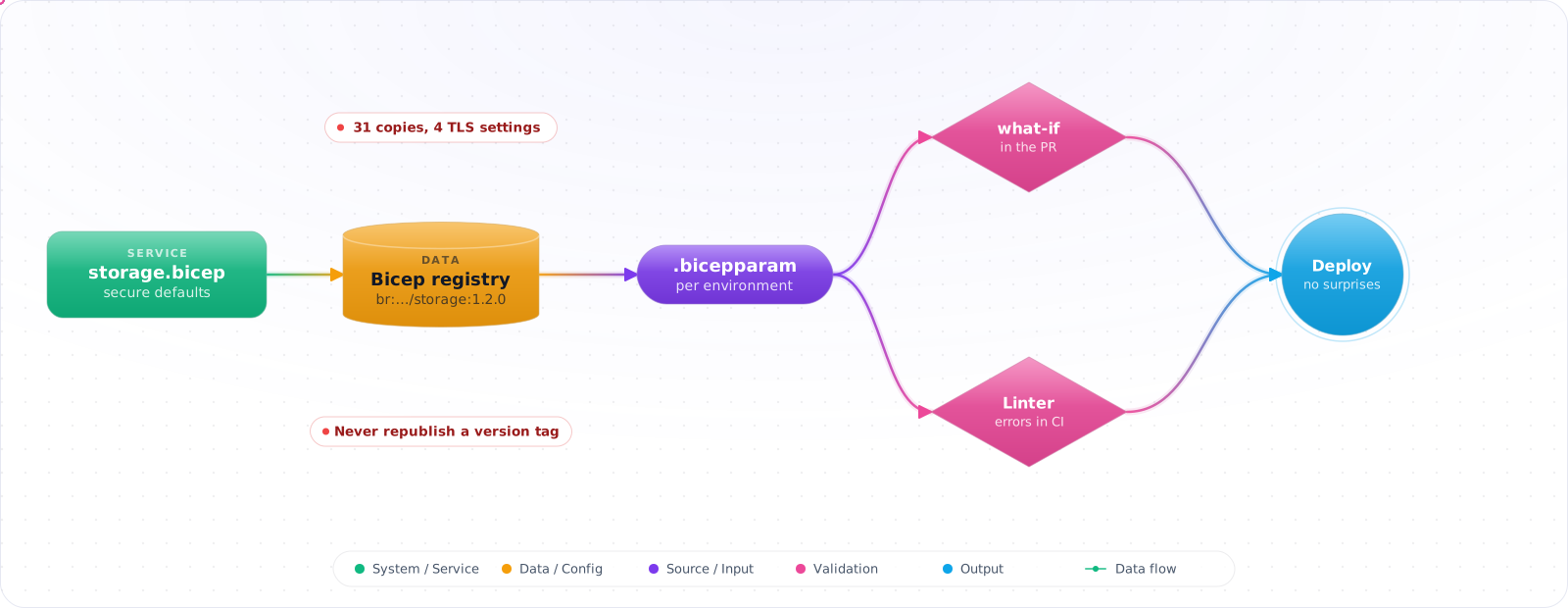
Take an illustrative case. An inventory of a company's Bicep files found the same kind of storage account defined 31 times, with four different minimum TLS versions and shared key access left on in most of them. Each copy had started as someone else's example. Then a module fix was republished under an existing version tag, and deployments changed without anyone touching their code.
Bicep modules, published to a registry with proper versions, fix both problems. Below are the Bicep basics, how modules and their sources work, conditions and loops, bicepconfig.json, a repository layout that scales across teams, and the what-if checks that show you a deployment before it happens.
- Your ARM templates are 500+ lines and nobody wants to touch them
- You're copy-pasting the same network module across 5 repos with minor variations
- A typo in a
resourceId()string caused a 3am incident - You want reusable, versioned infrastructure components your team can trust
Bicep Basics
The same storage account from ARM templates in Bicep:
param storageAccountName string
param sku string = 'Standard_LRS'

var location = resourceGroup().location

resource storageAccount 'Microsoft.Storage/storageAccounts@2023-01-01' = {
  name: storageAccountName
  location: location
  sku: { name: sku }
  kind: 'StorageV2'
  properties: {
    minimumTlsVersion: 'TLS1_2'
    allowBlobPublicAccess: false
    supportsHttpsTrafficOnly: true
  }
}

output blobEndpoint string = storageAccount.properties.primaryEndpoints.blob
No $schema, no contentVersion, no [parameters()] functions — just declaration. The compiler handles the ARM translation. The VS Code Bicep extension gives you IntelliSense for every property, type checking on assignments, and navigation to resource documentation.
Modules: The Core Abstraction
A Bicep module is just a .bicep file that you reference from another file. Nothing special goes inside the file itself, so any Bicep file can be a module. The caller is the side that uses the module keyword.
// modules/storage.bicep
@description('Storage account name — must be globally unique')
@minLength(3)
@maxLength(24)
param name string

@allowed(['Standard_LRS', 'Standard_ZRS', 'Standard_GRS'])
param sku string = 'Standard_LRS'

param location string = resourceGroup().location

resource sa 'Microsoft.Storage/storageAccounts@2023-01-01' = {
  name: name
  location: location
  sku: { name: sku }
  kind: 'StorageV2'
  properties: {
    minimumTlsVersion: 'TLS1_2'
    allowBlobPublicAccess: false
    supportsHttpsTrafficOnly: true
  }
}

output id string = sa.id
output blobEndpoint string = sa.properties.primaryEndpoints.blob
// main.bicep — consuming the module
param environment string = 'dev'
module storage './modules/storage.bicep' = {
name: 'storageDeployment'
params: {
name: 'stapp${environment}westus001'
sku: environment == 'prod' ? 'Standard_GRS' : 'Standard_LRS'
}
}
// Reference module output downstream
output storageEndpoint string = storage.outputs.blobEndpointCheck it: Search your repositories for the same resource type defined more than once. Compare the security settings between the copies.
Module Sources: Local, Registry, and Template Specs
Bicep modules can come from three sources:
Local files
module network './modules/network.bicep' = { ... }Azure Container Registry (Bicep Registry)
// Push module to registry
az bicep publish --file modules/storage.bicep \
  --target br:myregistry.azurecr.io/bicep/storage:v1.2

// Consume from registry
module storage 'br:myregistry.azurecr.io/bicep/storage:v1.2' = {
  name: 'storageDeployment'
  params: { name: 'stprod001', sku: 'Standard_GRS' } // 3-24 lowercase letters and digits, globally unique
}
Public Bicep Registry (Microsoft-maintained)
// Use Microsoft's curated modules
module keyVault 'br/public:avm/res/key-vault/vault:0.11.0' = {
  name: 'kvDeployment'
  params: {
    name: 'kv-${environment}-001'
    location: location
    enableRbacAuthorization: true
  }
}
The Azure Verified Modules (AVM) library is the recommended starting point for common Azure resources. These modules are maintained by Microsoft, follow security best practices, and are versioned.
Check it: Open a file that uses a shared module and read the reference. It should name a version.
Conditions and Loops
// Conditional resource — only deploy in production
// StorageRead logs live on the blob service, not on the storage account itself
resource blobService 'Microsoft.Storage/storageAccounts/blobServices@2023-05-01' existing = {
  parent: storageAccount
  name: 'default'
}

resource diagnostics 'Microsoft.Insights/diagnosticSettings@2021-05-01-preview' = if (environment == 'prod') {
  name: 'diag-settings'
  scope: blobService
  properties: {
    workspaceId: logAnalyticsWorkspaceId
    logs: [{ category: 'StorageRead', enabled: true }]
    metrics: [{ category: 'Transaction', enabled: true }]
  }
}

// Loop — create multiple identical resources
param regions array = ['westus', 'eastus', 'westeurope']

resource storageAccounts 'Microsoft.Storage/storageAccounts@2023-01-01' = [for region in regions: {
  name: 'stapp${environment}${region}001'
  location: region
  sku: { name: 'Standard_GRS' }
  kind: 'StorageV2'
  properties: { minimumTlsVersion: 'TLS1_2', allowBlobPublicAccess: false }
}]
bicepconfig.json — Project Configuration
Place a bicepconfig.json at the root of your project to configure the Bicep compiler, enable linting rules, and set registry aliases:
{
  "moduleAliases": {
    "br": {
      "modules": {
        "registry": "myregistry.azurecr.io",
        "modulePath": "bicep"
      }
    }
  },
  "analyzers": {
    "core": {
      "enabled": true,
      "rules": {
        "no-hardcoded-location": { "level": "error" },
        "secure-secrets-in-params": { "level": "error" },
        "use-recent-api-versions": { "level": "warning" }
      }
    }
  }
}Check it: On a branch, add a hard-coded environment URL. The build should fail on the linter rule.
Repository Structure for Bicep at Scale
infra/
├── main.bicep                  # Entry point per environment
├── main.dev.bicepparam         # Dev parameter values
├── main.prod.bicepparam        # Prod parameter values
├── modules/
│   ├── network/
│   │   ├── vnet.bicep
│   │   └── private-endpoint.bicep
│   ├── compute/
│   │   └── app-service.bicep
│   └── storage/
│       └── storage-account.bicep
└── bicepconfig.json
Bicep parameter files (.bicepparam) are the modern replacement for ARM .parameters.json. They support expressions, reference Key Vault secrets directly, and provide type checking:
// main.prod.bicepparam
using './main.bicep'

param environment = 'prod'
param storageAccountName = 'stprod001'
param sqlAdminPassword = getSecret('sub-id', 'rg-prod', 'kv-prod', 'sql-admin-password')
Preview, Type, and Track Your Deployments
Three Bicep features make modules safer to change once other teams depend on them.
- What-if before every deployment.
az deployment group what-ifshows what would be created, changed or deleted without touching anything. Run it in the pull request pipeline and post the result as a comment, so reviewers see the effect and not only the diff. - User-defined types for module inputs. A typed object parameter documents the shape callers must pass and fails at compile time when a property is missing or misspelled.
- Deployment stacks for lifecycle. A stack tracks the resources a template created, so removing a resource from the template can also remove it from Azure, and deny settings can block changes made outside the pipeline.
@export()
type appSettings = {
  name: string
  sku: 'B1' | 'P1v3' | 'P2v3'
  @minValue(1)
  instanceCount: int
  tags: object?
}

param app appSettingsCheck it: Run what-if on your next change, and compare its list with what you meant to change.
Production Checklist
- Use
@description()decorators on all params — they surface in portal deployments - Use
@secure()for passwords; never output secrets - Enable all linting rules in
bicepconfig.json; fail CI onerror-level violations - Pin module versions from ACR — don't reference
:latest - Run
az deployment group what-ifin CI before merging infra PRs - Store
.bicepparamfiles per environment; never hard-code environment values in.bicep - Consider Azure Verified Modules before writing custom modules for common resources
Bicep in Production
Bicep's lifecycle story improved with deployment stacks, which fix a long-standing gap: ARM deployments never removed resources you'd deleted from the template. A stack tracks what it manages, so when you remove a resource from your code, the stack can delete or detach it. It can also deny changes made outside the stack, which prevents drift:
az stack group create \
  --name app-prod \
  --resource-group rg-app-prod \
  --template-file main.bicep \
  --action-on-unmanage deleteResources \
  --deny-settings-mode denyWriteAndDelete
Start with detachAll until you trust what the stack manages, because deleteResources does exactly what it says.
Always run what-if
az deployment group what-if shows what would change before you deploy. Add it to your pull request pipeline and post the result as a comment. It's the Bicep equivalent of a Terraform plan, and it has some noise, so read it carefully for Azure's default-value false positives. A reviewer who sees "this will delete the storage account" before merge has saved you a bad day.
Linting and sharing modules
Configure the linter in bicepconfig.json, and treat warnings as errors in CI. Rules such as no-hardcoded-env-urls and secure-parameter-default catch real problems. Publish shared modules to a private Azure Container Registry with version tags, and consider Azure Verified Modules before writing your own. They're Microsoft-maintained, tested, and follow consistent conventions, which saves you from maintaining another storage account module.
Parameters and secrets
Use .bicepparam files for each environment. They're type-checked against your template, unlike JSON parameter files. Mark secrets with @secure(), so that they aren't logged, and get them from Key Vault with getSecret, rather than from a pipeline variable. Use user-defined types to give parameters a real shape, as a typed object catches a typo at compile time.
Bicep or Terraform?
If you're Azure-only, Bicep has no state file to manage and gets new Azure features on day one, which is a real advantage. If you're multi-cloud, or you manage non-Azure resources like GitHub or Datadog, Terraform or OpenTofu remain the better choice. Don't run both in the same scope, or they'll end up fighting each other.
Try It on Your Own System This Week
Three checks on a Bicep estate, about an hour in total:
- Count the teams that write their own version of a common resource. That resource is the first module to publish.
- Check whether what-if runs in the pipeline, or only by hand. By hand means it gets skipped when people are busy.
- Look for a verified module before you write the next custom one. Someone may already maintain it.
Naming and Tags
Standardise names and tags in a shared module, so that every resource gets them automatically. Use uniqueString(resourceGroup().id) for globally unique names, as it's stable across deployments. Tags such as owner and cost centre pay off the first time you need to explain a bill. Enforce them with Azure Policy, so that they can't be skipped.