Start With Review and a Short Standard
For one team that reviews every infrastructure change, a short written standard and a careful reviewer are enough. Policy as code earns its place when many teams deploy, and a rule has to hold whether or not anyone remembers it.
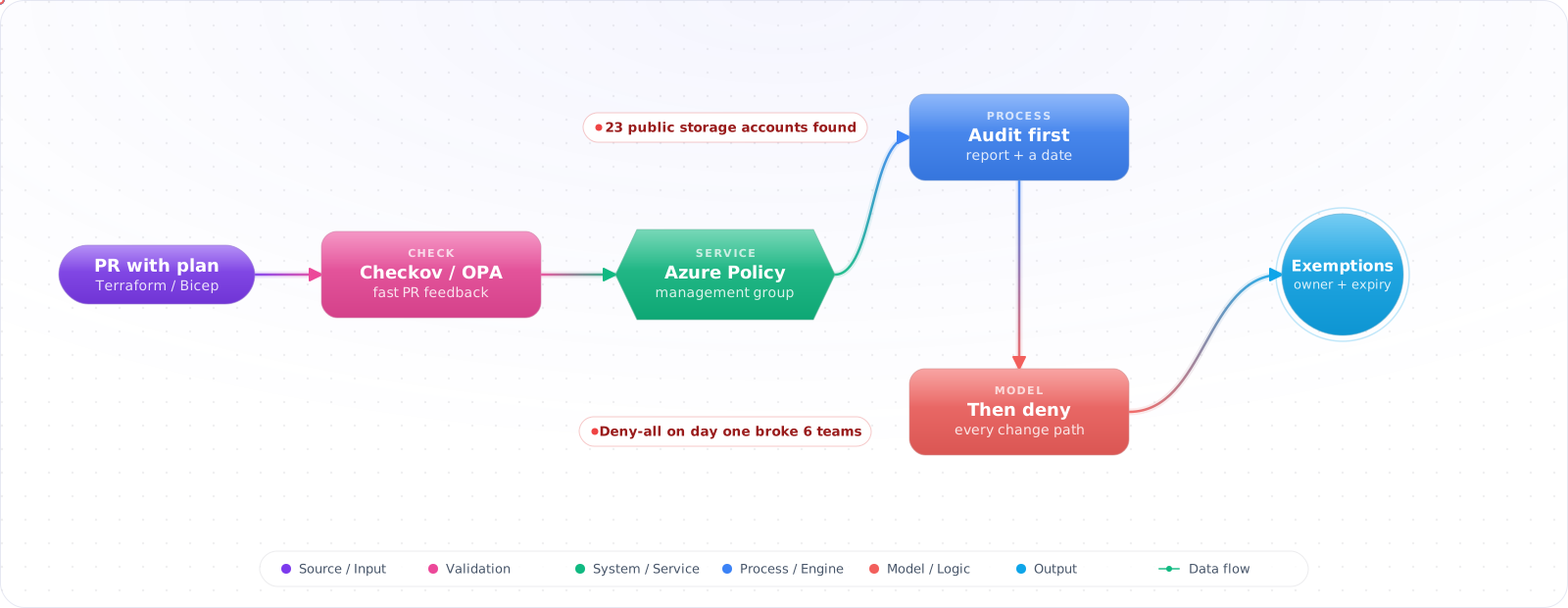
Take a typical case, made up for illustration. A yearly audit found 23 storage accounts with public blob access. The standard forbidding it had existed for two years. Most of the accounts were created by copying an old example, and two held exports with customer email addresses. The first fix, turning on a deny policy everywhere at once, broke six teams' pipelines and was rolled back the same day.
Policy as code puts the rules where changes happen: in pull requests, and in the platform itself. Below is Azure Policy, initiatives, OPA and Conftest, Checkov and Sentinel, and how to roll a new rule out without stopping every team on the day you switch it on.
- Security audit found 40 storage accounts with public access enabled — all created before the policy
- New engineers deploy without tags, breaking your cost allocation reports
- You're in a regulated industry and need continuous compliance evidence, not point-in-time audits
- Policy docs sit in Confluence and nobody reads them before deploying
Azure Policy: The Native Approach
Azure Policy evaluates resources against rules and takes actions: Deny (block deployment), Audit (flag violations), Modify (add/change properties automatically), or DeployIfNotExists (deploy remediation resources).
Custom policy definition
{
  "mode": "Indexed",
  "policyRule": {
    "if": {
      "allOf": [
        { "field": "type", "equals": "Microsoft.Storage/storageAccounts" },
        { "field": "Microsoft.Storage/storageAccounts/allowBlobPublicAccess", "equals": "true" }
      ]
    },
    "then": {
      "effect": "Deny"
    }
  },
  "parameters": {}
}
Deploy the policy with Bicep
// policies/deny-storage-public-access.bicep
targetScope = 'subscription'

resource policyDef 'Microsoft.Authorization/policyDefinitions@2021-06-01' = {
  name: 'deny-storage-public-access'
  properties: {
    displayName: 'Deny Storage Accounts with Public Blob Access'
    description: 'Blocks creation of storage accounts that allow public blob access'
    mode: 'Indexed'
    policyRule: {
      if: {
        allOf: [
          { field: 'type', equals: 'Microsoft.Storage/storageAccounts' }
          { field: 'Microsoft.Storage/storageAccounts/allowBlobPublicAccess', equals: 'true' }
        ]
      }
      then: { effect: 'Deny' }
    }
  }
}

resource policyAssignment 'Microsoft.Authorization/policyAssignments@2022-06-01' = {
  name: 'assign-deny-storage-public-access'
  properties: {
    policyDefinitionId: policyDef.id
    displayName: 'Deny Storage Accounts with Public Blob Access'
    enforcementMode: 'Default'
  }
}Check it: Assign one rule in audit mode and read the compliance report after the scan. The count is the real size of the problem.
Policy Initiatives (Policy Sets)
An initiative groups multiple policies into a single assignment. Use initiatives to package compliance frameworks (e.g., “CIS Azure Benchmark”, “Internal Security Baseline”):
resource initiative 'Microsoft.Authorization/policySetDefinitions@2021-06-01' = {
  name: 'security-baseline'
  properties: {
    displayName: 'Company Security Baseline'
    policyDefinitions: [
      {
        policyDefinitionId: denyPublicStoragePolicy.id
        policyDefinitionReferenceId: 'deny-public-storage'
      }
      {
        policyDefinitionId: requireTagsPolicy.id
        policyDefinitionReferenceId: 'require-tags'
        parameters: {
          requiredTags: { value: ['CostCenter', 'Owner', 'Environment'] }
        }
      }
    ]
  }
}
Open Policy Agent (OPA) / Conftest
For tool-agnostic policy (Terraform, Kubernetes, GitHub Actions, Dockerfile), OPA with Conftest lets you write policies in Rego that run in CI before deployment:
# policy/terraform/deny_public_storage.rego
package main

import rego.v1

# azurerm 3.0+ property. Anonymous blob access, which is separate from public_network_access_enabled.
deny contains msg if {
  some resource in input.resource_changes
  resource.type == "azurerm_storage_account"
  resource.change.after.allow_nested_items_to_be_public == true
  msg := sprintf("Storage account '%v' must not allow public blob access", [resource.address])
}

deny contains msg if {
  some resource in input.resource_changes
  resource.type == "azurerm_storage_account"
  not resource.change.after.tags["CostCenter"]
  msg := sprintf("Storage account '%v' missing required tag: CostCenter", [resource.address])
}
# Run policy checks against terraform plan output
terraform show -json tfplan > plan.json
conftest test plan.json --policy policy/terraform/GitHub Actions integration
- name: Terraform Plan
  run: terraform plan -out=tfplan

- name: Export Plan JSON
  run: terraform show -json tfplan > plan.json

- name: Policy Check with Conftest
  uses: instrumenta/conftest-action@v1
  with:
    files: plan.json
policy: policy/terraform/Check it: Open a pull request that breaks one rule. The finding should appear on the pull request within minutes, with a message that says how to fix it.
Checkov: IaC Security Scanning
Checkov is a static analysis tool for Terraform, Bicep, ARM, CloudFormation, and Kubernetes manifests. It ships with 1000+ pre-built policies and integrates directly into CI:
# Scan Terraform directory
checkov -d ./infra --framework terraform

# Scan Bicep files
checkov -d ./infra --framework bicep

# Output only failures, block on high severity
checkov -d ./infra --framework terraform \
  --compact --quiet \
  --check HIGH \
  --output cli --output junitxml \
  --output-file-path results/
Terraform Sentinel
For Terraform Cloud/Enterprise users, Sentinel is HashiCorp's policy-as-code framework. Policies run between plan and apply and can hard-stop deployments:
# sentinel.hcl
policy "deny-public-storage" {
  source = "./policies/deny-public-storage.sentinel"
  enforcement_level = "hard-mandatory"
}

policy "require-tags" {
  source = "./policies/require-tags.sentinel"
  enforcement_level = "soft-mandatory"   # Advisory — can override with justification
}
Rolling a Policy Out Without Stopping Every Team
The quickest way to get a policy programme switched off is to enable a deny rule that blocks forty deployments on its first morning. Introduce each rule in stages, and let the data decide when to move to the next one.
- Audit. Deploy the rule in audit mode and collect violations for a few weeks. This gives you the real size of the problem and the list of teams to talk to.
- Warn in the pipeline. Report violations on pull requests without failing the build. Developers see the rule where they can act on it, with the reason and the fix in the message.
- Deny for new resources. Enforce once the backlog is small. Existing resources stay on a tracked remediation list instead of failing every unrelated change.
- Exemptions with an expiry. Some exceptions are legitimate. Record who approved each one and when it ends, so that an exemption does not quietly become permanent.
Keep the policies in the same repository workflow as the infrastructure they govern: reviewed, versioned, and tested against known-good and known-bad examples before they are enforced.
Check it: For each rule you plan to enforce, write down how many existing resources fail it today. Enforce it only when that number is small.
Production Checklist
- Store all policy definitions alongside infrastructure code — same repo, same PR process
- Run Checkov/Conftest in CI on every PR that touches infrastructure
- Start with
Auditeffect before switching toDeny— build a compliance baseline first - Use initiatives to package related policies; assign initiatives, not individual policies
- Remember that
Denydoesn't repair anything: it blocks new or updated non-compliant resources. Fix existing ones through your IaC, or with remediation tasks onModifyandDeployIfNotExistspolicies - Test policy logic with
az policy state trigger-scanand validate outputs before production assignment - Export compliance reports on a schedule for audit evidence
Rolling Out Policy Without Blocking Everyone
The fastest way to fail with policy as code is to switch on 200 deny rules on a Monday. Teams get blocked, somebody asks for an exemption, and within a month the rules are off. Roll out in stages instead.
Start in audit mode. Azure Policy has an Audit effect, and Conftest can warn without failing. Measure how many resources would fail each rule. Fix the noisy rules, tell the owners, and give them a date. Only then move to Deny. New resources should comply first. Existing ones can follow with a remediation plan.
Treat policies like code: keep them in Git, review them, and test them. OPA has a built-in test framework, so a policy without tests is a future outage.
# Conftest only evaluates the 'main' namespace by default, so run this one with
# conftest test plan.json --namespace azure.storage, and prove a bad plan fails CI.
package azure.storage

import rego.v1

deny contains msg if {
    some r in input.resource_changes
    r.type == "azurerm_storage_account"
    r.change.after.min_tls_version != "TLS1_2"
    msg := sprintf("%s must use TLS 1.2", [r.address])
}

test_rejects_old_tls if {
    count(deny) == 1 with input as {"resource_changes": [{
        "address": "azurerm_storage_account.main",
        "type": "azurerm_storage_account",
        "change": {"after": {"min_tls_version": "TLS1_0"}},
    }]}
}
Shift left, and keep the backstop
Check policy at three points. In the pull request, run Conftest or Checkov so that developers get feedback in minutes. At plan time, evaluate the Terraform plan JSON, since it shows real values that a static scan can't see. At the cloud level, run Azure Policy or AWS SCPs as the final guard, because they catch changes made outside your pipeline, including those made in the portal.
Exemptions need an expiry
You'll need exceptions, and that's fine, provided they're explicit. Record each with an owner, a reason and an end date, then review them. An exemption with no expiry is a permanent hole. Azure Policy exemptions support an expiry date, so use it.
Write messages people can act on. "Policy violation 4471" wastes everyone's time. "Storage accounts must disable anonymous blob access. Set allow_nested_items_to_be_public = false" fixes itself. The same applies to agents writing Terraform: a clear message lets a coding agent correct its own change, which is becoming a real benefit as more IaC is generated.
Try It on Your Own System This Week
Three checks on a policy programme, about an hour in total:
- List your active exemptions and their end dates. One with no expiry is a permanent hole.
- Read the message a developer sees when a rule fails. It should say what to change.
- Look for tests beside your policies. A policy without tests is a future outage.
Measure the Programme
Track three numbers: compliance rate per policy, how long violations stay open, and how many exemptions are active. A rising exemption count means a policy doesn't fit reality, and either the rule or the platform needs to change. Review rules every quarter, and retire those that no longer matter.