Start With a Declarative Tool
If your infrastructure is a short, static list of resources, a declarative tool such as Bicep or Terraform is enough. Pulumi with Python earns its place when the team already writes Python every day and the infrastructure has real logic in it.
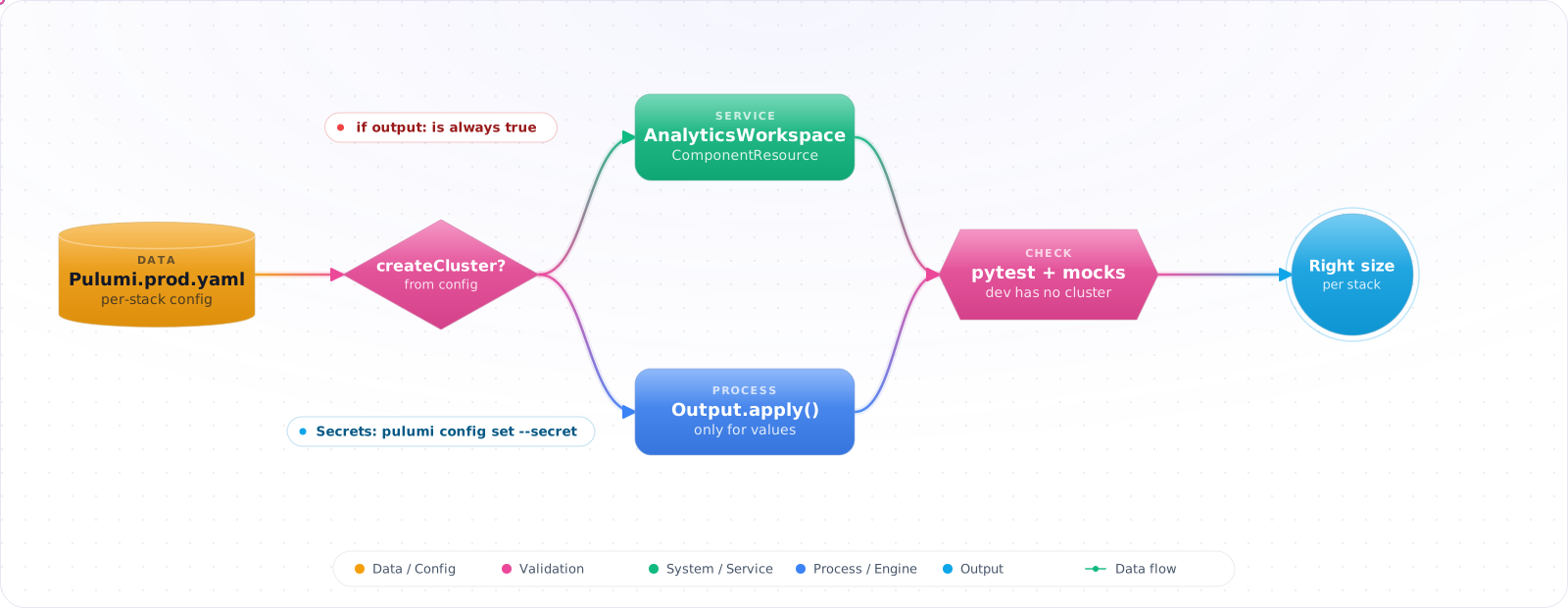
Take a typical case, made up for illustration. A data team's Pulumi program created an expensive analytics cluster with if workspace.sku: as the guard, meaning only in prod. An Output object is always truthy in Python, so dev and staging got the same cluster as prod, and the first sign was the monthly bill.
Pulumi with Python suits teams that already write Python every day, as long as they adjust a few script habits. Below is installing Pulumi and creating a project, resources, config and outputs, per-environment stack configuration, component resources, testing with pytest, and the deployment commands you will use daily.
- Your Terraform HCL has complex
for_eachanddynamicblocks that are hard to reason about - You want to unit-test your infrastructure logic before deploying
- Your team already writes Python and doesn't want to learn another DSL
- You need to call an API or read a database to generate resource configuration
Installing Pulumi and Creating a Project
# Install Pulumi CLI
curl -fsSL https://get.pulumi.com | sh

# Create a new Azure Python project
pulumi new azure-python --name myapp --stack dev

# Project structure
myapp/
├── __main__.py      # Infrastructure entry point
├── Pulumi.yaml      # Project metadata
├── Pulumi.dev.yaml  # Stack config (dev environment)
└── requirements.txt
Core Concepts: Resources, Config, Outputs
# __main__.py
import pulumi
import pulumi_azure_native as azure

# Config — per-stack values
config = pulumi.Config()
environment = config.require('environment')
location = config.get('location') or 'westus2'

# Resource group
rg = azure.resources.ResourceGroup(
    f'rg-{environment}',
    resource_group_name=f'rg-myapp-{environment}',
    location=location,
    tags={
        'Environment': environment,
        'ManagedBy': 'pulumi',
    },
)

# Storage account
storage = azure.storage.StorageAccount(
    f'sa-{environment}',
    account_name=f'samyapp{environment}001',
    resource_group_name=rg.name,
    location=rg.location,
    sku=azure.storage.SkuArgs(name='Standard_LRS'),
    kind='StorageV2',
    allow_blob_public_access=False,
    minimum_tls_version='TLS1_2',
    tags=rg.tags,
)

# Export outputs
pulumi.export('resourceGroupName', rg.name)
pulumi.export('storageAccountName', storage.name)
pulumi.export('blobEndpoint', storage.primary_endpoints.blob)Check it: Run a preview on a new stack and read the list. It should show exactly the resources your program declares, and change nothing.
Stack Configuration Per Environment
# Set config values per stack
pulumi stack select dev
pulumi config set environment dev
pulumi config set location westus2

pulumi stack select prod
pulumi config set environment prod
pulumi config set location eastus

# Secrets — encrypted in Pulumi state
pulumi config set --secret dbPassword "super-secret"

# Access in code
db_password = config.require_secret('dbPassword')
# db_password is a pulumi.Output[str] — never a plain string
Outputs and Input/Output Types
Pulumi uses Output[T] for values that are only known after a resource is created (like a generated resource name or an IP address). You can't use them as regular Python values — instead, compose them using apply or helper functions:
import pulumi

# Wrong — TypeError at runtime
connection_string = 'Server=' + storage.name + ';...'

# Correct — using apply
connection_string = storage.name.apply(
    lambda name: f'DefaultEndpointsProtocol=https;AccountName={name};...'
)

# Or using pulumi.Output.concat()
connection_string = pulumi.Output.concat(
    'DefaultEndpointsProtocol=https;AccountName=',
    storage.name,
    ';AccountKey=',
    storage_key,
)

pulumi.export('connectionString', connection_string)
ComponentResource: Reusable Infrastructure Components
ComponentResource is Pulumi's equivalent of a Terraform module — a class that groups related resources:
from typing import Optional
import pulumi
import pulumi_azure_native as azure

class SecureStorageComponent(pulumi.ComponentResource):
    def __init__(
        self,
        name: str,
        resource_group_name: pulumi.Input[str],
        location: pulumi.Input[str],
        environment: str,
        opts: Optional[pulumi.ResourceOptions] = None,
    ):
        super().__init__('myapp:storage:SecureStorageComponent', name, None, opts)

        child_opts = pulumi.ResourceOptions(parent=self)

        self.account = azure.storage.StorageAccount(
            f'{name}-sa',
            # 3-24 lowercase letters and digits, globally unique: 'app-storage' needs cleaning up
            account_name=f"sa{name.replace('-', '')}{environment}001"[:24].lower(),
            resource_group_name=resource_group_name,
            location=location,
            sku=azure.storage.SkuArgs(name='Standard_LRS'),
            kind='StorageV2',
            allow_blob_public_access=False,
            minimum_tls_version='TLS1_2',
            opts=child_opts,
        )

        self.register_outputs({
            'accountName': self.account.name,
            'blobEndpoint': self.account.primary_endpoints.blob,
        })

# Usage
storage = SecureStorageComponent(
    'app-storage',
    resource_group_name=rg.name,
    location=rg.location,
    environment='prod',
)
pulumi.export('storageEndpoint', storage.account.primary_endpoints.blob)
Unit Testing with pytest
# tests/test_storage.py
import pulumi

class MyMocks(pulumi.runtime.Mocks):
    def new_resource(self, args: pulumi.runtime.MockResourceArgs):
        return [args.name + "_id", args.inputs]   # [id, state]: echo the inputs back

    def call(self, args: pulumi.runtime.MockCallArgs):
        return {}

pulumi.runtime.set_mocks(MyMocks())   # must run BEFORE the program is imported

import infra  # your program as a module

@pulumi.runtime.test
def test_storage_no_public_access():
    def check(args):
        urn, allow_public = args
        assert allow_public is False, f"{urn} must have public blob access disabled"
    return pulumi.Output.all(infra.storage.account.urn, infra.storage.account.allow_blob_public_access).apply(check)

@pulumi.runtime.test
def test_storage_tls_version():
    return infra.storage.account.minimum_tls_version.apply(lambda tls: assert_tls(tls))

def assert_tls(tls):
    assert tls == "TLS1_2"
The decorator matters, and so does the return. @pulumi.runtime.test waits on the chain you return, so an assertion inside apply actually runs and can fail the test. Without them, the test can finish while the callback is still pending and pass without checking anything, which is worse than having no test. Break an assertion on purpose once to prove the test can fail.
Check it: Break a security setting in the program and run the tests. One should fail. If none does, check that each test returns the chain it asserts on.
Python Habits That Break Pulumi Programs
The cluster story at the top of this article is the classic case. In plain Python, if value: is a reasonable check. In Pulumi, workspace.sku is an Output object, and any object is truthy, so the branch always runs. Pulumi cannot give you the real value at that point, because it does not exist until the resource is created.
The fix is to make decisions from values you know before deployment. Environment choices belong in stack configuration, read as plain Python values:
config = pulumi.Config()
create_analytics = config.get_bool("createAnalytics") or False   # a real bool

if create_analytics:                      # safe: a plain value known up front
    cluster = AnalyticsCluster("analytics", sku=config.require("analyticsSku"))
A few other script habits to drop:
- Printing outputs to debug.
print(account.name)prints an object description. Usepulumi.exportoraccount.name.apply(lambda n: pulumi.log.info(n)). - Mixing f-strings and outputs. An f-string calls
str()on the output. Usepulumi.Output.concatorpulumi.Output.formatinstead. - Running your own event loop. Pulumi drives asyncio itself. Calling
asyncio.runinside a program leads to confusing errors; return outputs and let the engine resolve them. - Unpinned dependencies. A data team’s virtual environment drifts. Pin
pulumiand every provider package exactly, so a preview on a colleague’s machine and in CI uses the same provider version.
Check it: Search the program for if statements whose condition is a property of a resource. Each of those is always true.
Reading External Data Safely
One reason data teams like Pulumi is that a program can read a database or call an API to decide what to build, for example one storage container per tenant listed in a config table. That is powerful, and it brings one rule: the same inputs must produce the same program. If the query returns rows in a different order, or a tenant appears between preview and up, what you reviewed is not what gets deployed.
Sort everything you read, use stable identifiers as resource names (the tenant ID, never a list index), and for anything that changes often, snapshot the data to a file in the repository and have the program read the file. Then a code review shows exactly which tenants change, and the deployment is reproducible from the commit alone.
Deployment Commands
# Preview changes (like terraform plan)
pulumi preview

# Deploy
pulumi up

# Destroy (with confirmation prompt)
pulumi destroy

# Show current stack state
pulumi stack output

# Import existing resource into Pulumi state
pulumi import azure-native:storage:StorageAccount myStorage \
  /subscriptions/.../resourceGroups/rg-prod/providers/Microsoft.Storage/storageAccounts/stprod001
Sharing Outputs Between Stacks
Real systems are split across projects: networking in one, the database in another, applications in a third. A stack reference lets one project read the outputs of another without copying values by hand or putting everything into one large program.
import pulumi

network = pulumi.StackReference("acme/network/prod")
subnet_id = network.get_output("app_subnet_id")

config = pulumi.Config()
db_password = config.require_secret("dbPassword")   # stays encrypted in state and logs
Two rules keep this manageable. Export only what other stacks need, because every exported value is part of an interface you now have to keep stable. And read secrets with require_secret rather than require: the value stays wrapped as a secret output, so it is encrypted in the state file and masked in the console and in previews.
Production Checklist
- Use a remote state backend — Pulumi Cloud, Azure Blob, or S3 (never local filesystem for production)
- Separate stacks per environment:
pulumi stack select prodbefore any apply - Encrypt all secrets with
config set --secret— never store inPulumi.yaml - Write unit tests for every
ComponentResource; test properties that matter for security - Run
pulumi previewin CI on every PR; gate merges on successful preview - Pin provider versions in
requirements.txt; review changelogs before upgrades - Use
ResourceOptions(protect=True)on stateful resources to prevent accidental deletion
Testing and Using Pulumi With Agents
Pulumi's main advantage over HCL is real tests. Use mocks for fast unit tests of your resource logic, and policy packs (CrossGuard) to enforce rules in Python. Because it's ordinary code, coding agents handle it well, which is a reason to keep a clear structure and always review pulumi preview. Run it in CI with an explicit --expect-no-changes check on a schedule, so drift gets noticed.
Try It on Your Own System This Week
Three checks on a Pulumi program in Python, about an hour in total:
- Search for asyncio.run. Pulumi drives the event loop itself.
- Check where the state is stored. A local file isn't a production backend.
- Look for sensitive values set without the secret flag. Plain config is stored in plain text.
Structure and Secrets
Keep stacks small, and share values with stack references, rather than one huge program. Use component resources to package what you repeat. pulumi config set --secret encrypts a value in the stack file, which is an improvement on plain state, though it's still better to fetch secrets at runtime with a managed identity. Pin provider versions in requirements.txt, because an automatic update can change a resource's behaviour on your next up.