Start With a Declarative Tool
If your infrastructure is a short, static list of resources, a declarative tool is enough. Pulumi with TypeScript earns its place when the team that owns the infrastructure writes TypeScript daily, and wants types and tests around it.
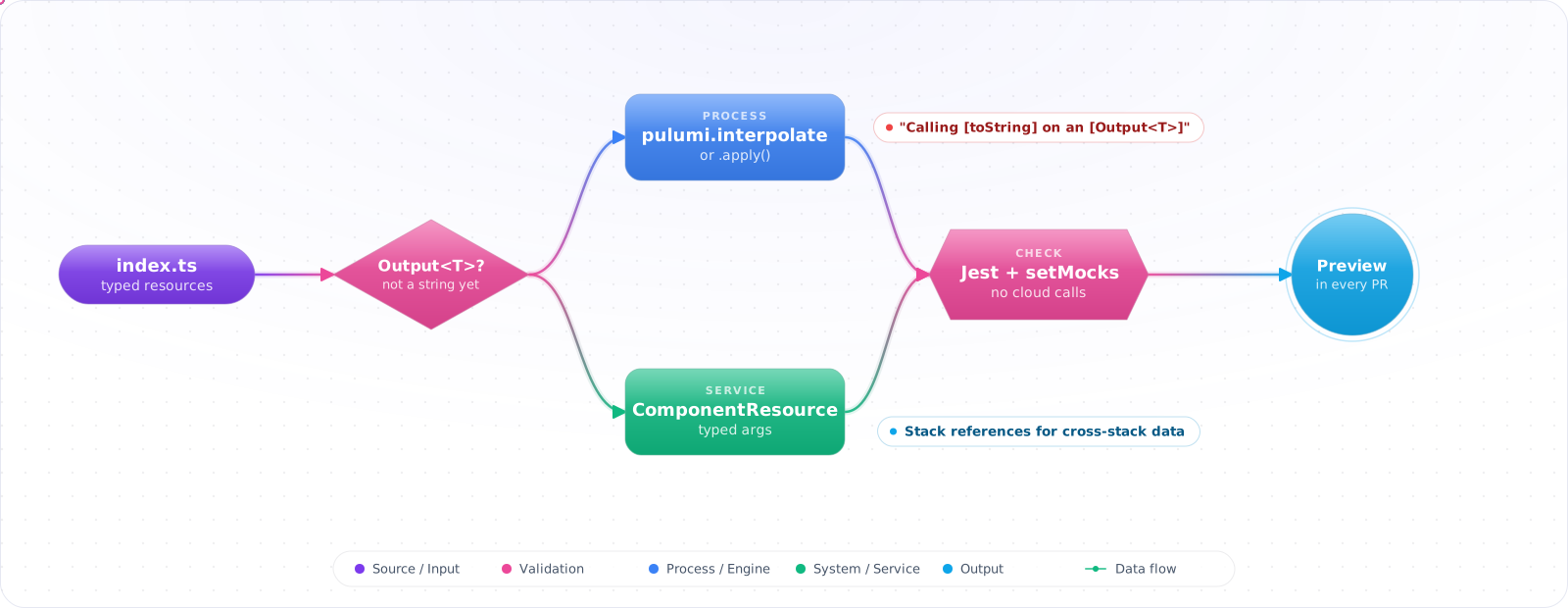
Take a typical case, made up for illustration. A web app failed at startup because its connection string read “Calling [toString] on an [Output<T>] is not supported…”. The code had built the string with a normal template literal. The type checker was happy, Pulumi printed a warning, and the setting went to Azure anyway.
Pulumi lets you write infrastructure in TypeScript with real types, functions and tests, which is a big win for teams that already live there. It also brings one concept you must get right: outputs are values that only exist after deployment. Below is project setup, typed resources, working with Output<T>, components, testing with mocks, stack references and organisation-wide defaults.
- A typo in an ARM template property name caused a silent misconfiguration
- You want to use TypeScript generics to model environment-specific infrastructure variations
- Your team is already TypeScript-fluent and wants one less language to maintain
- You need to test infrastructure logic with Jest before spending deploy time
Project Setup
# Create a new TypeScript Azure project
pulumi new azure-typescript --name myapp --stack dev

# Project structure
myapp/
├── index.ts              # Infrastructure entry point
├── Pulumi.yaml           # Project metadata
├── Pulumi.dev.yaml       # Stack config
├── package.json
├── tsconfig.json
└── node_modules/
// package.json (key sections)
{
"devDependencies": {
"@pulumi/pulumi": "^3.0.0",
"@pulumi/azure-native": "^2.0.0",
"typescript": "^5.0.0",
"@types/node": "^20.0.0"
}
}Type-Safe Resource Declarations
// index.ts
import * as pulumi from '@pulumi/pulumi';
import * as azure from '@pulumi/azure-native';

const config = new pulumi.Config();
const environment = config.require('environment');
const location = config.get('location') ?? 'westus2';

// TypeScript knows every valid property and its type
const rg = new azure.resources.ResourceGroup(`rg-${environment}`, {
  resourceGroupName: `rg-myapp-${environment}`,
  location,
  tags: {
    Environment: environment,
    ManagedBy: 'pulumi',
  },
});

// exported so tests can inspect its inputs
export const storage = new azure.storage.StorageAccount(`sa-${environment}`, {
  accountName: `samyapp${environment}001`,
  resourceGroupName: rg.name,
  location: rg.location,
  sku: { name: azure.storage.SkuName.Standard_LRS },
  kind: azure.storage.Kind.StorageV2,
  allowBlobPublicAccess: false,          // TypeScript: boolean, not string
  minimumTlsVersion: azure.storage.MinimumTlsVersion.TLS1_2,
  tags: rg.tags,
});

export const storageAccountName = storage.name;
export const blobEndpoint = storage.primaryEndpoints.apply(ep => ep.blob);Check it: Misspell a property name on a branch. The compiler should reject it before anything is deployed.
Working with Output<T>
Resources return Output<T> for values resolved after deployment. TypeScript's type system tracks this for you:
import * as pulumi from '@pulumi/pulumi';

// Output<string> — can't use directly as a string
const name: pulumi.Output<string> = storage.name;

// Transform with .apply()
const connectionString: pulumi.Output<string> = storage.name.apply(
  n => `DefaultEndpointsProtocol=https;AccountName=${n};...`
);

// Combine multiple outputs
const message: pulumi.Output<string> = pulumi.interpolate`
  Storage account ${storage.name} deployed in ${rg.location}
`;

// all() — wait for multiple outputs
const summary = pulumi.all([storage.name, rg.location]).apply(
  ([name, loc]) => `${name} @ ${loc}`
);
Why Outputs Bite, and How to Stay Out of Trouble
Your index.ts runs once, top to bottom, registering each resource as it goes, and Pulumi works through those registrations asynchronously, in the order the dependencies between outputs and inputs allow. So a value usually isn't known while your code runs, and during preview it may stay unknown. An Output<T> is a promise for a value plus the knowledge of which resource it came from. That second part is why you cannot unwrap it yourself: if you could, Pulumi would lose track of the dependency, and resources could be created in the wrong order.
The three mistakes I see most often, and the fix for each:
- Template literals around outputs.
`Server=${server.name}`compiles, because an output has atoString. It produces a warning string instead of the name, which is the startup failure from the introduction. Usepulumi.interpolateor.applyevery time an output goes into a string. - Creating resources inside
.apply. It works onpulumi up, butpulumi previewcannot show those resources because the callback has not run yet, so reviewers approve a plan that is missing part of the change. Pass outputs straight into resource arguments instead; inputs accept outputs directly. - Secrets in plain config. A connection string built from an output is stored in state. Mark it with
pulumi.secret(...), and set sensitive configuration withpulumi config set --secret, so it is encrypted in the state file and masked in CLI output.
Check it: Search for template literals that contain a property of a resource. Each one should use pulumi.interpolate.
ComponentResource: Typed Infrastructure Modules
import * as pulumi from '@pulumi/pulumi';
import * as azure from '@pulumi/azure-native';

interface AppStorageArgs {
  resourceGroupName: pulumi.Input<string>;
  location: pulumi.Input<string>;
  environment: string;
  replicationEnabled?: boolean;
}

class AppStorage extends pulumi.ComponentResource {
  public readonly accountName: pulumi.Output<string>;
  public readonly blobEndpoint: pulumi.Output<string | undefined>;

  constructor(
    name: string,
    args: AppStorageArgs,
    opts?: pulumi.ComponentResourceOptions,
  ) {
    super('myapp:storage:AppStorage', name, {}, opts);

    const sku = args.replicationEnabled
      ? azure.storage.SkuName.Standard_GRS
      : azure.storage.SkuName.Standard_LRS;

    const account = new azure.storage.StorageAccount(
      `${name}-sa`,
      {
        accountName: `sa${name}${args.environment}001`.toLowerCase(),
        resourceGroupName: args.resourceGroupName,
        location: args.location,
        sku: { name: sku },
        kind: azure.storage.Kind.StorageV2,
        allowBlobPublicAccess: false,
        minimumTlsVersion: azure.storage.MinimumTlsVersion.TLS1_2,
      },
      { parent: this },
    );

    this.accountName = account.name;
    this.blobEndpoint = account.primaryEndpoints.apply(ep => ep.blob);

    this.registerOutputs({
      accountName: this.accountName,
      blobEndpoint: this.blobEndpoint,
    });
  }
}

// Usage
const storage = new AppStorage('app', {
  resourceGroupName: rg.name,
  location: rg.location,
  environment: 'prod',
  replicationEnabled: true,
});

export const blobEndpoint = storage.blobEndpoint;
Testing with Jest
// __tests__/storage.test.ts
import * as pulumi from '@pulumi/pulumi';

// Mock provider
pulumi.runtime.setMocks({
  newResource: (args) => ({
    id: args.inputs.accountName + '_id',
    state: args.inputs,
  }),
  call: (args) => ({ result: args.inputs }),
});

// Load the program with require() inside each test. A top-level import is hoisted
// above setMocks, so the program would run before the mocks exist.
describe('Storage Account Security', () => {
  test('public access is disabled', done => {
    const infra = require('../index');

    infra.storage.allowBlobPublicAccess.apply(
      (allowPublic: boolean) => {
        expect(allowPublic).toBe(false);
        done();
      }
    );
  });

  test('TLS version is 1.2', done => {
    const infra = require('../index');

    infra.storage.minimumTlsVersion.apply(
      (tls: string) => {
        expect(tls).toBe('TLS1_2');
        done();
      }
    );
  });
});
What Mocked Tests Prove, and What They Do Not
The mocks above replace the cloud provider entirely: newResource echoes the inputs back as state, so a test sees exactly what your program asked for. That makes these tests fast and good at one thing, checking your own logic. Does the production stack get geo-redundant storage? Does every account disable public blob access? Does the component name things the way your naming standard says?
They cannot tell you whether Azure will accept the request, whether a name is already taken, or whether two settings conflict once the resource exists. Three layers cover the gap, cheapest first:
- Unit tests with mocks on every commit, for program logic and naming.
- Policy packs for organisation-wide rules (“no public storage”, “TLS 1.2 minimum”). Run them with
pulumi preview --policy-pack ./policiesin the pull request pipeline, so the rule applies to every project, not only the ones that remembered to write a test for it. - An ephemeral stack for components that other teams consume: deploy to a short-lived stack in CI, run a smoke check against the real resources, then destroy it. Slow and costly, so keep it for shared components rather than every change.
Check it: List what your mocked tests assert. Then name one thing that only a real deployment could tell you, and where that gets checked.
Stack References: Cross-Stack Outputs
// Consume outputs from another stack
const networkStack = new pulumi.StackReference(
  'org/network/prod'  // or 'org/network/${environment}'
);

const vnetId = networkStack.getOutput('vnetId') as pulumi.Output<string>;
const subnetId = networkStack.getOutput('appSubnetId') as pulumi.Output<string>;

// Use in this stack's resources
const appService = new azure.web.WebApp('app', {
  virtualNetworkSubnetId: subnetId,
  // ...
});
Organisation-Wide Defaults With Resource Transforms
Some rules apply to every resource: required tags, a default region, a naming prefix. Repeating them in each declaration does not last, because the first resource someone adds in a hurry will miss them. A resource transform is a function that Pulumi runs for every resource before it is registered, so the rule lives in one place.
import * as pulumi from '@pulumi/pulumi';

const requiredTags = { owner: 'platform-team', costCentre: 'cc-1042', managedBy: 'pulumi' };

// List the types that accept tags. Checking 'tags' in args.props would skip
// exactly the resources you want to catch: the ones where someone forgot them.
const taggable = new Set(['azure-native:resources:ResourceGroup', 'azure-native:storage:StorageAccount']);

pulumi.runtime.registerResourceTransform((args) => {
  if (!taggable.has(args.type)) return undefined;
  return {
    props: { ...args.props, tags: { ...args.props.tags, ...requiredTags } },
    opts: args.opts,
  };
});
Pair this with drift detection. Running pulumi preview --refresh in a scheduled pipeline compares the real cloud state with the program and reports anything that was changed by hand, which is how tags and settings usually drift after a deployment.
Renaming Without Replacing
Pulumi identifies a resource by its logical name, the first argument to the constructor, plus its parent. Refactor a resource into a component, or tidy its name, and Pulumi sees one resource deleted and a new one created. For a storage account or a database that means data loss, and the preview shows it as a replace that is easy to miss in a long diff.
// Moved into AppStorage and renamed: tell Pulumi it is the same resource
const account = new azure.storage.StorageAccount('app-sa', { /* ... */ }, {
  parent: this,
  aliases: [{ name: 'sa-prod', parent: pulumi.rootStackResource }],
  protect: true,
});
The alias maps the old identity to the new one, so the next pulumi up only updates state. Make it a review rule: any preview that says replace on a stateful resource needs a second look and, usually, an alias.
Check it: Rename one resource in a test stack and run a preview. With an alias, it should show an update and no replacement.
Pulumi or Terraform for a TypeScript Team
Pulumi’s pitch is that infrastructure becomes ordinary code, and for a TypeScript team that is real: shared types with the application, loops and functions instead of HCL workarounds, and tests in the same runner. The cost is that ordinary code allows ordinary complexity. I have seen Pulumi programs with clever abstractions that only their author could change safely.
My rule of thumb: pick Pulumi when the team that owns the infrastructure writes TypeScript daily and the infrastructure has real logic in it, such as many similar environments or tenants. Pick Terraform when a separate platform team owns it, when you need the largest pool of examples and hires, or when the infrastructure is mostly static declarations. Either way, keep components boring: typed arguments, no network calls, no hidden defaults.
Try It on Your Own System This Week
Three checks on a Pulumi program in TypeScript, about an hour in total:
- Search for resources created inside apply. They work on a real run, and a preview can't show them.
- Check that strict is on in tsconfig.json. It catches null and undefined at compile time.
- Look for a scheduled preview with refresh. It compares the real cloud state with your program.
Production Checklist
- Enable
strict: trueintsconfig.json— catch null/undefined issues at compile time - Type all
ComponentResourceargs interfaces — avoidany - Write Jest tests for security-critical properties (public access, TLS, encryption)
- Use
pulumi.interpolatefor string templates that includeOutput<T> - Pin
@pulumi/azure-nativeto a specific minor version; review provider changelogs before upgrading - Use
ResourceOptions.protect: trueon databases and state stores - Run
pulumi previewin CI on every pull request; require approval for production deploys