Start With the Default Workspace
With a single environment, the default workspace is all you need. The choice between workspaces and directories starts when there are several environments that differ in size, in settings and in who may touch them.
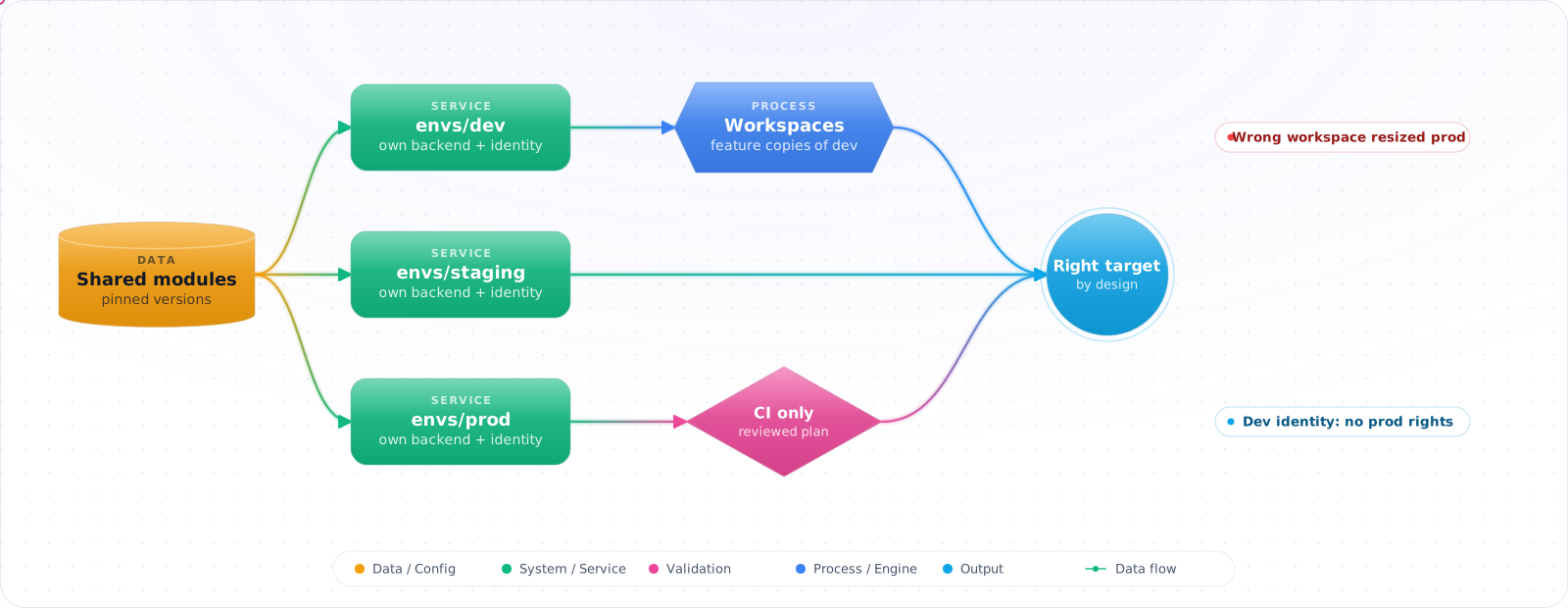
Take a typical case, made up for illustration. An engineer wanted to scale dev down for the weekend. Earlier in the day they had switched to the prod workspace to check something, and forgot. The dev-sized variables went to prod, the AKS node pool shrank, and checkout slowed down until someone noticed. The same credentials worked everywhere, so nothing stopped it.
Terraform workspaces are useful, just not for separating environments that differ in size, settings and access. Below is how workspaces actually work, when they are a good fit, the directory-per-environment layout I would use instead for long-lived environments, and how Terraform Cloud workspaces differ from the CLI ones.
- You're about to use workspaces for dev/staging/prod but aren't sure if that's the right approach
- A workspace plan showed it would delete production resources because you were in the wrong workspace
- Your dev workspace shares some resources with production and you don't know which
- You're not sure how workspaces relate to Terraform Cloud environments
How Workspaces Work
Terraform workspaces maintain separate state files for the same configuration directory. The default workspace is called default. Every terraform apply modifies the state of the current workspace only.
# List workspaces
terraform workspace list

# Create and switch to a new workspace
terraform workspace new staging

# Switch to an existing workspace
terraform workspace select production

# Show current workspace
terraform workspace show

# Delete a workspace (must be empty of resources)
terraform workspace delete staging
You can reference the current workspace inside your configuration:
locals {
  is_production = terraform.workspace == "production"
}

resource "azurerm_service_plan" "main" {
  name     = "asp-myapp-${terraform.workspace}"
  sku_name = local.is_production ? "P2v3" : "B2"
  ...
}Check it: Before your next apply, say which workspace is selected, then run terraform workspace show. If you weren't sure, the target isn't obvious enough.
Workspace-Based Environment Strategy
Workspaces work well for ephemeral, short-lived environments — feature branch environments, review apps, temporary testing environments. Each developer creates a workspace, deploys, and destroys it when done:
# CI: create feature branch environment
WORKSPACE="feature-${PR_NUMBER}"
terraform workspace new $WORKSPACE || terraform workspace select $WORKSPACE
terraform apply -var="environment=$WORKSPACE" -auto-approve

# CI: destroy on PR merge
terraform workspace select $WORKSPACE
terraform destroy -auto-approve
terraform workspace select default
terraform workspace delete $WORKSPACE
When NOT to Use Workspaces for Environments
HashiCorp itself recommends against using workspaces as a primary environment promotion mechanism. The reasons:
- Single backend: All workspace state files are in the same storage location. A misconfigured IAM policy can expose production state to dev users.
- Shared provider configuration: All workspaces use the same
providers.tf. You can't easily use different service principals per environment. - Human error:
terraform workspace select production && terraform applylooks identical to dev commands. It's easy to run apply against the wrong workspace. - Configuration parity: It's hard to guarantee that dev and prod use the same code version when you're switching workspaces in a single directory.
Check it: Try to read the production state with the identity you use for dev. It should be refused.
The Alternative: Directory-Per-Environment
infra/
├── modules/
│   ├── app-service/
│   └── networking/
├── environments/
│   ├── dev/
│   │   ├── main.tf          # Calls modules
│   │   ├── backend.tf       # Separate state per env
│   │   ├── terraform.tfvars # Dev-specific values
│   │   └── providers.tf     # Dev service principal
│   ├── staging/
│   │   └── ...
│   └── production/
│       └── ...
Benefits: separation at the filesystem level, the option of separate backends (and so separate IAM for state access), clear blast radius, independent deployment pipelines.
# Different state keys separate the state files, but not access to them. For real
# isolation, give each environment its own container or account and a scoped identity.
# environments/production/backend.tf
terraform {
  backend "azurerm" {
    resource_group_name  = "rg-terraform-state"
    storage_account_name = "stterraformstate001"
    container_name       = "tfstate"
    key                  = "production/main.tfstate"
  }
}

# environments/dev/backend.tf
terraform {
  backend "azurerm" {
    resource_group_name  = "rg-terraform-state"
    storage_account_name = "stterraformstate001"
    container_name       = "tfstate"
    key                  = "dev/main.tfstate"
  }
}
Terraform Cloud Workspaces
Terraform Cloud workspaces are a different concept from CLI workspaces. Each Terraform Cloud workspace has its own:
- State file
- Variables (including secrets)
- Run history
- Access controls
- VCS trigger configuration
Terraform Cloud workspaces map well to environments — they're the right place for dev/staging/prod isolation.
# Connecting a directory to a Terraform Cloud workspace
# terraform.tf
terraform {
  cloud {
    organization = "myorg"
    workspaces {
      name = "myapp-production"   # One workspace per environment
    }
  }
}
Decision Guide
Use workspaces when:
  ✅ Creating short-lived feature/preview environments
  ✅ Testing configuration changes before promoting to long-lived envs
  ✅ Environments are structurally identical, just need separate state

Use separate directories when:
  ✅ Long-lived environments (dev, staging, prod)
  ✅ Environments need different provider configs or service principals
  ✅ Environment state must be strictly isolated for compliance
  ✅ Different teams own different environments
Where Workspaces Are the Right Tool
Workspaces shine for short-lived copies of the same configuration: one environment per pull request, a load-test copy for a week, a sandbox per developer. Every copy has the same shape, differs only in name, and is destroyed when the work is done. That is exactly what a workspace models, one configuration with several independent state files.
# in the PR pipeline
terraform workspace select -or-create "pr-$PR_NUMBER"
terraform apply -auto-approve -var="sku=B1"

# when the PR closes
terraform workspace select "pr-$PR_NUMBER"
terraform destroy -auto-approve
terraform workspace select default
terraform workspace delete "pr-$PR_NUMBER"
My rule is to use terraform.workspace inside the configuration only for naming ("app-${terraform.workspace}"), and not for branching logic such as a different SKU in a conditional. Once the configuration has if prod then behaviour hidden inside it, you have long-lived environments pretending to be copies. And put a cost alert on the subscription: forgotten PR environments are the most common way this pattern goes wrong.
Check it: Open a pull request and watch an environment appear. Close it, and check that the workspace and its resources are gone.
If You Already Use Workspaces for Environments
Plenty of teams run dev, staging and prod as workspaces today, and migrating is not always the first priority. Three guardrails remove most of the risk from the story at the top of this article:
- Different credentials per environment. If the identity that can change dev cannot touch prod, selecting the wrong workspace fails at the first API call instead of resizing production.
- Applies only from CI. Laptops run
plan; a pipeline with an approval step runsapplyfor prod. The pipeline selects the workspace from the branch or job name, not from someone’s memory. - A check that the variables match the workspace. A precondition that compares
terraform.workspacewith anenvironmentvariable in the tfvars file stops a dev variable file from being applied to prod.
Check it: In a test, select the dev workspace and give it the production variables. The plan should fail on the mismatch.
Migrating From Workspaces to Directories
When you do move to a directory per environment, the state moves with it, and no cloud resource needs to change. For each environment: freeze applies from the old path, back up both states, create the new directory with its own backend key, pull the old workspace’s state, push it into the new backend, and confirm the plan is empty before anyone applies anything.
# in the old configuration
terraform workspace select prod
terraform state pull > prod.tfstate

# in environments/prod (new backend key already configured)
terraform init
terraform state push prod.tfstate
terraform plan        # must report: No changes
If that last plan shows changes, stop and compare: usually a variable value differs between the old workspace setup and the new tfvars file. Fix the variables until the plan is empty, then delete the local state file, because it contains every secret the state does. Retire the old workspace and its pipeline before you re-enable applies, or two paths will manage the same resources.
Production Checklist
- Do not use CLI workspaces for long-lived dev/staging/prod environments — use separate directories
- Use workspaces for ephemeral PR/feature environments where parity with prod is required
- Always display the current workspace in your terminal prompt when working with Terraform
- Add workspace name validation in
variables.tfif using workspaces for environments - In CI, set
TF_WORKSPACEenvironment variable explicitly rather than relying on local state - For Terraform Cloud, create one workspace per environment with separate variable sets per workspace
Try It on Your Own System This Week
Three checks on how you separate environments, about an hour in total:
- Search the configuration for terraform.workspace. It should only be used for naming.
- Check how CI chooses its target. It should be set explicitly, and never inherited.
- Put the current workspace in your terminal prompt. Then the target is in front of you before every command.
A Note on Stacks
If you're choosing a structure now, look at Terraform Stacks in HCP Terraform as well. They model deployments across environments as a first-class concept, and that may fit better than workspaces for repeated infrastructure. Keep whichever you choose simple, as nobody wants a clever layout at 2 a.m.