Start With a Plan Before Each Apply
If one person owns one environment and every change goes through code, reading the plan before each apply is enough. Drift checks earn their place when other people, or the platform itself, can change what is running.
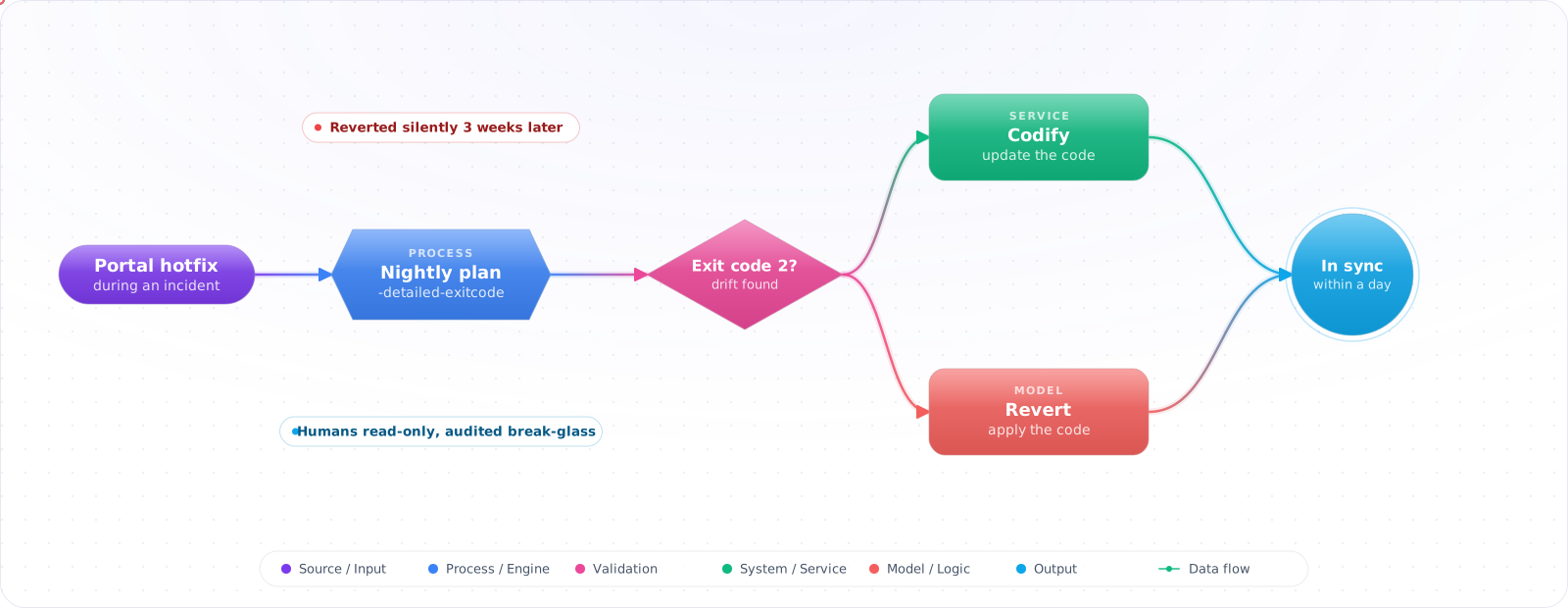
Take a typical case, made up for illustration. During an incident, an engineer raised a database tier in the portal. It fixed the problem, everyone moved on, and nobody updated the Terraform. Three weeks later an unrelated change was applied, Terraform helpfully set the tier back, and the original problem returned at peak time.
That is drift: the gap between what your code says and what is actually running. It always appears eventually. Below is how drift happens, how to detect it on a schedule with Terraform and Azure Policy, how to decide whether to keep or revert it, and how to make it rarer at the source.
- Someone fixed a firewall rule manually and “forgot” to update Terraform
- Your compliance scanner flags a resource that your IaC says is compliant
- A plan shows unexpected deletions even though you didn't change anything
- You don't know if your prod environment matches your last approved deployment
How Drift Happens
Drift sources fall into three categories:
- Manual changes: Portal edits, CLI one-liners during incidents, direct API calls.
- Automated platform changes: Auto-scaling events, Azure Policy remediations, platform-managed rotations, AKS node pool updates.
- IaC gaps: Resources created outside IaC (the “just this once” resource), properties not managed by the IaC tool (Azure adds new properties your older provider doesn't track).
Terraform: Built-In Drift Detection
Terraform's terraform plan is drift detection — it reads live state, compares it to your configuration, and produces a diff. The key is running it regularly, not just before applies.
Scheduled plan-only runs
# Run plan and capture exit code
# Exit 0 = no changes, Exit 2 = changes detected, Exit 1 = error
terraform plan -detailed-exitcode -out=tfplan

if [ $? -eq 2 ]; then
  echo "DRIFT DETECTED" | notify-slack
fi
GitHub Actions drift detection workflow
name: Drift Detection
on:
  schedule:
    - cron: '0 */6 * * *'   # Every 6 hours
  workflow_dispatch:

jobs:
  drift:
    runs-on: ubuntu-latest
    env:   # job level, so init AND plan can authenticate. Prefer OIDC where you can.
      ARM_CLIENT_ID: ${{ secrets.ARM_CLIENT_ID }}
      ARM_CLIENT_SECRET: ${{ secrets.ARM_CLIENT_SECRET }}
      ARM_SUBSCRIPTION_ID: ${{ secrets.ARM_SUBSCRIPTION_ID }}
      ARM_TENANT_ID: ${{ secrets.ARM_TENANT_ID }}
    steps:
      - uses: actions/checkout@v7

      - name: Setup Terraform
        uses: hashicorp/setup-terraform@v4

      - name: Terraform Init
        run: terraform init

      - name: Check for Drift
        id: plan
        run: terraform plan -detailed-exitcode -no-color 2>&1
        continue-on-error: true

      - name: Alert on Drift
        if: steps.plan.outputs.exitcode == 2
        uses: slackapi/slack-github-action@v1
        with:
          payload: |
            { "text": "⚠️ Infrastructure drift detected in production. Run: ${{ github.server_url }}/${{ github.repository }}/actions/runs/${{ github.run_id }}" }

      # continue-on-error hides real failures, so a broken plan must fail the run
      - name: Fail on Plan Error
        if: steps.plan.outputs.exitcode == 1
run: exit 1Check it: Change one setting on a test resource in the portal, then run the scheduled job. It should exit with code 2 and raise an alert.
terraform refresh and State Reconciliation
terraform refresh updates the state file to match the real infrastructure without modifying the infrastructure. It's useful when platform-managed changes (like auto-scaling) cause spurious drift noise. However, it also silently accepts manual security changes into state — use it carefully.
# Refresh state from live infrastructure
terraform refresh

# Or during plan (refresh is implicit but can be disabled)
terraform plan -refresh=false   # Skip refresh, use cached state
terraform plan -refresh=true    # Default: refresh before planning
Azure Policy for Continuous Compliance
For Azure-specific deployments, Azure Policy provides a complementary layer. While Terraform detects drift in what IaC manages, Azure Policy detects compliance violations across all resources, including those outside IaC scope.
# Check compliance for a policy assignment
az policy state list \
  --resource-group rg-production \
  --filter "complianceState eq 'NonCompliant'" \
  --query "[].{resource: resourceId, policy: policyDefinitionId}" \
  --output table

# Trigger an on-demand compliance evaluation
az policy state trigger-scan --resource-group rg-productionCheck it: Create a non-compliant resource by hand, outside Terraform. The compliance scan should flag it.
Drift in Bicep / ARM Deployments
ARM deployments in Incremental mode will not detect or revert manual changes to properties not in your template. Complete mode deletes unlisted resources, including anything deployed by other means, so don't use it as a general drift fix. Detect with what-if, then apply a reviewed change. For continuous drift detection:
# What-if to see drift. This changes nothing.
az deployment group what-if \
  --mode Incremental \
  --resource-group rg-production \
  --template-file main.bicep \
  --parameters @main.prod.bicepparam

# After review, reapply the template through your normal pipeline
az deployment group create \
  --mode Incremental \
  --resource-group rg-production \
  --template-file main.bicep \
  --parameters @main.prod.bicepparam
Drift vs Desired State Enforcement
Detection tells you drift exists. Enforcement corrects it. These are two distinct operations with different risk profiles:
- Detection only (safe): Schedule
terraform plan/what-ifon a cron, alert the team. Humans decide whether to revert or adopt the change. - Auto-remediation (higher risk): Pipeline automatically runs
terraform applyor complete-mode ARM deploy on drift detection. Can overwrite legitimate emergency changes. Use only when you have strong change controls and rollback mechanisms.
For most production environments, detection + human approval is the right balance.
Production Checklist
- Run
terraform plan -detailed-exitcodeon a schedule (not just before applies) - Alert the on-call team immediately on drift detection
- Document which resources are intentionally not managed by IaC (e.g., manually scaled resources)
- Use
lifecycle { ignore_changes }for properties that legitimately drift (auto-scaling) - Separate drift detection from remediation — require human approval before auto-apply
- Combine Terraform drift detection with Azure Policy compliance scans for full coverage
Deciding What to Do About Drift
Finding drift is the easy half. The harder half is deciding what each difference means. Not all drift is a mistake. Sometimes a person fixed an incident in the portal at 2 a.m., and the change was right. If your pipeline blindly applies, it reverts their fix and brings the outage back. So classify what you find before you act.
I sort drift into three groups. Emergency changes should be copied into code and merged, so that code catches up with reality. Unauthorised changes should be reverted, then investigated. Expected changes, such as an autoscaler adjusting a node count, should be excluded with lifecycle { ignore_changes = [...] } so that they stop making noise. Use that last option sparingly. A long ignore_changes list is drift you've decided to stop looking at.
Run detection on a schedule
Run a scheduled plan every night, with -detailed-exitcode, and alert when it returns 2:
# Capture the status this way so 'set -e' can't stop the script on exit code 2
status=0
terraform plan -refresh-only -detailed-exitcode -input=false || status=$?
case $status in
  0) echo "no drift" ;;
  2) ./notify-drift.sh ;;
  *) echo "plan failed" && exit 1 ;;
esac
A plan needs read access to every resource, so this job holds powerful credentials. Give it a read-only identity, and don't reuse your deploy role. The tool you'd use for a large estate may be a platform like HCP Terraform or Spacelift, with built-in drift detection, while Terraform 1.17 and OpenTofu both support this flow on the command line.
Stop drift at the source
Detection is a seatbelt. Prevention is better. Remove write access to production from people's day-to-day roles, and use just-in-time elevation for emergencies, so that each portal change is deliberate and logged. Azure Policy can deny or flag changes as they happen, and AWS Config rules can flag them (use IAM or SCPs to block them), which is much faster than a nightly plan. Log portal changes through the Activity Log, or CloudTrail, and tie them to a person.
Small, frequent applies help too. A stack that's applied daily rarely drifts far. One that hasn't been applied in six months is frightening to touch, since nobody knows what the plan will do. Split huge state files as well, because a single stack with 2,000 resources takes so long to plan that people stop running it.
Check it: Take your last three drift alerts and sort them: emergency, unauthorised or expected. Each should have ended in a merge, a revert or an ignore rule.
Try It on Your Own System This Week
Three checks on an estate managed as code, about an hour in total:
- Find when each stack was last applied. One that has sat untouched for six months is the one to worry about.
- Check which identity the drift job uses. It should be read-only, and never the deploy role.
- List who has standing write access to production. Each name is a way for drift to start.
Drift Between Environments
There's a quieter kind of drift: staging and production slowly becoming different. A fix applied to one and not the other means your tests stop predicting production. Use the same modules everywhere, with environment differences limited to a small variables file. Then compare them on a schedule, and keep any difference deliberate and documented.