Start With a Session and a Library
If you have one application with its own back end, and nobody else calls your API, a well-tested sign-in library and a session cookie are enough. OAuth and OpenID Connect earn their place when sign-in happens at an identity provider, or when an app has to call an API on a user's behalf.
Take an illustrative case. A security review of a single-page app found access tokens in the analytics logs. The app used the implicit flow, so tokens arrived in the URL fragment, where they sat in browser history and within reach of every script on the page. The same app sent its ID token to the API, and the API accepted it because the signature was valid.
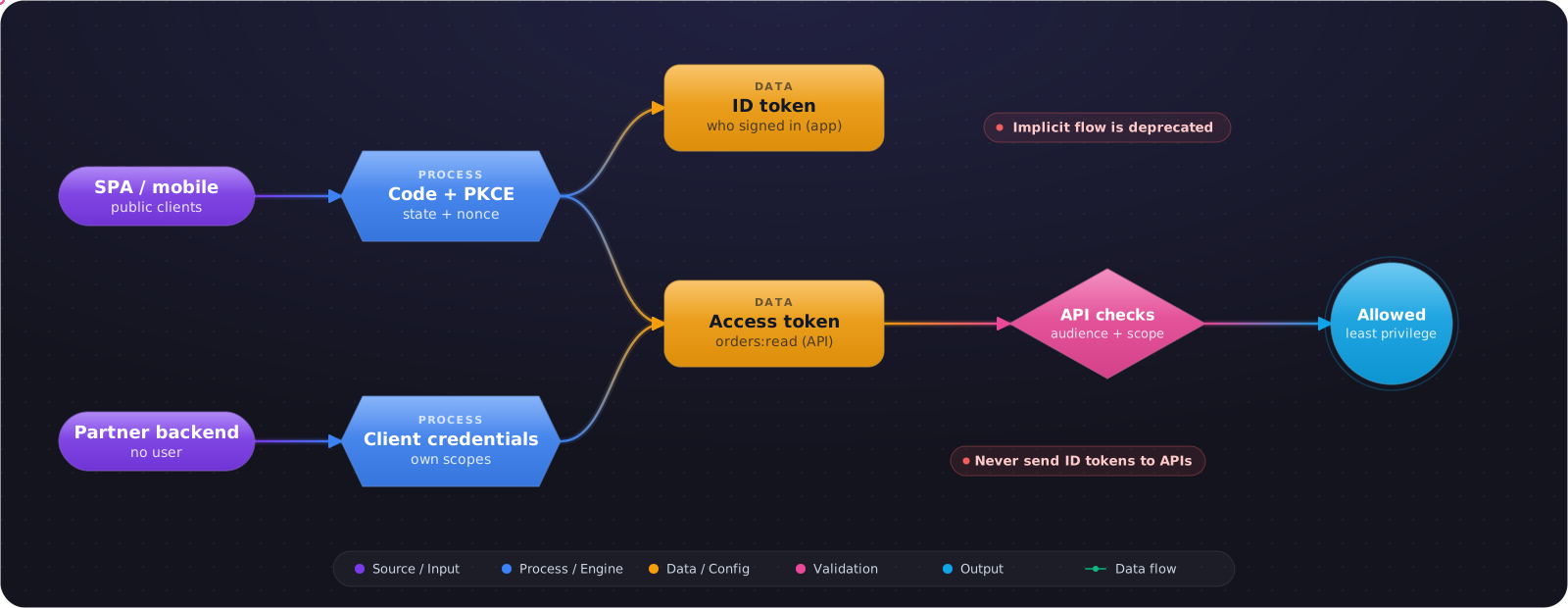
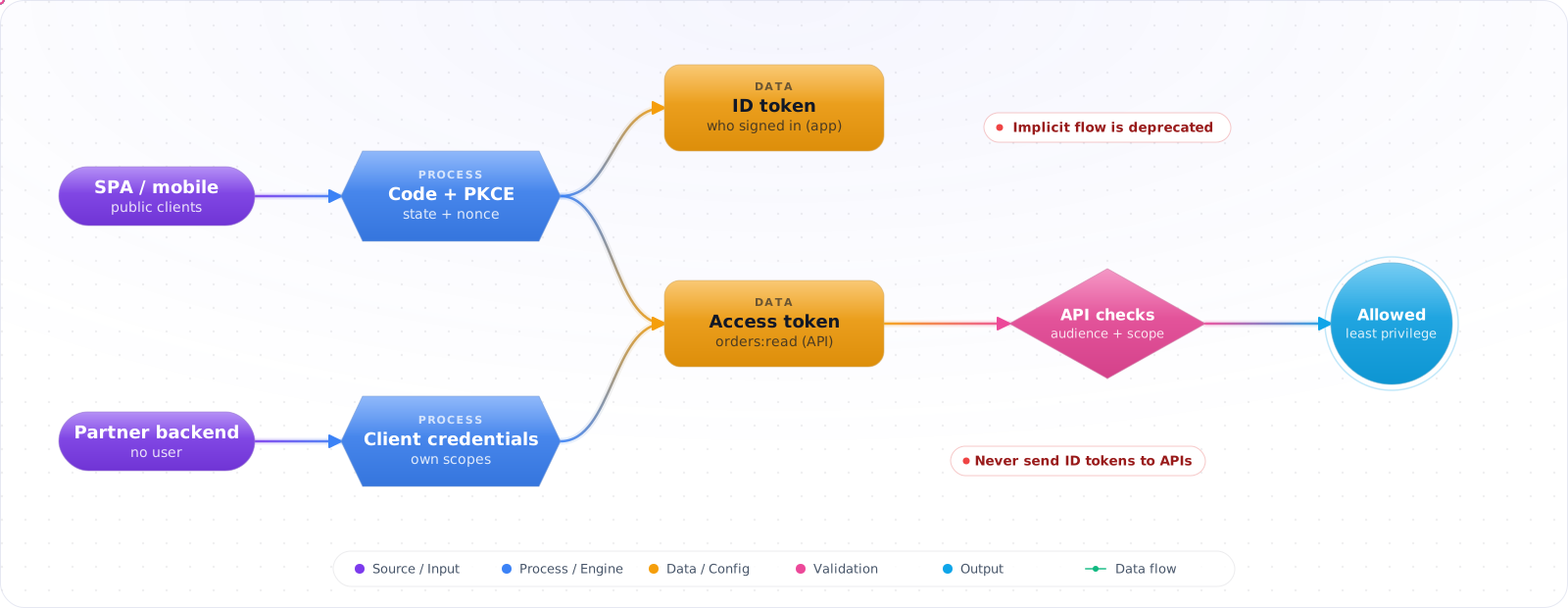
Both mistakes come from treating OAuth 2.0 and OpenID Connect as one thing. OAuth is about delegated access: what may this client do on the user's behalf. OIDC adds identity: who signed in. Below are the flows you should actually use today, the ones to retire, and how to keep ID tokens and access tokens in their own lanes.
- Your “Login with Google” flow uses the OAuth access token to identify the user
- SPAs use the implicit flow because that's what the 2015 tutorial said
- You don't know the difference between an ID token and an access token
- Your mobile app stores the client secret in the bundle
The 2026 baseline: Authorization Code with PKCE for every client (SPA, mobile, server), ID tokens for identity, access tokens for API calls, and refresh-token rotation with reuse detection.
The Core Roles
flowchart LR
    RO["Resource Owner<br/>(user)"] -->|authorizes| AS["Authorization Server<br/>(Auth0, Entra, Cognito)"]
    C["Client<br/>(your app)"] -->|requests tokens| AS
    AS -->|issues access_token + id_token| C
    C -->|Bearer access_token| RS["Resource Server<br/>(your API)"]
    RS -->|verify via JWKS| AS
The Grant Types You Actually Use in 2026
Authorization Code + PKCE
The default for everything with a UI. The user is redirected to the auth server; on return your client exchanges a one-time code for tokens. PKCE (Proof Key for Code Exchange) binds the redirect to the original request so an intercepted code can't be redeemed by an attacker.
// PKCE in 3 steps, shown for a Node backend-for-frontend. A browser SPA would use
// Web Crypto instead. In production, prefer a maintained OIDC library for both.
import { randomBytes, createHash } from 'node:crypto';

// 1. Create a verifier (high entropy, stored server-side for this login attempt)
const verifier = randomBytes(32).toString('base64url');

// 2. Derive the challenge (sent in the /authorize redirect)
const challenge = createHash('sha256').update(verifier).digest('base64url');

// 3. Build the authorize URL
const url = new URL('https://auth.example/authorize');
url.searchParams.set('response_type', 'code');
url.searchParams.set('client_id', CLIENT_ID);
url.searchParams.set('redirect_uri', REDIRECT_URI);
url.searchParams.set('scope', 'openid profile email api:read');
const state = randomBytes(16).toString('base64url'); // CSRF: store it with the verifier
url.searchParams.set('state', state);
url.searchParams.set('code_challenge', challenge);
url.searchParams.set('code_challenge_method', 'S256');

// 4. On callback, reject the request unless state matches this login attempt, and check
//    iss and nonce where they apply. Only then exchange code + verifier for tokens.
await fetch('https://auth.example/token', {
  method: 'POST',
  body: new URLSearchParams({
    grant_type: 'authorization_code',
    code, redirect_uri: REDIRECT_URI,
    client_id: CLIENT_ID,
    code_verifier: verifier,
  }),
});Check it: Sign in with the browser's network tab open. No token should appear in any URL. You should see a code in the redirect, and then a request that exchanges it.
Client Credentials
Machine-to-machine. No user, no browser — just a client ID and secret (or a private-key JWT assertion) exchanged for an access token. Use for backend services calling other services with their own identity, not a user's.
Device Authorization Grant
TVs, CLIs, IoT — devices with no easy way to render a login form. The device shows a code and URL; the user authenticates on their phone; the device polls until tokens are issued. Pattern used by az login --use-device-code, gh auth login, and many CLI tools.
Deprecated Grants — Don't Use These
| Grant | Status | Replacement |
|---|---|---|
Implicit (response_type=token) | RFC 9700 says SHOULD NOT; removed in the OAuth 2.1 draft | Auth Code + PKCE |
| Resource Owner Password Credentials | RFC 9700 says MUST NOT | Auth Code + PKCE |
Hybrid flow (response_type=code id_token) | Niche; complexity rarely worth it | Plain Auth Code + PKCE |
Access Token vs ID Token — Don't Mix Them
The ID token is for your client to know who logged in. It's a JWT with claims like sub,email, name. Validate it once at login. Don't send it to APIs.
The access token is for your APIs. It may be a JWT or opaque. The API validates it on every request. Don't parse it on the client to display the user's name — use the userinfo endpoint or the ID token instead.
Check it: Send your ID token to your API as the bearer token. The API should refuse it.
OIDC = OAuth + Identity
OIDC adds three things on top of OAuth: the openid scope, the ID token, and the /.well-known/openid-configurationdiscovery document. The discovery document tells you where everything lives (authorize, token, jwks, userinfo, end_session) — your client should fetch it once at startup rather than hardcoding endpoints.
# Providers that support OIDC Discovery expose this. Fields vary:
# end_session_endpoint, for one, comes from the separate RP-Initiated Logout spec.
curl https://issuer.example/.well-known/openid-configuration

{
  "issuer": "https://issuer.example",
  "authorization_endpoint": ".../authorize",
  "token_endpoint": ".../token",
  "userinfo_endpoint": ".../userinfo",
  "jwks_uri": ".../jwks.json",
  "end_session_endpoint": ".../logout",
  "response_types_supported": ["code"],
  "grant_types_supported": ["authorization_code","refresh_token","client_credentials"],
  "code_challenge_methods_supported": ["S256"]
}
Token Introspection vs Local Validation
JWT access tokens validate locally — pull the public key from JWKS once, cache it, verify on every request without a network call. Opaque access tokens require /introspect calls — secure (revocation is instant) but slower and a hard dependency on the auth server.
High-traffic APIs usually use JWT access tokens with short TTLs. Systems that need immediate revocation often use opaque tokens with introspection. Pick based on the latency vs revocation tradeoff you're willing to make.
Scopes and Audience
Scopes name capabilities (orders:read, payments:write). Audience names the API the token is intended for. Together they prevent the “confused deputy” problem — a token meant for one service being replayed against another.
// In your API middleware
const required = 'orders:read';
const requiredAud = 'urn:orders-api';

const { payload } = await jwtVerify(token, JWKS, {
  audience: requiredAud,
  issuer: ISSUER,
  algorithms: ['RS256'],
});

const scopes = String(payload.scope ?? '').split(' ');
if (!scopes.includes(required)) return res.sendStatus(403);Check it: Take a token issued for one of your APIs and send it to another. It should be refused on audience alone.
Logout, Done Right
Three layers must clear: the local session, the auth-server session, and any active access tokens. Where the provider supports it, RP-Initiated Logout (OIDC) handles the first two via the end_session_endpoint. It doesn't cancel access tokens already issued, so keep those short-lived, and if you need a faster cut-off, add revocation with introspection or a token-version check.
Check it: Sign out, then replay the access token you had. Note how long it keeps working. That is how long your logout really takes.
Try It on Your Own System This Week
Three checks on a sign-in you already run, about an hour in total:
- Search your clients for response_type=token. That is the implicit flow. Replace it with authorization code and PKCE.
- Look for a client secret in a mobile bundle or a single-page app. A public client can't keep one.
- List the scopes each client asks for. Remove the ones it never uses.
Pitfalls
Storing client secrets in public clients
Mobile apps and SPAs are public clients — they can't keep a secret. Use PKCE, not a client secret. If your auth server requires a secret for SPAs, it's misconfigured.
Skipping state and nonce
state protects against CSRF on the redirect; nonce binds the ID token to the original request. Both must be random per request and validated on return. Most libraries do this for you — don't roll your own.
Treating the OAuth access token as proof of identity
A classic mistake is an app that takes the access token, callsuserinfo, and trusts whatever email comes back — even if the access token was minted for a different app. Use the ID token, validate aud, done.
OAuth for Agents and MCP
Agents have become one of OAuth's most demanding use cases. A person grants an agent access, and it then acts for minutes or hours, possibly while the person is gone. Three practices matter.
Use delegated access rather than a service account. The agent should act as the user, with the user's permissions, so that it can't see what they can't. Token exchange (RFC 8693) lets you issue a token recording both the user and the agent, which keeps your audit trail honest.
Keep scopes narrow and tokens short. A coding agent that needs to read one repository doesn't need write access to the whole organisation. Ask for the least you can, because a prompt injection can use whatever you've granted.
Remote MCP servers use OAuth as well. The 2026-07-28 spec added issuer validation (RFC 9207), and deprecated Dynamic Client Registration in favour of Client ID Metadata Documents. If you run an MCP authorization server, read those changes.
Also check your flows against RFC 9700, the current OAuth security best practice. It requires PKCE for public clients and exact redirect URI matching, tells clients not to use the implicit grant, and forbids the password grant.