


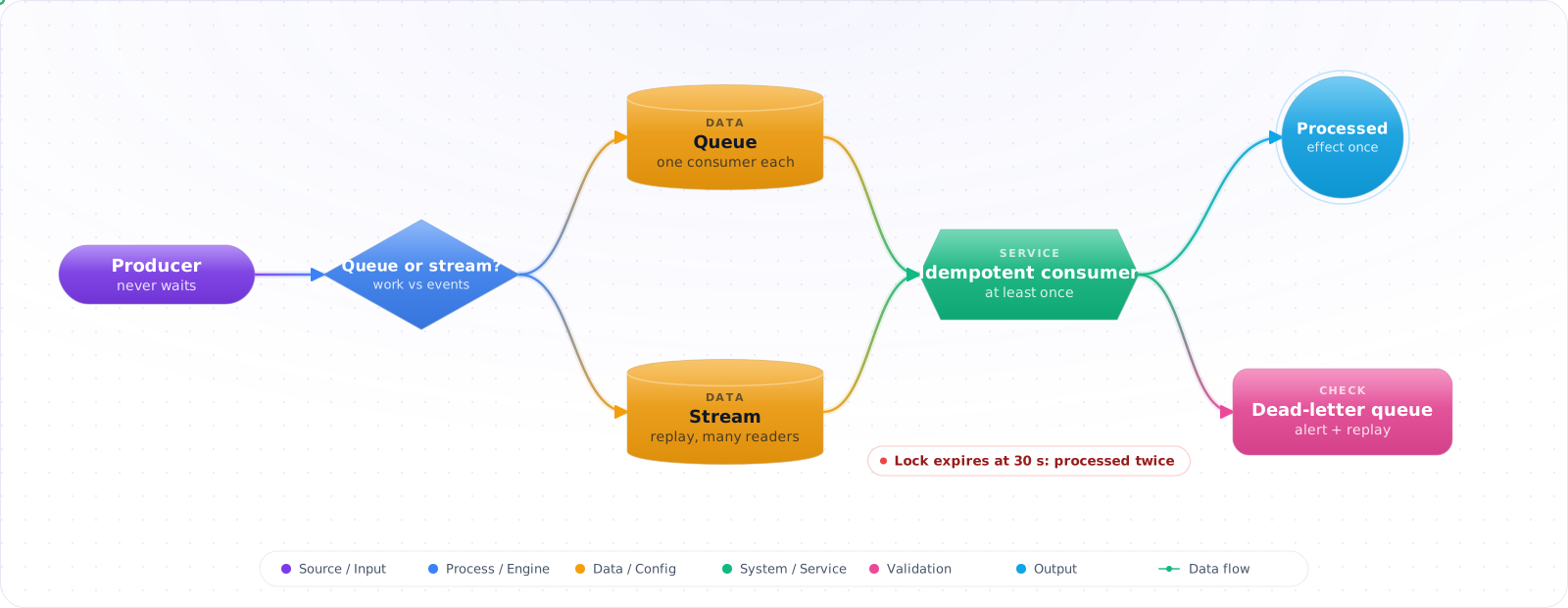
When One Slow Service Breaks Everything
Direct synchronous calls between services are the simplest thing that can possibly work — until one downstream service slows down and the failure cascades upstream. A message queue (or stream / event bus) breaks that coupling: the producer hands off a message and moves on; the consumer processes when it's ready, at the rate it can sustain. The system absorbs traffic spikes, survives downstream outages, and gives you replayability for free.
But messaging introduces its own failure modes — duplicate delivery, out-of-order messages, poison messages, lost messages, and the existential question of whether you actually want exactly-once (you almost never do; you want idempotent at-least-once). Below is the messaging mental model in 2026 — when to queue vs stream, the delivery guarantees you actually get, and the patterns that keep the consumer code sane.
- Your "async" service is actually synchronous over HTTP and falls over together
- You can't explain when to use Service Bus vs Event Hubs vs Event Grid
- Your consumer crashes mid-handler and the message replays forever
- You believed the "exactly-once" marketing line and don't handle duplicates
This is the message-queue playbook — queues vs streams, delivery semantics that actually exist, idempotency, and the failure modes that bite in production.
Queues, Streams and Delivery Guarantees
Three shapes of asynchronous messaging:
- Queue (work distribution) — one message, one consumer. Multiple competing consumers share the load. Azure Service Bus queues, RabbitMQ.
- Stream (event log) — append-only ordered log; many consumers, each tracks its own offset; messages persist for a retention window. Event Hubs, Kafka, Kinesis.
- Pub/sub topic — one message, many subscribers (each with its own queue). Service Bus topics, Event Grid.
flowchart LR
    P["Producer"] --> Q["Service Bus Queue<br/>(work distribution)"]
    Q --> C1["Consumer 1"]
    Q --> C2["Consumer 2"]
    Q -.->|max-deliveries exceeded| DLQ["Dead-letter Queue"]

    P2["Producer"] --> T["Topic"]
    T --> S1["Sub: billing"]
    T --> S2["Sub: analytics"]
    T --> S3["Sub: notifications"]

    P3["Producer"] --> EH["Event Hubs<br/>(append-only stream)"]
    EH --> RD1["Reader: realtime ETL<br/>offset 12345"]
    EH --> RD2["Reader: ML pipeline<br/>offset 8000 (replay)"]

    style DLQ fill:#dc2626,color:#fff,stroke:#b91c1c
    style EH fill:#0078D4,color:#fff,stroke:#005a9e
Building a Reliable Pipeline
Step 1: Pick the right primitive
Service Bus QUEUE / TOPIC
  Use when: enterprise messaging, ordered per-session FIFO, transactions,
            DLQ, scheduled delivery, dedup window
  Throughput: depends on tier and messaging units
  Retention: TTL per message or queue

Event Hubs (or Kafka)
  Use when: telemetry, clickstreams, ETL, replay, fan-out to many readers
  Throughput: millions of events/s
  Retention: up to 7 days on Standard, 90 on Premium and Dedicated; consumers track offsets

Event Grid
  Use when: lightweight pub/sub for state-change events (push, not pull)
  Throughput: high; handler invocation per event
  Retention: 24h delivery retry, then DLQ

Storage Queue
  Use when: simple, cheap, polling-based; no automatic dead-lettering
  Throughput: up to 2,000 msg/s per queue
Step 2: Producer — send with idempotency keys
var sender = client.CreateSender("orders");

var msg = new ServiceBusMessage(JsonSerializer.SerializeToUtf8Bytes(order))
{
    ContentType = "application/json",
    MessageId   = order.Id.ToString(),    // ← dedup window uses this
    SessionId   = order.TenantId.ToString(),  // ← optional: FIFO per tenant
    ApplicationProperties =
    {
        ["correlation-id"]     = correlationId,
        ["schema-version"]     = "v2",
        ["idempotency-key"]    = order.IdempotencyKey
    }
};
await sender.SendMessageAsync(msg);
Step 3: Consumer — peek-lock + explicit Complete + Defer
var processor = client.CreateProcessor("orders", new ServiceBusProcessorOptions
{
    AutoCompleteMessages = false,            // we control completion
    MaxConcurrentCalls   = 16,
    PrefetchCount        = 32,
    ReceiveMode          = ServiceBusReceiveMode.PeekLock
});

processor.ProcessMessageAsync += async args =>
{
    var msgId = args.Message.MessageId;
    if (await store.AlreadyProcessedAsync(msgId))      // idempotency check
    { await args.CompleteMessageAsync(args.Message); return; }

    try
    {
        await ProcessAsync(args.Message);
        await store.MarkProcessedAsync(msgId);
        await args.CompleteMessageAsync(args.Message);
    }
    catch (PoisonMessageException ex)
    {
        await args.DeadLetterMessageAsync(args.Message, "Poison", ex.Message);
    }
    catch (TransientException)
    {
        await args.AbandonMessageAsync(args.Message); // delivery count++
    }
};

processor.ProcessErrorAsync += err => { log.LogError(err.Exception, "ProcessError"); return Task.CompletedTask; };
await processor.StartProcessingAsync();
Step 4: Idempotency — the cure for at-least-once
// "Exactly-once" doesn't really exist across networks. Aim for at-least-once
// delivery + idempotent handlers. Options:

// (a) Idempotency table — atomic insert of message_id; conflict = already processed
INSERT INTO processed_messages (message_id) VALUES (@id);  -- PK conflict = skip

// (b) Natural idempotency — the operation is intrinsically safe to retry
UPDATE accounts SET balance = 100 WHERE id = @id;          -- SET = idempotent
                                                            -- (vs += which isn't)

// (c) Outbox pattern — publish message in same DB tx as the state change
//     A relay job moves rows from the "outbox" table to the broker and retries
//     until the publish succeeds, so delivery is at least once
Step 5: Ordering — sessions for per-key FIFO
// Service Bus: only sessions guarantee FIFO; a single session is processed by
// one consumer at a time. Throughput per session = single consumer.
var sessionProcessor = client.CreateSessionProcessor("orders", new ServiceBusSessionProcessorOptions
{
    MaxConcurrentSessions  = 32,
    AutoCompleteMessages   = false
});
// Set SessionId on producer to "tenant-123" or "order-id-42" — all messages
// with that SessionId go through one consumer in send order.
Step 6: Dead-letter handling — replay, don't reprocess blindly
// Periodically drain the DLQ, fix the root cause, then resubmit
var dlqReceiver = client.CreateReceiver("orders",
    new ServiceBusReceiverOptions { SubQueue = SubQueue.DeadLetter });

var seen = new HashSet<long>();
while (true)
{
    var batch = await dlqReceiver.ReceiveMessagesAsync(maxMessages: 50, maxWaitTime: TimeSpan.FromSeconds(5));
    if (batch.Count == 0 || batch.Count(m => seen.Add(m.SequenceNumber)) == 0) break;

    foreach (var dead in batch)
    {
        log.LogWarning("DLQ {Id}: reason={R}", dead.MessageId, dead.DeadLetterReason);
        if (await CanReplayAsync(dead))
        {
            await sender.SendMessageAsync(new ServiceBusMessage(dead));
            await dlqReceiver.CompleteMessageAsync(dead);
        }
        // Anything else stays in the DLQ when its lock expires
    }
}
How Queues Lose or Duplicate Work
1. Believing in exactly-once. Network partitions and crashes mean producers may publish twice and consumers may process twice. Design for at-least-once + idempotency. Service Bus dedup window helps for short windows; idempotency tables are the long-term fix.
2. Auto-complete + swallowed exception = lost message. With auto-complete on, the processor completes a message when your handler returns, and abandons it if the handler throws. Catch an error and return normally, and the message is gone. Disable auto-complete and call CompleteMessageAsyncexplicitly on success.
3. Poison messages stuck in a loop. A bad message is delivered, fails, retried, fails... up toMaxDeliveryCount, then dead-lettered. Without a DLQ-monitoring pipeline you don't know it's happening. Alert on DLQ depth.
4. Treating ordering as default. Competing consumers on a Service Bus queue don't give you ordering, and Event Hubs keeps order only within a partition. If you need ordering, use sessions (Service Bus) or partition by key (Event Hubs). Both reduce throughput.
5. Long handlers + lock expiry. The default lock is 1 minute, and the processor renews it for up to 5 minutes. A handler that runs longer loses the lock, the message is redelivered, you process it twice. Either renew the lock (RenewMessageLockAsync) or chunk the work.
6. Mixing transactional state with publish without an outbox. Save to DB, then publish. The publish fails. State diverges. The transactional outbox pattern (publish via a row in the same DB tx) is the clean fix.
When I Would Use a Queue
- Queue for work distribution, stream for telemetry/replay, topic for fan-out, Event Grid for lightweight state-change events.
- Always at-least-once + idempotent handlers. "Exactly-once" claims only hold inside one system.
- Peek-lock + explicit Complete, so a swallowed exception can't complete a message by accident.
- Use the outbox pattern when you publish as part of a DB transaction.
- Use sessions (or partition keys) only when you actually need ordering — they cap throughput.
- Monitor DLQ depth and lock-renewal events. They're your early warning.
- For replayable analytics workloads, prefer Event Hubs/Kafka — consumer-managed offsets are the killer feature.
Queues for AI Workloads
LLM work suits queues well. Calls are slow, expensive and rate limited, and users often don't need the answer right away. Accept the request, return a job ID, process it in the background, and notify on completion. This protects your web tier from long-held connections, and absorbs bursts that would otherwise hit provider limits.
A few things differ from a typical queue. Jobs vary enormously in length, so set the visibility timeout or lock duration for your slowest case, and extend it while working. Otherwise, a long job reappears in the queue, and a second worker starts it, and you pay twice. Control concurrency to stay within your provider's rate limits. If you get 429s, slow the consumers rather than retrying quickly. Put big payloads in object storage, and pass a reference. Most brokers have message size limits, and prompts with documents get large.
Idempotency, again
Most brokers deliver at least once, so any job can run twice. For a model call, that wastes money. For a side effect, such as sending an email, it's a bug. Use an idempotency key, and record completed work, so that a retry finds the result rather than redoing the job. Be careful with exactly-once claims across systems: what you can build is at-least-once delivery with idempotent processing, which gives you the same effect.
Poison messages and ordering
A message that always fails can retry forever and hold up whatever is behind it. Limit retries, then move it to a dead-letter queue with the error attached. Then alert on that queue, and have a tool to replay messages after a fix. Distinguish a temporary failure, such as a timeout, from a permanent one, such as a malformed input, and don't retry the second kind.
Kafka and similar logs preserve order only within a partition, so choose a key that groups what must stay in order, such as a customer ID. A traditional queue with competing consumers gives you no order at all. If order really matters, you'll also find that one slow message holds up everything behind it. Before you build around ordering, ask if a version number or timestamp on each event would be enough, because consumers that tolerate out-of-order messages are much easier to scale.
Monitor queue age as well as depth. Depth says how much is waiting, and age says how long users have been waiting, which is what matters.