Problem Context
Single-agent systems hit a ceiling fast. Ask one LLM to research, plan, write code, review it, and deploy — and you get mediocre results at every step. The model tries to do everything and does nothing well.
Multi-agent architectures split complex tasks across specialized agents, each with focused system prompts, tools, and responsibilities. But "just add more agents" is not a strategy. The coordination overhead, failure cascading, and debugging complexity grow faster than the benefits — unless you pick the right pattern for your problem.
- Your single-agent system works for demos but produces mediocre output on complex, multi-step tasks
- You've seen the "agent swarm" videos on Twitter and wonder if that's actually how production systems work
- You tried chaining multiple LLM calls and the context window exploded after 3 rounds
- You want multi-agent but have no idea which pattern fits your use case
This article covers the three patterns that actually work in production — and when to use each one.
Concept Explanation
There are three dominant multi-agent patterns in production systems. Each makes fundamentally different trade-offs around control, flexibility, and reliability.
Pattern 1: Orchestrator
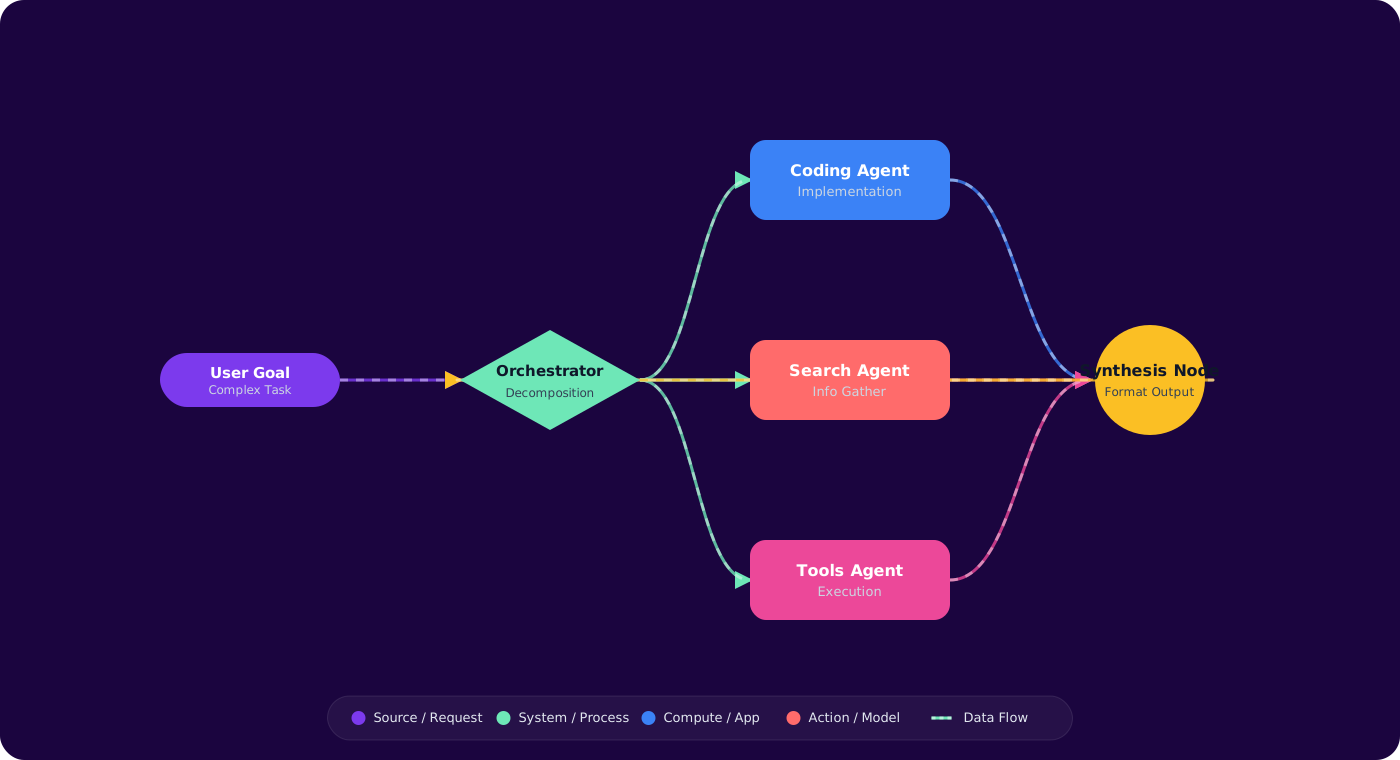
A central agent decomposes the task, delegates subtasks to worker agents, and synthesizes their outputs. The orchestrator sees the full picture; workers see only their slice.
      flowchart TD
          U["User Request"] --> O["Orchestrator Agent"]
          O -->|"Research X"| A1["Research Agent"]
          O -->|"Write code for Y"| A2["Coding Agent"]
          O -->|"Review output"| A3["Review Agent"]
          A1 -->|"findings"| O
          A2 -->|"code"| O
          A3 -->|"feedback"| O
          O --> R["Final Response"]

          style O fill:#4f46e5,color:#fff,stroke:#4338ca
          style A1 fill:#059669,color:#fff,stroke:#047857
          style A2 fill:#7c3aed,color:#fff,stroke:#6d28d9
          style A3 fill:#d97706,color:#fff,stroke:#b45309
When to use: Well-defined workflows where you know the steps upfront. Code generation pipelines, document analysis, multi-step data processing.
Trade-off: The orchestrator is a single point of intelligence — if it misunderstands the task, every downstream agent does wasted work. Strong orchestrator prompts are critical.
Pattern 2: Supervisor
Similar to the orchestrator, but the supervisor monitors agent outputs and can redirect, retry, or override. It adds a feedback loop: if the coding agent produces buggy code, the supervisor sends it back with the review agent's feedback.
      flowchart TD
          U["User Request"] --> S["Supervisor Agent"]
          S --> A1["Agent A"]
          S --> A2["Agent B"]
          A1 -->|"output"| S
          A2 -->|"output"| S
          S -->|"Not good enough"| A1
          S -->|"Revise with feedback"| A2
          S --> R["Approved Result"]

          style S fill:#dc2626,color:#fff,stroke:#b91c1c
          style A1 fill:#059669,color:#fff,stroke:#047857
          style A2 fill:#7c3aed,color:#fff,stroke:#6d28d9
When to use: Quality-critical workflows where outputs need validation. Content generation, code review, compliance checking.
Trade-off: Iteration loops can run away. Always set a max-iteration limit (typically 3). Each loop costs tokens and latency. A supervisor that's too strict will loop forever; too lenient defeats the purpose.
Pattern 3: Swarm (Peer-to-Peer)
No central coordinator. Agents hand off to each other based on the conversation state. Agent A decides "this needs coding expertise" and transfers control to Agent B, which might later hand off to Agent C for deployment.
When to use: Dynamic, open-ended tasks where the workflow can't be predetermined. Customer service (escalation paths), interactive assistants, exploratory research.
Trade-off: Hardest to debug. When something goes wrong, you're tracing a chain of handoffs between autonomous agents. Requires robust logging and the ability to replay agent decisions. OpenAI's Swarm framework implements this for experimentation, but production use demands careful guardrails.
Implementation
Orchestrator Pattern with Semantic Kernel
// Define specialized agents
      var researcher = new ChatCompletionAgent
      {
          Name = "Researcher",
          Instructions = """
              You research technical topics. Return structured findings with sources.
              Do NOT write code. Do NOT make recommendations.
              Focus only on gathering factual information.
              """,
          Kernel = kernel
      };

      var coder = new ChatCompletionAgent
      {
          Name = "Coder",
          Instructions = """
              You write production C# code based on provided requirements and research.
              Follow SOLID principles. Include error handling.
              Do NOT research — use only the information given to you.
              """,
          Kernel = kernel
      };

      var reviewer = new ChatCompletionAgent
      {
          Name = "Reviewer",
          Instructions = """
              Review code for bugs, security issues, and best practices.
              Be specific: cite line numbers and provide fixes.
              Rate overall quality: APPROVED or NEEDS_REVISION with reasons.
              """,
          Kernel = kernel
      };
// Orchestrator using AgentGroupChat with round-robin
      var chat = new AgentGroupChat(researcher, coder, reviewer)
      {
          ExecutionSettings = new()
          {
              TerminationStrategy = new ApprovalTerminationStrategy
              {
                  Agents = [reviewer],
                  MaximumIterations = 6,  // Safety limit
                  AutomaticReset = true
              },
              SelectionStrategy = new SequentialSelectionStrategy()
          }
      };

      await foreach (var message in chat.InvokeAsync())
      {
          Console.WriteLine($"[{message.AuthorName}]: {message.Content}");
      }
Supervisor Pattern with Evaluation Loop
public async Task<string> SupervisedGeneration(string task, int maxRetries = 3)
      {
          var worker = CreateWorkerAgent();
          var evaluator = CreateEvaluatorAgent();

          string output = null;
          string feedback = null;

          for (int i = 0; i < maxRetries; i++)
          {
              var prompt = feedback == null
                  ? task
                  : $"Revise based on feedback:\n{feedback}\n\nOriginal task: {task}";

              output = await worker.InvokeAsync(prompt);

              var evaluation = await evaluator.InvokeAsync(
                  $"Evaluate this output for: {task}\n\nOutput:\n{output}");

              if (evaluation.Contains("APPROVED"))
                  return output;

              feedback = evaluation;
              _logger.LogWarning("Supervisor iteration {i}: revision needed", i + 1);
          }

          _logger.LogError("Max retries reached, returning best effort");
          return output;
      }
Message Format Between Agents
Standardize how agents communicate. A structured handoff format prevents information loss:
{
          "from": "Researcher",
          "to": "Coder",
          "task_id": "abc-123",
          "context": {
              "original_request": "Build a rate limiter for our API",
              "findings": [
                  "Token bucket algorithm is standard for API rate limiting",
                  "Azure APIM supports built-in rate limiting policies",
                  "Redis is commonly used for distributed rate limiting state"
              ],
              "constraints": ["Must work in distributed environment", ".NET 8"]
          },
          "iteration": 1
      }
Pitfalls
1. Agents that talk to themselves
Without clear role boundaries, Agent A's output sounds like Agent B's input, and they converge on generic responses. Each agent needs strict constraints on what it does and doesn't do. "You are NOT allowed to write code" is more effective than "You are a researcher."
2. Unbounded iteration loops
Supervisor loops without limits will burn tokens indefinitely. A reviewer agent that's never satisfied keeps sending work back. Always setMaximumIterations and define what "good enough" means in the evaluator's prompt.
3. Context window exhaustion
Each agent exchange adds to the conversation history. After 3–4 rounds of orchestrator → worker → reviewer, you're at 10K+ tokens of context before the actual work. Summarize previous rounds before feeding them to the next agent, or use a shared memory store instead of passing full transcripts.
4. No observability
When the final output is wrong, which agent made the bad decision? Without structured logging of each agent's input/output/reasoning, you're debugging in the dark. Log every agent invocation with: agent name, input (truncated), output, token count, and latency.
5. Agents for simple prompts
If a single well-written prompt with examples can do the job, adding agents adds complexity without benefit. Multi-agent is for genuinely complex workflows that exceed a single model call's capability — not for making simple tasks look sophisticated.
Practical Takeaways
- Start with the orchestrator pattern. It's the most predictable and debuggable. Move to supervisor only when output quality requires iteration.
- Constrain agents by exclusion ("You do NOT do X") more than by inclusion. LLMs are eager to help and will exceed their role unless explicitly told not to.
- Set hard limits on iteration count and total tokens. A 3-iteration supervisor cap is almost always sufficient. If it's not converging in 3 rounds, the prompt needs fixing, not more iterations.
- Log every agent handoff. The handoff chain is your debugging lifeline. Make it searchable and replayable.
- Don't use swarm/peer-to-peer in production until you have mature observability. The debugging cost is not worth the flexibility for most use cases.