Problem Context
Most teams think they've built an AI system when they connect GPT to a search box.
The demo works. Queries return something meaningful. Stakeholders are impressed.
Then production hits:
- Costs spike 3–5x within days
- Latency becomes unpredictable under real load
- Search quality degrades silently as data grows
- Simple queries return irrelevant or hallucinated results
- The system has no fallback when a component fails
The issue is not the model. It's the system around it.
- You built a RAG prototype but results feel inconsistent in production
- Azure AI Search returns data, but relevance is weak
- You're unsure how to design embeddings for structured SaaS data
- You don't know how to handle millions of existing tenant records
- You have no visibility into what the system is actually doing
This article shows how to move from demo to production using Azure OpenAI, Azure AI Search, and .NET — with real code. If you haven't yet built your first RAG pipeline, start with Designing RAG Systems That Actually Scale first.
Demo vs Production
A typical prototype looks like this:
User Query → Embedding → Vector Search → GPT → AnswerThat works at 10 queries/day. It breaks at 10,000.
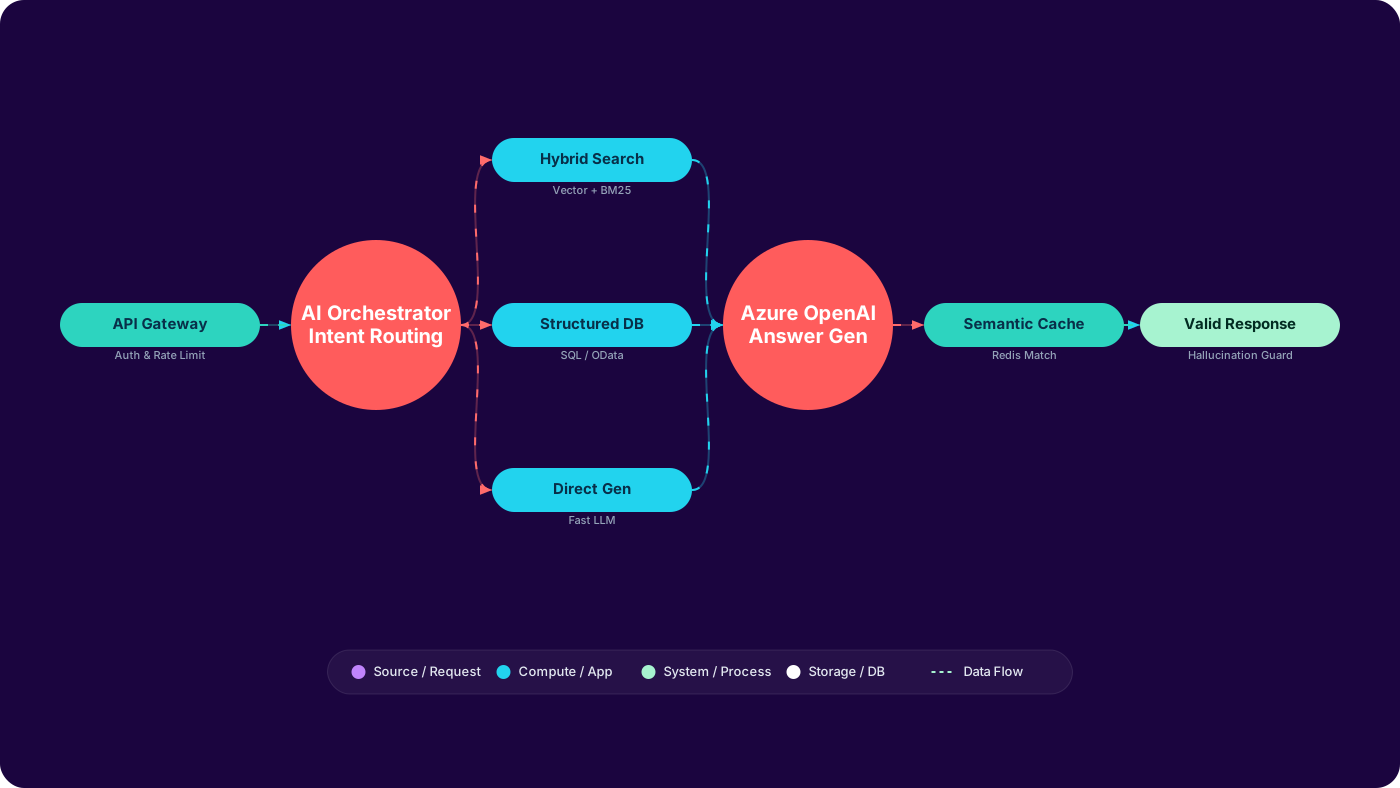
A production system looks like this:
User Query
        → API Gateway (auth, rate limit, tenant ID)
          → Orchestrator (intent classification)
            → Retrieval Strategy (search vs SQL vs direct gen)
              → Hybrid Search (BM25 + vector + semantic rerank)
                → Token Budget Check
                  → Azure OpenAI (bounded context, structured output)
                    → Output Validation (hallucination guard)
                      → Semantic Cache (skip GPT for repeated queries)
                        → Structured Response
Each step exists for a reason. Remove one and you'll pay for it in production.
The Full Production Architecture
Each component below has a single responsibility. Merge them — letting the LLM do filtering, or letting the frontend call search directly — and you lose control of cost, latency, and quality.
In production systems, this architecture is typically fronted by an AI Gateway.
- AI Gateway → controls model routing, fallback strategies, rate limiting, and cost policies
Instead of calling Azure OpenAI directly from multiple services, all model interactions should pass through a centralized gateway. This allows you to enforce token budgets, apply caching, switch models, and introduce failover without changing application code.
      flowchart TD
          U(["👤 User Query"]):::userNode --> G["🔒 API Gateway\nRate Limiting \n Auth \n Tenant ID"]:::gatewayNode
          G --> O["🧠 AI Orchestrator\nIntent Classification\nGPT-4o-mini"]:::orchNode

          O -->|"<div style={{{ padding: '0 15px' }}}>🔍 search / lookup</div>"| SR["Retrieval Strategy\nSelector"]:::stratNode
          O -->|"<div style={{{ padding: '0 15px' }}}>📊 analytics / count</div>"| DB["Structured Query\nSQL · OData Filter"]:::dbNode
          O -->|"<div style={{{ padding: '0 15px' }}}>✍️ explain / summarise</div>"| GPT2["Azure OpenAI\nDirect Generation\nGPT-4.1"]:::gptNode
          O -->|"<div style={{{ padding: '0 15px' }}}>❓ unclear</div>"| CL["Clarification\nPrompt"]:::clarNode

          SR --> HS["🔎 Azure AI Search\nHybrid Query\nBM25 + Vector + Semantic Rerank"]:::searchNode

          HS --> RR["Result Reranking\n+ Score Filtering\n+ Tenant Isolation"]:::rerankNode
          DB --> RR
          GPT2 --> RR
          CL --> RR

          RR --> TC{"Token Budget\nCheck"}:::budgetNode
          TC -->|"<div style={{{ padding: '0 15px' }}}>✅ within budget</div>"| GPT["💬 Azure OpenAI\nAnswer Generation\nGPT-4.1"]:::gptNode
          TC -->|"<div style={{{ padding: '0 15px' }}}>⚠️ over budget</div>"| COMP["<div style={{{ padding: '0 10px' }}}>Context Compression<br />Summarise chunks</div>"]:::compNode
          COMP --> GPT

          GPT --> OV["Output Validation\nHallucination Guard"]:::validNode
          OV --> CACHE["⚡ Semantic Cache\nRedis · similarity lookup"]:::cacheNode
          CACHE --> R(["✅ Structured Response"]):::responseNode

          GPT -.->|"traces"| OT["📡 OpenTelemetry\nTokens · Latency · Cost"]:::telNode

          classDef userNode     fill:#6366f1,stroke:#4f46e5,color:#fff,font-weight:bold
          classDef gatewayNode  fill:#1e3a5f,stroke:#2563eb,color:#93c5fd
          classDef orchNode     fill:#312e81,stroke:#6366f1,color:#c7d2fe
          classDef stratNode    fill:#1e3a5f,stroke:#3b82f6,color:#93c5fd
          classDef dbNode       fill:#1e3a5f,stroke:#0ea5e9,color:#7dd3fc
          classDef gptNode      fill:#134e4a,stroke:#0d9488,color:#99f6e4
          classDef clarNode     fill:#292524,stroke:#78716c,color:#d6d3d1
          classDef searchNode   fill:#1e3a5f,stroke:#38bdf8,color:#7dd3fc,font-weight:bold
          classDef rerankNode   fill:#1e3a5f,stroke:#3b82f6,color:#93c5fd
          classDef budgetNode   fill:#713f12,stroke:#d97706,color:#fde68a
          classDef compNode     fill:#451a03,stroke:#b45309,color:#fcd34d
          classDef validNode    fill:#1a2e05,stroke:#4d7c0f,color:#bef264
          classDef cacheNode    fill:#0c4a6e,stroke:#0284c7,color:#7dd3fc
          classDef responseNode fill:#0d9488,stroke:#0f766e,color:#fff,font-weight:bold
          classDef telNode      fill:#1f2937,stroke:#374151,color:#9ca3af
Now that the system is clear, let’s break down each layer and what it is responsible for in production.
Core Components
1. Azure OpenAI — The Reasoning Layer
GPT-4.1 (the recommended model for production answer generation in Azure OpenAI as of 2025) is capable but expensive and non-deterministic. Use it only where it adds unique value that cheaper, faster tools cannot provide.
Use Azure OpenAI for:
- Natural language answer generation from retrieved context
- Summarising long documents or multi-record results
- Intent classification — use GPT-4o-mini here, it's ~30× cheaper and performs equally well for routing
- Reformulating ambiguous or misspelled queries before search
Do NOT use Azure OpenAI for:
- Filtering or counting records — use OData filters in Azure AI Search
- Date range queries — push these to structured search
- Aggregations or calculations — use your database directly
- Anything deterministic — the model will hallucinate edge cases
Model choice in Azure OpenAI (2025): For answer generation, use GPT-4.1 — it replaced GPT-4o as the recommended production model with better instruction-following, lower cost, and a 1M token context window. For intent classification, useGPT-4o-mini. For embeddings, use text-embedding-3-large. Avoidada-002 for new projects.
2. Embeddings — The Semantic Layer
Embeddings convert your records into semantic vectors that Azure AI Search can retrieve by meaning, not just keywords.
The quality of your embeddings depends almost entirely on the quality of the text you embed — not the model itself.
For a typical SaaS platform, raw database values are a poor embedding source:
usr_a1b2 | acme-corp | pro | 2024-01-15 | activeStructured natural language is far better:
Tenant Acme Corp on the Pro plan.
      Account created 15 January 2024. Status: active.
      Active users: 12 of 20 seats. Last activity: exported report, invited 2 members.
      Subscription renews: 15 January 2025.
This is exactly the text the model would write about that record — and exactly what the embedding model understands best.
Field order matters: The embedding model pays more attention to what comes first. Put the most discriminating information — plan tier, tenant name, status — at the start of your content string, not buried after less important fields.
In C#, you build this with a dedicated content builder:
public static class EmbeddingContentBuilder
      {
          public static string Build(TenantRecord record) =>
              $"Tenant {record.Name} on the {record.Plan} plan. " +
              $"Account created {record.CreatedAt:d}. Status: {record.Status}. " +
              $"Active users: {record.ActiveUsers} of {record.SeatLimit}. " +
              $"Last activity: {record.LastActivityDescription}. " +
              $"Subscription renews: {record.RenewalDate:d}.";
      }
For bulk ingestion of existing records, batch your embedding calls:
public async Task IndexTenantBatchAsync(
          IEnumerable<TenantRecord> records,
          AzureOpenAIClient openAiClient,
          SearchClient searchClient)
      {
          var embeddingClient = openAiClient
              .GetEmbeddingClient("text-embedding-3-large");
          var documents = new List<SearchDocument>();

          // Azure embedding batch limit is 16 items per call
          foreach (var batch in records.Chunk(16))
          {
              var contents = batch
                  .Select(EmbeddingContentBuilder.Build)
                  .ToList();

              var embeddings = await embeddingClient
                  .GenerateEmbeddingsAsync(contents);

              for (int i = 0; i < batch.Length; i++)
              {
                  documents.Add(new SearchDocument
                  {
                      ["id"]            = batch[i].Id,
                      ["tenantName"]    = batch[i].Name,
                      ["plan"]          = batch[i].Plan,
                      ["status"]        = batch[i].Status,
                      ["content"]       = contents[i],
                      ["contentVector"] = embeddings.Value[i]
                                              .ToFloats().ToArray(),
                      ["lastModified"]  = batch[i].UpdatedAt
                  });
              }
          }

          await searchClient.MergeOrUploadDocumentsAsync(documents);
      }
3. Azure AI Search — The Retrieval Layer
Azure AI Search is not just a vector database. Its real strength is combining three retrieval signals in a single query. For a deeper look at selecting the right vector database for your RAG setup, seeVector Database Selection for Production RAG.
| Signal | How it works | Best for |
|---|---|---|
| 🔤 BM25 Keyword | Exact term frequency matching | IDs, names, error codes, plan names, exact phrases |
| 🧲 Vector Search | Cosine similarity on embedding vectors | Natural language, synonyms, paraphrased intent |
| 🏆 Semantic Reranking | Azure ML re-scores the top combined results | Catching cases where BM25 and vector disagree |
The hybrid query in .NET using the Azure.Search.Documents SDK:
public async Task<IReadOnlyList<SearchResult<SearchDocument>>>
          HybridSearchAsync(
              string userQuery,
              float[] queryEmbedding,
              string tenantId)
      {
          var options = new SearchOptions
          {
              // Tenant isolation — never skip this
              Filter = $"tenantId eq '{tenantId}'",
              Size   = 10,
              Select = { "id", "tenantName", "plan", "status", "content" },

              VectorSearch = new VectorSearchOptions
              {
                  Queries =
                  {
                      new VectorizedQuery(queryEmbedding)
                      {
                          KNearestNeighborsCount = 20, // wider for reranking
                          Fields = { "contentVector" }
                      }
                  }
              },

              SemanticSearch = new SemanticSearchOptions
              {
                  SemanticConfigurationName = "semantic-config",
                  QueryCaption = new QueryCaption(
                      QueryCaptionType.Extractive),
                  QueryAnswer = new QueryAnswer(
                      QueryAnswerType.Extractive)
              }
          };

          var response = await _searchClient
              .SearchAsync<SearchDocument>(userQuery, options);
          return await response.Value
              .GetResultsAsync().ToListAsync();
}Tenant isolation is not optional. Vector similarity does not respect tenant boundaries. Without theFilter parameter on every search call, semantically similar records from other tenants can surface in results. Enforce this at the handler level — never rely on the orchestrator or the model to decide whether to filter.
The Orchestrator — Routing Intent to the Right Handler
Without an orchestrator, every query hits every component. That's slow, expensive, and fragile.
The orchestrator classifies intent first using a fast, cheap model — then routes to the lowest-cost path that can correctly answer the query:
      flowchart LR
          Q(["👤 User Query"]):::userNode --> IC["🧠 Intent Classifier\nGPT-4o-mini\n~$0.0003 per call"]:::classNode

          IC -->|"<div style={{{ padding: '0 15px' }}}>🔍 search / lookup</div>"| HS["Azure AI Search\nHybrid Query"]:::searchNode
          IC -->|"<div style={{{ padding: '0 15px' }}}>📊 analytics / count</div>"| SQ["Structured Query\nSQL · OData"]:::dbNode
          IC -->|"<div style={{{ padding: '0 15px' }}}>✍️ explain / summarise</div>"| GD["Azure OpenAI\nDirect Generation"]:::gptNode
          IC -->|"<div style={{{ padding: '0 15px' }}}>❓ unclear / ambiguous</div>"| CL["Clarification\nPrompt"]:::clarNode

          HS --> AG["📋 Response Assembler\nformat · citation · confidence"]:::assembleNode
          SQ --> AG
          GD --> AG
          CL --> AG

          AG --> R(["✅ Response"]):::responseNode

          classDef userNode     fill:#6366f1,stroke:#4f46e5,color:#fff,font-weight:bold
          classDef classNode    fill:#312e81,stroke:#6366f1,color:#c7d2fe
          classDef searchNode   fill:#1e3a5f,stroke:#38bdf8,color:#7dd3fc
          classDef dbNode       fill:#064e3b,stroke:#059669,color:#6ee7b7
          classDef gptNode      fill:#134e4a,stroke:#0d9488,color:#99f6e4
          classDef clarNode     fill:#292524,stroke:#78716c,color:#d6d3d1
          classDef assembleNode fill:#1c1917,stroke:#57534e,color:#d6d3d1
          classDef responseNode fill:#0d9488,stroke:#0f766e,color:#fff,font-weight:bold
In code, the orchestrator uses a switch expression for clean, type-safe routing:
public enum QueryIntent
      {
          Search,      // user wants to find or look up records
          Analytics,   // user wants counts, trends, aggregations
          Generative,  // user wants explanation, summary, or recommendation
          Ambiguous    // intent unclear — request clarification
      }

      public class AiOrchestrator
      {
          private readonly ChatClient         _intentModel;
          private readonly ISearchHandler     _searchHandler;
          private readonly IAnalyticsHandler  _analyticsHandler;
          private readonly IGenerativeHandler _generativeHandler;

          public async Task<OrchestratorResult> HandleAsync(
              string userQuery, TenantContext ctx)
          {
              var intent = await ClassifyIntentAsync(userQuery);

              return intent switch
              {
                  QueryIntent.Search =>
                      await _searchHandler.HandleAsync(userQuery, ctx),
                  QueryIntent.Analytics =>
                      await _analyticsHandler.HandleAsync(userQuery, ctx),
                  QueryIntent.Generative =>
                      await _generativeHandler.HandleAsync(userQuery, ctx),
                  QueryIntent.Ambiguous =>
                      OrchestratorResult.NeedsClarification(
                          "Could you be more specific? Are you looking " +
                          "for a record, a trend, or an explanation?"),
                  _ =>
                      await _searchHandler.HandleAsync(userQuery, ctx)
              };
          }

          private async Task<QueryIntent> ClassifyIntentAsync(string query)
          {
              var systemPrompt = """
                  Classify the user query into exactly one of:
                  Search, Analytics, Generative, Ambiguous.
                  Search     = finding or looking up specific records.
                  Analytics  = counts, trends, aggregations.
                  Generative = explanations, summaries, recommendations.
                  Ambiguous  = unclear intent, too vague to route.
                  Respond with the single word only.
                  """;

              var response = await _intentModel.CompleteChatAsync(
                  [new SystemChatMessage(systemPrompt),
                   new UserChatMessage(query)]);

              return Enum.TryParse<QueryIntent>(
                  response.Value.Content[0].Text.Trim(), out var intent)
                  ? intent
                  : QueryIntent.Ambiguous;
          }
      }
When Not to Use RAG
RAG is powerful — but it's not a replacement for structured systems. Using it in the wrong place increases cost and reduces accuracy.
- Exact lookups (IDs, codes, names) → use keyword search (BM25)
- Counts and aggregations → use SQL or OData filters
- Deterministic workflows → call APIs directly
RAG is for semantic retrieval — not for replacing databases or business logic.
If your system can answer a query deterministically, using RAG is a design mistake.
Handling Legacy Data
This is where most SaaS AI projects fail. You don't have 1,000 records. You have millions — spread across years, with inconsistent schemas and varying activity levels.
Embedding everything is expensive and largely pointless. Most queries target recent, active data. Old records rarely justify an embedding token budget.
| Tier | Definition | Strategy | Index Cost |
|---|---|---|---|
| 🔥 Hot | Modified in last 30 days | Full embedding + vector + semantic reranking | High — worth it |
| 🌤 Warm | Active, not recent (30–365 days) | Indexed + hybrid search (BM25 + vector) | Medium |
| 🧊 Cold | No activity in 12+ months | Keyword search only — no vector field | Minimal |
| 📦 Archive | Cancelled / deleted accounts | On-demand only — embed at query time if needed | Near zero |
Implement this as a background job that re-classifies records on a schedule and triggers incremental re-indexing only where the tier has changed:
public class TieredIndexingService : BackgroundService
      {
          protected override async Task ExecuteAsync(CancellationToken ct)
          {
              while (!ct.IsCancellationRequested)
              {
                  await ProcessTierTransitionsAsync(ct);
                  await Task.Delay(TimeSpan.FromHours(6), ct);
              }
          }

          private async Task ProcessTierTransitionsAsync(CancellationToken ct)
          {
              var transitions = await _repository
                  .GetTierTransitionsAsync(since: _lastRunAt);

              foreach (var record in transitions)
              {
                  var newTier = ClassifyTier(record);

                  if (newTier is DataTier.Hot or DataTier.Warm)
                  {
                      var embedding = await _embeddingService
                          .GenerateAsync(record);
                      await _searchIndex
                          .UpsertWithVectorAsync(record, embedding);
                  }
                  else if (newTier == DataTier.Cold)
                  {
                      // Strip vector field, keep keyword fields
                      await _searchIndex.UpsertKeywordOnlyAsync(record);
                  }
                  else
                  {
                      await _searchIndex.DeleteAsync(record.Id);
                  }
              }
          }

          private static DataTier ClassifyTier(TenantRecord r)
          {
              var age = (DateTime.UtcNow - r.LastActivityAt).TotalDays;
              return age switch
              {
                  <= 30  => DataTier.Hot,
                  <= 365 => DataTier.Warm,
                  _      => r.Status == "cancelled"
                              ? DataTier.Archive
                              : DataTier.Cold
              };
          }
      }
Cost Control and Token Budgeting
This is the section most articles skip. It's also the one that decides whether your AI system is financially sustainable at scale.
The token budget gate
Never call the model without first counting how many tokens you're about to send. The Azure OpenAI SDK does not protect you from this. You have to implement the gate yourself.
public class TokenBudgetGate
      {
          private const int MaxContextTokens  = 8_000;
          private const int MaxResponseTokens = 1_500;

          private readonly TiktokenTokenizer _tokenizer =
              TiktokenTokenizer.CreateForModel("gpt-4o");

          public BudgetResult Evaluate(
              string systemPrompt,
              IEnumerable<string> rankedChunks,
              string userQuery)
          {
              var baseTokens = _tokenizer.CountTokens(systemPrompt)
                             + _tokenizer.CountTokens(userQuery);
              var budgetLeft = MaxContextTokens - baseTokens;

              var selectedChunks = new List<string>();
              var tokensUsed = 0;

              // Chunks are pre-sorted by relevance score
              foreach (var chunk in rankedChunks)
              {
                  var chunkTokens = _tokenizer.CountTokens(chunk);
                  if (tokensUsed + chunkTokens > budgetLeft) break;
                  selectedChunks.Add(chunk);
                  tokensUsed += chunkTokens;
              }

              return new BudgetResult(
                  selectedChunks, tokensUsed, MaxResponseTokens);
          }
      }
Per-query cost tracking
Track cost at the query level, not the invoice level. By the time the invoice arrives, the damage is done.
var usage = completion.Value.Usage;

      _telemetry.TrackQueryCost(new QueryCostEvent
      {
          TenantId    = ctx.TenantId,
          QueryIntent = intent.ToString(),
          InputTokens = usage.InputTokenCount,
          OutputTokens = usage.OutputTokenCount,
          // GPT-4.1 pricing — verify current rates in Azure portal
          EstimatedCostUsd =
              (usage.InputTokenCount  / 1_000_000.0 * 2.00) +
              (usage.OutputTokenCount / 1_000_000.0 * 8.00),
          LatencyMs = stopwatch.ElapsedMilliseconds
      });
Semantic caching
Many queries in a SaaS system are near-identical across tenants. A semantic cache avoids calling the model at all for functionally identical queries.
public class SemanticCacheMiddleware
      {
          private const float SimilarityThreshold = 0.94f;

          public async Task<string?> GetCachedResponseAsync(
              float[] queryEmbedding, string tenantId)
          {
              var cacheHit = await _cacheIndex.FindSimilarAsync(
                  queryEmbedding,
                  filter: $"tenantId eq '{tenantId}'",
                  threshold: SimilarityThreshold,
                  maxAgeMinutes: 15);

              return cacheHit?.CachedResponse;
          }
}Tune threshold by query type. Analytics queries need a higher threshold (0.97+) because exact data matters — "how many users last week" and "how many users this week" are semantically similar but factually different. Exploratory search can use a lower threshold (0.90) safely.
DI Registration — Wiring It All Together
Register all components in Program.cs using DefaultAzureCredential for secretless auth. No API keys in config files.
// Azure AI Search
      builder.Services.AddSingleton(_ =>
          new SearchClient(
              new Uri(config["AzureSearch:Endpoint"]!),
              config["AzureSearch:IndexName"],
              new DefaultAzureCredential()));

      // Shared Azure OpenAI client
      builder.Services.AddSingleton(_ =>
          new AzureOpenAIClient(
              new Uri(config["AzureOpenAI:Endpoint"]!),
              new DefaultAzureCredential()));

      // Named model clients from the shared client
      builder.Services.AddSingleton<ChatClient>(sp =>
          sp.GetRequiredService<AzureOpenAIClient>()
            .GetChatClient(config["AzureOpenAI:DeploymentName"]));

      builder.Services.AddSingleton<EmbeddingClient>(sp =>
          sp.GetRequiredService<AzureOpenAIClient>()
            .GetEmbeddingClient(
                config["AzureOpenAI:EmbeddingDeployment"]));

      // Application services
      builder.Services.AddSingleton<TokenBudgetGate>();
      builder.Services.AddSingleton<SemanticCacheMiddleware>();
      builder.Services.AddScoped<IAiOrchestrator, AiOrchestrator>();
      builder.Services.AddScoped<ISearchHandler, HybridSearchHandler>();
      builder.Services.AddScoped<IAnalyticsHandler, StructuredAnalyticsHandler>();
      builder.Services.AddScoped<IGenerativeHandler, GenerativeResponseHandler>();
      builder.Services.AddHostedService<TieredIndexingService>();
Observability — Know What the System is Doing
Without instrumentation, you are flying blind. Retrieval quality can degrade for weeks before anyone notices — because the model will still produce plausible-sounding answers even when retrieved context is stale or irrelevant.
Wrap every model call with an OpenTelemetry span:
using var activity = ActivitySource.StartActivity("ai.completion");

      activity?.SetTag("ai.intent",      intent.ToString());
      activity?.SetTag("ai.search.hits", searchResults.Count);
      activity?.SetTag("ai.tenant",      ctx.TenantId);

      var completion = await _chatClient
          .CompleteChatAsync(messages, options);

      activity?.SetTag("ai.tokens.input",
          completion.Value.Usage.InputTokenCount);
      activity?.SetTag("ai.tokens.output",
          completion.Value.Usage.OutputTokenCount);
      activity?.SetTag("ai.finish_reason",
completion.Value.FinishReason.ToString());| Metric | Why it matters | Alert threshold |
|---|---|---|
| Search hit rate | Zero results → model hallucinates with confidence | Alert if < 80% return ≥ 1 result |
| Semantic score p50 | Falling scores signal embedding drift or index staleness | Alert if p50 drops below 0.75 |
| Input token p99 | Runaway context = runaway cost | Alert if p99 exceeds MaxContextTokens |
| Model latency p99 | Long tail latency kills UX | Alert if p99 exceeds 8 seconds |
| Cost per query by tenant | Identify heavy consumers before billing surprises | Alert if any tenant exceeds 3× average |
Failure Modes — What Breaks in Production
1. Embedding model version change → silent quality degradation
Azure may silently update the underlying embedding model. Your index was built with the old version. Vectors become incompatible. Search quality drops — no errors, just wrong answers.
Fix: pin your embedding deployment name in config. Monitor semantic score distribution weekly. Trigger a full re-index when the model version changes.
2. Azure AI Search throttling under burst load
AI Search returns HTTP 429 under burst traffic. Without a retry policy, this becomes user-facing errors at exactly the worst time — peak usage.
Fix: wrap all search calls with Polly v8 resilience pipeline. Use exponential backoff with jitter. Set circuit breaker thresholds.
3. Model timeout on long contexts
Large contexts cause slow completions. Without a timeout and fallback, users wait indefinitely and the request eventually errors with no useful response.
Fix: set explicit HttpClient.Timeout on the OpenAI client. Return a degraded response — "I found these results but couldn't summarise them" — rather than an error page.
4. Index staleness — hot data misses
If your background indexer fails silently, recently created records won't appear in search results. The model will confidently answer about data that doesn't include the user's latest activity.
Fix: monitor indexer job success rate as a first-class metric. Alert on indexer lag exceeding 30 minutes for hot-tier records.
5. Token runaway — surprise billing
A single malformed or adversarial query can construct a massive context if you don't gate it. One bad query can cost 100× what a normal query costs.
Fix: the TokenBudgetGate above is mandatory, not optional. Also set hard quota limits in the Azure OpenAI deployment settings.
6. Multi-tenant data leakage via semantic similarity
Vector similarity does not understand tenant boundaries. Without explicit Filter parameters on every search call, records from one tenant can surface for another — and the model will include them in the answer.
Fix: enforce tenant filter at the search handler level. Make it structurally impossible to call search without a tenant filter.
Architecture Anti-Patterns
Treating RAG as a feature, not a distributed system
RAG has network calls, caches, quota limits, and multiple failure surfaces. It needs retries, circuit breakers, fallbacks, and observability from day one — not bolted on after the first production incident.
Embedding everything blindly
Embedding 10 million cold records that are never queried wastes money and pollutes your index. The tiered strategy improves retrieval quality by keeping only relevant, recent content in the hot index.
Ignoring retrieval quality and blaming the model
The model cannot recover from bad retrieval. Wrong chunks in context = wrong answer, stated confidently. Search configuration — field weights, semantic config, score thresholds — matters more than model selection.
Using the model for structured queries
"How many Pro tenants upgraded last month?" is a SQL query. Routing it to GPT-4.1 costs 10–100× more and produces a non-deterministic answer. The orchestrator exists specifically to prevent this.
Practical Takeaways
- Add a TokenBudgetGate — count tokens before every model call. This one change typically reduces cost by 20–40%.
- Switch to hybrid search — if you're on pure vector search, add BM25 + semantic reranking. Relevance improves immediately for exact-match queries.
- Enforce tenant filtering — make it structurally impossible to call AI Search without a tenant filter. Not a code convention — an architectural constraint.
- Add OpenTelemetry spans — you cannot optimise what you cannot measure. Token counts, search hit rate, and latency are the three signals that matter most.
- Classify your data tiers — identify your hot/warm/cold split. Stop embedding records untouched for 12+ months.
- Upgrade to GPT-4.1 and GPT-4o-mini — use GPT-4.1 for answer generation (better quality, lower cost than GPT-4o), GPT-4o-mini for intent classification.
Final Thought
Most AI systems don't fail because of the model.
They fail because:
- No retrieval strategy — everything routes through vector search regardless of intent
- No orchestration — the frontend calls the model directly
- No cost control — token budgets are an afterthought
- No observability — quality degrades silently for weeks before anyone notices
- No tenant isolation — the architecture trusts where it should enforce separation
The model is the easy part. Any major provider will give you a capable LLM.
The system around it — retrieval, orchestration, cost control, observability, isolation — that's what separates a production AI feature from a demo that worked once on a Tuesday.
Build the system first. The model will take care of itself.
RAG is not your product — it’s just one component of the system.