

When the Model Has to Live on the Device
Some features cannot wait for a round trip to a data centre, or are not allowed to make one. A field-service app used in plant rooms with no signal. A note-taking app whose whole pitch is that your text never leaves the laptop. A browser extension that classifies every page you open, where sending each page to a server would be slow, expensive and creepy. For these, the model runs where the user is.
Edge models are small language models, usually 0.5 to 8 billion parameters, quantised hard and run on phones, laptops, browsers and small embedded boards. They are genuinely useful now. They are also a different engineering problem from calling an API, and most of the difficulty is not the model. It is memory, download size, heat and the long tail of devices your users actually own.
- The feature must work offline or on a poor connection
- The data is personal enough that sending it anywhere is a product or legal problem
- The task is narrow: classify, extract, rewrite, autocomplete, search personal notes
- Per-request cloud cost would not survive the volume (one call per keystroke, per page view)
If the task needs broad knowledge or multi-step reasoning, a small model on a phone will disappoint. Use the device for the narrow part and a server for the rest.
The Budget Is Memory and Bandwidth
On a server you ask how many GPUs. On a device you ask how much memory the operating system will let your app keep, and the answer is less than the spec sheet suggests, because the OS, the browser and every other open app share it.
model file  = parameters x bits per weight / 8
  3B model at Q4_K_M (about 4.8 bits/weight)  =~ 1.8 GB
  1B model at Q4_K_M                         =~ 0.6 GB
  8B model at Q4_K_M                         =~ 4.8 GB   (laptops, not phones)

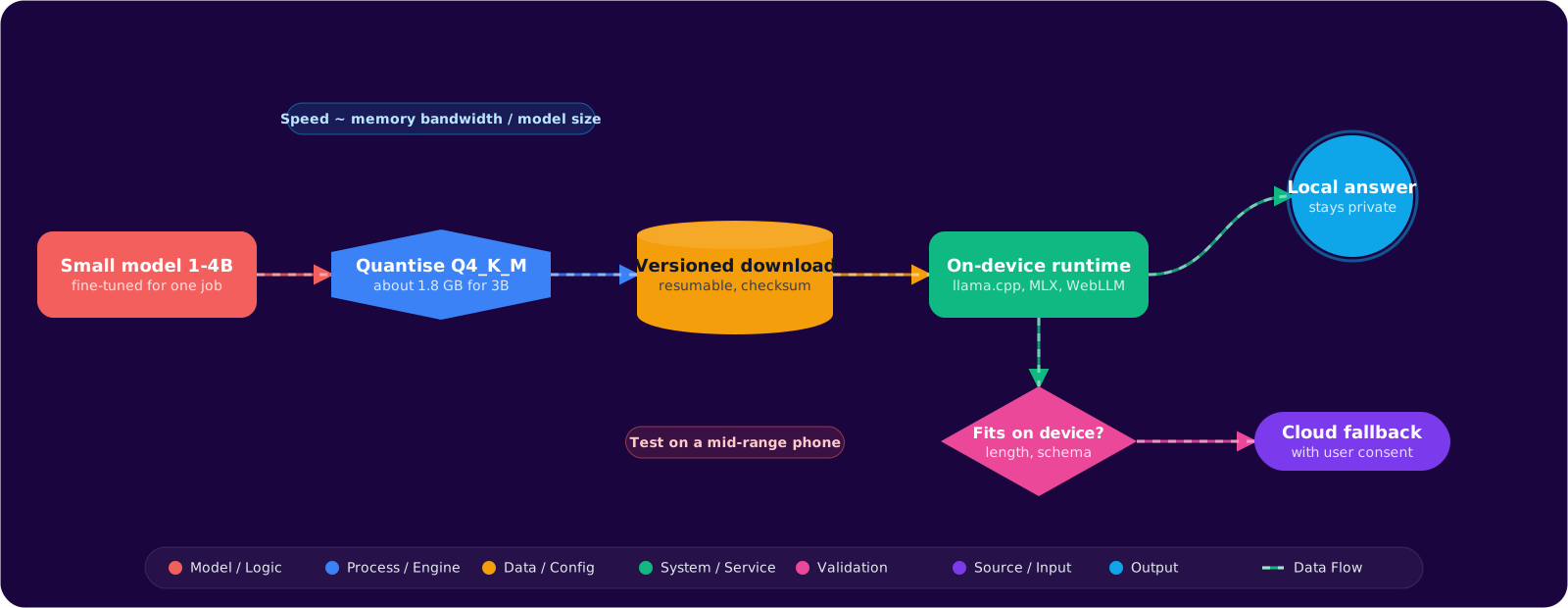
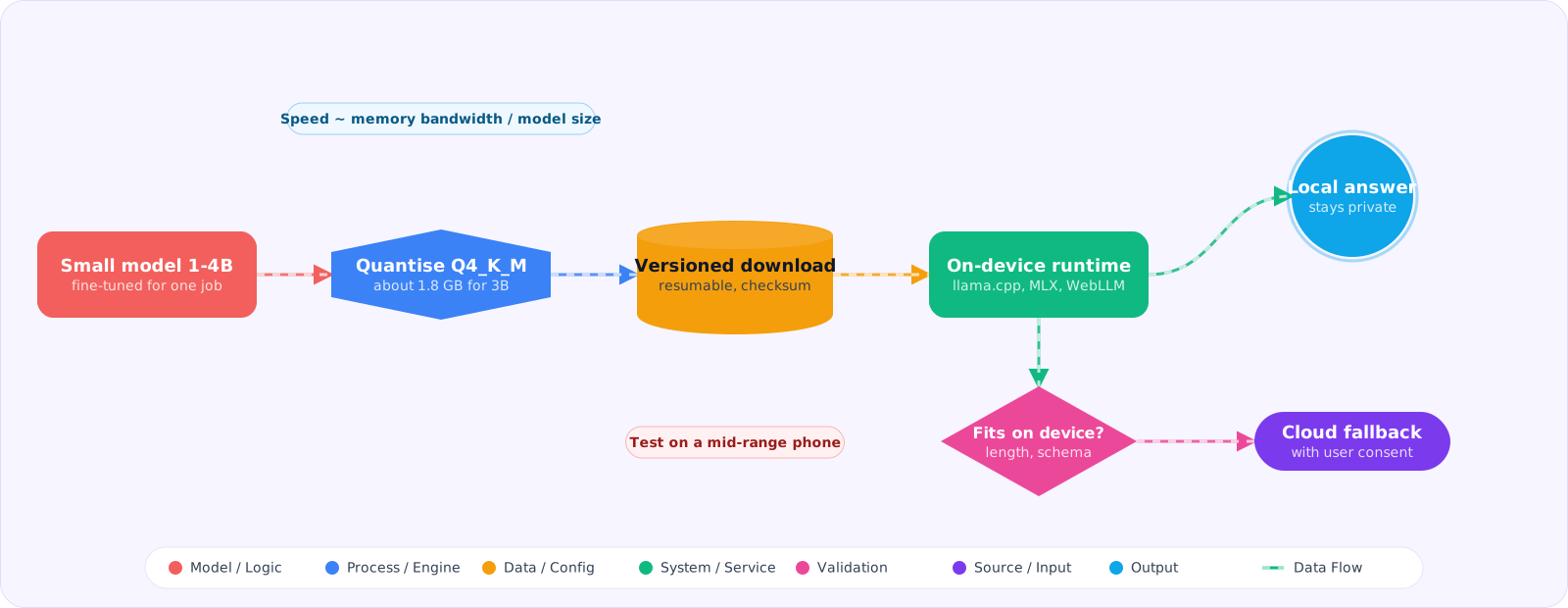
decode speed ceiling =~ memory bandwidth / bytes read per token
  (each generated token reads roughly the whole model once)
  laptop at ~100 GB/s with a 1.8 GB model  ->  at most ~55 tokens/s
  phone  at ~50 GB/s  with a 1.8 GB model  ->  at most ~27 tokens/s
Those are upper bounds; real numbers come in lower, and they drop further when the device warms up and throttles. The second formula is the useful one for planning: generation on a device is limited by how fast memory can be read, so a smaller or more heavily quantised model is faster almost in proportion to its size. On top of the weights you need KV cache for the context, which is why on-device features work best with short prompts.
Pick the Task to Fit the Model
| Works well on device | Struggles on device |
|---|---|
| Classifying short text into a fixed set of labels | Open-ended questions that need world knowledge |
| Extracting fields into a fixed JSON schema | Long multi-step reasoning or planning |
| Rewriting, shortening or fixing the tone of a paragraph | Long documents that blow the context and memory budget |
| Search over personal notes with a small embedding model | Anything where a wrong answer is costly and hard to spot |
The pattern that works: make the on-device task narrow enough that a 1B to 4B model can do it reliably, and fine-tune or few-shot it for that one job. Families worth evaluating include Llama 3.2 (1B and 3B), Gemma 3, Phi-4-mini and the small Qwen3 models. New sizes appear every few months, so treat this as a starting shortlist and check current releases before you choose.
Runtimes by Platform
| Platform | Common runtime | Notes |
|---|---|---|
| Laptops and desktops | llama.cpp (GGUF), Ollama for development | Metal on Apple silicon, Vulkan or CUDA elsewhere, CPU fallback everywhere |
| Windows apps | ONNX Runtime GenAI | DirectML for GPU acceleration across vendors |
| Apple devices | MLX, Core ML, llama.cpp | Unified memory helps; watch the per-app memory limit on iOS |
| Android | MediaPipe LLM Inference, platform models where available, llama.cpp | Some devices ship a system model you can call without downloading weights |
| Browser | WebLLM over WebGPU | No install; first load downloads the model into the browser cache |
Quantise, Then Test on the Device
The usual path with llama.cpp is convert, quantise, then measure. Q4_K_M is a sensible first choice for phones and browsers; try Q5_K_M or Q8_0 if the quality drop on your task is too large and memory allows.
# Hugging Face weights -> GGUF at full precision
python convert_hf_to_gguf.py ./my-finetuned-3b --outfile model-f16.gguf

# quantise to 4-bit
./build/bin/llama-quantize model-f16.gguf model-q4_k_m.gguf Q4_K_M

# serve locally with a small context and full GPU offload for a quick check
llama-server -m model-q4_k_m.gguf -c 4096 -ngl 99 --port 8080
Then run your evaluation set through the quantised file, not the original. Quantisation hurts some tasks much more than others: exact extraction and arithmetic suffer before tone rewriting does. Compare the scores side by side and decide per task.
In the Browser With WebLLM
WebLLM runs MLC-compiled models on WebGPU with an OpenAI-style API. Always check for WebGPU first and keep a server path for browsers and devices without it.
import { CreateMLCEngine } from '@mlc-ai/web-llm';

export async function createLocalClassifier(onProgress: (text: string) => void) {
  if (!('gpu' in navigator)) return null;          // no WebGPU: use the server path

  // Model IDs come from WebLLM's prebuilt list; check it for current names.
  const engine = await CreateMLCEngine('Llama-3.2-1B-Instruct-q4f16_1-MLC', {
    initProgressCallback: (p) => onProgress(p.text), // first load downloads the weights
  });

  return async (text: string) => {
    const reply = await engine.chat.completions.create({
      messages: [
        { role: 'system', content: 'Classify the note as one of: task, idea, reference. Reply with the label only.' },
        { role: 'user', content: text },
      ],
      temperature: 0,
    });
    return reply.choices[0]?.message.content?.trim().toLowerCase();
  };
}
The first load is the user-visible cost: hundreds of megabytes to a couple of gigabytes, depending on the model. Show progress, start the download only when the user opts into the feature, and let the cached copy serve every later visit.
Device First, Cloud as a Fallback
Most real products end up hybrid. The device handles the common case; a server model handles what the device cannot, such as a long document or low confidence. Two rules keep this honest:
- Decide the fallback rule in code, not by feel. Input longer than the on-device context, an output that fails schema validation, or a label outside the allowed set all go to the server. Log how often it happens; if most requests fall back, the device model is not doing its job.
- Do not quietly break the privacy promise.If the pitch is “stays on your device”, falling back to the cloud needs the user’s consent, or the feature should fail on the device instead.
Shipping the Weights
Do not put the model inside the app binary. Store limits, update size and install conversion all suffer. Download it on first use, over Wi-Fi by default, with resume support and a checksum, and version it separately from the app so you can ship a better model without an app release. Keep the previous version until the new one has passed a quick on-device self-test.
- On-device suits narrow tasks on private or offline data, not open-ended reasoning.
- Memory decides what fits, and memory bandwidth decides how fast it generates.
- Quantise, then evaluate the quantised file on your own task and on real devices.
- Plan the hybrid path: explicit fallback rules and a privacy promise you keep.
- Ship weights as a separate, versioned, resumable download.
Pitfalls
Testing only on a flagship
The developer’s new laptop is not your median user. Put a three-year-old mid-range phone and a low-memory laptop in your test matrix, and measure load time, first-token latency and speed after five minutes of continuous use, when thermal throttling kicks in.
Ignoring load time
Generation speed gets all the attention, but loading a multi-gigabyte model from storage can take seconds. Load it ahead of need, keep it warm while the feature is in use, and release it when the app goes to the background.
Using a server prompt on a small model
A long, nuanced system prompt written for a frontier model confuses a 1B model and eats its small context. Keep on-device prompts short and literal, and use the model’s own chat template.
Forgetting storage is the user’s
A 2 GB model is a noticeable share of a phone’s free space. Tell users the size before downloading, and give them a way to delete it from the settings screen.