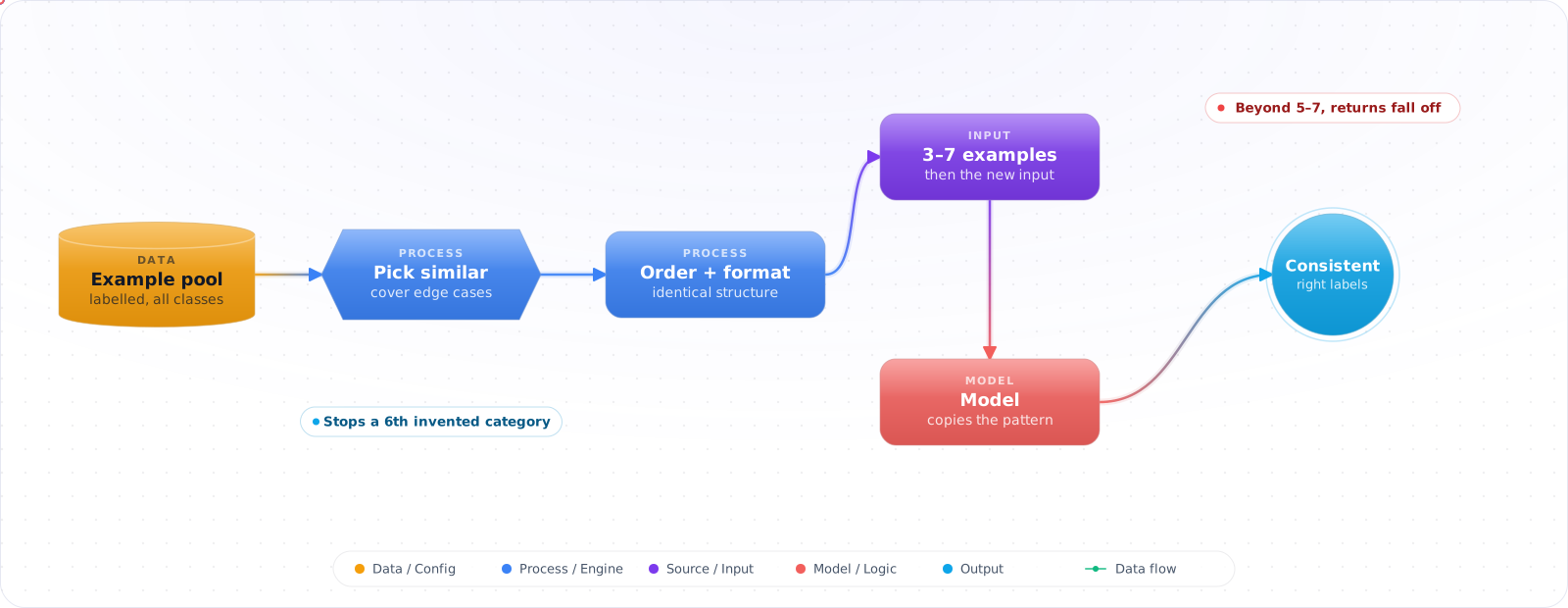
Start With a Clear Instruction
If the model gets the task right from a clear instruction, stop there. Examples cost tokens on every call. They earn their place when the output has to follow conventions the model can't guess: your labels, your format, and where you draw the line on a borderline case.
You have written two careful paragraphs describing the summary format: three lines, these labels, no greetings. The model follows it most of the time and drifts the rest. Then you paste in three example summaries, and the drift mostly stops.
That is few-shot prompting, and it works because models copy what they are shown more reliably than they follow descriptions. It is also easy to get wrong. Examples teach content as well as format, their order matters more than it should, and every example costs tokens on every call. Below is how to choose them, when zero-shot is enough, and how the advice changes on reasoning models.
- Your LLM outputs the right content but the wrong format — you're spending tokens reformatting
- You have a classification task with 5 categories and the model keeps inventing a 6th
- Your model writes in a style that doesn't match your product voice
- You've tried describing what you want in instructions but the model ignores them
For format-sensitive tasks, three well-chosen examples often do more than two paragraphs of instructions. Test it on your own eval set.
Few-Shot vs Zero-Shot
flowchart TD
    task["New task"] --> wellKnown

    wellKnown{"Well-known task?
(summarise, translate,
write code)"}
    wellKnown -->|Yes| zeroShot["Zero-shot
Just describe the task"]
    wellKnown -->|No| specific

    specific{"Format-sensitive
or style-specific?"}
    specific -->|Yes| fewShot["Few-shot
3–5 examples in prompt"]
    specific -->|No| zeroShot
Few-Shot Structure
// Building a few-shot prompt programmatically
const examples = [
  {
    input: "The checkout button doesn't work on mobile",
    output: JSON.stringify({
      category: "bug",
      priority: "high",
      component: "checkout",
      platform: "mobile"
    })
  },
  {
    input: "Can you add dark mode?",
    output: JSON.stringify({
      category: "feature-request",
      priority: "medium",
      component: "ui",
      platform: "all"
    })
  },
  {
    input: "How do I reset my password?",
    output: JSON.stringify({
      category: "support",
      priority: "low",
      component: "auth",
      platform: "all"
    })
  }
];

function buildFewShotPrompt(userTicket: string): string {
  const exampleBlock = examples.map(e =>
    `Input: ${e.input}\nOutput: ${e.output}`
  ).join('\n\n');

  return `You are a support ticket classifier. Classify each ticket into the JSON format shown.

${exampleBlock}

Input: ${userTicket}
Output:`;
}

// Usage
const prompt = buildFewShotPrompt("App crashes when I upload a profile picture");
// Model completes: {"category":"bug","priority":"high","component":"profile","platform":"all"}Check it: Run your eval set with the instruction alone, then with three examples added. Compare how many outputs match the format exactly.
Example Selection
Random examples are the baseline. Choosing examples similar to the input does better: Liu et al. (2021) found retrieval-based selection consistently beat random examples for GPT-3 across their benchmarks.
// Strategy 1: Semantic similarity — show examples most similar to the input
// Uses embeddings to find the closest examples in your example bank

async function selectSimilarExamples(
  input: string,
  exampleBank: Array<{ input: string; output: string; embedding: number[] }>,
  k = 3
): Promise<Array<{ input: string; output: string }>> {
  const inputEmbedding = await embed(input);

  // Embed the bank once, offline, and store the vectors with the examples.
  // Embedding every example on every request costs one API call per example.
  const ranked = exampleBank.map((example) => ({
    example,
    similarity: cosineSimilarity(inputEmbedding, example.embedding),
  }));

  return ranked
    .sort((a, b) => b.similarity - a.similarity)
    .slice(0, k)
    .map(r => r.example);
}

// Strategy 2: Label coverage — ensure examples span all output categories
// For classification: include at least one example per class
function selectBalancedExamples(
  exampleBank: Array<{ input: string; output: { category: string } }>,
  categoriesNeeded: string[]
): Array<{ input: string; output: { category: string } }> {
  return categoriesNeeded.flatMap(category => {
    const match = exampleBank.find(e => e.output.category === category);
    if (!match) console.warn(`No example for category: ${category}`);  // a gap in the bank, not a crash later
    return match ? [match] : [];
  });
}
Ordering and Format Consistency
// Order effect: example order alone can swing few-shot accuracy from near chance
// to near state of the art (Lu et al., 2022), and models lean toward labels that
// appear near the end of the prompt (Zhao et al., 2021).
// So mix labels across positions, don't end on a run of one class,
// and test a few orderings on your eval set

// Format consistency: your examples must follow the EXACT same format
// or the model will blend the formats

// ❌ Inconsistent — model will produce inconsistent output
const badExamples = [
  "Input: foo\nOutput: {\"a\":1}",
  "Input: bar\nOutput: {\n  \"a\": 2\n}"  // different JSON formatting
];

// ✅ Consistent — same format every time
const goodExamples = [
  "Input: foo\nOutput: {\"a\":1}",
  "Input: bar\nOutput: {\"a\":2}"  // identical formatting
];

// If you want structured JSON output, use structured output mode
// instead of few-shot JSON examples:
const response = await openai.chat.completions.create({
  model: 'gpt-6.1-sol',
  messages: [{ role: 'user', content: prompt }],
  response_format: {
    type: 'json_schema',
    json_schema: {
      name: 'ticket_classification',
      strict: true,  // without this the schema is best effort, not enforced
      schema: {
        type: 'object',
        properties: {
          category: { type: 'string', enum: ['bug', 'feature-request', 'support'] },
          priority: { type: 'string', enum: ['low', 'medium', 'high'] },
        },
        required: ['category', 'priority'],
        additionalProperties: false,  // required by strict mode
      },
    },
  },
});Check it: Shuffle the order of your examples and run the eval set again. If the score moves, fix the order and record it.
Few-Shot With Reasoning Models
Examples have not stopped working, but what they are good for has narrowed. A current frontier model rarely needs examples to understand a task. It still needs them to learn conventions that cannot be guessed: your label set, your house style, the exact output shape, where you draw the line on an ambiguous case.
- Use examples for conventions, not for capability. If the model already gets the task right zero-shot, examples mostly cost tokens. If it gets the task right but in the wrong format or with the wrong boundary cases, examples are the fastest fix.
- Watch for over-anchoring. Strong models copy examples closely. Three examples that all happen to be short, polite and about billing will pull every answer toward short, polite and billing. Vary the examples along every dimension you do not want copied.
- Leave the reasoning out of the examples. Worked reasoning traces helped single-pass models. A reasoning model does its own thinking, and a scripted trace tends to constrain it. Show input and final output only.
- Put examples in the cached part of the prompt. A stable block of examples near the top of the prompt is billed at the cached rate on repeat requests, a small fraction of the normal input price. Examples chosen per request cannot be cached, so only select dynamically when it measurably improves accuracy.
Check it: Read twenty outputs next to your examples. Look for anything copied that you didn't mean to teach: length, tone, topic or a name.
Pitfalls
Too many examples
More examples are not always better. On simple format tasks the gains usually flatten after a handful, and every extra example is paid for on every call. On harder tasks the curve can keep rising: Agarwal et al. (2024) report significant gains going from few-shot to hundreds or thousands of examples. Measure where your task flattens instead of picking a fixed number.
Label leakage in examples
If your examples are not representative of your production input distribution, the model will learn patterns that don't transfer. Evaluate on a held-out set of real inputs, not on examples similar to the ones in your prompt.
Conflating few-shot with fine-tuning
Few-shot prompting works at inference time and costs tokens on every call. Fine-tuning bakes the pattern into model weights, so the examples leave the prompt, but fine-tuned models can carry a higher per-token price (OpenAI lists fine-tuned o4-mini at $4 / $16 per 1M input / output tokens) and need retraining when the task changes. For high-volume, repetitive tasks, compare the two on cost and accuracy, and price cached examples too. Check availability as well: OpenAI's self-serve fine-tuning is closed to organizations that have not used it before.
Try It on Your Own System This Week
Three checks on a prompt that uses examples, about an hour in total:
- Remove the examples one at a time and re-run your evals. The ones that change nothing are only costing tokens.
- Count the examples for each class. If most are positive, predictions lean positive.
- Look for a real name or order number in an example. Models copy details, so use values that are obviously fake.
Few-Shot in 2026
The technique still works, but the reasons to use it have narrowed. On reasoning models, clear instructions now do much of what examples used to. I reach for examples in a few specific cases: when the format is hard to describe, when the task depends on a judgment that's easier to show than to explain, and when you are working with a small or open-weight model, which benefits much more from them.
For strict output shapes, use structured outputs rather than examples. A schema enforces the shape, while an example only suggests it. Keep examples for the judgment that a schema can't express, such as how formal a reply should be, or which category a borderline ticket falls into.
Choosing examples is the actual work
Most few-shot prompts use the first examples somebody thought of, and those tend to be the easy cases that the model would get right anyway. The valuable examples are the hard ones. Look at where the model fails on your eval set, and add examples for those. Include a borderline case and a case where the right answer is "I don't know" or "none of the above". Without that, the model learns that every input must fit a category.
Watch out for bias from your examples. If three of your five sentiment examples are positive, predictions lean positive. Balance the classes, and vary the length and style. Models can also copy details from examples into answers, such as a customer name or an order number, so use obviously fake values and check for leakage in your evals.
Dynamic examples
Rather than a fixed list, retrieve the examples most similar to the current input from a labelled store. This keeps the prompt short and relevant, and it improves as your set grows.
def build_prompt(query: str, store, k: int = 3) -> list[dict]:
    examples = store.search(query, k=k)
    messages = [{"role": "system", "content": SYSTEM_PROMPT}]
    for ex in examples:
        messages.append({"role": "user", "content": ex.input})
        messages.append({"role": "assistant", "content": ex.output})
    messages.append({"role": "user", "content": query})
    return messages
There's a cost to this. Examples that change per request can't sit in your cached prefix, so you trade a little caching for relevance. Put stable examples early and dynamic ones late. And keep the example store under version control, because a bad example added last week can change behaviour as much as a prompt edit, and it's harder to spot.
Before you add more examples, check whether they're still helping. Each one costs tokens on every call. Remove them one at a time and watch your eval scores. You'll often find that the last few weren't doing anything.