Start With the Prompt Inline
For a one-off script or a prototype, a prompt written inline is fine. You're still finding out what it should say, and tooling would only slow that down. The practices below start to pay once the prompt is live, changes regularly, and something else depends on its output.
A prompt change goes out, something breaks, and the post-mortem turns up the same three facts every time: nobody knows which version was running yesterday, there were no tests, and the prompt lives in a string constant that three services import.
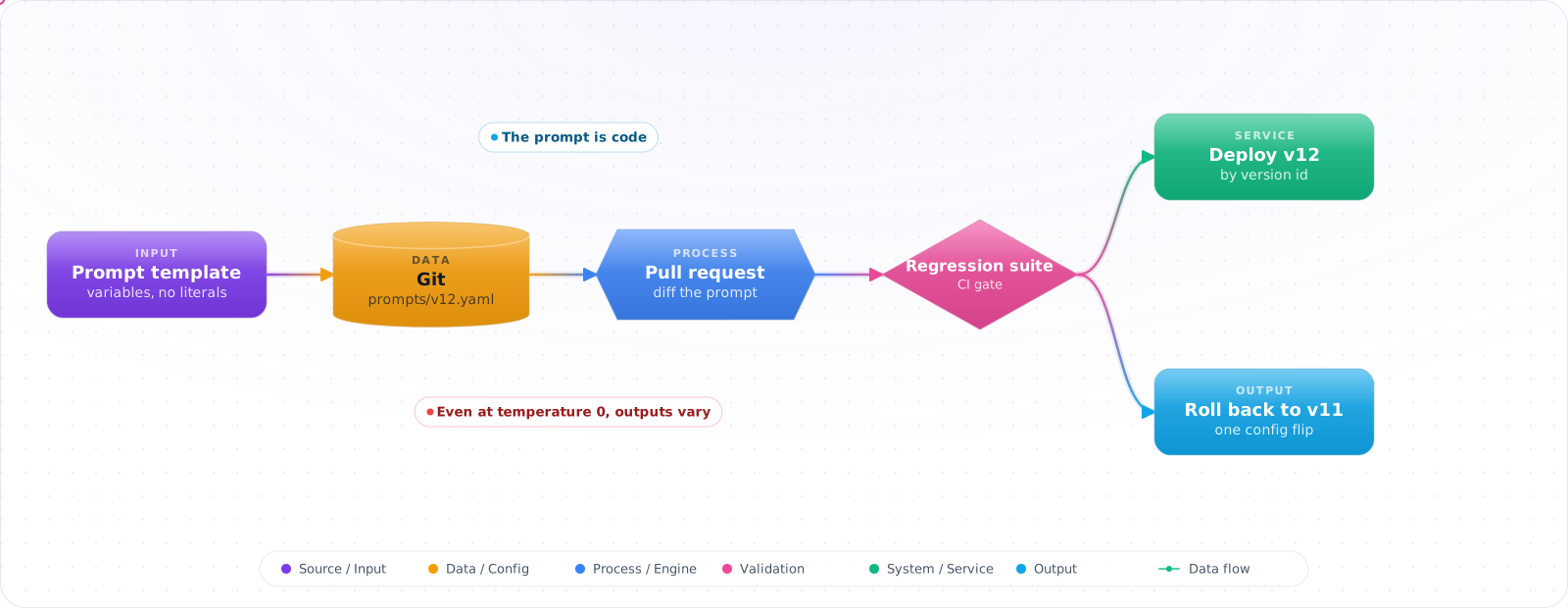
Prompts tend to get treated as a craft: tweak until the output reads well, then move on. But in production a prompt has inputs, outputs, edge cases and regressions, like any other function your product depends on. Everything below is ordinary engineering practice (versioning, templates, tests, review, staged rollout) applied to the file nobody thought of as code.
- You've got prompts scattered across code files, config files, and someone's Notion page
- A "small prompt tweak" broke something in production and you spent hours figuring out what changed
- You want to A/B test prompts but there's no infrastructure for it
- Your team argues about prompt quality based on gut feeling rather than measured evaluation
What "Prompts as Code" Means in Practice
The core idea is simple: prompts are configuration with behavior. Like database migrations or feature flags, they need versioning, validation, and controlled rollout. The trick is building the right infrastructure without over-engineering.
      flowchart LR
          A["Prompt Template\n(version controlled)"] --> B["Parameterization\n(variables + context)"]
          B --> C["Evaluation Suite\n(test cases)"]
          C --> D["CI Pipeline\n(automated checks)"]
          D --> E["Deployment\n(feature flag / canary)"]
          E --> F["Monitoring\n(quality + cost)"]

          style A fill:#4f46e5,color:#fff,stroke:#4338ca
          style C fill:#059669,color:#fff,stroke:#047857
          style D fill:#7c3aed,color:#fff,stroke:#6d28d9
          style F fill:#dc2626,color:#fff,stroke:#b91c1c
Prompt as Template
Separate the prompt structure from runtime data. A prompt template has placeholders for variables, clearly defined sections (system instruction, examples, user input), and metadata (version, author, intended model).
Evaluation-Driven Development
Before changing a prompt, define what "good" looks like. Write test cases with expected outputs (or properties of good outputs). Run the new prompt against the test suite. Only ship if quality is maintained or improved.
Versioning, Testing and Shipping a Prompt
Step 1: When nobody knows what is running, give the prompt a file and a version
A prompt in a string constant has no history of its own. In a file with a name and a version, every change shows up in a diff.
# prompts/summarize-article/v3.yaml
metadata:
  name: summarize-article
  version: 3
  model: gpt-6.1-sol
  author: team-content
  max_tokens: 500
  temperature: 0.3

system: |
  You are a technical content summarizer.
  Rules:
  - Output exactly 3 bullet points
  - Each bullet must be one sentence
  - Focus on actionable insights, not descriptions
  - Never start a bullet with "This article"

user: |
  Summarize the following article for a software engineering audience:

  Title: {{title}}
  Content: {{content}}
Check it: Change one word in the prompt and open a pull request. The diff should show that one word and nothing else. If the prompt is assembled from pieces scattered through the code, the reviewer can't see what the model will receive.
Step 2: Prompt Loading with Versioning
The application asks for a prompt by name and version, so a deployment always knows which one it runs.
public class PromptRegistry
{
    private readonly string _promptsDir;

    public PromptRegistry(string promptsDir) => _promptsDir = promptsDir;

    public PromptTemplate Load(string name, int? version = null)
    {
        var dir = Path.Combine(_promptsDir, name);
        var files = Directory.GetFiles(dir, "v*.yaml")
            .OrderByDescending(f => ExtractVersion(f))
            .ToList();

        var file = version.HasValue
            ? files.First(f => ExtractVersion(f) == version.Value)
            : files.First(); // Latest version

        var yaml = File.ReadAllText(file);
        return PromptTemplate.Parse(yaml);
    }

    public string Render(PromptTemplate template, Dictionary<string, string> variables)
    {
        var result = template.UserTemplate;
        foreach (var (key, value) in variables)
            result = result.Replace($"{{{{{key}}}}}", value);

        return result;
    }
}
Check it: Pick any model call from yesterday's logs and say which prompt version produced it. If you can't, the version isn't being recorded with the call, and the next regression will be as hard to trace as the last one.
Step 3: When a tweak breaks another feature, test on fixed cases
Reading a few outputs won't catch a regression that appears once in twenty cases. A fixed set of cases will, as long as it checks properties and not exact strings.
[TestClass, TestCategory("summarize-article")]
public class SummarizePromptTests
{
    private readonly PromptEvaluator _evaluator;

    [TestMethod]
    public async Task SummarizeProduces_ExactlyThreeBullets()
    {
        var template = _registry.Load("summarize-article");
        var testCases = LoadTestCases("summarize-article");

        foreach (var testCase in testCases)
        {
            var output = await _evaluator.RunAsync(template, testCase.Variables);
            var bullets = output.Split('\n')
                .Where(l => l.TrimStart().StartsWith("-") || l.TrimStart().StartsWith("•"))
                .ToList();

            Assert.AreEqual(3, bullets.Count,
                $"Expected 3 bullets, got {bullets.Count} for test case '{testCase.Name}'");
        }
    }

    [TestMethod]
    public async Task SummarizeNeverStartsWithThisArticle()
    {
        var template = _registry.Load("summarize-article");
        var testCases = LoadTestCases("summarize-article");

        foreach (var testCase in testCases)
        {
            var output = await _evaluator.RunAsync(template, testCase.Variables);
            Assert.IsFalse(
                output.Contains("This article", StringComparison.OrdinalIgnoreCase),
                $"Output contains 'This article' for test case '{testCase.Name}'");
        }
    }
}
Check it: Run the suite twice against the current prompt without changing anything. Every test should pass both times. A test that flips between runs is checking something the model doesn't do consistently, and it teaches the team to ignore failures.
Step 4: When the tests get skipped, run them on every change
A suite that depends on someone remembering to run it gets skipped on the day it counts. Put it in the pipeline.
# .github/workflows/prompt-ci.yml
name: Prompt Evaluation
on:
  pull_request:
    paths: ['prompts/**']

jobs:
  evaluate:
    runs-on: ubuntu-latest
    steps:
      - uses: actions/checkout@v7
        with:
          fetch-depth: 0   # origin/main isn't fetched by default

      - name: Detect changed prompts
        id: changes
        run: |
          changed=$(git diff --name-only origin/main -- prompts/ | \
            sed 's|prompts/\([^/]*\)/.*|\1|' | sort -u | tr '\n' ' ')
          echo "prompts=$changed" >> "$GITHUB_OUTPUT"

      - name: Run evaluations
        env:
          AZURE_OPENAI_ENDPOINT: ${{ secrets.AZURE_OPENAI_ENDPOINT }}
        run: |
          for prompt in ${{ steps.changes.outputs.prompts }}; do
            dotnet test --filter "TestCategory=$prompt" \
              --logger "trx;LogFileName=$prompt-results.trx"
          done

      - name: Comment results on PR
        uses: actions/github-script@v9
        with:
          script: |
            // Parse .trx files and post summary as PR comment
Check it: Open a pull request that deletes a key instruction from the prompt. The pipeline should fail it. If it passes, your cases don't cover that instruction.
Step 5: When tests pass and traffic still surprises you, roll out gradually
A test set is a sample of what users send. Sending the new version to a small share of real traffic first shows you what the sample missed.
public class PromptRouter
{
    private readonly IFeatureFlagService _flags;
    private readonly PromptRegistry _registry;

    public PromptTemplate GetPrompt(string name, string userId)
    {
        var activeVersion = _flags.GetVariant($"prompt-{name}", userId);
        var version = int.Parse(activeVersion);
        return _registry.Load(name, version);
    }
}
Check it: Switch the flag off and confirm that every request is back on the old version straight away. A rollout you can't reverse quickly isn't a staged rollout.
Try It on Your Own System This Week
Three checks on a prompt you already run in production, about an hour in total:
- Find every place the prompt lives. Search the code, the config and the team wiki. If there's more than one copy, decide which is the real one and delete the rest.
- Record a baseline. Run the current prompt over twenty saved inputs and keep the outputs. That's what your next change gets compared with.
- Delete one rule and run it again. If nothing changes, the rule was doing nothing, or your cases don't cover it. Either way you've learned something.
Habits That Cause Prompt Regressions
1. Testing exact string matches
LLM outputs are non-deterministic. Even at temperature 0, outputs can vary across API calls. Test for properties (bullet count, no forbidden words, JSON validity) rather than exact strings. Use semantic similarity for content validation.
2. One giant prompt file
Stuffing system instructions, examples, context, and user input into one template makes it impossible to test sections independently. Decompose into composable parts: a system template, an examples file, and context injection logic.
3. No baseline measurements
You can't know if a prompt change is an improvement without measuring the current version. Before touching any prompt, run the existing version against your test suite and record the baseline. Then compare.
4. Over-engineering the infrastructure
You don't need a prompt management platform on day one. Start with YAML files in your repo, a simple test suite, and CI that runs evaluations on changed prompts. Scale the infrastructure as the prompt count grows.
Prompts Are Only Part of What You Ship
Treating prompts as code was the right first step. The bigger shift since then is that a prompt is one small part of what reaches the model. Tool definitions, retrieved documents, memory and history often outweigh it, and a change to any of them can change behaviour just as much. That wider discipline is context engineering, and it deserves the same version control and tests.
Model upgrades are the other big change. New models now arrive monthly, and a prompt tuned for one can behave differently on the next. Reasoning models have made some old techniques unnecessary, or even harmful. Long step-by-step instructions can get in the way of a model that plans for itself, and aggressive language such as "YOU MUST" can cause over-compliance on a model that already takes instructions seriously. When you upgrade, re-test rather than assume, and expect to delete parts of your prompt.
A release process that works
Here is the flow I'd use for a prompt change, and it's the same flow you'd use for code:
- Keep the prompt in the repo, with a name and a version.
- Change it in a pull request, with the reason in the description.
- Run the eval suite in CI, and show the score difference in the pull request.
- Roll out to a small share of traffic behind a flag.
- Watch online quality and cost, and keep rollback one click away.
The score comparison is what makes this work. A prompt review without evidence is an opinion, and a pull request that says "accuracy up 3 points, cost down 8%, one regression on refund questions" gives the reviewer something real to judge.
Keep prompts small and deletable
Prompts grow by accretion. Someone hits a bug and adds a sentence, then someone else adds another, and after a year the prompt has fifty rules that nobody dares to remove. Each rule costs tokens on every call and competes for attention. Run a test now and then: delete a rule and see whether any eval changes. If nothing moves, it was doing nothing, or your evals don't cover it, and either way you've learned something. Tool-specific knowledge often belongs in Agent Skills, which load only when needed.
Separate what changes
Keep stable instructions at the top and anything dynamic at the end, because prompt caching matches on a prefix. A templating bug that puts the date in line one can cost you the whole cache discount. Render your final prompt in tests and compare it with a snapshot, so that this kind of change shows up in review rather than on the invoice.
- Store prompts in version-controlled template files. YAML or Markdown with metadata. Never in string constants buried in application code.
- Test prompt properties, not exact outputs. Validate structure, constraints, and absence of forbidden patterns. Use semantic similarity for content correctness.
- Run evaluations in CI on prompt changes. Treat prompt PRs like code PRs — they need automated quality checks before merging.
- Measure before you change. Establish baselines for every prompt. You can't improve what you don't measure.
- Start simple. YAML files in the repo, property-based tests, CI that evaluates changed prompts. You can add feature flags and A/B testing later.