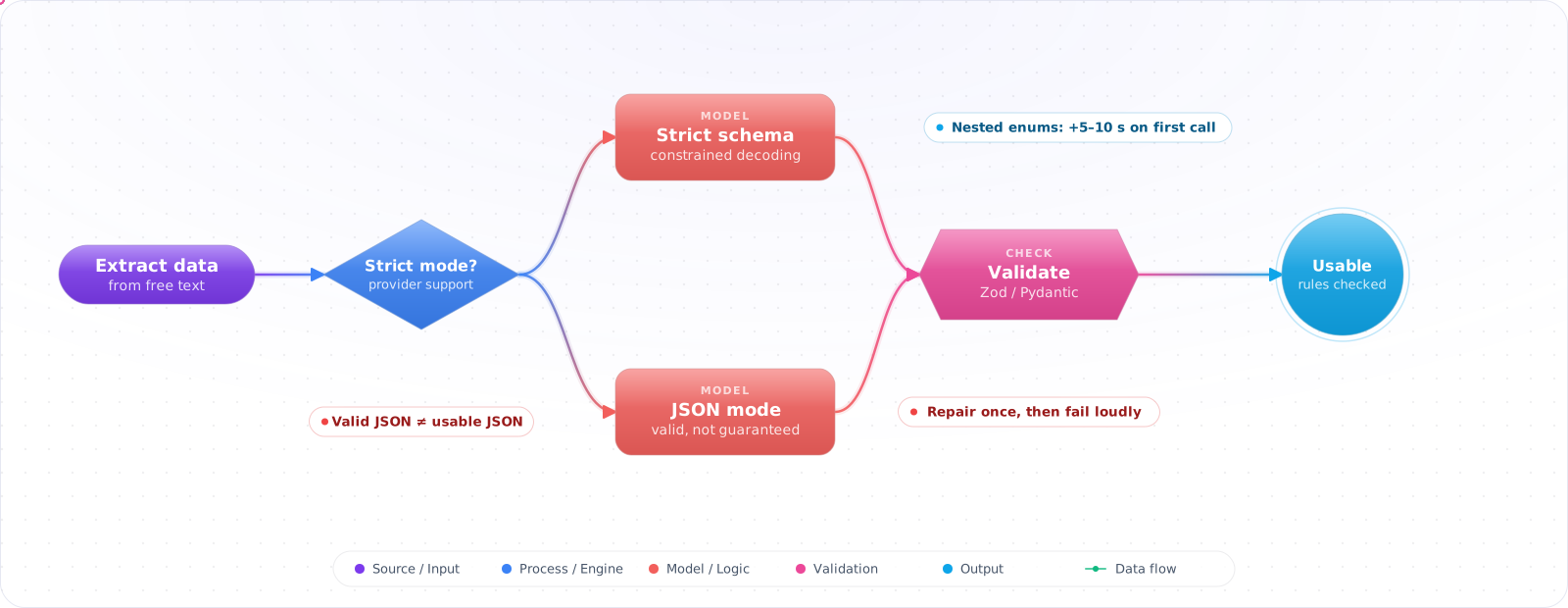
Start With Plain Text
If a person reads the reply, plain text is fine and no schema is needed. Structure starts to matter when code loads the reply, and each option below guarantees a little more than the one before it.
You turn on JSON mode, the parse errors stop, and for a week everything looks fixed. Then the order system starts rejecting records: one reply used orderId, another order_number, a third returned the quantity as the word "two". Every one of them was valid JSON.
JSON mode promises syntax, not your schema. Strict structured outputs go further and bind the reply to a schema you define, ideally generated from the same Pydantic or Zod model your code validates with. Even then, the right shape does not make the content right, so checks on meaning stay in code. Below are the options, in order of how much each one guarantees.
- Your JSON parsing fails intermittently because the LLM wraps output in markdown code fences
- You've written increasingly desperate prompt instructions like "ONLY return JSON, nothing else"
- You need to extract entities from text into a typed object, but the model keeps inventing extra fields
- You're not sure when to use JSON mode vs function calling vs structured outputs
JSON Mode, Strict Schemas and Validation
There are three tiers of structured output enforcement, each with increasing reliability and decreasing flexibility:
      flowchart TD
          A["Prompt Instructions\n'Return JSON...'"] -->|"Least reliable"| F["Parse + Validate"]
          B["JSON Mode\nresponse_format: json"] -->|"Valid JSON, no schema"| F
          C["Function Calling\ntools / tool_choice"] -->|"Schema-shaped arguments"| F
          D["Structured Outputs\nstrict: true"] -->|"Schema enforced"| F
          F --> G{"Valid?"}
          G -->|"Yes"| H["Use Data"]
          G -->|"No"| I["Retry / Fallback"]

          style A fill:#dc2626,color:#fff,stroke:#b91c1c
          style B fill:#d97706,color:#fff,stroke:#b45309
          style C fill:#059669,color:#fff,stroke:#047857
          style D fill:#4f46e5,color:#fff,stroke:#4338ca
Prompt-Only Instructions
The baseline: ask the model to return JSON in the prompt. Works most of the time. Fails in ways that are hard to catch — extra whitespace, markdown wrapping, missing optional fields. No schema enforcement.
JSON Mode
Available in OpenAI and Azure OpenAI. Setting response_format: { type: "json_object" } guarantees the output is valid JSON. But it doesnot guarantee the JSON matches your schema. You'll get valid JSON, but maybe not the fields you asked for.
Function Calling (Tool Use)
Define a JSON schema as a "tool" or "function." The model returns a function call whose arguments should match your schema, but without strict mode the schema is guidance and nothing enforces it, so validate the arguments. It works across OpenAI, Azure OpenAI, Anthropic Claude, and most open models.
Strict Structured Outputs
OpenAI's strict: true mode constrains output tokens at generation time, so a completed, non-refusal response with a supported schema matches that schema. That scope matters: the model can still refuse, and a response cut off at the token limit can be incomplete, so check for both before you deserialize. The trade-off: first requests with a new schema have added latency for schema compilation.
Getting Structured Output You Can Trust
Step 1: JSON Mode (Azure OpenAI)
var options = new ChatCompletionOptions
{
    ResponseFormat = ChatResponseFormat.CreateJsonObjectFormat()
};

var messages = new List<ChatMessage>
{
    new SystemChatMessage("""
        Extract the product info and return a JSON object with fields:
        name (string), category (string), price (number), in_stock (boolean).
        Return ONLY the JSON object.
        """),
    new UserChatMessage(userInput)
};

var response = await client.CompleteChatAsync(messages, options);
var json = response.Value.Content[0].Text;
var product = JsonSerializer.Deserialize<Product>(json);
Check it: Send twenty varied inputs and parse every reply. Then compare the field names across the replies. They should all parse, and they may not all match.
Step 2: Function Calling for Schema Enforcement
var extractTool = ChatTool.CreateFunctionTool(
          functionName: "extract_product",
          functionDescription: "Extract structured product information from text",
          functionParameters: BinaryData.FromString("""
          {
            "type": "object",
            "properties": {
              "name": { "type": "string", "description": "Product name" },
              "category": { "type": "string", "enum": ["electronics", "clothing", "food", "other"] },
              "price": { "type": "number", "description": "Price in USD" },
              "in_stock": { "type": "boolean" }
            },
            "required": ["name", "category", "price", "in_stock"]
          }
          """)
      );

      var options = new ChatCompletionOptions
      {
          Tools = { extractTool },
          ToolChoice = ChatToolChoice.CreateFunctionChoice("extract_product")
      };

      var response = await client.CompleteChatAsync(messages, options);
      var toolCall = response.Value.ToolCalls[0];
      var product = JsonSerializer.Deserialize<Product>(toolCall.FunctionArguments);
Step 3: Strict Structured Outputs (OpenAI)
var options = new ChatCompletionOptions
{
    ResponseFormat = ChatResponseFormat.CreateJsonSchemaFormat(
        jsonSchemaFormatName: "product_extraction",
        jsonSchema: BinaryData.FromString("""
        {
          "type": "object",
          "properties": {
            "name": { "type": "string" },
            "category": { "type": "string", "enum": ["electronics", "clothing", "food", "other"] },
            "price": { "type": "number" },
            "in_stock": { "type": "boolean" }
          },
          "required": ["name", "category", "price", "in_stock"],
          "additionalProperties": false
        }
        """),
        jsonSchemaIsStrict: true
    )
};
Check it: Deserialise a hundred replies straight into your type. None should fail on shape. Time the first call with a new schema on its own.
Step 4: Validation and Fallback Layer
public async Task<T> ExtractWithRetry<T>(
          string prompt,
          ChatCompletionOptions options,
          int maxRetries = 2) where T : class
      {
          for (int attempt = 0; attempt <= maxRetries; attempt++)
          {
              var response = await _client.CompleteChatAsync(
                  new[] { new UserChatMessage(prompt) }, options);

              var text = response.Value.ToolCalls.Any()
                  ? response.Value.ToolCalls[0].FunctionArguments.ToString()
                  : response.Value.Content[0].Text;

              try
              {
                  var result = JsonSerializer.Deserialize<T>(text, _jsonOptions);
                  if (result != null)
                  {
                      var validationResults = new List<ValidationResult>();
                      if (Validator.TryValidateObject(result,
                          new ValidationContext(result), validationResults, true))
                          return result;
                  }
              }
              catch (JsonException) when (attempt < maxRetries)
              {
                  // Retry on parse failure
                  continue;
              }
          }

          throw new ExtractionException("Failed to extract valid structured data");
      }
Check it: Feed in an input with a value missing. The retry count should stop at its cap, and the record should fail explicitly.
Where Structured Output Still Fails
1. JSON mode without a schema in the prompt
JSON mode guarantees valid JSON, not correct JSON. Without a schema in your prompt, the model will return some valid JSON — but probably not the structure you need. Always describe the expected schema even when using JSON mode.
2. Not handling refusals in structured outputs
Even with strict mode, the model can refuse to answer (safety filters, content policy). The response will have a refusal field instead of content. Always check for refusals before parsing.
3. Complex nested schemas on first call
Strict structured outputs compile your schema on the first request. Deeply nested schemas with many enum values can add noticeable latency on the first call. Subsequent calls use a cached schema. Plan for this cold-start in user-facing flows.
4. Assuming function calling works identically across providers
OpenAI, Anthropic, and open models all support function calling, but argument formatting, multi-tool behavior, and error modes differ. Test your extraction pipeline against each provider you support.
Try It on Your Own System This Week
Three checks on a pipeline that loads model output, about an hour in total:
- Look for the code that handles a refusal. It should be a case of its own, and never a parse error.
- Find the required fields that the source may not contain. Make them nullable, or the model will invent a value.
- Run each schema against every provider you use. Each one supports a different subset of JSON Schema.
Schemas Across Providers
Native structured outputs are now standard, and they differ in ways that bite you when you switch providers. Each one supports a subset of JSON Schema, so a schema that works on one model can be rejected by another. Keep schemas simple: avoid deep nesting, large enums and recursive types, and give every field a description, since the model reads it. Test each schema against every provider you use, in CI.
A guaranteed shape can also hide a wrong answer. If a field is required, the model must fill it, so it may invent a value rather than admit it doesn't know. Make fields nullable where the data might be missing, and allow an explicit unknown value in enums. This one change removes a whole class of confident nonsense from extraction pipelines.
Streaming needs thought too. Partial JSON isn't valid JSON, so use a tolerant parser or your SDK's streaming helper, and validate fully at the end. Refusals are the other edge case: a model may decline a request, and that response won't match your schema, so handle it as its own case rather than as a parsing error.
Schema changes are migrations
Treat your output schema like a database schema. If stored records use the old shape, plan how to read both, and keep a version field when the data lasts longer than a request. Run the eval suite after any change, because a new field can change how the model treats the existing ones.
- Use strict structured outputs when schema compliance is critical. For data extraction, entity recognition, and any pipeline where downstream code expects exact types — strict mode removes most parsing failures.
- Use function calling as the universal fallback. It works across all major providers with good schema adherence. It's the most portable structured output mechanism.
- Always validate after parsing. Even with strict mode, validate business rules (ranges, required patterns, enum values). Schema compliance doesn't mean semantic correctness.
- Build a retry layer with budget limits. Retries are cheap for extraction tasks. But cap them — three attempts max — and fail explicitly rather than looping.
- Describe the schema in the prompt even when using API-level enforcement. The model generates better data when it understands what each field means, not just its type.