
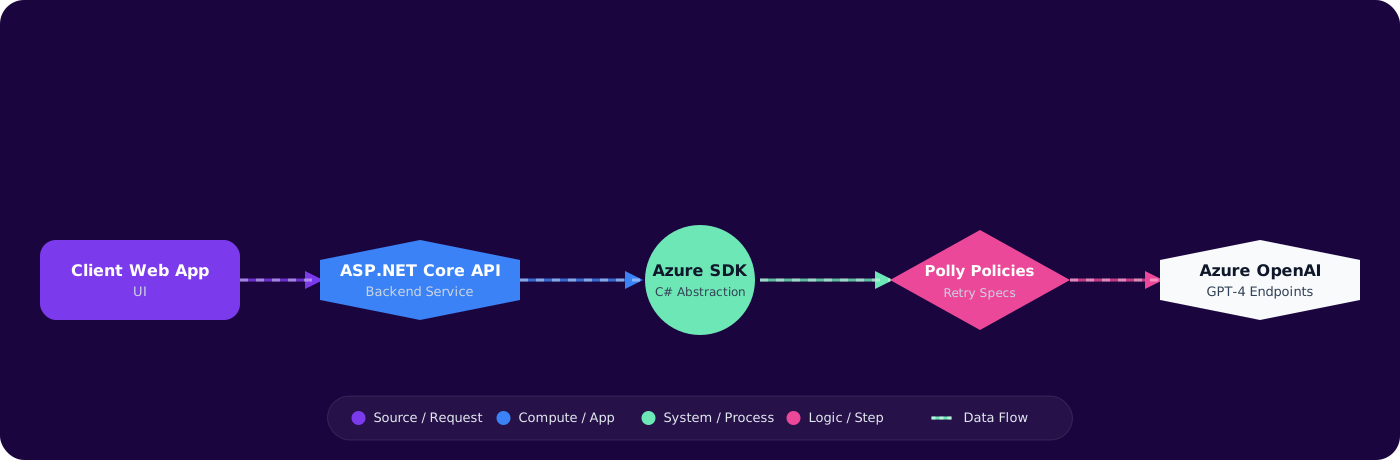
Problem Context
Calling an LLM from a .NET app is easy. Calling it reliably, efficiently, and cost-effectively in production is a different problem. You need connection pooling, retry logic for 429s, streaming for responsive UIs, structured output parsing, and proper dependency injection — none of which the quickstart tutorials cover.
This guide covers the patterns that survive production traffic: how to configure the Azure OpenAI SDK for real workloads, handle the failure modes you'll actually encounter, and structure your code so it doesn't become unmaintainable as you add more LLM features.
- You followed the Azure OpenAI quickstart and it works — but you're not sure it's production-ready
- Your app creates a new
AzureOpenAIClientper request and you're seeing socket exhaustion - Users complain about 10-second load times because you're waiting for GPT-4o to finish before responding
- You want structured JSON from the LLM but keep getting free-text responses that break your parser
This guide gives you the production patterns — from DI setup to streaming to structured outputs.
Concept Explanation
The Azure OpenAI .NET SDK (Azure.AI.OpenAI) wraps the REST API with typed models, built-in retry logic, and streaming support. The key decision: use AzureOpenAIClient as a long-lived singleton, not a per-request disposable.
      flowchart LR
          A["ASP.NET Core App"] --> B["AzureOpenAIClient - Singleton"]
          B --> C["Chat Completions"]
          B --> D["Embeddings"]
          B --> E["Image Generation"]
          B --> F["Audio/Whisper"]

          C --> G["Azure OpenAI Endpoint"]
          D --> G
          E --> G
          F --> G

          style B fill:#4f46e5,color:#fff,stroke:#4338ca
          style G fill:#059669,color:#fff,stroke:#047857
Implementation
Step 1: SDK Setup and Dependency Injection
// Program.cs — Register as singleton
      using Azure.AI.OpenAI;
      using Azure.Identity;

      builder.Services.AddSingleton(sp =>
      {
          var endpoint = new Uri(builder.Configuration["AzureOpenAI:Endpoint"]!);
          // Use managed identity — no API keys in config
          var credential = new DefaultAzureCredential();

          return new AzureOpenAIClient(endpoint, credential);
      });

      // Register a typed chat client for your deployment
      builder.Services.AddSingleton(sp =>
      {
          var client = sp.GetRequiredService<AzureOpenAIClient>();
          return client.GetChatClient("gpt-4o");  // deployment name
      });
Why singleton? The AzureOpenAIClient manages an internal HttpClient with connection pooling. Creating a new client per request causes socket exhaustion — the same problem as new HttpClient() in a loop.
Step 2: Basic Chat Completion
public class ChatService
      {
          private readonly ChatClient _chatClient;

          public ChatService(ChatClient chatClient)
          {
              _chatClient = chatClient;
          }

          public async Task<string> GetCompletionAsync(string userMessage)
          {
              var messages = new List<ChatMessage>
              {
                  new SystemChatMessage("You are a helpful technical assistant."),
                  new UserChatMessage(userMessage)
              };

              var options = new ChatCompletionOptions
              {
                  MaxOutputTokenCount = 1000,
                  Temperature = 0.3f
              };

              ChatCompletion response = await _chatClient.CompleteChatAsync(
                  messages, options);

              return response.Content[0].Text;
          }
      }
Step 3: Retry Policy Configuration
The SDK has built-in retry logic, but the defaults aren't tuned for LLM workloads. 429 (rate limit) responses include aRetry-After header — the SDK respects it automatically, but you should configure max retries and timeouts:
// Custom retry options for LLM workloads
      var clientOptions = new AzureOpenAIClientOptions
      {
          RetryPolicy = new ClientRetryPolicy(maxRetries: 4),
          NetworkTimeout = TimeSpan.FromMinutes(3) // Long outputs take time
      };

      var client = new AzureOpenAIClient(endpoint, credential, clientOptions);
For production systems, add Polly for more sophisticated retry strategies:
// Polly retry with exponential backoff + circuit breaker
      builder.Services.AddResiliencePipeline("azure-openai", pipelineBuilder =>
      {
          pipelineBuilder
              .AddRetry(new RetryStrategyOptions
              {
                  MaxRetryAttempts = 3,
                  BackoffType = DelayBackoffType.Exponential,
                  Delay = TimeSpan.FromSeconds(2),
                  ShouldHandle = new PredicateBuilder()
                      .Handle<Azure.RequestFailedException>(ex =>
                          ex.Status == 429 || ex.Status >= 500)
              })
              .AddCircuitBreaker(new CircuitBreakerStrategyOptions
              {
                  FailureRatio = 0.5,
                  SamplingDuration = TimeSpan.FromSeconds(30),
                  MinimumThroughput = 10,
                  BreakDuration = TimeSpan.FromSeconds(15)
              });
      });
Step 4: Streaming Responses
For chat-style UIs, streaming tokens as they're generated drops perceived latency from 5–10 seconds to under 500ms:
// Minimal API endpoint with SSE streaming
      app.MapPost("/api/chat", async (
          ChatRequest request,
          ChatClient chatClient,
          HttpContext httpContext) =>
      {
          httpContext.Response.ContentType = "text/event-stream";

          var messages = new List<ChatMessage>
          {
              new SystemChatMessage(request.SystemPrompt),
              new UserChatMessage(request.Message)
          };

          await foreach (StreamingChatCompletionUpdate update in
              chatClient.CompleteChatStreamingAsync(messages))
          {
              foreach (ChatMessageContentPart part in update.ContentUpdate)
              {
                  await httpContext.Response.WriteAsync(
                      $"data: {JsonSerializer.Serialize(new { text = part.Text })}\n\n");
                  await httpContext.Response.Body.FlushAsync();
              }
          }

          await httpContext.Response.WriteAsync("data: [DONE]\n\n");
      });
Step 5: Structured Outputs with JSON Schema
When you need the LLM to return structured data (not free text), use JSON mode with a schema definition:
public async Task<ProductClassification> ClassifyAsync(string productDescription)
      {
          var messages = new List<ChatMessage>
          {
              new SystemChatMessage("""
                  Classify the product and extract attributes.
                  Return JSON matching the provided schema.
                  """),
              new UserChatMessage(productDescription)
          };

          var options = new ChatCompletionOptions
          {
              ResponseFormat = ChatResponseFormat.CreateJsonSchemaFormat(
                  "product_classification",
                  BinaryData.FromObjectAsJson(new
                  {
                      type = "object",
                      properties = new
                      {
                          category = new { type = "string",
                              @enum = new[] { "electronics", "clothing", "food", "other" } },
                          confidence = new { type = "number", minimum = 0, maximum = 1 },
                          tags = new { type = "array",
                              items = new { type = "string" } }
                      },
                      required = new[] { "category", "confidence", "tags" },
                      additionalProperties = false
                  }),
                  strictSchemaEnabled: true
              ),
              Temperature = 0f
          };

          var response = await _chatClient.CompleteChatAsync(messages, options);
          return JsonSerializer.Deserialize<ProductClassification>(
              response.Content[0].Text)!;
      }
Pitfalls
1. Not setting NetworkTimeout
Default HTTP timeout is 100 seconds. Long completions (2000+ tokens with GPT-4o) can exceed this, especially under load. SetNetworkTimeout to 3–5 minutes for generation endpoints.
2. Storing API keys in appsettings.json
Use DefaultAzureCredential with managed identity in production. For local dev, it falls back to Azure CLI credentials. API keys in config files end up in source control, logs, and error messages.
3. Ignoring token count in responses
Every response includes Usage.InputTokenCount and Usage.OutputTokenCount. Log these. Without usage tracking, you can't identify which features are driving costs or when prompt changes increase consumption.
4. Blocking on streaming enumeration
If you enumerate CompleteChatStreamingAsync into a list before sending to the client, you've defeated the purpose. Stream directly to the HTTP response. Don't collect all chunks then forward them.
5. One deployment for everything
Use separate Azure OpenAI deployments (and ideally separate resource instances) for different workload tiers: chat (latency-sensitive, lower TPM), batch processing (throughput-optimized, higher TPM), embeddings (high volume, separate quota).
Practical Takeaways
- Register
AzureOpenAIClientas a singleton. Never create per-request instances — socket exhaustion is real. - Use
DefaultAzureCredentialinstead of API keys. It works locally (Azure CLI) and in production (managed identity) with zero code changes. - Add Polly circuit breaker + retry on top of the SDK's built-in retries for production resilience. The SDK retries handle transient errors; Polly handles sustained outages.
- Stream responses for any user-facing chat feature. The time-to-first-token matters more than total completion time for perceived performance.
- Log token counts on every request. Cost visibility is a production requirement, not a nice-to-have.