Start With Plain Function Calling
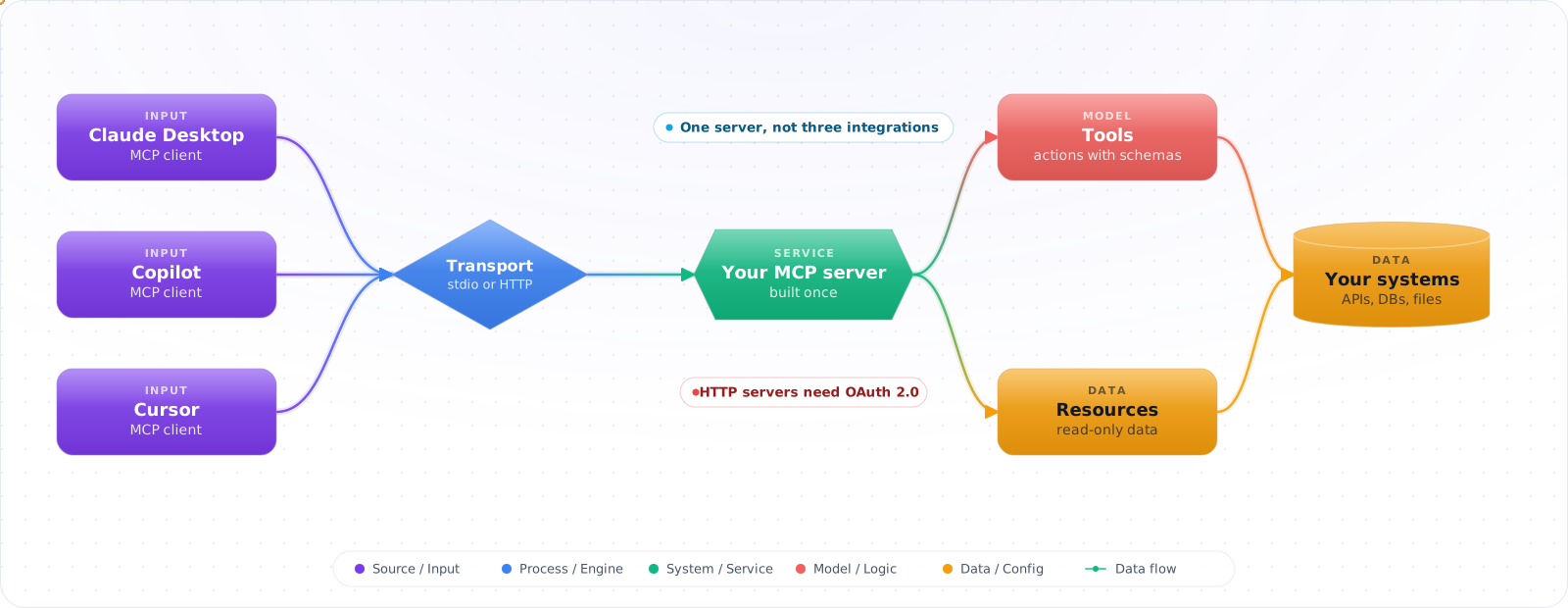
If one application calls one or two of its own functions, plain function calling inside that application is all you need. An MCP server would only be one more process to run. MCP earns its place when the same tool has to work in several AI applications.
It usually starts small. Someone wires your internal search into a Semantic Kernel plugin for one assistant. A month later another team wants the same search in their LangChain agent, and a third wants it inside VS Code. Each gets its own copy of the tool, with its own schema, its own way of passing credentials and its own bugs. When the search API changes, you find out how many copies exist by watching them break.
The Model Context Protocol reduces that duplication. You expose the tool from an MCP server, and compatible clients can discover it when they support the same protocol capabilities and transport. It adds a process you have to run, version, and secure, so it is not free. What you get in return is that "whose copy of the tool is this?" has one answer.
- You've built custom tools for AI agents but they only work with one framework
- You want to expose internal APIs to AI assistants but need a standard interface
- You're intrigued by MCP but the docs feel abstract — you want to build something concrete
- You want VS Code Copilot or Claude to interact with your custom systems
- Outcome: Decide whether MCP removes meaningful integration duplication and design separate local and remote boundaries.
- Environment: MCP
2026-07-28, C# SDK v2-style APIs, .NET hosting, stdio, and Streamable HTTP. - Code status: The examples are partial snippets requiring pinned packages, caller access, service configuration, a backend API, and negative tests.
- Scope: Covers protocol shape, tools, resources, transports, and authorization—not a complete identity provider, deployment, or tenant model.
What MCP Actually Defines
MCP follows a client-server architecture. The MCP client is the AI application (or the LLM runtime within it) that needs tools. TheMCP server exposes tools, resources, and prompts through a standardized JSON-RPC protocol. Communication happens over stdio (local) or Streamable HTTP (remote). Everything below follows the 2026-07-28 revision of the spec, which changed more than any release since authorization landed. If you learned MCP before last summer, read the section on that revision before you trust your memory.
      flowchart LR
          U["User"] --> C["AI Client\n(VS Code, Claude Desktop)"]
          C -->|"JSON-RPC"| S1["MCP Server:\nDatabase Tools"]
          C -->|"JSON-RPC"| S2["MCP Server:\nFile System"]
          C -->|"JSON-RPC"| S3["MCP Server:\nCloud APIs"]

          S1 --> DB["PostgreSQL"]
          S2 --> FS["Local Files"]
          S3 --> API["Azure / AWS"]

          style C fill:#4f46e5,color:#fff,stroke:#4338ca
          style S1 fill:#059669,color:#fff,stroke:#047857
          style S2 fill:#059669,color:#fff,stroke:#047857
          style S3 fill:#059669,color:#fff,stroke:#047857
MCP Capabilities
- Tools: Functions the LLM can call — query a database, create a ticket, search documents
- Resources: Data the client can read — file contents, database schemas, configuration
- Prompts: Reusable prompt templates that the server provides to the client
Transport Modes
stdio: The client spawns the server as a child process and communicates via stdin/stdout. Simple, with no network listener, ideal for local tools. Streamable HTTP: The server is a web service with one endpoint that accepts POST, and each response is either JSON or a stream scoped to that request. It supports remote access, authentication, and many concurrent clients. The older HTTP+SSE transport is deprecated, so don't start anything new on it.
What the 2026-07-28 Revision Changed
Until this year, MCP was a stateful protocol. A client ran an initialize handshake, got an Mcp-Session-Id, and the server remembered that session. Fine on a laptop. Behind a load balancer it meant sticky routing or a shared session store, just to serve what is usually a read-only lookup. The new revision drops all of that, and each request now stands alone.
| Before | Since 2026-07-28 |
|---|---|
initialize handshake | Removed. Each request carries its version and client capabilities in _meta; server/discover is an optional first call |
Mcp-Session-Id | Removed. Keep state in your own store, or pass an identifier through a tool parameter |
| Server sends requests to the client (sampling, elicitation, roots) | The server returns resultType: "input_required" and the client retries the original request with the answers |
GET stream and resources/subscribe | subscriptions/listen, a POST whose response is the event stream |
| Experimental tasks in the core spec | An official extension, io.modelcontextprotocol/tasks, polled with tasks/get |
| Routers had to parse the JSON body | Mcp-Method and Mcp-Name headers, so a gateway can route and rate limit by tool |
Clients re-fetched tools/list to stay current | List results carry ttlMs and cacheScope |
Sampling, Roots and Logging are deprecated, with at least twelve months before removal. Dynamic Client Registration is deprecated in favour of Client ID Metadata Documents, which matters if you run your own authorization server. Elicitation stays.
Here is what I'd check first on an existing server. Search for anything reading the session ID, and move that state out; that is where the real work is. Then look for code that calls back to the client in the middle of a tool, because it now raises an error instead of working. If you depend on a server-side requestState, treat it as attacker-controlled: the spec requires integrity protection, such as an HMAC, whenever it affects authorization or business logic. The TypeScript SDK ships a codemod for the package rename (npx @modelcontextprotocol/codemod@latest v1-to-v2 .), but it only handles the mechanical part. It will not make a stateful server stateless.
You don't have to move everything at once. The v2 SDKs negotiate either era, and a new client falling back to initialize for an old server is part of the spec. The TypeScript packages split into @modelcontextprotocol/server and @modelcontextprotocol/client, and Python's FastMCP became MCPServer with the old import path removed, so an unpinned dependency can break your build before the protocol change ever reaches you.
Building a Server, Step by Step
Step 1: When a second app wants the tool, put it in one server
Start local. A server over stdio has no network listener, so you can get the shape of the tools right before you think about hosting.
// Program.cs — MCP server over stdio
// dotnet add package ModelContextProtocol
var builder = Host.CreateApplicationBuilder(args);

// stdout is the protocol channel, so send every log line to stderr.
builder.Logging.AddConsole(o => o.LogToStandardErrorThreshold = LogLevel.Trace);

builder.Services.AddHttpClient("devops", http =>
    http.BaseAddress = new Uri(builder.Configuration["DEVOPS_API_URL"]!));

builder.Services
    .AddMcpServer()
    .WithStdioServerTransport()
    .WithTools<DevOpsTools>()
    .WithResources<DevOpsResources>();

await builder.Build().RunAsync();
Step 2: Define a few narrow tools
The model picks a tool from its name and description, and then reads whatever the tool returns. So each tool should do one thing, say exactly when to use it, and return a bounded result.
// ICallerAccess is implemented from validated claims for HTTP and from an explicit
// local policy for stdio. It never trusts a tenant or service name supplied by the model.
public interface ICallerAccess
{
    Task RequireServicePermissionAsync(string service, string permission);
}

[McpServerToolType]
public class DevOpsTools(IHttpClientFactory httpFactory, ICallerAccess callerAccess)
{
    private readonly HttpClient _http = httpFactory.CreateClient("devops");

    [McpServerTool(Name = "list_recent_deployments")]
    [Description("List recent deployments for a service")]
    public async Task<string> ListDeployments(
        [Description("Service name")] string service,
        [Description("Number of deployments to return")] int count = 5)
    {
        await callerAccess.RequireServicePermissionAsync(service, "deployments:read");
        var response = await _http.GetAsync(
            $"/api/deployments?service={Uri.EscapeDataString(service)}&top={count}");
        response.EnsureSuccessStatusCode();
        return await response.Content.ReadAsStringAsync();
    }

    [McpServerTool(Name = "get_service_health")]
    [Description("Get current health status of a service including uptime and error rate")]
    public async Task<string> GetServiceHealth(
        [Description("Service name")] string service)
    {
        await callerAccess.RequireServicePermissionAsync(service, "health:read");
        var response = await _http.GetAsync(
            $"/api/health/{Uri.EscapeDataString(service)}");
        response.EnsureSuccessStatusCode();
        return await response.Content.ReadAsStringAsync();
    }

    [McpServerTool(Name = "search_logs")]
    [Description("Search application logs with a KQL-like query")]
    public async Task<string> SearchLogs(
        [Description("Service to search logs for")] string service,
        [Description("Search query")] string query,
        [Description("Time range in hours")] int hours = 24)
    {
        await callerAccess.RequireServicePermissionAsync(service, "logs:read");
        var response = await _http.PostAsJsonAsync("/api/logs/search", new
        {
            service,
            query,
            timeRange = $"{hours}h"
        });
        response.EnsureSuccessStatusCode();
        return await response.Content.ReadAsStringAsync();
    }
}
Check it: Read each description as if it were the only documentation you had. Could you tell when to call the tool? Then call each one with the widest input you can, and confirm the output stays small.
Step 3: Configure in VS Code
// .vscode/mcp.json
{
  "servers": {
    "devops-tools": {
      "type": "stdio",
      "command": "dotnet",
      "args": ["run", "--project", "./tools/DevOpsMcp"],
      "env": {
        "DEVOPS_API_URL": "https://your-devops-api.internal"
      }
    }
  }
}
Check it: Open the client and ask a question that needs your tool. The client should discover the tool and call it. You wrote no integration code for this client, and that is what the server is for.
Step 4: When other people need it, serve it over HTTP with auth
Stdio serves one person on one machine. A shared server is a web service, and from its first day it has to know who is calling.
// dotnet add package ModelContextProtocol.AspNetCore
// dotnet add package Microsoft.AspNetCore.Authentication.JwtBearer
using Microsoft.AspNetCore.Authentication.JwtBearer;

var builder = WebApplication.CreateBuilder(args);

const string RequiredScope = "mcp:devops";
builder.Services
    .AddAuthentication(JwtBearerDefaults.AuthenticationScheme)
    .AddJwtBearer(options =>
    {
        options.Authority = "https://id.example.com";       // validates issuer + signature
        options.Audience = "https://mcp.example.com/mcp";  // reject tokens for another API
        options.TokenValidationParameters.ValidateLifetime = true;
    });
builder.Services.AddAuthorizationBuilder()
    .AddPolicy(RequiredScope, policy => policy
        .RequireAuthenticatedUser()
        .RequireAssertion(context => context.User.FindAll("scope")
            .SelectMany(claim => claim.Value.Split(' ', StringSplitOptions.RemoveEmptyEntries))
            .Contains(RequiredScope)));
// Register the "devops" HttpClient here too, as in Step 1; DevOpsTools needs it.

builder.Services
    .AddMcpServer()
    // Stateless is the default in the v2 SDK. Spelled out here because it is
    // the decision that lets you run several replicas behind a load balancer.
    .WithHttpTransport(options => options.SessionMode = HttpServerSessionMode.Stateless)
    .WithTools<DevOpsTools>();

var app = builder.Build();
app.UseAuthentication();
app.UseAuthorization();
app.MapMcp("/mcp").RequireAuthorization(RequiredScope);
app.Run();
Your load balancer no longer needs sticky sessions, and a gateway can read Mcp-Name to rate limit search_logs without parsing the body. The endpoint policy is only the coarse boundary. Each sensitive tool must also derive the caller and tenant from the validated identity and authorize the requested service; never accept a tenant identifier from the model and treat it as permission. Add negative tests for no token, a wrong issuer or audience, an expired token, a missing scope, and cross-tenant resource access.
Check it: Call the endpoint with no token, an expired token, a token for the wrong audience and one that is missing the scope. Every call must be rejected. Then call as one tenant and ask for another tenant's data.
Step 5: Resources for Context
A resource is data the client can read without the model calling anything. Use one for context that belongs in the conversation, and a tool for anything the model has to decide to do.
[McpServerResourceType]
public class DevOpsResources(IServiceConfigStore configStore)
{
    [McpServerResource(
        UriTemplate = "config://services/{service}/{environment}",
        Name = "Service configuration",
        MimeType = "application/json")]
    [Description("Environment variables and feature flags for a service")]
    public async Task<string> GetConfig(string service, string environment)
    {
        var config = await configStore.GetAsync(service, environment);
        return JsonSerializer.Serialize(config);
    }
}
What Bites You After the Demo
1. Exposing write operations without confirmation
Tools that create, update, or delete resources should require explicit user confirmation. The LLM might decide to "clean up" by deleting things. MCP itself doesn't enforce this — your tool implementation must include safety boundaries.
2. Returning too much data
Tools that return thousands of lines flood the LLM's context window. Paginate results, limit row counts, and summarize large datasets. Return the minimum data the LLM needs to answer the user's question.
3. No authentication on HTTP transport
stdio limits transport exposure to the client that launched the server, but that doesn't make it safe. The server still runs code with your host permissions and can reach the network, so pin trusted server code, scope its credentials, and sandbox it where you can. Read-only tools can leak sensitive data too. HTTP servers are network-accessible. Always add authentication to HTTP-based MCP servers: OAuth 2.1, as the MCP authorization spec defines it, or an API key as a simpler stopgap. An unauthenticated MCP server is an unauthenticated backdoor to your systems.
4. Vague tool descriptions
The LLM decides which tool to call based on the description. "Get data" is useless. "Get current health status including uptime percentage, error rate, and last deployment timestamp for a named service" tells the LLM exactly when to use this tool.
5. Holding a long job open on one request
A tool that takes ten minutes shouldn't keep an HTTP request open for ten minutes. Return a task handle through the Tasks extension and let the client poll tasks/get. If you keep task state in durable storage, the call survives a dropped connection, a client restart, and a redeploy of your server.
Try It on Your Own System This Week
Three things to find out before you write a server, about an hour in total:
- Count the copies of one tool. Search your repositories for the same internal API wrapped as a tool. Two or more copies is the case MCP is for. One copy isn't.
- Pick one read-only tool as the pilot. Deployment status or a scoped log search are good candidates. Write down what data it can return, and who is allowed to see it.
- Decide where it runs. If only you need it, stdio on your own machine is enough. If a team needs it, plan the authentication before you plan the hosting.
What I Would Do First
- MCP is a shared interface, not automatic portability. A server can support several compatible clients, including Semantic Kernel through its MCP integration, but protocol revision, capabilities, transport, and authentication still have to line up. Start with stdio for local tools and add Streamable HTTP when remote access is justified.
- Write specific tool descriptions. The description is the LLM's API documentation. Specific, detailed descriptions lead to correct tool selection. Vague descriptions lead to wrong calls.
- Limit output size. Return concise, structured data. Large outputs waste context window tokens and degrade the LLM's ability to reason about results.
- Secure write operations. Read-only tools are lower risk, but they can still leak data, so scope them to what each user may see. Write tools need confirmation flows, rate limits, and careful access control.
- Choose a bounded pilot. Monitoring, deployment status, and scoped log search can be useful first servers when access is read-only, tenant-aware, and tested. Their risk is determined by the data and permissions they expose, not by the fact that the tools only read.
Completion Check
- The stdio and Streamable HTTP hosts build and start independently against pinned package versions.
- Tool and resource discovery returns the intended schemas, descriptions, MIME types, and bounded outputs.
- HTTP tests reject missing, expired, wrong-issuer, wrong-audience, and insufficient-scope tokens.
- Every sensitive tool performs resource-level authorization, including a negative cross-tenant test.
- Long-running work has explicit ownership, status, cancellation, retention, and recovery behaviour.