Start With Polling
If updates are rare and a minute of delay is acceptable, polling is the simplest thing that works. There's no connection to keep alive and nothing to reconnect. Push earns its place when many screens need to see a change within a second or two, because polling then spends most of its effort answering that nothing has changed.
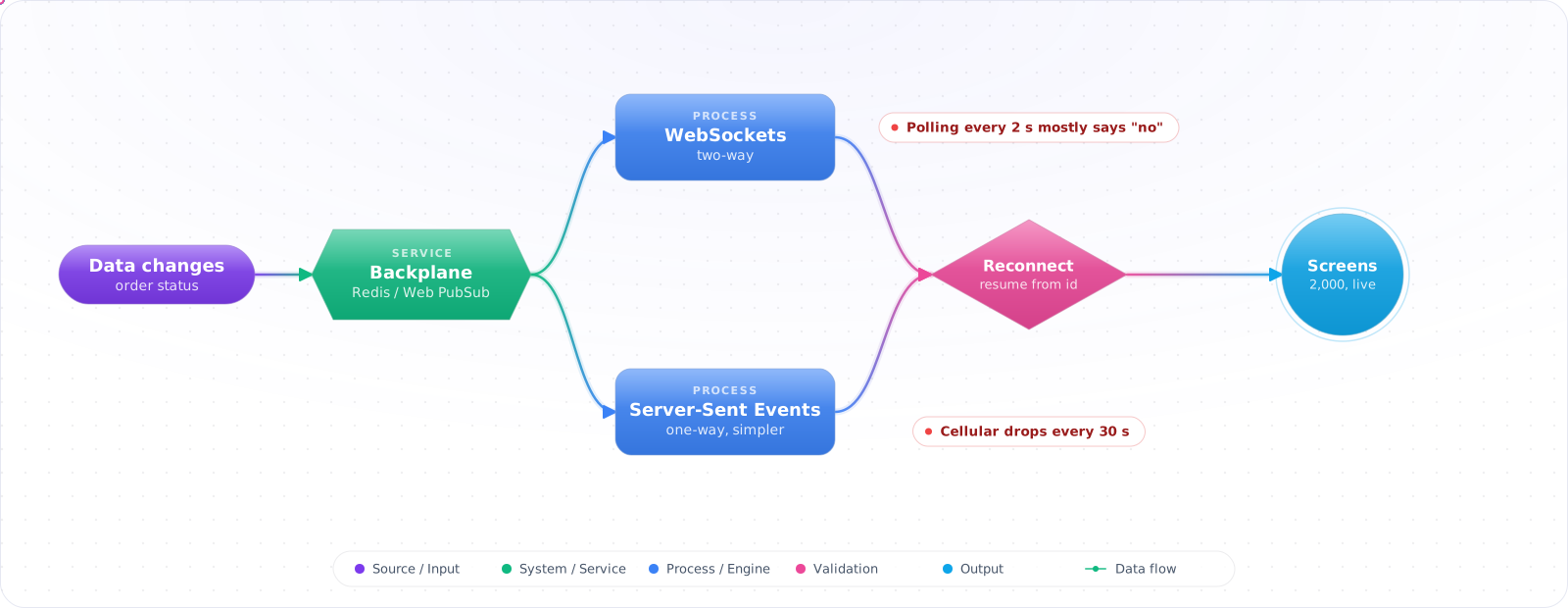
Two thousand warehouse screens ask “anything new?” every two seconds. Almost every answer is no, and the API spends most of its capacity saying so, while updates still arrive a couple of seconds late.
A persistent connection flips that around: the server pushes a change when it happens, so load follows the rate of change instead of the number of people watching. WebSockets give you a two-way channel; Server-Sent Events are simpler when updates only flow one way. Below is how to build either so it survives dropped Wi-Fi, deploys and more than one server.
- Your dashboard polls
/statusevery 2 seconds - Your chat works locally but breaks behind your reverse proxy
- Half your users are on cellular and the connection drops every 30 seconds
- You scaled to two instances and presence stopped working
WebSockets, SSE and When to Use Each
- Handshake — HTTP/1.1 GET with
Upgrade: websocket, server replies 101 Switching Protocols. - Frames — text, binary, ping/pong, close. No HTTP semantics after upgrade.
- Heartbeat — ping/pong every ~15-30s; idle TCP gets killed by NATs and load balancers.
- Backpressure — slow consumers can balloon server memory. Bound the send queue or drop.
flowchart LR
    C1["Client A"] -->|wss| LB["Load balancer<br/>(sticky / cookie)"]
    C2["Client B"] -->|wss| LB
    LB --> S1["SignalR instance 1"]
    LB --> S2["SignalR instance 2"]
    S1 <-->|backplane| BP["Redis pub/sub<br/>or Azure SignalR Service"]
    S2 <--> BP

    style BP fill:#DC382D,color:#fff,stroke:#a02a23
Building Live Updates That Survive Reality
Step 1: Bare WebSocket in ASP.NET Core 10
var app = WebApplication.CreateBuilder(args).Build();
app.UseWebSockets(new WebSocketOptions
{
    KeepAliveInterval = TimeSpan.FromSeconds(15),  // ping frequency (default is 2 minutes)
    KeepAliveTimeout  = TimeSpan.FromSeconds(15)   // abort if no pong arrives in time
});
// If you authenticate with cookies, also fill WebSocketOptions.AllowedOrigins:
// CORS does not apply to WebSockets.

app.Map("/ws", async (HttpContext ctx) =>
{
    if (!ctx.WebSockets.IsWebSocketRequest) { ctx.Response.StatusCode = 400; return; }

    using var ws = await ctx.WebSockets.AcceptWebSocketAsync();
    var buffer = new byte[4 * 1024];
    while (ws.State == WebSocketState.Open)
    {
        var r = await ws.ReceiveAsync(buffer, ctx.RequestAborted);
        if (r.MessageType == WebSocketMessageType.Close)
        {
            // Complete the close handshake instead of just dropping the socket
            await ws.CloseOutputAsync(WebSocketCloseStatus.NormalClosure, null, ctx.RequestAborted);
            break;
        }
        // Simplified: assumes each message fits in one 4 KB read (check r.EndOfMessage)

        var msg = Encoding.UTF8.GetString(buffer, 0, r.Count);
        await ws.SendAsync(Encoding.UTF8.GetBytes($"echo: {msg}"),
            WebSocketMessageType.Text, true, ctx.RequestAborted);
    }
});
app.Run();
Step 2: SignalR hub (recommended for production)
builder.Services.AddSignalR()
    .AddMessagePackProtocol()                              // smaller frames than JSON
    .AddStackExchangeRedis("redis:6379");                  // backplane

app.MapHub<PresenceHub>("/hubs/presence");

public class PresenceHub : Hub
{
    public override async Task OnConnectedAsync()
    {
        var userId = Context.UserIdentifier!;
        await Groups.AddToGroupAsync(Context.ConnectionId, $"user:{userId}");
        await Clients.Others.SendAsync("user-online", userId);
        await base.OnConnectedAsync();
    }

    public Task Send(string toUserId, string body) =>
        Clients.Group($"user:{toUserId}").SendAsync("message", new { from = Context.UserIdentifier, body });
}Check it: Open two browser tabs and trigger a change. Both should update within a second, with no request from either tab.
Step 3: Client (TypeScript) with reconnect
// const conn = new HubConnectionBuilder()
//     .withUrl("/hubs/presence", { accessTokenFactory: () => getJwt() })
//     .withAutomaticReconnect([0, 2_000, 5_000, 10_000, 30_000])
//     .withHubProtocol(new MessagePackHubProtocol())
//     .configureLogging(LogLevel.Information)
//     .build();
//
// conn.on("message", (m) => render(m));
// conn.onreconnecting(() => showBanner("reconnecting..."));
// conn.onreconnected(() => hideBanner());
// await conn.start();

// SignalR negotiates: WebSockets → SSE → long-polling, so it still works behind
// proxies that block WebSockets.Check it: Turn the network off for ten seconds and back on. The client should reconnect by itself. Then check whether it missed anything, which is the subject of the section on recovering.
Step 4: Auth on the upgrade request
// Browsers can't set an Authorization header on the WS upgrade. They do send
// cookies; for bearer tokens, SignalR's JS client puts the token in the query string.
builder.Services.AddAuthentication(JwtBearerDefaults.AuthenticationScheme)
    .AddJwtBearer(o =>
    {
        o.Events = new JwtBearerEvents
        {
            OnMessageReceived = ctx =>
            {
                var token = ctx.Request.Query["access_token"];
                var path  = ctx.HttpContext.Request.Path;
                if (!string.IsNullOrEmpty(token) && path.StartsWithSegments("/hubs"))
                    ctx.Token = token;
                return Task.CompletedTask;
            }
        };
    });

[Authorize]                              // standard ASP.NET auth on hubs
public class PresenceHub : Hub { ... }Check it: Open a connection with no ticket, and with an expired one. Both should be refused at the upgrade.
Step 5: Backpressure + slow consumer handling
builder.Services.AddSignalR(o =>
{
    o.MaximumReceiveMessageSize = 32 * 1024;        // reject huge frames
    o.StreamBufferCapacity      = 10;               // client upload streams: block after 10 buffered items
    o.ClientTimeoutInterval     = TimeSpan.FromSeconds(30);
    o.KeepAliveInterval         = TimeSpan.FromSeconds(15);
});

// None of these bound what the server sends. For raw WS (or your own fan-out
// code): track per-connection send queue depth and disconnect if it
// exceeds, say, 200 messages. One slow client must not OOM the server.Check it: Connect a client that never reads, and broadcast steadily. Server memory should level off, and the slow client should be disconnected.
Step 6: Scale out with Azure SignalR Service or Redis
// Option A — Redis backplane (DIY, cheaper)
builder.Services.AddSignalR().AddStackExchangeRedis("redis:6379");

// Option B — Azure SignalR Service (managed, no sticky sessions needed)
builder.Services.AddSignalR().AddAzureSignalR(opts =>
{
    opts.ConnectionString = builder.Configuration["AzureSignalR"];
});
// Service offloads the sockets; your app becomes stateless.
// Required for serverless (Azure Functions) hubs.Check it: Connect two clients to two different instances and publish from one. The other should receive it.
Reconnecting Is Not Recovering
The client in Step 3 reconnects automatically, which is necessary and not sufficient. Every update sent while the screen was disconnected, during a Wi-Fi blip, a laptop lid closing or a server deploy, is gone. The warehouse screen reconnects and shows a list that looks current and is missing three picks.
Fix it with sequence numbers. Give every message for a stream a monotonically increasing number. The client remembers the last one it processed and sends it when it reconnects. The server then does one of two things: replays the messages after that number from a short buffer (a few minutes in Redis is usually enough), or, if the gap is too large, tells the client to reload the full state over a normal HTTP request and continue from there. Server-Sent Events build this in with the Last-Event-ID header, which is one more reason to prefer SSE when data only flows from server to client.
connection.onreconnected(async () => {
  const { missed, resync } = await connection.invoke('Resume', lastSeq);
  if (resync) {
    applySnapshot(await fetch('/api/picks/current').then((r) => r.json()));
  } else {
    missed.forEach(applyUpdate);
  }
});Check it: Disconnect a client, send five events and reconnect it. All five should arrive in order, or the client should be told to reload its state.
Capacity Planning for Long-Lived Connections
A request-response API is sized in requests per second. A real-time API is sized in concurrent connections, and every connection holds memory, a socket and a file descriptor for as long as the screen is open, whether or not anything is sent. Measure memory per idle connection on your stack under a load test before you promise a number, and raise the process and container file descriptor limits to match.
- Idle timeouts. Load balancers drop connections that look idle: 60 seconds by default on AWS Application Load Balancer, 4 minutes on Azure Load Balancer. Send a heartbeat well inside the shortest timeout on the path. SignalR pings every 15 seconds by default; ASP.NET Core's bare WebSocket middleware defaults to every 2 minutes, which is longer than the ALB default.
- Deploys drop everyone at once. Restarting an instance disconnects all of its clients, and they all reconnect in the same second. Add jitter to the client’s reconnect delay and drain instances one at a time, or the reconnect wave is the outage.
- Uneven load. Connections stick to the instance they landed on, so scaling out does not rebalance existing clients. A new instance stays nearly empty until clients reconnect for other reasons. Plan capacity per instance, not just in total.
How Real-Time Connections Fail
- No heartbeat. NATs and load balancers drop idle TCP connections, often after a minute or a few (see the defaults above). Without ping/pong, a socket that looks open may have been dead for minutes.
- Scaling out without a backplane. Two instances = two islands. A user connected to instance A never sees a message published on instance B.
- No backpressure. One slow client + a chatty broadcast and your process RAM grows linearly with time. Bound the send buffer; disconnect slow consumers.
- Auth in headers, not query. Browser WebSocket APIs can't set
Authorization:headers on the upgrade. Use a query-string token (and treat the URL as a credential — log carefully). - Sending huge frames. A 5MB JSON frame freezes the event loop on both ends. Chunk over multiple messages or send a link to a blob.
- Trusting client sequence numbers for ordering. Clients reconnect, retry, send out of order. Add server-assigned monotonic IDs and dedupe on receive.
Try It on Your Own System This Week
Three checks on a feature that shows live data, about an hour in total:
- Count the polling requests that return nothing new. If it's nearly all of them, you're paying to say no.
- Find the shortest idle timeout on the path. Your heartbeat has to be well inside it, or connections that look open are dead.
- Restart one instance and watch the reconnects. If they all arrive in the same second, add jitter before the next deploy.
When I Would Use Them
- SignalR is the right default on .NET. It manages negotiation, reconnect, framing, and groups.
- Always heartbeat (ping/pong) every 15-30 seconds.
- Always run a backplane the moment you have more than one instance.
- SSE for one-way push is simpler and works through more proxies than WebSockets.
- WebTransport (HTTP/3) suits low-latency multi-stream apps; MDN lists it as Baseline since March 2026, so check older browsers before relying on it.
- Bound the per-connection send queue; one slow client must not take the server down.
- Treat the WS upgrade URL as auth-bearing — never log it in plaintext.
Picking a Transport for LLM Features
For one-way token streaming, SSE is still the better default: it's simple and it works through proxies. Use WebSockets or WebRTC when the client must interrupt in real time, as in a voice agent. Remember that MCP's HTTP transport now uses plain POST with a per-request stream, so you no longer need a long-lived connection for tools.
Authentication and Limits
Browsers can't set headers on a WebSocket upgrade, so authenticate with a short-lived ticket from an API call, or a cookie, rather than a long-lived token in the URL, since URLs end up in logs. Re-check permissions on long-lived connections, because a user removed from a team shouldn't keep receiving updates. Limit message size and rate per connection too.