

A Good Model on a Bad Phone Call
Your text agent is excellent, so someone connects it to a phone line. The first test call is painful. There is a long pause after each sentence, so the caller starts talking again and both of them overlap. The agent reads out a bulleted list. It says “see the link below”. When the caller interrupts, it keeps going for four more seconds, because the audio was already in the pipe.
Voice is a real-time systems problem with a model inside it. Text users tolerate two seconds. A caller who hears silence for two seconds assumes the line dropped. InfoQ's 2026 trends reportlists voice agents among the innovators, which matches what I'd expect: the models are good, and the engineering around them is still where projects succeed or fail.
- You are putting an agent on a phone line or in a voice interface
- Your prototype feels slow and you can't see where the time goes
- You need to choose between a speech-to-speech model and a pipeline
- Interruptions make your agent talk over people
Two Architectures
| Speech-to-speech | Pipeline (STT, LLM, TTS) | |
|---|---|---|
| How it works | One model hears audio and speaks audio | Three services in a chain |
| Latency | Lower and simpler | The sum of three stages |
| Sounds natural | Keeps tone and emotion | Plain text transcripts drop tone unless you carry it separately |
| Control | Less; hard to inspect or swap one part | Full; change any stage, log every transcript |
| Best for | Open conversation with simple tools | Regulated flows and complex tool use |
I would start with a pipeline if you need your best text agent, strict logging or a specific voice. I would start with speech-to-speech if natural conversation is the product, and the tools are simple. OpenAI's gpt-realtime-2.1 and Google's gemini-3.8-live are the current speech-to-speech options to test.
Where the Time Goes
Target a response within about a second of the caller finishing, and measure end to end under real load. These are rough stage budgets for a pipeline, not benchmarks. Vendor latency numbers are measured in ways that rarely compare, so trust your own.
| Stage | Rough budget | Main lever |
|---|---|---|
| Knowing the caller stopped | 200–500 ms | Semantic turn detection, not just a silence timer |
| Speech to text, final | 100–300 ms | Streaming transcription |
| Model, first token | 200–500 ms | A fast tier, and low reasoning effort |
| Text to speech, first audio | 100–200 ms | Stream by sentence |
| Network and telephony | 50–150 ms | Region placement |
Slow tools are the usual reason a call goes wrong. If a lookup takes three seconds, say something first: “Let me check that for you.” A short filler phrase buys time, and callers accept it because a person would do the same.
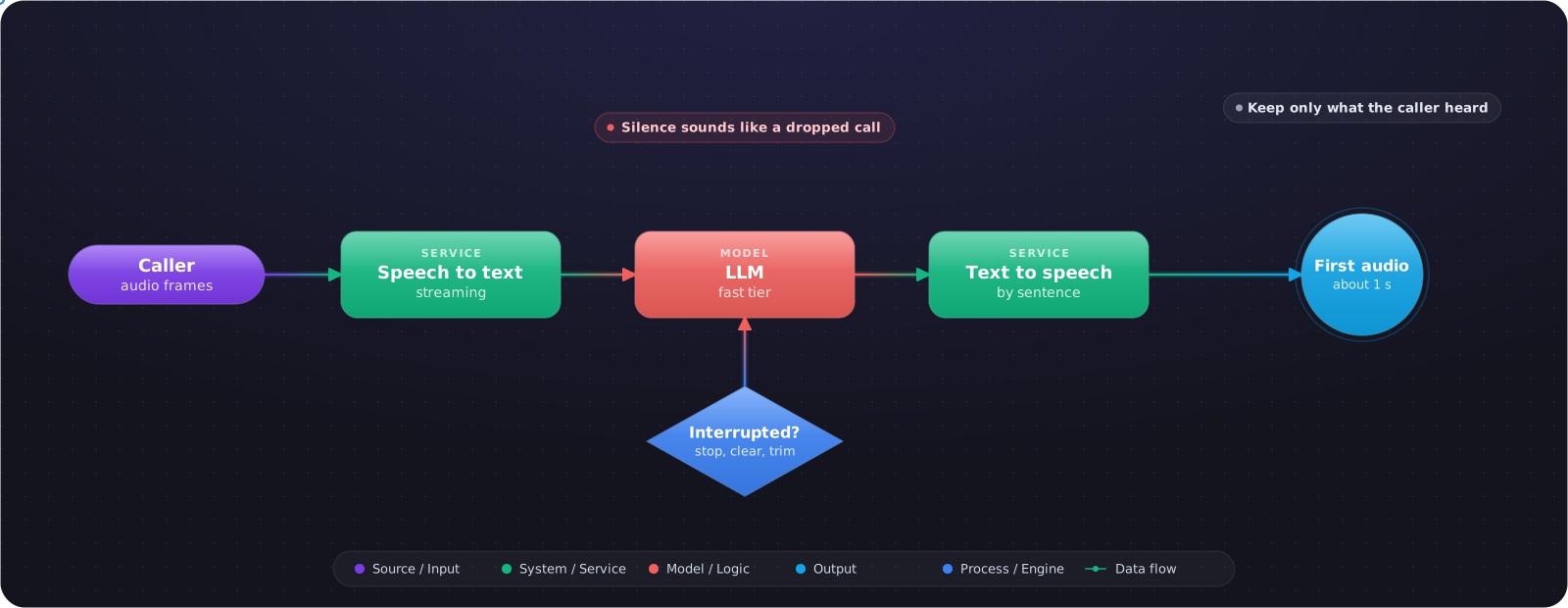
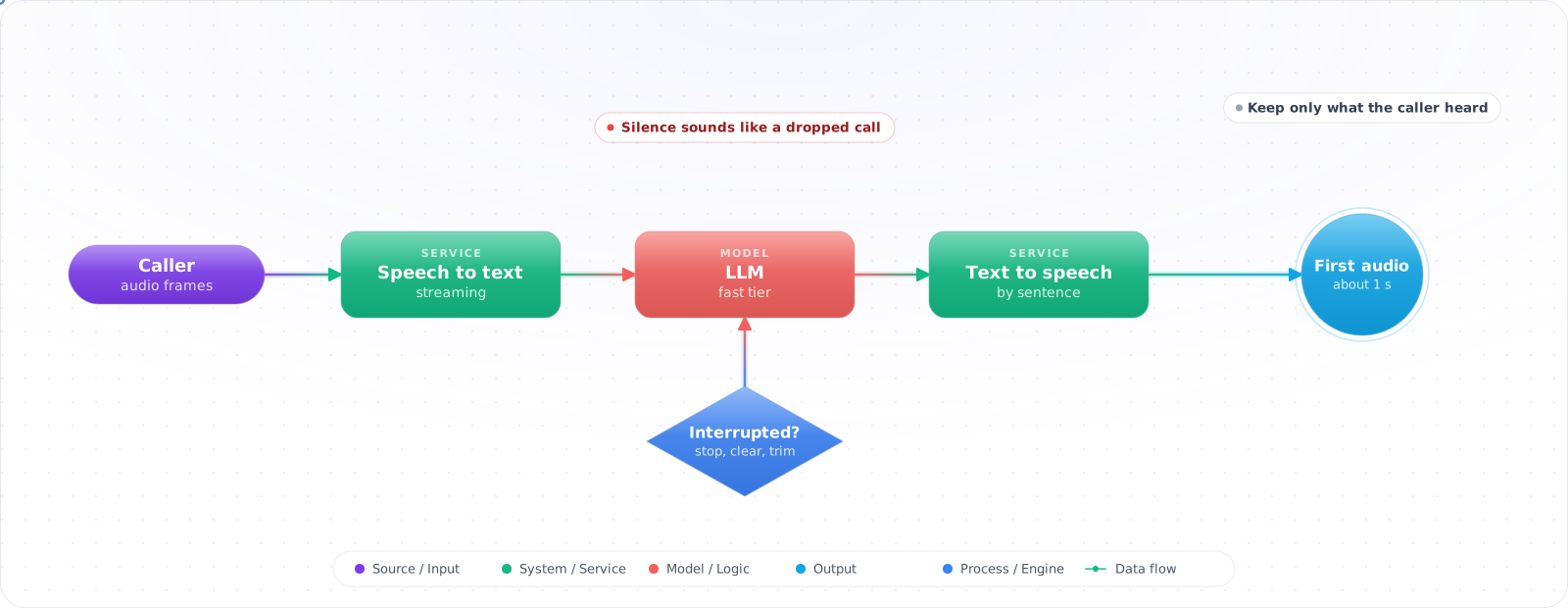
sequenceDiagram
    participant C as Caller
    participant T as Transport
    participant S as STT
    participant L as LLM
    participant V as TTS
    C->>T: Audio frames
    T->>S: Stream audio
    S-->>L: Final transcript
    L-->>V: Tokens, sentence by sentence
    V-->>C: First audio, ~1 s after caller stops
    C->>T: Caller interrupts
    T->>V: Stop and clear the buffer
    T->>L: Cancel, keep only what was spoken
Interruptions Are the Hard Part
When a caller speaks over the agent, three things must happen at once: stop playback, clear the audio buffer, and cancel the model. The fourth step is the one teams miss. You have to trim the conversation history to what the caller actually heard, or the model believes it finished a sentence that was cut off.
async def on_user_speech_started(call: Call) -> None:
    played_ms = call.player.position_ms()

    await call.player.stop()
    call.player.clear_buffer()
    await call.llm_stream.cancel()

    # Pseudocode: names differ by provider. Base this on audio actually played, not
    # audio received, and keep only the words that reached the caller's ear.
    call.history.truncate_last_assistant(spoken=call.tts.text_up_to(played_ms))
Write for the Ear
A voice prompt is a different document from a text prompt. No lists, no markdown, no URLs. Short sentences. Spell out numbers the way you would say them. Confirm important values by reading them back, because speech recognition makes mistakes that typing doesn't, and the caller can't see the error.
What It Costs
Audio is priced well above text. OpenAI lists gpt-realtime-2.1 at $32 per million audio input tokens and $64 for output, against $4 and $24 for text on the same model, and a mini tier at $10 and $20. gpt-live-1 charges $0.05 per minute for the voice session, with backend model and tool use billed separately. A busy line adds up fast, so model cost per call minute before you commit. A 5-minute call at $0.05 a minute is $0.25 before tools, which is cheap next to a human agent and expensive next to a text chat.
What Goes Wrong
1. Testing in a quiet room
Real calls have traffic, speakerphones and accents. Build your eval set from recordings of real conditions, with consent.
2. Measuring one call
Latency on a single idle request tells you very little. Test under concurrent load, and watch the p95.
3. No path to a person
Every voice agent needs a clear way out. Being trapped with a bot is the fastest way to lose a customer.
4. Forgetting the rules
Recording consent and disclosure rules vary by jurisdiction, so check them with your legal team. Telling people at the start of the call that they're talking to an AI is a sensible default either way.
Evaluating a Voice Agent
Text evals don't transfer directly, because the failures are different. A transcript can read perfectly while the call felt terrible. So measure the call as well as the words.
Build a test set from real conditions: accents, background noise, speakerphones, people talking over the agent, and names that speech recognition gets wrong. Replay recorded audio through the pipeline, so that a change can be compared fairly. Score transcription accuracy on the words that matter, such as order numbers and names, since an overall error rate hides those.
Then track task outcomes per intent: did the call resolve, and did the caller ask for a person? Listen to a sample every week. Dashboards won't tell you that the agent sounds impatient, or that it reads a date in a strange way. Keep a small set of end-to-end simulated calls in CI, with a scripted caller, so that a prompt change can't quietly break a flow.
What I Would Do First
Get a pipeline working end to end and log a timestamp at every stage. Fix interruption before you tune anything else, because it decides whether the agent feels broken. Then run it on a real phone line, in a noisy place, and listen to the recordings yourself.