Start With the Database
If the database answers fast enough, read from the database. Every cache is a second copy that can be wrong, and Redis is one more service to run. Add it when the same data is read far more often than it changes, or when you need an atomic counter or a ranking that the database does slowly.
Redis memory keeps climbing, and customers occasionally lose items from their carts. Both problems usually come from the same habit: storing everything as JSON strings with no expiry, and updating them by reading, changing and writing back in code.
Redis is fast because of its data structures (hashes, sorted sets, counters) and the atomic commands that work on them. Use those, give keys a TTL, and set a memory limit, and most of the trouble goes away. Licensing has also moved: Redis changed licence in 2024, the Valkey fork appeared, and Redis 8 added an open-source licence option again in 2025. Below is how to use it well, whichever you run.
- You used
SET+EXPIREas two commands and lost atomicity - You implemented "distributed locks" with
SETNXand never released them on crash - You don't know whether to use
LIST,STREAM, orSORTED SETfor a queue - You hit a thundering herd because your TTL was the same for every key
Data Structures, Expiry and Memory
Redis executes commands on a single main thread. The data model is keys mapping to typed values:
- STRING — bytes, integers (with
INCR), bitmaps, HyperLogLog. - HASH — field-to-value map; perfect for objects.
- LIST — doubly linked list; LPUSH/RPOP for a FIFO queue.
- SET — unordered unique strings; intersection/union are O(N).
- SORTED SET (ZSET) — leaderboard, time-based queue, geo index.
- STREAM — append-only log with consumer groups (Kafka-lite, since 5.0).
sequenceDiagram
    participant APP as App
    participant L1 as L1 · in-process MemoryCache
    participant L2 as L2 · Redis / Valkey
    participant DB as Database (source of truth)
    APP->>L1: get(key)
    alt L1 hit
        L1-->>APP: value
    else L1 miss
        L1->>L2: get(key)
        alt L2 hit
            L2-->>L1: value
        else L2 miss
            L2->>DB: query
            DB-->>L2: row, fill L2
            L2-->>L1: value
        end
        L1-->>APP: value, fill L1
    end
Building Carts, Caches and Leaderboards
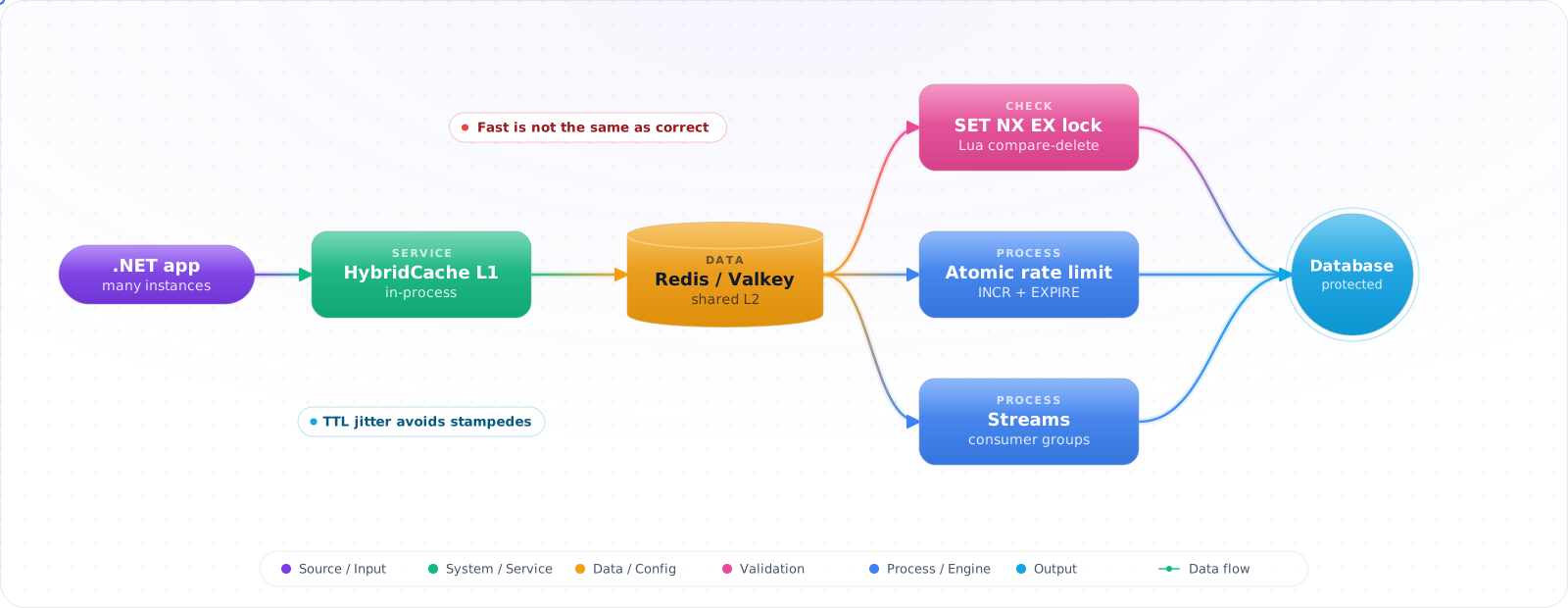
Step 1: Cache-aside with HybridCache (.NET 9+)
// Program.cs
builder.Services.AddStackExchangeRedisCache(o => o.Configuration = redisConn);
builder.Services.AddHybridCache(o => {
    o.DefaultEntryOptions = new() {
        Expiration = TimeSpan.FromMinutes(10),
        LocalCacheExpiration = TimeSpan.FromSeconds(30)   // L1 TTL
    };
});

public class ProductService(HybridCache cache, IProductDb db)
{
    public ValueTask<Product> GetAsync(int id, CancellationToken ct) =>
        cache.GetOrCreateAsync(
            $"product:{id}",
            async tok => await db.LoadAsync(id, tok),
            cancellationToken: ct);
    // HybridCache coalesces concurrent misses inside one process, so each instance loads once
}Check it: Request the same product twice and watch the database. The second request shouldn't reach it. Then change the product, and time how long the old value keeps being served.
Step 2: Atomic counter with TTL (rate limiting)
// StackExchange.Redis 2.8+
var key  = $"ratelimit:{userId}:{DateTimeOffset.UtcNow:yyyyMMddHHmm}";
var db   = mux.GetDatabase();
// INCR then EXPIRE as two commands can leave a key with no TTL, so run both in one script
const string incr = @"
    local n = redis.call('INCR', KEYS[1])
    if n == 1 then redis.call('EXPIRE', KEYS[1], ARGV[1]) end
    return n";
var hits = (long)await db.ScriptEvaluateAsync(incr,
    new RedisKey[] { key }, new RedisValue[] { 60 });
if (hits > 100) throw new RateLimitedException();Check it: Send requests past the limit from several clients at once. The count should be exact, and the key should expire by itself when the window ends.
Step 3: Distributed lock done correctly (SET NX EX + token)
var token = Guid.NewGuid().ToString("N");
bool got = await db.StringSetAsync(
    $"lock:order:{id}", token,
    expiry: TimeSpan.FromSeconds(30),     // ← MUST set TTL atomically
    when: When.NotExists);

if (!got) throw new LockBusyException();
try { /* critical section */ }
finally
{
    // Release only if WE still hold it (Lua = atomic compare-and-delete)
    const string lua = @"
        if redis.call('get', KEYS[1]) == ARGV[1] then
            return redis.call('del', KEYS[1])
        else return 0 end";
    await db.ScriptEvaluateAsync(lua,
        new RedisKey[] { $"lock:order:{id}" },
        new RedisValue[] { token });
}
// A single-node SET NX EX lock is fine for many apps, but it is NOT a consensus
// algorithm. If correctness depends on it, see the Redlock note below.Check it: Take the lock, then kill the process that holds it. The lock should free itself when its expiry passes, and a second process shouldn't be able to release a lock it doesn't own.
Step 4: Streams for a real queue with consumer groups
// Producer
await db.StreamAddAsync("orders", new NameValueEntry[] {
    new("order_id", id), new("payload", json) });

// Consumer (creates group once)
try { await db.StreamCreateConsumerGroupAsync("orders", "billing", "0-0", true); }
catch (RedisServerException ex) when (ex.Message.StartsWith("BUSYGROUP")) { /* group exists */ }

while (!ct.IsCancellationRequested)
{
    var entries = await db.StreamReadGroupAsync(
        "orders", "billing", "worker-1", count: 10, noAck: false);
    if (entries.Length == 0) { await Task.Delay(500, ct); continue; } // this read doesn't block
    foreach (var e in entries)
    {
        await ProcessAsync(e);
        await db.StreamAcknowledgeAsync("orders", "billing", e.Id);
    }
}
Step 5: Leaderboard with sorted sets
await db.SortedSetIncrementAsync("leaderboard:season-9", userId, 10);
// Top 100, descending
var top = await db.SortedSetRangeByRankWithScoresAsync(
    "leaderboard:season-9", 0, 99, Order.Descending);
// User's rank
long? rank = await db.SortedSetRankAsync(
"leaderboard:season-9", userId, Order.Descending);Check it: Add scores for a few users and read the top three. The order should be right, with no sorting in your own code.
Step 6: TTL with jitter to avoid stampedes
// Don't expire 100k keys at the same instant
TimeSpan TtlWithJitter(TimeSpan baseTtl)
{
    var jitter = Random.Shared.NextDouble() * 0.2 - 0.1;   // ±10%
    return baseTtl * (1 + jitter);
}
await db.StringSetAsync(key, value, TtlWithJitter(TimeSpan.FromMinutes(10)));Check it: Write a thousand keys and look at their remaining TTLs. They should be spread out, not identical.
Mistakes That Lose Data or Memory
- SET then EXPIRE. A crash between the two leaves a key with no TTL — eternal "cache" entries. Always use
SET key val EX seconds(StringSetAsync(..., expiry)). - KEYS in production.
KEYS *is O(N) over the entire keyspace and blocks the single thread. UseSCANcursors. - Big keys. A single 500 MB hash freezes the server during DEL or migration. Watch
redis-cli --bigkeys; shard large structures. - Pipeline vs MULTI confusion. Pipelining batches network round trips; MULTI/EXEC is a transaction (atomic, no interleaving). They're different tools.
- Cache stampede. 100k requests miss simultaneously and all hit the DB. Solution: HybridCache, request coalescing, or probabilistic early expiration.
- Treating Redlock as consensus. Redlock's safety is disputed, and Redis's own distributed locks page links both sides of that argument. For correctness-critical mutual exclusion, use a system that gives you fencing tokens, such as ZooKeeper or etcd.
Try It on Your Own System This Week
Three checks on a Redis instance you already run, about an hour in total:
- Count the keys with no expiry. Each one stays until the memory limit removes something. Decide which of them really should live for ever.
- Run the big-keys scan. One huge hash or set can freeze the server when it's read or deleted.
- Stop Redis in a test environment. If it's only a cache, the application should keep working, slowly. Find out what yours does.
How I Would Use It
- Use HybridCache (.NET 9+) — it gives you L1+L2 with stampede protection out of the box.
- Always set TTL atomically with the value (
SET key val EX), and add jitter to avoid synchronized expiry. - Streams beat lists for queues: consumer groups, acknowledgements, replay.
- Sorted sets are unbeatable for leaderboards, time-windowed counters, and priority queues.
- Distributed locks with
SET NX EX+ Lua release are good enough for "mostly mutual exclusion"; use a real consensus system when correctness is critical. - Avoid
KEYS, big keys, and unbounded LPUSH — they break the single-threaded server. - Valkey forked from Redis 7.2 and has since grown its own module ecosystem (JSON, Bloom, search) and independent performance work — it's not just a clone anymore. Pick based on licensing, managed-offering support, and which modules you actually need.
Licensing, Valkey and What's New
Redis has changed more in the last two years than in the decade before. In 2024 it moved away from its BSD licence, which led the Linux Foundation to back Valkey, a fork that many cloud providers adopted. Redis 8 added AGPL as an option, and it brought features such as JSON, search and vector sets into the core distribution. Before you upgrade, check which licence applies to you, and whether your managed service runs Redis or Valkey. Valkey is close to a drop-in replacement for the older command set, while newer Redis-only features won't be there.
Redis 8.10 is the current stable line, and it includes a security fix for an overflow in cluster-mode publishing. If you run clusters, patch.
Caching for AI workloads
Redis has become a common piece of AI infrastructure. It's used for semantic caches, session state, rate limits per user and tool-call deduplication, and it can serve as a vector store for small sets. Keep a semantic cache conservative: include the tenant in the key, set a TTL, and test your similarity threshold, because returning a slightly wrong cached answer looks like a hallucination. Exact-match caching of model responses is much safer.
Stampedes and the big-key problem
When a popular key expires, every request misses at once and hits your database. Protect against this with a short lock so that one request refills the cache, or refresh popular keys before they expire. Add jitter to TTLs so that a batch of keys doesn't expire at the same second.
Big keys are the other common outage. Redis is single-threaded for commands, so KEYS *, HGETALL on a huge hash, or deleting a million-member set blocks everyone. Use SCAN rather than KEYS, UNLINK rather than DEL, and run redis-cli --bigkeys to find the worst offenders. Check SLOWLOG when latency spikes.
Finally, decide what happens when Redis is down. If it's a cache, your app should work without it, slowly. If it holds rate-limit counters, choose whether to fail open. If it's your only copy of data, it isn't really a cache, so plan persistence and failover accordingly. Set maxmemory and an eviction policy: on 64-bit systems the default is no limit at all, and under noeviction Redis returns errors on writes once it's full.