Start With the Simple Loop
For a handful of rows, fetching them and looping in code is fine. It's easy to read, and nobody waits. The patterns below matter when the row count grows, because a loop that runs one query per item gets slower with every item.
A weekly report takes six minutes. Looking at the code, it fetches categories, then loops over products, then runs a query per product, about twelve thousand of them. Each query is fast; the round trips are not.
SQL keeps outlasting the alternatives because it lets you describe the whole result and leave the how to the database. CTEs make complex queries readable in steps, and window functions handle ranks, running totals and comparisons with previous rows without loops. Below are the patterns that turn minutes of application code into one query.
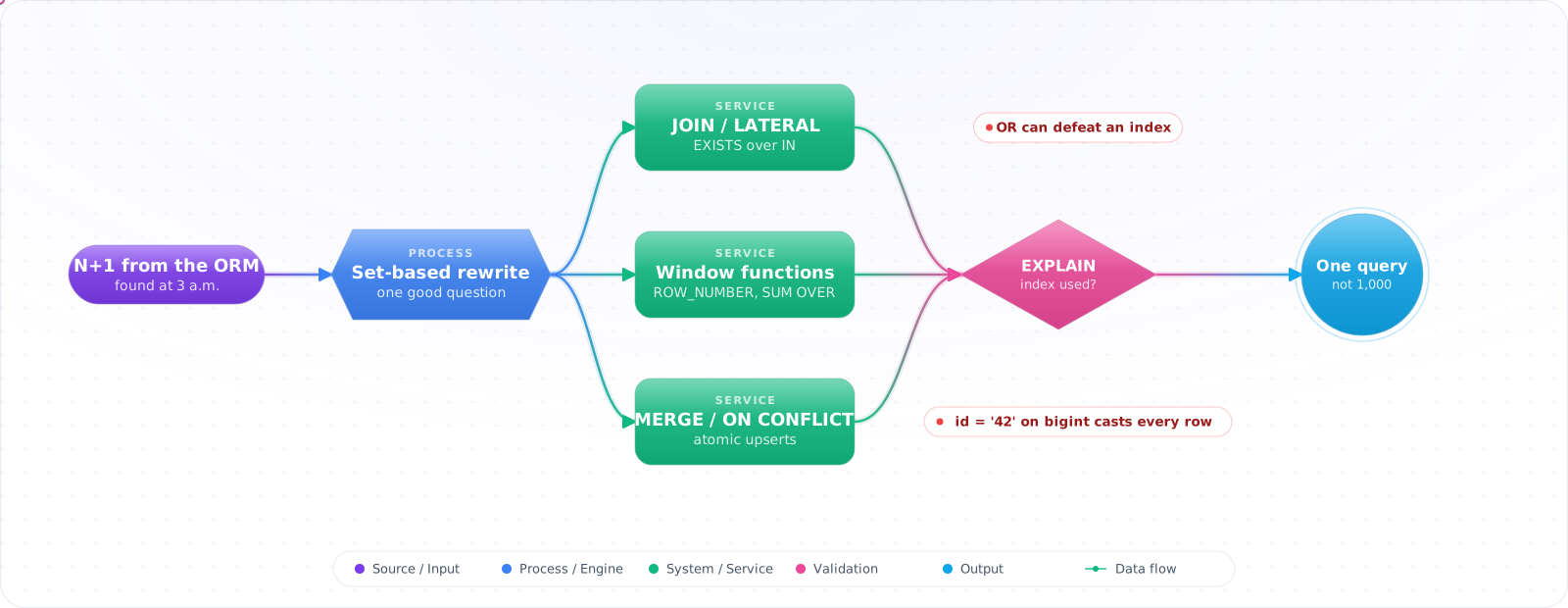
- Your ORM emits N+1 queries and you discovered it in production at 3am
- You don't know when to use
EXISTSvsINvsJOIN - You wrote a 200-line stored procedure that one window function would replace
- You can't read an execution plan
Set-Based Thinking, CTEs and Window Functions
Think in relations: tables and query results are unordered sets of rows. SQL is the language for transforming sets:
- FROM / JOIN — combine sets (cartesian product, then filter).
- WHERE — filter rows.
- GROUP BY / HAVING — collapse rows into buckets, then filter buckets.
- SELECT — project columns (and compute aggregates / window functions).
- ORDER BY / LIMIT — finally impose ordering for the consumer.
The optimizer reorders all of this; you describe what, it picks how. The execution plan is your contract with it.
flowchart LR
    F["FROM / JOIN<br/>(combine)"] --> W["WHERE<br/>(filter rows)"]
    W --> G["GROUP BY<br/>(bucket)"]
    G --> H["HAVING<br/>(filter buckets)"]
    H --> S["SELECT<br/>(project + window)"]
    S --> O["ORDER BY / LIMIT<br/>(present)"]

    style F fill:#0078D4,color:#fff,stroke:#005a9e
    style O fill:#16a34a,color:#fff,stroke:#15803d
Rewriting Real Queries
Step 1: Solve N+1 with a single JOIN or LATERAL
-- Bad: ORM loops, one query per author
-- SELECT * FROM authors;
-- foreach author: SELECT * FROM books WHERE author_id = ?

-- Good: one round trip
SELECT a.id, a.name, b.id AS book_id, b.title
FROM authors a
LEFT JOIN books b ON b.author_id = a.id
ORDER BY a.id;

-- Better when you only need the latest N per author
SELECT a.id, a.name, b.title, b.published_at
FROM authors a
JOIN LATERAL (
    SELECT title, published_at FROM books
    WHERE author_id = a.id
    ORDER BY published_at DESC
    LIMIT 3
) b ON true;Check it: Turn on query logging in development and load the page once. Count the queries. If the count grows with the number of rows shown, you have an N+1.
Step 2: EXISTS for membership, JOIN for projection
-- "Customers who placed an order in 2026"
SELECT c.id, c.name
FROM customers c
WHERE EXISTS (
    SELECT 1 FROM orders o
    WHERE o.customer_id = c.id AND o.created_at >= '2026-01-01'
);

-- IN with a subquery is fine too, and planners often treat the two the same
-- JOIN would duplicate customers per matching order — wrong shape.
Step 3: Window functions instead of self-joins
-- Running total per customer
SELECT customer_id, created_at, total_cents,
       SUM(total_cents) OVER (
           PARTITION BY customer_id
           ORDER BY created_at
           ROWS UNBOUNDED PRECEDING
       ) AS lifetime_total
FROM orders;

-- Top N per group
SELECT * FROM (
    SELECT *,
           RANK() OVER (PARTITION BY category_id ORDER BY price DESC) AS r
    FROM products
) t WHERE r <= 5;Check it: Create two rows that tie on the value you rank by, and run the query. Decide whether both should get the same rank, and confirm that the function you chose does that.
Step 4: Upsert with MERGE or ON CONFLICT
-- MERGE is in the SQL standard, and Postgres has it from version 15. The usual isolation
-- rules apply, so two sessions can still race to insert the same new key.
MERGE INTO inventory AS t
USING (VALUES ('SKU-1', 10), ('SKU-2', 5)) AS s(sku, qty)
ON t.sku = s.sku
WHEN MATCHED THEN UPDATE SET qty = t.qty + s.qty
WHEN NOT MATCHED THEN INSERT (sku, qty) VALUES (s.sku, s.qty);

-- Postgres alternative that updates instead if a concurrent insert gets there first
INSERT INTO inventory (sku, qty) VALUES ('SKU-1', 10)
ON CONFLICT (sku) DO UPDATE SET qty = inventory.qty + EXCLUDED.qty;Check it: Run the same upsert from two sessions at once, for a key that doesn't exist yet. You should end up with one row and no error.
Step 5: Parameterize from C# (Dapper, no ORM tax)
using Dapper;
using Npgsql;

await using var conn = new NpgsqlConnection(connStr);

// Always parameterize — never string-concatenate user input
var orders = await conn.QueryAsync<Order>(
    """
    SELECT id, customer_id, total_cents, created_at
    FROM orders
    WHERE customer_id = @CustomerId AND created_at >= @Since
    ORDER BY created_at DESC
    LIMIT @Take
    """,
    new { CustomerId = customerId, Since = since, Take = 50 });
Step 6: Read the plan
-- Postgres
EXPLAIN (ANALYZE, BUFFERS) SELECT ...;

-- SQL Server
SET STATISTICS IO, TIME ON; SELECT ...;

-- Look for:
-- "Seq Scan" / "Table Scan"    → missing index or unused index
-- Estimated and actual rows far apart → stale statistics, run ANALYZE
-- "Nested Loop" on large rows  → usually you want hash or merge join
-- "Sort" → consider an index that already ordersCheck it: Take one query from a hot path and compare the rows the plan estimated with the rows it really read. A large gap usually means stale statistics or a missing index.
Pages That Skip and Repeat Rows
A support agent pages through tickets sorted by creation time and sees the same ticket on pages 3 and 4, while another ticket never appears at all. The query looks fine: ORDER BY created_at LIMIT 50 OFFSET 100. The problem is ties. When several rows share acreated_at, the database may return them in any order, and it is allowed to pick a different order on the next query. A sort is only stable if it is unique.
-- Always end the sort with a unique column
SELECT id, subject, created_at
FROM tickets
ORDER BY created_at DESC, id DESC
LIMIT 50;

-- Next page: keyset (cursor) pagination with a row comparison
SELECT id, subject, created_at
FROM tickets
WHERE (created_at, id) < ($1, $2)        -- values from the last row of the previous page
ORDER BY created_at DESC, id DESC
LIMIT 50;
The row comparison (created_at, id) < ($1, $2) continues exactly where the previous page ended, uses an index on(created_at, id), and does not shift when new tickets arrive while someone is paging, which OFFSET does. The same rule applies to any query with LIMIT: without a unique ORDER BY, “the first 50” is not a defined set of rows.
Check it: Insert several rows with the same timestamp and page through them twice. Every row should appear exactly once each time. If one repeats or goes missing, the sort isn't unique.
Correct Answers Under Concurrency
Most SQL bugs that only appear in production are not about the query, they are about two queries running at the same time. The classic is read, modify, write:
-- Two requests run this at once for the last item in stock
SELECT stock FROM products WHERE id = 7;            -- both read 1
UPDATE products SET stock = 0 WHERE id = 7;         -- both write 0, two orders, one item

-- Fix 1: one atomic statement that checks and changes together
UPDATE products SET stock = stock - 1
WHERE id = 7 AND stock > 0
RETURNING stock;                                     -- zero rows returned = sold out

-- Fix 2: lock the row when the logic cannot be one statement
BEGIN;
SELECT stock FROM products WHERE id = 7 FOR UPDATE;  -- second request waits here
-- ... application logic ...
UPDATE products SET stock = stock - 1 WHERE id = 7;
COMMIT;
Prefer the single statement whenever the rule fits in a WHERE clause; it holds no lock beyond the row update and cannot be broken by application code. Use SELECT ... FOR UPDATE when the decision needs data from several places, and keep that transaction short. For edits made in a UI that a user may sit on for minutes, use optimistic concurrency instead: aversion column, UPDATE ... WHERE id = $1 AND version = $2, and a conflict message when no row matches. The default isolation level in Postgres and SQL Server, Read Committed, does not prevent any of these races on its own.
Check it: Run the stock query from two sessions at the same moment for the last item. Exactly one should succeed.
Mistakes That Give Wrong or Slow Results
- SELECT * everywhere. Wastes network, defeats covering indexes, and breaks when columns are added. Project explicit columns.
- Functions on indexed columns.
WHERE LOWER(email) = 'x'kills the index. Either store normalized data or create a functional index:CREATE INDEX ON users (LOWER(email)). - Implicit type coercion. Comparing a column with a value of another type can force a conversion on every row and skip the index, for example an
nvarcharparameter against avarcharcolumn in SQL Server. Match types exactly. - OR across columns.
WHERE a = 1 OR b = 2can defeat indexes. If it does, try aUNIONof two single-column lookups.UNION ALLwould return a row twice if it matches both. - NULL semantics surprises.
NULL = NULLis unknown, not true. UseIS NULL, and rememberNOT INwith a NULL in the list returns no rows. - Trusting the ORM's SQL. Always log generated queries in dev. EF Core, Hibernate, Sequelize all emit pathological SQL when given the chance — eager loading, projection mistakes, polymorphic queries.
Try It on Your Own System This Week
Three checks on an application that queries a database, about an hour in total:
- Log every query for one page load. The count tells you whether the ORM is looping.
- Find an ORDER BY with a LIMIT. Check that the sort ends in a unique column. Without one, the first 50 rows aren't a defined set.
- Search for a function wrapped round an indexed column. LOWER(email) in a WHERE clause skips the index, unless there's a functional index to match.
Patterns I Reach For
- Think in sets, not loops. If you're writing a cursor or app-side loop, ask whether one query would do it.
- EXISTS for "does any match exist", JOIN for "give me the matching rows".
- Window functions replace many self-joins and running-total subqueries.
- Use MERGE for upserts where your database has it, and
INSERT ... ON CONFLICTin Postgres when concurrent inserts are likely. - Parameterize everything; never concatenate strings into SQL.
- Read the execution plan before tuning. EXPLAIN ANALYZE is the only honest profiler.
- Log every query your ORM emits in dev. The N+1 you find is the production incident you avoid.
Reading Plans, and Agents Writing SQL
A query is only as good as its plan, so make EXPLAIN (ANALYZE, BUFFERS) a habit for anything on a hot path. Look for the gap between estimated and actual rows, since a big gap means stale statistics, and ANALYZE may fix it.
Coding agents now write much of this SQL. They produce correct-looking queries that can do a sequential scan on your largest table. Check the plan on production-sized data, and run generated SQL on a read-only role with row limits and a statement timeout. For anything that takes user input, require parameters. Generated SQL is untrusted input to your database.
Keyset Pagination in Practice
OFFSET gets slower the deeper you go, because the database must read and discard every skipped row. Use the last row's key instead: WHERE (created_at, id) < ($1, $2) ORDER BY created_at DESC, id DESC LIMIT 20, with a matching index. It stays fast at any depth, and rows inserted during paging can't shift your results. The trade-off is that you can't jump to page 50, which few users ever want anyway.