Start With Plain Manifests
For one service in one environment, plain Kubernetes manifests are easier to read and to debug than any template. Helm earns its place when the same service runs in several environments with small differences, and you find yourself copying files and editing them by hand.
Helm is Kubernetes' de-facto package manager. You will love it for the first 5 charts, fight it for the next 10, and either adopt disciplined patterns or migrate to Kustomize/Carvel/Timoni for the rest. The framework is not the problem — the problem is that teams adopt Helm without a chart strategy and end up with 200-line values.yaml files nobody understands.
- Your
values.yamlis so deeply nested you can't override anything cleanly helm upgradedrifts fromgit diff; nobody knows what's actually in the cluster- A failed upgrade left the release in
pending-upgradeand you can't roll back
The Mental Model
A Helm chart is a templated bundle of Kubernetes manifests. A release is one installation of that chart with specific values, tracked by name + revision in a Kubernetes secret. helm upgrade --install is the verb you actually use; helm rollback is the panic button.
flowchart LR
    C[Chart] --> T[templates/*.yaml]
    V[values.yaml] --> R[helm template / upgrade]
    O[--values override.yaml] --> R
    T --> R
    R --> M[Rendered manifests]
    M --> K[Kubernetes API]
    K --> S[Release secret<br/>sh.helm.release.v1.<name>.v<rev>]
Chart Layout That Doesn't Rot
my-app/
  Chart.yaml          # name, version, appVersion, dependencies
  values.yaml         # documented defaults; every key has a comment
  values.schema.json  # JSON schema — fail fast on typos
  templates/
    _helpers.tpl      # named templates (fullname, labels, selectors)
    deployment.yaml
    service.yaml
    hpa.yaml
    NOTES.txt         # printed on install
  charts/             # vendored dependencies, never edit
  ci/                 # ci-values-*.yaml for chart-testing
The values.schema.json is the Helm habit I'd adopt first. Helm checks it on install, upgrade, lint and template, and with "additionalProperties": false it rejects misspelled keys instead of producing a silently broken Pod.
Check it: Misspell a key in a values file and run a lint. With a schema that forbids unknown keys, it should fail and name the key.
Three Rules for Templates
- One concern per file — Deployment in
deployment.yaml, Service inservice.yaml. Don't multiplex. - Helpers for labels and names —
{{ include "my-app.labels" . | nindent 4 }}everywhere; never hand-write. - Minimal templating — if-blocks are debug nightmares. Prefer flat values with a default and explicit overrides.
Values Strategy
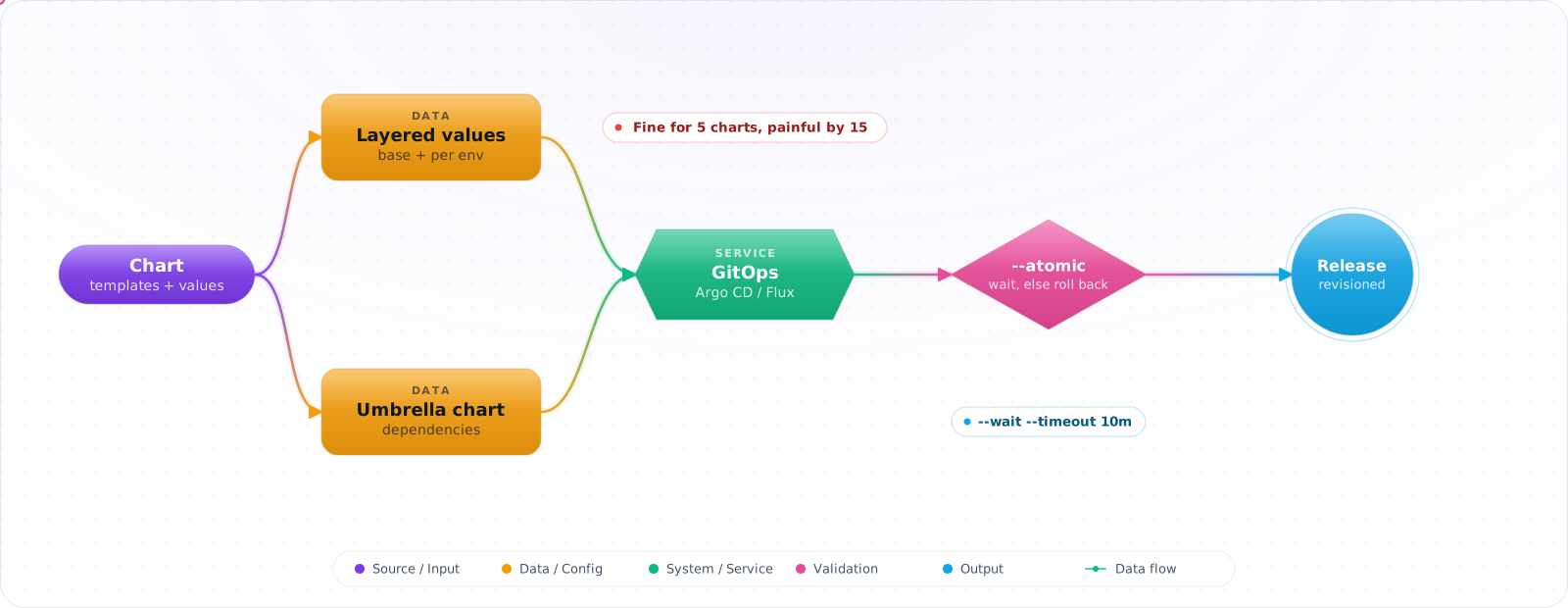
Layer values, don't copy them:
helm upgrade --install api ./my-app \
  -f values.yaml \
  -f environments/prod/values.yaml \
  -f environments/prod/secrets.dec.yaml \
--set image.tag=sha-3f2a9c8- Base values in the chart.
- Per-environment overlay file in your deploy repo.
- Per-release
--setonly for things that change per deploy (image tag). - Secrets via SOPS-encrypted YAML, External Secrets, or sealed-secrets — never plain.
Check it: Compare the values files for two environments. Every difference should be one you can explain. Anything else is drift you've inherited.
Dependencies and Umbrella Charts
Subcharts are great for reusing community charts (Postgres, Redis, kube-prometheus-stack). Umbrella charts that bundle "your whole platform" into one release tend to age badly — one chart upgrade blocks everything. Prefer many small releases orchestrated by Argo CD / Flux instead.
GitOps: Helm Without Running Helm
In a modern setup you don't run helm from your laptop. Argo CD (with the Helm source type) or Flux (with HelmRelease) renders charts in-cluster, reconciles to git, and gives you drift detection. Rollback differs: Argo CD only uses helm template, so you roll back by reverting Git, while Flux's HelmRelease can roll back a failed upgrade through its remediation settings. The Helm CLI becomes a dev/debug tool.
Check it: Change something in the cluster by hand and wait. The controller should report the drift, or put it back.
Upgrades, Hooks, and Atomicity
--rollback-on-failure(called--atomicin Helm 3; Helm 4 still accepts the old name with a deprecation warning) rolls back on failure. Use it in CI.--wait --timeout 10mwaits for Pods to be Ready before marking success.- Hooks (
helm.sh/hook: pre-upgrade) for migrations — but they can leave clusters in weird states; prefer Job manifests with proper dependencies via Argo. helm history+helm rollback NAME Nrecovers most bad upgrades. If a release is stuck inpending-upgrade, roll back to the last revision thathelm historyshows asdeployed. Editing the release Secret by hand isn't a documented procedure, so keep it as a last resort.
Check it: Deploy a version whose pods can never become ready. The upgrade should fail and roll back by itself, leaving the previous release running.
Failure Modes
- Templates without a schema — typos in
values.yamlsucceed silently and break Pods. - Capabilities-based templates —
.Capabilities.APIVersions.Hasevaluated at render time differs across clusters; pin to versions you support. - Chart-as-database — embedding business config in values; use ConfigMaps / external config stores instead.
- Mass
helm dependency update— pulls latest subchart versions; pin and review.
Try It on Your Own System This Week
Three checks on a chart you already deploy, about an hour in total:
- Render your chart for production and read the output. It's what the cluster gets. If it surprises you, the templates are too clever.
- Look for a values schema. Without one, a typo deploys.
- Find out who last ran an upgrade from a laptop. If anyone can, git isn't the source of truth.
Production Checklist
- Every chart has
values.schema.jsonand CI runshelm lint+helm template | kubeconform. - Releases managed by Argo CD or Flux;
helmCLI is a dev tool. - Layered values: chart → env overlay → SOPS secrets → per-deploy image tag.
- Pinned subchart versions; renovate PRs reviewed, not auto-merged.
--rollback-on-failure --wait(--atomic --waiton Helm 3) in any direct CI install path.
Helm 4, Testing and Supply Chain
Helm 4 was released in late 2025, the first major version in six years. Most charts keep working, but check your plugins and any automation that calls the SDK. Server-side apply is a big change, because it gives clearer ownership of fields and fewer surprises when another controller has modified a resource. Helm 4 uses it by default for new releases, while releases created by Helm 3 keep client-side apply on upgrade unless you pass --server-side. Test that switch on a non-production cluster first, since it is where field-ownership conflicts show up. Also rename --atomic to --rollback-on-failure and --force to --force-replace in your scripts. Helm 3 gets security fixes only until February 2027.
Testing a chart
Most chart bugs are simple, and they're easy to catch before a deploy. Run these in CI on every change:
helm lint ./chart --strict
helm template ./chart -f values-prod.yaml | kubeconform -strict -summary
helm diff upgrade my-app ./chart -f values-prod.yaml
helm template renders manifests with no cluster, and kubeconform validates them against the Kubernetes schema. helm-diff shows what would change, which is the most useful output in a review. For logic-heavy charts, helm-unittest lets you write assertions about rendered output. Add one test install in a throwaway cluster using kind for anything critical.
Treat charts as a supply chain
A third-party chart is code that runs with cluster permissions. Pin a version, and preferably a digest, since a tag can move. Store charts in an OCI registry, which is now the standard way to distribute them, and verify signatures if the publisher provides them. Read what a chart actually creates, particularly RBAC. Many popular charts ask for far more access than you need.
Rollback isn't always a rollback
helm rollback restores manifests. It doesn't undo a database migration or a change a hook has made. If a release includes a schema change, make it backward compatible so that the previous version can still run. Hooks are the source of many stuck releases as well, because a failed pre-upgrade hook can leave a release in pending-upgrade, and block every later deploy. Use --rollback-on-failure (--atomic on Helm 3) so that failed upgrades roll back automatically, and set --timeout to something realistic.
Keep values files small and environment-specific. Secrets don't belong in them. Use External Secrets, or a similar operator, so that a values file can be reviewed in a pull request without exposing anything.
Key Takeaways
- Helm pays off if you bring schema validation, layered values, and GitOps. Without those it becomes a YAML factory.
- Many small releases beat one umbrella chart for blast radius and ergonomics.
- The CLI is for debugging; production lives in Argo/Flux.