Start With the Defaults in Dev
In a development cluster that nobody depends on, applying a manifest with the default settings is fine, and you'll learn the moving parts faster that way. The defaults stop being good enough when the service takes live traffic, because a rollout then has to replace pods without anyone noticing.
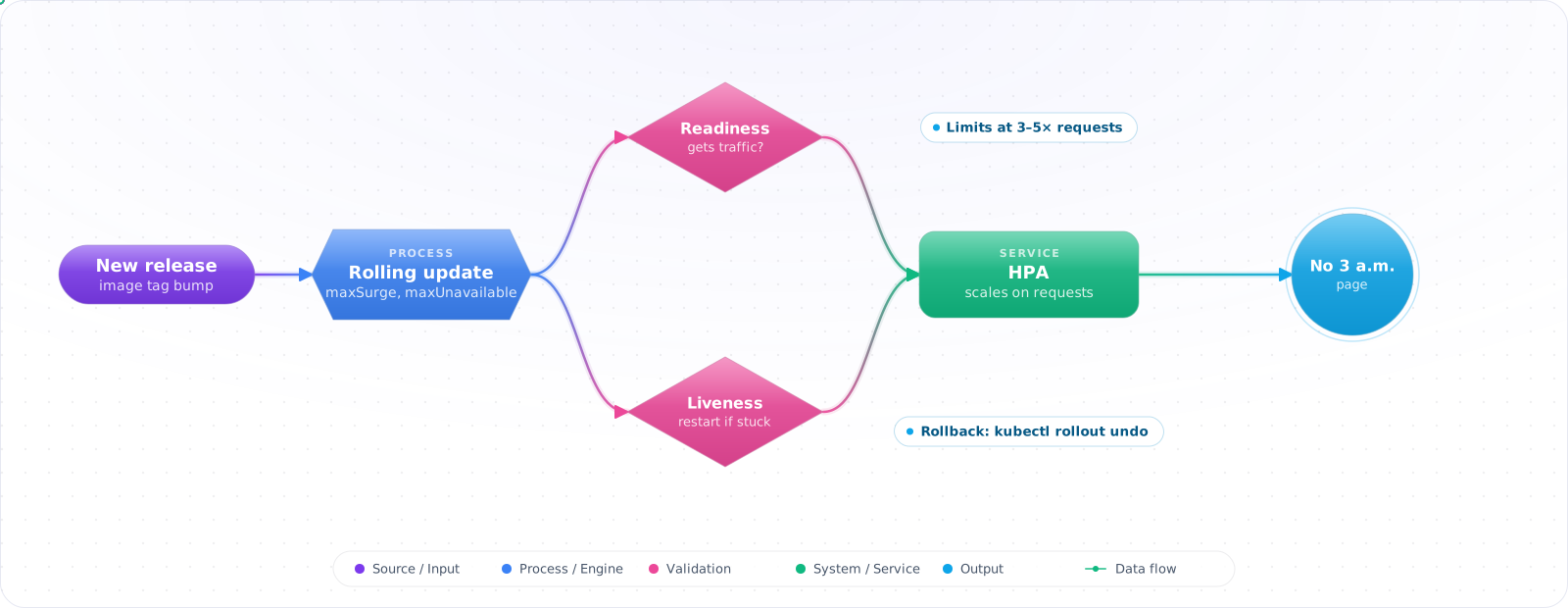
Kubernetes Deployments manage rollouts, rollbacks, and replica sets — but the defaults are wrong for production. Zero-downtime rolling updates require correct readinessProbe config. Resource limits prevent one misbehaving pod from killing a node. HPA scales your workload without manual intervention. None of this works without deliberate configuration.
- Your rolling updates drop requests because pods are marked ready before the app actually handles traffic
- A memory leak in one pod takes down other services on the same node
- You scale manually by editing
replicasin YAML and reapplying - You don't know the difference between
requestsandlimits
Properly configured readiness probes, resource limits, and HPA are the difference between “it usually works” and a production-grade deployment.
Rolling Updates Done Right
sequenceDiagram
    participant K as Kubernetes
    participant P1 as Pod v1
    participant P2 as Pod v2 (new)
    participant LB as Load Balancer

    K->>P2: Create new pod
    P2->>P2: App starting...
    K->>P2: readinessProbe fails
    Note over LB,P2: No traffic sent yet
    P2->>P2: App ready
    K->>P2: readinessProbe passes
    LB->>P2: Traffic starts routing
    K->>P1: Terminate old pod
# k8s/deployment.yaml
apiVersion: apps/v1
kind: Deployment
metadata:
  name: api-server
  labels:
    app: api-server
spec:
  replicas: 3

  strategy:
    type: RollingUpdate
    rollingUpdate:
      maxSurge: 1         # Allow 1 extra pod during update (max 4 total)
      maxUnavailable: 0   # Never take pods offline before replacement is ready

  selector:
    matchLabels:
      app: api-server

  template:
    metadata:
      labels:
        app: api-server
    spec:
      containers:
        - name: api
          image: ghcr.io/myorg/api:sha-abc123
          ports:
            - containerPort: 3000

          # Resource requests: what the scheduler uses for placement
          # Resource limits: hard ceiling — OOMKill at memory limit
          resources:
            requests:
              memory: "512Mi"
              cpu: "100m"      # 100 millicores = 0.1 CPU core
            limits:
              memory: "512Mi"
              cpu: "500m"      # 0.5 CPU core

          # Readiness: is this pod ready to receive traffic?
          # Kubernetes won't route traffic until this passes
          readinessProbe:
            httpGet:
              path: /health/ready
              port: 3000
            initialDelaySeconds: 10
            periodSeconds: 5
            failureThreshold: 3

          # Liveness: is this pod still alive?
          # Kubernetes will restart the pod if this fails
          livenessProbe:
            httpGet:
              path: /health/live
              port: 3000
            initialDelaySeconds: 30
            periodSeconds: 15
            failureThreshold: 3

          # Startup: only checked during startup (prevents liveness killing slow-starting pods)
          startupProbe:
            httpGet:
              path: /health/live
              port: 3000
            failureThreshold: 30  # 30 * 10s = 5 minutes for startup
            periodSeconds: 10

          # Graceful shutdown — preStop runs first, then the container gets SIGTERM
          lifecycle:
            preStop:
              exec:
                command: ["/bin/sleep", "5"]  # Give LB time to stop routing

          envFrom:
            - secretRef:
                name: api-secrets
            - configMapRef:
                name: api-config

terminationGracePeriodSeconds: 30Check it: Run a steady stream of requests against the service and deploy a new version. Count the failed requests. The target is none.
Health Endpoints
// src/routes/health.ts — Express example
import { Router } from 'express';
import { db } from '../db';

const router = Router();

// Liveness: is the process healthy? No external checks.
// Fast — Kubernetes calls this constantly
router.get('/health/live', (req, res) => {
  res.status(200).json({ status: 'ok' });
});

// Readiness: can this pod serve traffic?
// Checks dependencies — fails if they're unreachable
router.get('/health/ready', async (req, res) => {
  try {
    await db.raw('SELECT 1'); // Check DB connection
    res.status(200).json({ status: 'ok', db: 'connected' });
  } catch (error) {
    // Return 503 — Kubernetes won't route traffic to this pod
    res.status(503).json({ status: 'unavailable', db: 'disconnected' });
  }
});

export { router as healthRouter };Check it: Call the readiness endpoint from inside a pod while its database is unreachable, and again while it's healthy. Decide whether each answer is what you want the load balancer to act on.
Horizontal Pod Autoscaler
# k8s/hpa.yaml
apiVersion: autoscaling/v2
kind: HorizontalPodAutoscaler
metadata:
  name: api-server-hpa
spec:
  scaleTargetRef:
    apiVersion: apps/v1
    kind: Deployment
    name: api-server

  minReplicas: 2   # Never scale below 2 (for availability)
  maxReplicas: 20  # Never scale above 20

  metrics:
    # Scale on CPU utilization
    - type: Resource
      resource:
        name: cpu
        target:
          type: Utilization
          averageUtilization: 70  # Scale up when average CPU > 70% of requests

    # Scale on memory utilization
    - type: Resource
      resource:
        name: memory
        target:
          type: Utilization
          averageUtilization: 80

  behavior:
    scaleUp:
      stabilizationWindowSeconds: 60  # Consider recommendations from the last 60s
      policies:
        - type: Pods
          value: 2
          periodSeconds: 60  # Add max 2 pods per 60s

    scaleDown:
      stabilizationWindowSeconds: 300  # Use the highest recommendation from the last 5min
      policies:
        - type: Percent
          value: 25
periodSeconds: 60 # Remove max 25% of pods per 60sCheck it: Generate load and watch the replica count rise, then stop and watch it fall. If nothing happens, check that the pods declare resource requests.
Rollbacks
# Check rollout status
kubectl rollout status deployment/api-server

# View rollout history (the kubernetes.io/change-cause annotation fills CHANGE-CAUSE)
kubectl rollout history deployment/api-server

# Rollback to previous version
kubectl rollout undo deployment/api-server

# Rollback to specific revision
kubectl rollout undo deployment/api-server --to-revision=3

# Pause a rollout (useful for canary-style manual checks)
kubectl rollout pause deployment/api-server
# ... check metrics ...
kubectl rollout resume deployment/api-serverCheck it: Deploy a version that fails its readiness probe, then undo the rollout. Time how long it takes for the old version to be serving all traffic again.
Spreading Replicas and Catching Stuck Rollouts
Three replicas on the same node are one failure away from zero. The scheduler's built-in spreading is only a soft preference. Topology spread constraints let you tighten it, and two rollout settings make a failed deployment visible instead of leaving it half finished.
spec:
  progressDeadlineSeconds: 300     # mark the rollout failed after 5 minutes without progress
  revisionHistoryLimit: 5          # old ReplicaSets kept for rollback
  template:
    spec:
      topologySpreadConstraints:
        - maxSkew: 1
          topologyKey: topology.kubernetes.io/zone
          whenUnsatisfiable: ScheduleAnyway
          labelSelector:
            matchLabels:
app: orders-api- Topology spread keeps the replica count per zone within
maxSkewof each other. UseScheduleAnywayfor a preference andDoNotSchedulewhen an uneven spread is worse than a pending pod. progressDeadlineSecondsturns a rollout that cannot make progress into a reported failure, andkubectl rollout statusthen exits with an error, so the pipeline can roll back. The default is 600 seconds.revisionHistoryLimitcontrols how many previous versions you can roll back to. The default of ten is usually more than you need, and zero removes the ability to roll back at all.
Graceful Shutdown: Where Zero-Downtime Usually Breaks
Teams set up readiness probes and rolling updates correctly and still see a burst of 502s on every deploy. The cause is often termination, not startup. When Kubernetes terminates a pod, two things start at the same moment: the pod is removed from the Service’s endpoints, and the container starts shutting down (preStop first, then SIGTERM). Endpoint removal has to propagate to every node and every load balancer, which takes a few seconds. If the application exits immediately on SIGTERM, requests that were already routed to it during those seconds fail.
The fix has three parts, and you need all of them:
- A short pause before shutdown starts. The
preStopsleep in the manifest above keeps the pod serving while routing catches up. Five to ten seconds is typical; newer Kubernetes versions also offer a built-in sleep action, so the image does not need asleepbinary. - An application that drains. On
SIGTERM, stop accepting new connections, finish in-flight requests, close database pools, then exit. Most frameworks have a graceful shutdown hook; check that it is wired up, because many starters do not enable it. - A grace period longer than both.
terminationGracePeriodSecondsmust cover thepreStopsleep plus your slowest request. After it expires, the container is killed regardless.
Check it: Send a slow request, delete the pod that is handling it, and see whether the request completes. If it fails, the application isn't draining, or the grace period is too short.
Debugging a Rollout That Will Not Finish
When kubectl rollout status hangs or fails, work through the layers in this order:
kubectl rollout status deploy/orders-api --timeout=5m
kubectl describe deploy/orders-api          # Conditions: look for ProgressDeadlineExceeded
kubectl get rs -l app=orders-api            # is the new ReplicaSet scaling up at all?
kubectl get pods -l app=orders-api
kubectl describe pod <new-pod>              # Events: image pulls, scheduling, probe failures
kubectl logs <new-pod> --previous           # output of the container before its last crash
The pod events usually name the problem. ImagePullBackOff is a wrong tag or missing registry credentials.Pending with FailedScheduling means no node has the requested CPU or memory, or a spread constraint cannot be met. CrashLoopBackOff means the process exits, and --previous shows why, often a missing secret or config value. A pod that is Running but not Ready is failing its readiness probe; call the probe endpoint from inside the pod and read what it returns. If production is affected while you investigate, run kubectl rollout undo first and debug the failed version afterwards.
Try It on Your Own System This Week
Three checks on a service that runs on Kubernetes, about an hour in total:
- Deploy during a load test. Count the errors. Any at all means the probe or the shutdown path needs work.
- List the deployments with no PodDisruptionBudget. Each of them can lose every replica in one node drain.
- Read your readiness probe's failure threshold. At one, a single slow check takes the pod out of service.
Pitfalls
No CPU limits
CPU limits are controversial — some teams remove them to avoid CPU throttling. The tradeoff: without limits, a noisy neighbour pod can starve others of spare CPU on the node, though requests still protect each pod's share. Always set memory limits.
readinessProbe too aggressive
A readiness probe with failureThreshold: 1 and periodSeconds: 5 will temporarily remove pods from load balancing on a single slow health check response. Set failureThreshold to 3+ to tolerate transient slowness.
Forgetting a PodDisruptionBudget, or expecting too much of one
Node maintenance drains nodes, and the cluster autoscaler removes them. Both evict pods through the eviction API, and without aPodDisruptionBudget a drain can take down every replica that happens to sit on the nodes being drained. A PDB withminAvailable (or maxUnavailable) makes those evictions wait until enough pods are healthy elsewhere.
Know its limits. A PDB only governs evictions. It does not slow down a Deployment rollout, which is controlled bymaxUnavailable and maxSurge, and it does not stop the HPA from scaling down, which deletes pods rather than evicting them. And a PDB that allows zero disruptions, for example minAvailable equal to the replica count, blocks node drains completely, which your platform team will discover during the next cluster upgrade.
Migrating Off ingress-nginx
The community ingress-nginx project was retired in March 2026, so it no longer receives security fixes. If you still run it, this is a priority. The direction of travel is Gateway API, which is the standard successor to Ingress. Run the new controller alongside the old one, shift traffic host by host, and watch error rates. Kubernetes 1.37 is the current release, so check your APIs against its deprecations before you upgrade.
Requests, Limits and Probes
Set memory limits equal to requests to avoid surprise evictions, and be wary of CPU limits, since throttling can hurt latency more than it helps. Keep liveness probes simple: one that checks a database can restart every pod during a database blip. Use readiness for dependencies, and a startup probe for slow boots such as loading a model.